





Signal Converters Buying Guide: Professional Interfaces
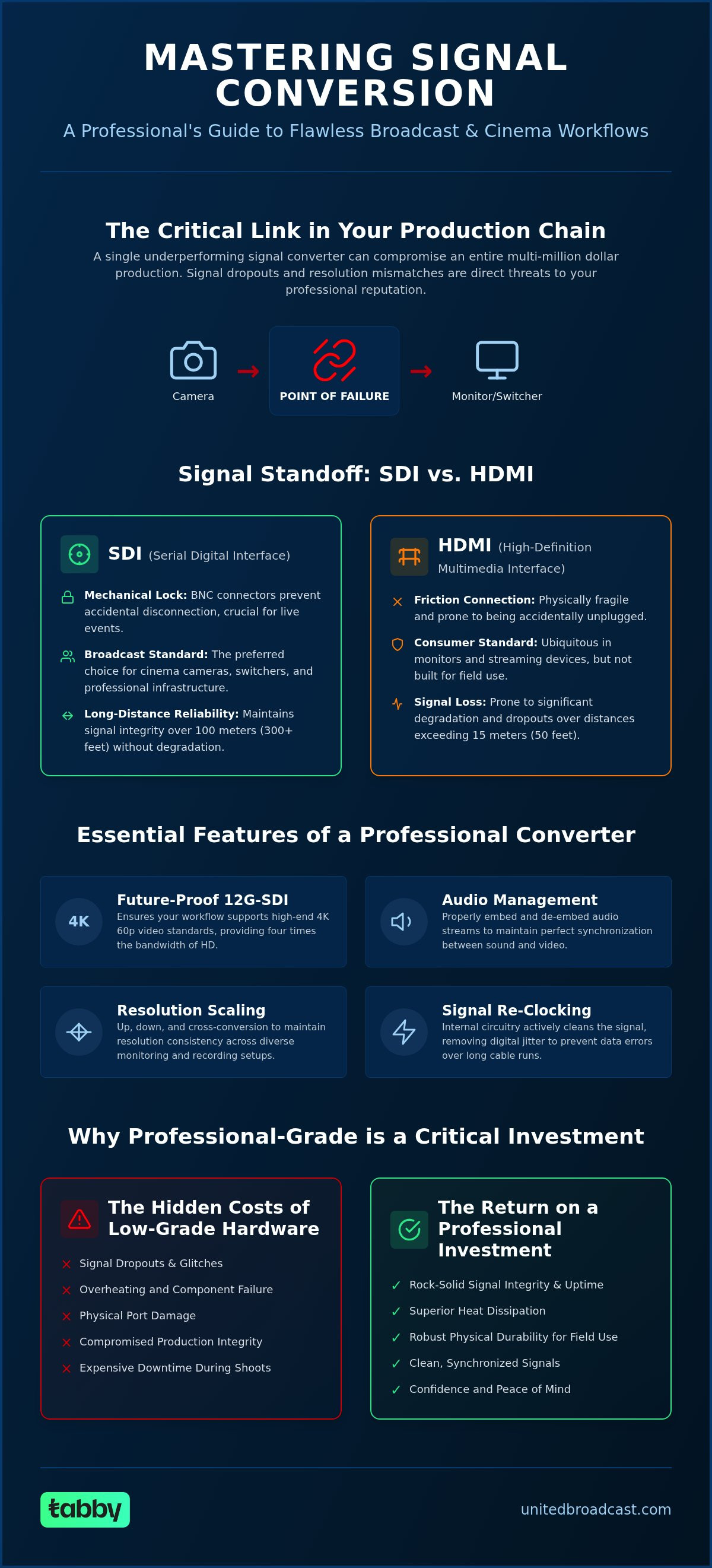
In a professional broadcast environment, the smallest link in your signal chain is often the most critical point of failure. A single underperforming signal converter can compromise an entire multi-million dollar production, turning a high-stakes live event into a technical nightmare in seconds. You understand that signal dropouts and resolution mismatches aren't just inconveniences; they're threats to your professional reputation and the integrity of your delivery.
We agree that your gear should work as hard as you do, especially when bridging the gap between consumer HDMI devices and high-end SDI infrastructure. This guide will help you master the technical nuances of signal conversion to ensure seamless connectivity and signal integrity across your entire broadcast or cinema workflow. You'll learn how to achieve zero-latency signal paths, maintain robust physical connections for field use, and select future-proof 12G-SDI hardware for demanding 4K productions. We will break down the essential specifications you need to look for to keep your signals clean and your monitors active, no matter how complex the setup.
Key Takeaways
- Learn why professional signal converters are essential for bridging consumer HDMI and broadcast SDI gear without signal loss or latency.
- Understand the technical requirements for 12G-SDI to ensure your workflow supports high-end 4K 60p video standards.
- Discover how to manage audio embedding and de-embedding to maintain perfect synchronization between sound and video streams.
- Identify the key differences between up, down, and cross-conversion to maintain resolution consistency across diverse monitoring setups.
- Learn how to avoid the hidden costs of low-grade hardware by choosing units designed for superior heat dissipation and robust physical durability.
The Essential Role of Signal Converters in Professional Video Workflows
In the context of professional media and broadcast, signal converters are dedicated hardware devices that translate video and audio data between different interface standards. They don't just change the physical shape of a connector. Instead, they perform active digital processing to ensure that the timing, resolution, and color space of a source match the requirements of the destination device. This is a fundamental requirement in environments where equipment from different eras or manufacturers must communicate without error. Without this active processing, the digital handshake between devices would often fail, resulting in no signal or corrupted imagery.
Unlike simple passive adapters found in consumer electronics, professional signal converters use internal circuitry to re-clock and amplify signals. This active processing is essential for maintaining signal strength over long cable runs. In large-scale venues or multi-room broadcast studios, a signal might need to travel 100 meters or more. Without the re-clocking capabilities of a high-quality converter, digital jitter would quickly degrade the image, leading to intermittent dropouts that ruin a live production. These devices act as a bridge, ensuring that the data packets remain intact from the camera sensor to the final broadcast switcher.
Professional production companies, such as miamivideoproductions.com, depend on this high-end infrastructure to maintain signal integrity and deliver broadcast-quality livestreams for major events.
Bridging the Gap Between Professional and Consumer Standards
Cinema cameras and high-end switchers typically rely on SDI (Serial Digital Interface) because of its locking BNC connectors and long-distance reliability. However, many high-quality monitoring and streaming solutions use HDMI. Bridging these two worlds requires active conversion to manage complex data protocols like HDCP (High-bandwidth Digital Content Protection) and EDID (Extended Display Identification Data). By using professional-grade conversion hardware, engineers can integrate affordable consumer displays into a professional SDI ecosystem without sacrificing image accuracy. This allows for flexible monitoring setups that don't require every single screen to be a specialized broadcast monitor.
Why Your Production Workflow Relies on Reliable Conversion
Uptime is the most critical metric in live broadcast. A single failed interface can halt an entire workflow. Reliable conversion ensures that when you connect modern 4K equipment to legacy HD infrastructure, the signal remains clean and synchronized. Many professional video cameras output specialized signals that require external conversion for streaming, recording, or multi-view monitoring. Using robust hardware prevents the physical port failure and overheating common in cheaper, consumer-grade alternatives. It's an investment in stability that protects your production from the hidden costs of downtime and signal degradation during high-stakes events.
Choosing the Right Standard: SDI, HDMI, and Fiber Conversion
Selecting the correct interface standard is the most critical decision when architecting a professional signal chain. While consumer equipment relies heavily on HDMI, professional broadcast and cinema environments favor the robust nature of SDI. Choosing the right signal converters depends entirely on your resolution, color depth, and transmission distance requirements. These devices act as the essential bridge, ensuring that disparate pieces of hardware speak the same language without compromising the integrity of the data.
For studios maintaining a mix of generations, analog to digital conversion remains a necessity. These units allow you to keep legacy broadcast gear relevant by bridging older composite or component sources into a modern digital infrastructure. This prevents the need for a total equipment overhaul when only a specific legacy source is required for a production.
SDI vs. HDMI: The Primary Production Interface Debate
The primary difference between these standards lies in physical reliability and distance. SDI uses BNC connectors that provide a mechanical lock, preventing accidental disconnection during a live shot. HDMI is ubiquitous and supports high bandwidth, but it's physically fragile and prone to signal loss over distances exceeding 15 meters. If your camera is across a large room from your switcher, you must convert that HDMI signal to SDI or Fiber to maintain a clean feed. Bi-directional signal converters have become the "Swiss Army knife" of the field kit, allowing a single unit to act as an HDMI to SDI or SDI to HDMI bridge simultaneously. This flexibility is invaluable when you don't know what interfaces you'll encounter on location.
Handling 4K, 12G-SDI, and Ultra HD Requirements
The industry has moved rapidly toward 4K 60p workflows, which demand 12G-SDI bandwidth. It's vital to understand the technical tiers: 3G-SDI is sufficient for 1080p, but it'll fail when presented with an Ultra HD stream. High-tier signal converters also preserve 10-bit or 12-bit color accuracy, ensuring that your HDR workflows remain consistent from the camera sensor to the grading suite. Future-proofing your inventory means investing in 12G-capable hardware now, even if you're currently working in HD. This ensures your workflow remains compatible with the next generation of broadcast standards without requiring new hardware.
For national-scale events or stadium coverage, even copper SDI reaches its physical limits due to signal attenuation. Fiber optic converters are the solution for these long-haul runs. They allow signals to travel kilometers with zero electromagnetic interference, making them the standard for high-end live events. If you are designing a complex multi-standard facility, our team can help you consult on the best integration strategy for your specific needs.
Key Technical Features to Evaluate Before You Buy
Beyond simply changing a physical plug, professional signal converters perform complex digital mathematics to ensure your video remains broadcast-legal and visually accurate. One of the most valuable features in modern units is LUT (Look Up Table) support. This allows DITs and cinematographers to apply creative color grades to a flat LOG signal directly within the converter. It ensures that directors and clients see a finished look on set monitors without taxing the camera's internal processing or requiring a separate computer-based grading station.
Audio management is another technical hurdle that separates professional hardware from consumer alternatives. High-quality signal converters often include dedicated audio embedding or de-embedding capabilities. This allows you to strip audio from an SDI feed to send to a separate audio mixer or, conversely, inject balanced analog audio into a video stream before it reaches a switcher. Maintaining this level of control within the conversion stage prevents synchronization issues and ensures the sound remains married to the correct video frames throughout the chain.
Up/Down/Cross Conversion: Solving Resolution Mismatches
Mismatched resolutions and frame rates are common in mixed-generation environments. Up-conversion allows you to feed a legacy 1080i broadcast signal into a modern 4K display without the image appearing soft or blurry. Conversely, down-conversion is vital when you need to send a high-resolution 4K feed to an older HD recorder or secondary monitor. The quality of the scaling engine is the deciding factor here; premium converters prevent the aliasing artifacts and "jaggies" that often plague cheaper hardware. Cross-conversion is equally critical for international productions, providing the ability to switch between 50Hz and 60Hz standards to meet specific regional broadcast requirements.
Power Options and Form Factors: Micro vs. Rackmount
The physical environment of your production dictates the ideal form factor. Micro converters are designed for "behind the monitor" applications or camera-top mounting where weight and space are primary concerns. While many micro units can be powered via USB, this can be physically fragile in high-motion environments. For mission-critical field reliability, look for units that feature locking DC connectors to prevent accidental power loss during a live take.
In a permanent facility or mobile production truck, high-density broadcast studio gear UAE specialists rely on typically involves rackmount solutions. These chassis house multiple conversion channels in a single 1U or 2U space, simplifying cable management and power distribution. A significant advantage of rackmount or high-tier micro units is superior heat dissipation. Signal converters generate significant thermal energy during 12G-SDI processing; without proper metal housing and thermal management, compact units can throttle or fail entirely during long production days.
Standout Signal Converter Solutions for Professional Sets
Choosing the right hardware depends on the specific demands of your production environment. High-performance signal converters are now the industry standard for 4K monitoring, specifically 12G-SDI to HDMI 2.0 models. They allow you to feed a professional 12G signal into high-end consumer OLEDs or professional monitors that lack native SDI inputs. This preserves the 4K 60p resolution and high dynamic range required for modern cinema workflows without requiring expensive proprietary displays for every crew member.
BiDirectional models offer unmatched versatility for field kits. These units can simultaneously convert HDMI to SDI and SDI to HDMI, often handling different formats on each path. For long-distance transport, specialized Fiber converters are the only reliable way to move high-bandwidth signals across kilometers without degradation. We're also seeing a significant shift toward IP Video Converters. These devices facilitate the transition to NDI and SMPTE 2110 workflows, allowing traditional baseband signals to integrate into networked environments for more flexible routing.
Best Compact Converters for Field Production
Field production requires hardware that can survive more than just a clean studio. When selecting from the signal converters collection, prioritize ruggedized builds. These units often feature machined aluminum housings that act as heat sinks, which is vital for outdoor shoots in the UAE. Camera-mounted converters should be lightweight but include secure mounting points to prevent them from dangling by their cables. Look for models that offer status LEDs that are visible in bright daylight so you can confirm signal lock at a glance.
High-Density Solutions for Broadcast Studios
In a broadcast facility, density and reliability are the primary concerns. High-density rackmount solutions allow you to manage dozens of conversion channels within a central machine room. These systems often include redundant power supplies, ensuring that a single power failure doesn't take down a critical broadcast feed. This level of infrastructure is a core component of OB van system integration projects where space is at a premium. Failure isn't an option in these environments, so choosing hardware with proven thermal stability is essential for 24/7 operation.
Why Professional-Grade Converters Are a Critical Investment
In high-stakes broadcast and cinema environments, the price of equipment failure far exceeds the cost of the hardware itself. While entry-level adapters might seem like a budget-friendly shortcut, they often introduce hidden technical liabilities. Cheap converters frequently suffer from micro-latency, which can desynchronize multi-camera feeds and ruin a live switch. They also tend to utilize generic chipsets that struggle with signal integrity, leading to the intermittent dropouts that haunt professional operators. Investing in professional signal converters is essentially an insurance policy for your production's uptime and your professional reputation.
Beyond the internal electronics, the physical build of a converter determines its longevity in the field. Consumer-grade units often rely on fragile plastic housings and non-locking connectors that can easily be bumped loose during a shoot. Professional hardware is designed to survive the rigors of constant travel and varied environmental conditions. This durability ensures that your signal chain remains a stable foundation rather than a source of anxiety during a live broadcast or a complex film set.
Avoiding Common Failures: Build Quality and Heat
Heat is the primary enemy of digital signal processing. Professional metal housings are significantly superior to plastic alternatives because they act as a heat sink, drawing thermal energy away from the internal processors. This is especially vital when processing high-bandwidth 12G-SDI signals which generate considerable heat. Professional converters utilize high-grade internal components and advanced thermal management to ensure continuous operation for weeks or months without needing a manual reboot. Furthermore, the inclusion of locking BNC and DC power connectors prevents the accidental signal loss that often occurs with friction-based consumer plugs.
Expert Support and System Integration Nationwide
Choosing the right hardware is only half the battle. Designing a complex signal path for a modern studio or a large-scale event requires a technical partner that understands how these components interact within a larger ecosystem. UBMS acts as more than just a vendor; we provide comprehensive system integration services to help you architect reliable, future-proof workflows. Our expertise ensures that every converter in your chain is optimized for the specific standards of your cameras, switchers, and delivery platforms.
Operating within the UAE, our clients benefit from local technical support and an in-house service center. This means you don't have to wait for international shipping if a unit requires maintenance or if you need immediate technical advice for a project. We understand the unique demands of the regional media landscape and provide the logistical excellence required to keep your production moving. Whether you are building a new machine room or upgrading a field kit, we offer the technical infrastructure to support your vision from start to finish.
Explore the full range of Signal Converters at UBMS
Optimize Your Signal Chain for Future-Proof Production
Establishing a reliable workflow requires more than just connecting cables; it's about ensuring every transition between standards is handled with technical precision. High-quality signal converters act as the critical backbone of your infrastructure, protecting your production against the latency and thermal failures that often plague consumer-grade alternatives. By prioritizing 12G-SDI compatibility and robust physical build quality, you secure the integrity of your 4K deliverables and high-stakes live broadcast feeds.
UBMS supports your technical journey with a specialized inventory of 93 professional conversion products from global industry leaders. Our UAE-based service center and expert system integration team provide the necessary technical infrastructure to ensure your studio or mobile unit operates at peak performance. Whether you're bridging legacy analog gear or transitioning to advanced IP-based workflows, we offer the tools and expertise to keep your signals clean and your uptime guaranteed.
We're ready to help you build a more resilient and efficient media environment through expert guidance and dependable hardware.
Frequently Asked Questions
What is the difference between a signal converter and a signal adapter?
A signal converter is an active electronic device that uses internal processing to translate digital data between different standards, such as HDMI and SDI. In contrast, a signal adapter is a passive tool that only changes the physical shape of a connector without altering the electronic signal itself. Using active signal converters ensures that timing, resolution, and color space remain consistent across your professional broadcast chain.
Do signal converters introduce latency into my video feed?
Professional-grade hardware is specifically engineered to provide zero-latency or near-zero-latency signal paths. While entry-level consumer units may introduce noticeable frame delays, high-end broadcast models process the stream in real-time. This is essential for live productions where synchronization between multiple camera angles and audio feeds must be frame-accurate to avoid lip-sync issues.
Can I use a signal converter to connect my 4K camera to a 1080p monitor?
Yes, you can achieve this by using a unit equipped with down-conversion capabilities. These specific signal converters take a high-resolution 4K input and scale it to a 1080p output while maintaining the correct frame rates. This allows you to utilize existing HD monitoring infrastructure even when shooting with modern 4K digital cinema cameras in the field.
What is 12G-SDI and do I need a specific converter for it?
12G-SDI is a high-bandwidth interface that supports 4K video at 60 frames per second over a single BNC cable. You must use a converter specifically rated for 12G speeds to handle this data rate effectively. Using a lower-rated 3G or 6G device with a 12G signal will result in no image or significant signal corruption because the hardware cannot process the higher frequency.
How do I power a signal converter when working in the field?
Field-ready converters offer several power options, including USB power from a camera and professional locking DC connectors. Many technicians use D-Tap to DC cables to power their converters directly from large cinema batteries on a camera rig. Choosing a model with a locking power input is a best practice to prevent accidental disconnects during high-motion shoots or live events.
Can I convert a consumer HDMI signal to a professional SDI signal with HDCP?
Professional SDI infrastructure does not support HDCP (High-bandwidth Digital Content Protection). If you attempt to convert a copy-protected HDMI signal, such as from a commercial player or certain laptops, to SDI, the converter will typically output a black screen. You should always verify that your source signal is non-encrypted before attempting to integrate it into an SDI-based professional workflow.
What is audio embedding and why is it useful in signal conversion?
Audio embedding is the process of injecting separate audio signals into the digital video stream. This is useful because it allows you to take a clean feed from an external audio mixer and marry it to the video before it reaches a broadcast switcher or recorder. It ensures that sound and picture remain perfectly synchronized and reduces the need for separate audio cables in complex routing setups.
Are there signal converters that support fiber optic cables for long distances?
Yes, fiber optic converters are designed for long-distance signal transport that can extend over several kilometers. These units convert your SDI or HDMI signal into light pulses, which are immune to electromagnetic interference and signal degradation over long runs. They are the primary solution for stadium coverage and large-scale live event venues where copper cables reach their physical limits.


