

IP-based video workflow benefits for UK production teams
The next step in broadcast production isn’t simply replacing cables with a network. The IP-based video workflow benefits are clearest when teams need to connect sources, share feeds across locations and adapt production resources without rebuilding the entire system.
That shift does not mean every production should move to IP at once. Existing SDI infrastructure can remain part of a hybrid workflow, while network-based routing and software control offer more options for remote collaboration, flexible signal paths and expansion as requirements change.
This guide explains where IP video can add value for production teams, how protocols such as SMPTE ST 2110, NDI and SRT serve different workflow needs, and why interoperability matters when equipment and systems come from multiple vendors. It also looks at scalability and agility, including the practical considerations that shape a transition. The aim is to help you understand what IP can improve, where a hybrid approach may make sense, and how to assess the workflow before making infrastructure decisions.
Key Takeaways
- Identify where remote production can connect teams and resources across locations, and what that changes in a live workflow.
- Understand how interoperability can bring equipment and software from different vendors into a shared production environment.
- Compare the roles of SMPTE ST 2110, NDI, SRT, RIST and IPMX when selecting an approach for your workflow.
- See how IP and cloud resources can help production teams adapt capacity as audience and event demands change.
- Learn how to approach a gradual transition that builds on existing infrastructure instead of requiring an all-at-once migration.
Where does IP video add most value in UK production?
IP video adds value when production teams need to route feeds, coordinate operators or work across multiple facilities. For productions in the UK, remote workflows can keep capture at a venue while selected production resources operate from a central hub.
Remote Collaboration
Remote collaboration connects production teams in different locations so they can share video feeds and coordinate work over an IP network. For a live sports broadcast or event in the UK, venue crews can capture action while operators elsewhere manage switching, graphics or monitoring. Teams can share feeds across a private network or the internet, allowing specialists to contribute without all being on-site.
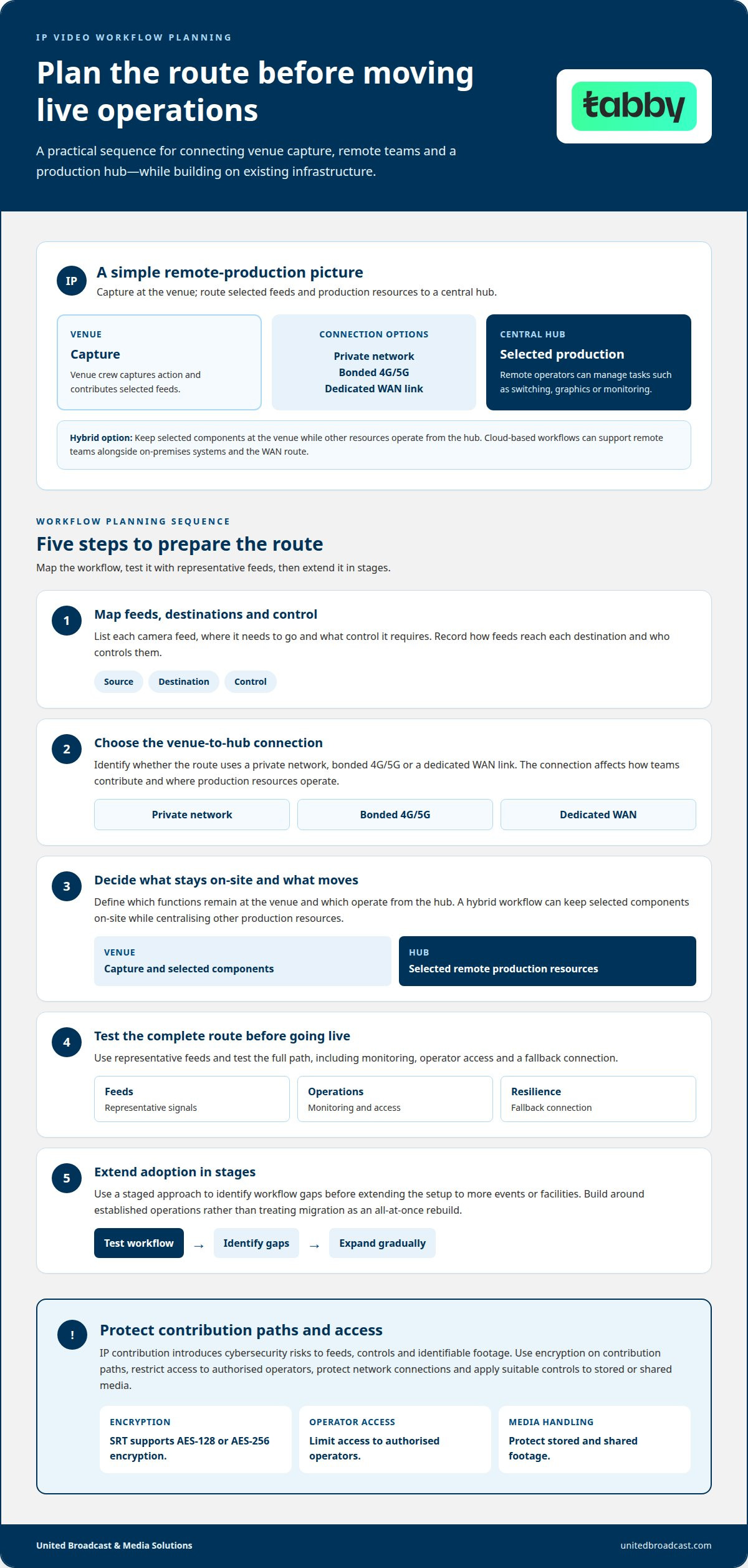
A WAN contribution workflow can carry a compressed feed from a venue to a hub using bonded 4G/5G or a dedicated WAN link. This separates capture from the main production operation. A central team can work with feeds from remote locations, while a hybrid workflow keeps selected components at the venue. The right arrangement depends on the event, available network paths and the production roles involved.
IP contribution also creates cybersecurity risks, including unauthorised access to feeds, controls or identifiable footage. Mitigate these risks with encryption on contribution paths, restricted access for authorised operators and protected network connections. SRT supports AES-128 or AES-256 encryption. Production teams should also handle captured footage responsibly and apply suitable access controls to stored or shared media.
Workflow Planning and Implementation
Planning an IP workflow means mapping signal paths, network links and production roles before moving live operations. Start by listing each camera feed, destination and control requirement. Then identify whether the venue-to-hub connection uses a private network, bonded 4G/5G or a dedicated WAN link. This matters because the connection affects how teams contribute and where production resources operate.
Define which functions stay on-site and which move to the hub. Test the complete route with representative feeds before a live broadcast, including monitoring, operator access and a fallback connection. Record how feeds reach each destination and who controls them. A staged approach helps teams identify workflow gaps before extending adoption to more events or facilities.
For a major event, a hub can centralise selected production resources while venue staff focus on capture and contribution. Cloud-based workflows can support remote teams alongside on-premises systems and the WAN route. Mapping these connections helps identify where delays, access issues or network interruptions could affect the live workflow, with technical backing and integration expertise provided by United Broadcast & Media Solutions (UBMS).
Interoperability across vendors and systems
Interoperability lets equipment and software from different vendors work within a shared IP production environment. This can extend existing infrastructure while supporting event, broadcast delivery and streaming workflows.
Integration with Existing Workflows
Interoperability with existing workflows means adding IP connections without replacing every part of a traditional production chain. A facility can retain established live-production equipment while introducing network-based routing for selected sources or destinations. This staged approach lets teams add capabilities around current operations instead of treating migration as an all-at-once rebuild.
For example, a broadcaster could keep its existing production system while connecting an IP-enabled source for a specific event. The new feed can join the workflow where needed, while other signals continue along established paths. Planning hand-off points and control responsibilities helps engineers understand how new and existing components work together.
NDI Connectivity
NDI, or Network Device Interface, is a video connectivity standard based on proprietary IP networking specifications. It can support camera switching, video routing and audio management over the same network. For a production team, this can bring several tasks onto shared infrastructure rather than separate systems for each function.
NDI can suit workflows that need network connectivity across compatible devices and software, while standards-based approaches can support equipment from multiple vendors. The right choice depends on existing tools, required connections and how feeds move between sources and destinations. Treating NDI as one option, not a universal compatibility guarantee, keeps system design grounded in actual workflow needs.
Interoperability involves more than connecting devices to a switch. Teams need to map how each source enters the system, where it must be routed and which control layer manages the connection. For a live event, identify how cameras, audio and production software exchange signals before they reach streaming or broadcast delivery. Clear signal paths make integration easier to assess and troubleshoot.
A practical integration review can group components by role: capture, routing, control and output. Identify which connections use network-based video and which remain part of the traditional chain. This reveals system boundaries and shows where a hybrid design can add IP capabilities without disrupting established production processes. System integration planning is especially useful when equipment from several vendors must support one coordinated workflow.
To discuss how an IP workflow could fit an existing production environment, start a conversation about IP integration.
SMPTE ST 2110, NDI, SRT, RIST and IPMX protocol choices
IP video protocols shape how media travels, synchronises and reaches production destinations. Unlike traditional SDI’s fixed point-to-point connections, IP workflows use shared network infrastructure, with routing controlled through software. The right platform depends on the production’s signal format, network design, latency requirements and interoperability needs.
SMPTE ST 2110 carries uncompressed video, audio and ancillary data as separate, time-aligned IP streams. Video uses 2110-20, audio uses 2110-30, and ancillary data uses 2110-40. This separation gives production systems more flexibility in routing each media essence. It also requires an engineered network fabric and PTP timing. Uncompressed 1080i/59.94 video needs roughly 1.5 Gbps per stream, so bandwidth planning matters.
NDI and SMPTE ST 2110 serve different workflow priorities. NDI is based on proprietary IP networking specifications and can be more cost-effective than building facilities purely around SMPTE 2110. ST 2110 is suited to engineered broadcast environments requiring separate, synchronised media essences; NDI can suit network-based connectivity across production devices. Neither label alone establishes interoperability. Check how the chosen hardware and software fit the complete signal path.
For contribution over a wide-area network, SRT provides built-in AES-128 or AES-256 encryption. SRT over a WAN typically adds 120-500 ms of latency, depending on buffer settings and link quality. That makes it important to weigh recovery from network variation against timing needs, especially for remote production. RIST and IPMX are also protocol choices to assess against the intended workflow, existing platform and interoperability requirements.
Redundancy needs its own bandwidth and network design. SMPTE 2022-7 provides duplicate IP paths, allowing receivers to switch cleanly if the primary path drops packets. Implementing this redundancy doubles the bandwidth requirement. A system designer therefore needs to account for both paths when sizing the network, rather than treating protection as a separate, cost-free feature.
Protocol selection is part of the transition from SDI, not simply a hardware swap. SDI uses dedicated physical connections, while IP can route media across shared infrastructure through software control. A scalable transition can retain existing SDI equipment while adding IP paths where they meet a defined need. Compare latency, bandwidth, timing, redundancy and device compatibility across the full workflow before choosing a protocol mix.
Scalability for changing audience demand
Scalability lets a media operation adjust production resources as audience demand changes. An IP-first workflow can scale up or down without sacrificing quality, using network connections and software routing to allocate resources. For example, a broadcaster can expand a live-event workflow for a major fixture, then return to its regular service configuration afterwards. That flexibility helps avoid building every production around peak demand.
Cloud environments offer another way to adjust capacity. A broadcaster can provision processing and routing for a temporary channel, live event or regionalised service, then reduce those resources when the need passes. Cloud video routing can connect media flows, processing functions and production resources dynamically. The workflow can reflect event requirements instead of relying on a fixed hardware chain for every output.
Building a separate processing chain for every destination can add effort and slow changes. A linear channel, streaming service and regional feed may need different outputs, but duplicating every production function is not always necessary. A shared IP workflow can route sources to the required processing and delivery points, letting teams adapt which feeds serve each platform without rebuilding the entire operation.
Cloud services can let media organisations pay for the resources they use, supporting flexible resource allocation. This can suit temporary production demand, when ongoing capacity may not match occasional peaks. The right approach still depends on the workflow: live output, processing needs, network connections and integration requirements all shape which resources should remain on-premises and which can run in the cloud.
Hybrid deployment supports gradual growth. An SDI-based entertainment facility can retain its existing core while adding an IP overlay for a new service or increased audience demand. This lets teams introduce network-based routing and cloud resources alongside established systems, expanding capacity without transitioning every device or process at once.
News workflows show why flexible capacity matters. A hybrid deployment can help a news organisation maintain service quality while responding to breaking stories and sudden demand. Production resources can be redirected to a developing story while regular services continue through the existing operation. The arrangement depends on how feeds, processing and outputs are integrated, and how quickly teams can assign resources to the priority broadcast.
For scalable planning, map demand to workflow functions rather than counting devices alone. Identify which outputs need separate processing, which resources can be shared and which event or audience changes trigger expansion. Then consider whether cloud capacity, local infrastructure or a hybrid configuration best meets those requirements. This makes scaling a decision based on actual routing and processing needs, not a blanket move to new technology.
Flexibility and agility for broadcasters
IP routing gives broadcasters flexibility to change signal paths through software rather than physical recabling. Traditional SDI systems use fixed point-to-point connections, while shared IP infrastructure can carry multiple services. This matters when a channel needs a new source, a revised output or a temporary production configuration. Engineers can adjust routing through software control, then restore the earlier setup when the need ends.
For a live news programme, a team could add a camera feed to an existing workflow without rewiring every destination. Network-based routing also makes it easier to remove equipment when a production changes. Centralised control can reduce setup and troubleshooting time by giving operators a clear view of connections and routing states.
Automation adds another layer of agility. Unified IP systems can handle routine tasks, such as recurring routing changes, so operators can focus on production decisions. Software-defined systems may also gain capabilities through upgrades rather than hardware replacement. For broadcasters, IP-based video workflow benefits can include adapting these capabilities as operational needs evolve.
IP distribution can support different versions of content for separate destinations. A broadcaster might prepare a main feed and tailored versions for OTT, FAST or other digital platforms. Localised versions can include custom feeds or local commentators. Rather than creating a separate physical signal path for every destination, teams can use routing and processing choices to define each output.
A converged TV platform can share playout, graphics and encoding functions across linear and streaming outputs. This lets teams coordinate capabilities across services rather than duplicate every function. The practical benefit depends on how shared resources are configured and which outputs need distinct processing. Defining these requirements early helps keep the workflow manageable as services expand.
Agility also supports experimentation. Broadcasters can trial a new service alongside existing operations using an IP-native backend, limiting disruption to established delivery. Cloud workflows can run alongside on-premises resources, so the transition need not happen all at once. Teams can add IP capacity gradually as requirements grow, assessing workflow performance at each step.
To assess IP-based video workflow benefits, map the changes operators need to make most often: adding sources, redirecting outputs or enabling new platform versions. Then identify which actions software control can handle and which still require physical intervention. This turns flexibility into a practical design goal tied to production tasks, rather than a general preference for newer technology.
United Broadcast & Media Solutions (UBMS): Professional Video Cameras
United Broadcast & Media Solutions (UBMS) can support the camera and equipment side of a broadcast workflow. Its professional video cameras and digital cinema cameras meet capture requirements, while cinema lenses and professional lighting equipment help shape the image at the source.
Consider these equipment categories when planning an IP workflow or updating a production setup. The right choices depend on the intended use, the camera’s role, lens requirements and lighting needs. Matching capture equipment to the wider workflow helps teams plan how footage will move into production and distribution systems.
For guidance on equipment for your production requirements, contact United Broadcast & Media Solutions (UBMS).
Make the Next Workflow Decision with Confidence
The clearest IP-based video workflow benefits come from solving a defined production need, not adopting new infrastructure for its own sake. In your next planning cycle, identify one operational constraint that matters: a difficult hand-off, limited routing flexibility or a new delivery requirement. Then set a practical measure of success, such as simpler signal management or a more adaptable production path.
A focused evaluation can help your team decide where to build, integrate or expand. Keep the intended production outcome at the centre and let it guide the technical choices. This creates a clearer foundation for future workflow improvements.
With a defined goal and the right technical support, your next workflow decision can move production forward with purpose.
Frequently Asked Questions
The Evolution of IP-Based Broadcast Workflows: What’s Next?
IP broadcast workflows are moving towards more connected, software-controlled production environments. The next stage is likely to combine on-premises systems, remote locations and cloud resources rather than rely on one production model. The practical priority for broadcasters is designing for interoperability and change: new services, formats or destinations should fit the workflow without requiring complete infrastructure replacement.
What are the real operational benefits of IP video?
IP video can make it easier to route sources, adapt production layouts and share resources between teams. For example, a broadcaster preparing a special event can assign network-connected resources to that production, then return them to regular operations afterwards. Software control can simplify some routine routing tasks. The value depends on whether these capabilities address actual production bottlenecks, rather than simply adding a new technology layer.
What are the trade-offs and failure modes to plan for?
IP workflows rely on a properly designed network, so congestion, packet loss, timing problems or a failed connection can affect media transport. Redundant paths can improve resilience, but require additional network capacity and careful configuration. Control systems and access permissions also need attention. A practical design should identify critical signal paths, monitor network performance and define how production continues if a primary component becomes unavailable.
What does a typical IP production architecture look like?
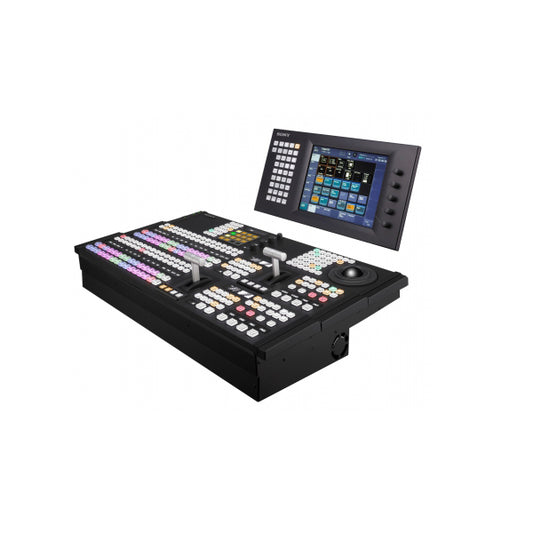
A typical architecture connects media sources to network switches, then uses routing and control software to direct feeds to production and output systems. It may include cameras, audio devices, processing resources, monitoring and destinations such as broadcast or streaming platforms. A hybrid facility can retain SDI equipment, linking established signal paths with IP-connected components where the workflow requires them.
Which protocols and standards should you use?
Choose protocols according to the media format, network environment and required contribution path. SMPTE ST 2110 carries professional video, audio and ancillary data as separate streams, while NDI supports network-based video connectivity. SRT is used for WAN contribution and includes encryption. RIST and IPMX may also fit particular workflows. Interoperability, timing, bandwidth and redundancy should inform the overall design.
What is an IP-based video workflow?
An IP-based video workflow transports video, audio and related data as packets across network infrastructure. Switches forward those packets, while control and orchestration software manages connections between sources, processing functions and destinations. Unlike a workflow built entirely around dedicated point-to-point video cabling, IP routing can use shared network resources. The equipment and network still need to be designed for the production’s media requirements.
What are the main benefits of IP-based video production and broadcasting?
IP production can support flexible signal routing, remote contribution and shared resources across facilities. It can also help teams create different outputs from common sources, such as a main broadcast feed and a tailored streaming version. These capabilities may improve coordination as production requirements change. The operational benefit comes from matching network routing and software control to specific workflows, not from adopting IP alone.
How much can IP-based workflows reduce production and infrastructure costs?
No single cost reduction applies to every production. The financial effect depends on existing infrastructure, network engineering, equipment requirements, integration work, training and ongoing cloud or network usage. Savings may come from sharing resources, reducing duplicated processing chains or limiting some physical connections. Compare the proposed workflow’s full lifecycle cost with the current setup, including resilience and support requirements.


