





Genlock Explained: How Video Sync Works and When You Need It
Genlock keeps video sources aligned to a shared timing reference, helping a switcher cut between live feeds without picture-timing jumps. This guide to genlock for broadcast engineers explains what the reference aligns and how genlock differs from timecode, SDI, and word clock.
If you’ve had to distinguish timing problems from signal transport or frame labeling, the terms can seem easy to mix up. They describe different parts of a production workflow, and genlock isn’t a substitute for the others. Here, you’ll learn when productions need genlock, how black burst and tri-level sync provide references, and what changes with 4K or high-frame-rate video. The guide keeps genlock explained for broadcast engineers in practical workflow terms, including how video timing relates to audio synchronization and recording timecode. You’ll leave with a clearer way to identify what each part of a broadcast setup does.
Key Takeaways
- Understand how a shared reference keeps video timing aligned, and how that differs from frame synchronization and timecode.
- Identify when a single-camera livestream can work without genlock and when switching live sources makes synchronization more important.
- Compare black burst and tri-level sync, and see how reference signals are distributed through a broadcast system.
- Account for timing and latency considerations when planning 4K or high-frame-rate production.
- Distinguish genlock from SDI and word clock so each part of the signal chain has a clear role.
WHY IS GENLOCK IMPORTANT IN BROADCAST PRODUCTION?
Genlock, short for generator locking, aligns video timing to a shared reference. This guide explains how that timing relationship differs from frame correction and timeline labeling.
Genlock and Other Synchronization Methods
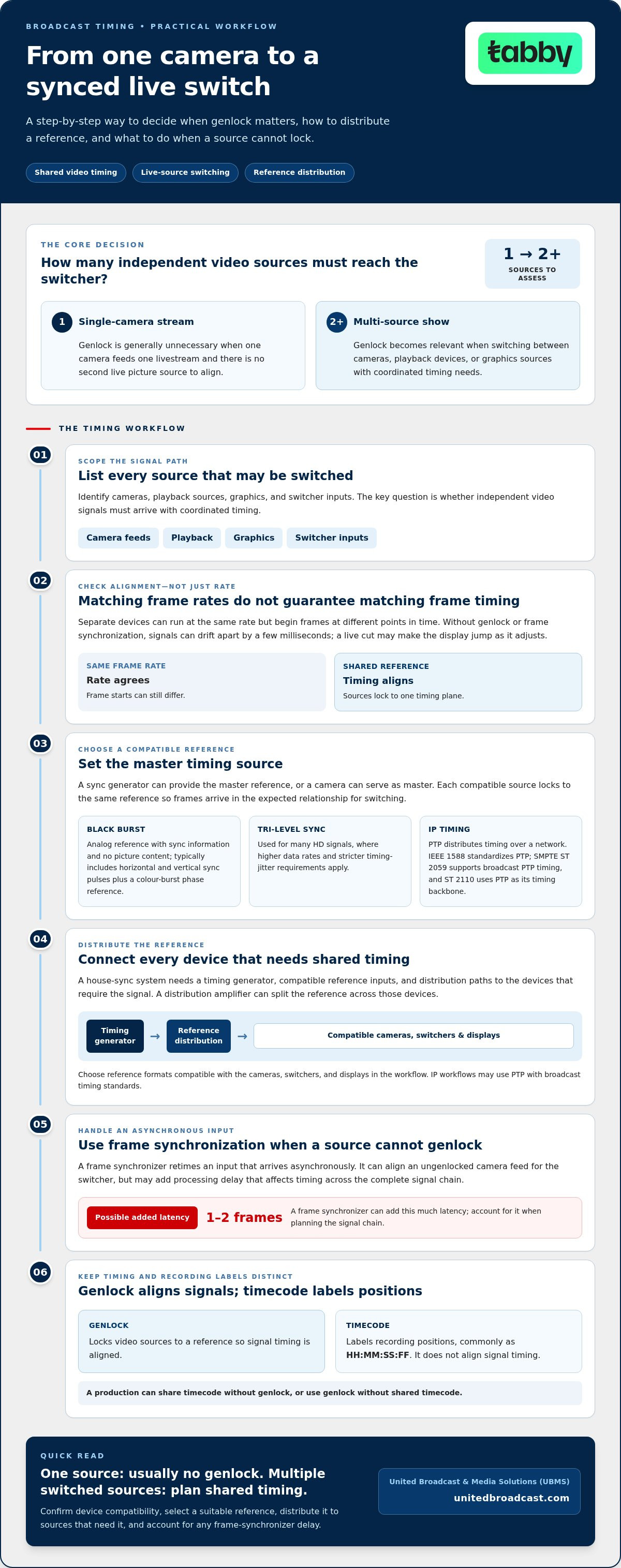
Genlock locks video sources to a reference signal; frame synchronization retimes an input that arrives asynchronously. A frame synchronizer can add 1-2 frames of latency. Timecode labels positions in recordings, often as HH:MM:SS:FF, but doesn’t align signal timing. A production can share timecode without genlock, or use genlock without shared timecode.
In IP systems, Precision Time Protocol (PTP), standardized as IEEE 1588, distributes timing over a network. SMPTE ST 2059 supports broadcast PTP timing, and SMPTE ST 2110 uses PTP as its timing backbone. Software can coordinate devices and workflows, but its function depends on implementation; it doesn’t automatically retime video signals. This “genlock explained for broadcast engineers” comparison helps identify which layer needs synchronization.
Synchronization in Live Broadcasts
Live synchronization matters when a switcher cuts between camera feeds. Aligned timing helps prevent a picture jump as the display adjusts to an incoming signal. A sync generator provides the master timing reference, and connected devices synchronize their internal clocks to it.
For multiple projectors or a large LED wall, synchronized playback can support flicker-free, tear-free images. Framelock coordinates frame presentation across display screens, while frame synchronization can pass timing from a master display system to other devices. These approaches support display continuity rather than assigning edit points to recorded media.
With composite video, sources being switched or combined need matching chrominance subcarrier phase to avoid changes in colour hue or saturation. Analog generator-lock signals usually include horizontal and vertical sync pulses, plus a colour-burst phase reference. Tri-level synchronization is used for many HD signals, where higher data rates and stricter timing-jitter requirements apply.
Reference standards and facility differences mainly reflect the video formats and infrastructure in use. Choose reference formats compatible with the cameras, switchers, and displays in your workflow. Black burst and tri-level sync are common reference types, while IP workflows may use PTP with broadcast timing standards.
A house-sync system needs a timing generator, compatible reference inputs, and distribution paths to devices that require the signal. A distribution amplifier can split the reference across those devices. Costs depend on equipment count, format support, distribution, and redundancy, so no single cost applies to every broadcast facility.
Do I need genlock for a single-camera livestream?
For a single-camera livestream, genlock is generally unnecessary because there is no second live picture source to align. It becomes relevant when a production switches between two or more cameras, playback devices, or graphics sources. The key question is whether independent video signals must reach the switcher with coordinated timing.
Genlock aligns a camera’s video timing to an external reference, so its frame boundaries follow the production’s timing plane. A sync generator can provide the reference, or a camera can serve as the master. Each compatible source locks to the same reference, helping frames arrive in the expected relationship for switching.
That alignment is different from simply setting cameras to the same frame rate. Separate devices can run at matching rates yet begin frames at different points in time. Without genlock or frame synchronization, their signals can drift apart by a few milliseconds. During a live switch, the display may jump as it adjusts to the incoming picture.
Genlock requires compatible inputs. Support for genlock and frame synchronization can vary between devices. A frame synchronizer can retime an asynchronous input for the switcher, but it may add processing delay. When a production combines an ungenlocked camera with a playback system, that delay can affect timing across the complete signal chain.
Timecode serves a different purpose. It labels each frame with a position in a timeline, commonly written as HH:MM:SS:FF. Connected cameras, video recorders, and audio recorders can use timecode to coordinate recordings and locate matching moments in post-production. Identical timecode values do not, by themselves, genlock video signals or align their frame boundaries.
For a one-camera stream, timecode may still help organize recordings, but genlock usually adds no benefit unless another live source enters the workflow. Adding a second camera for an interview, for example, creates a switching relationship that genlock can address. If that camera lacks a genlock input, frame synchronization can align its feed for the switcher, with possible latency.
Use the production’s signal path to decide. Identify each camera, playback source, and switcher input, then determine which sources share an external reference and which need frame synchronization. A single camera feeding one livestream encoder typically needs neither genlock nor a timing master. A multi-source show needs a plan for frame alignment, recording timecode, and any delay introduced by synchronizers.
WHAT IS BLACK BURST SYNC?
Black burst and tri-level sync are reference signals that let video equipment lock to a shared timing source. Choose the reference according to the formats supported by the connected devices.
Black Burst and Tri-Level Sync Signals
Black burst is an analog reference signal that carries synchronization information without picture content. It typically includes horizontal and vertical sync pulses, plus a colour burst that provides a phase reference for composite video.
Tri-level sync is a reference used commonly with high-definition systems. Its pulse moves from zero volts to a negative level, then a positive level, and back to zero; the excursions are typically 300 mV on either side of zero. Its three signal levels provide timing for HD formats.
Both signals can serve as genlock references, but they are not interchangeable in every setup. Some HD equipment accepts standard-definition black burst, while other systems use tri-level sync. Before distributing a reference, match it to each device’s supported format and the production’s video standards.
Sync Generator Signal Distribution
A sync generator creates the master reference; a distribution amplifier sends that signal to multiple device inputs. The reference commonly travels over 75-ohm coaxial cable with BNC connectors, including to cameras, switchers, servers, and graphics systems that need synchronized timing.
The reference signal is separate from the program video signal. SDI carries picture and audio between devices, while a compatible analog reference can use a coaxial path; the cable doesn’t need a 12G-SDI rating solely for that reference.
Use an independent, properly terminated reference path for each output. Incorrect termination can change signal amplitude and cause synchronization problems. Don’t add an external 75-ohm termination automatically to every REF IN connector; the device’s input design determines whether termination is internal or external.
Connecting and Adjusting Genlock References
Connecting equipment to a genlock reference means routing the master signal to compatible reference inputs, then aligning each device to that timing. This matters because a camera, switcher, server, or graphics system may otherwise produce a signal with different timing.
In a facility, connect the sync generator to a distribution amplifier, then route separate outputs to devices that require a reference. Select the matching format in each device, such as black burst or tri-level sync, and confirm its genlock status. For cameras using triaxial cable or optical fibre, the analog signal locks the camera control unit, which then synchronizes the camera head through the cable’s data channel.
Adjust timing by comparing signal arrival and phase across the system. Production switchers often provide variable input delay to compensate for phase differences caused by unequal cable-path lengths. For reliable switching, account for those path differences and make sure each input locks to the intended reference.
Broadcast cameras, switchers, servers, and graphics systems connect through compatible reference inputs, often using coaxial cable and BNC connectors. Setup involves distributing the master reference, selecting its format on each device, and adjusting input delay where path differences create phase offsets.
Genlock considerations for 4K and high-frame-rate video
As resolution and frame rate rise, production timing leaves less room for mismatch. Genlock keeps camera and playback clocks aligned, while frame synchronization can correct inputs that arrive asynchronously.
High-Resolution and High-Frame-Rate Timing
In high-resolution and high-frame-rate production, keeping video timing aligned can help avoid switching and display artifacts. At 60 frames per second, each frame lasts 16.67 milliseconds; at 120 fps, it lasts 8 milliseconds.
For 4K60, a one-frame timing error can produce a more disruptive artifact than at 1080p. Broadcast studios, video walls, and live shows using multiple media servers need coordinated outputs so cameras, playback, and displays maintain the intended frame relationship.
Some UHD systems accept compatible HD tri-level or black burst references, depending on equipment design. Match the reference format to the devices in the production chain, rather than assuming every 4K input accepts the same signal.
Clock Drift and Display Artifacts
Video clock drift occurs when independent device clocks gradually lose alignment. A camera feed may start close to another source, then drift over time, making a live switch less clean or disrupting continuity across a multi-screen display.
On a video wall, unsynchronized playback can show frames at different moments, creating visible tearing or flicker. Framelock helps maintain continuity by making screens display frames simultaneously. For a multi-projector show, synchronized playback outputs support flicker-free, tear-free images across the combined display.
A frame synchronizer can correct an asynchronous input by retiming it to the system reference. It adds at least one frame of latency while determining incoming frame boundaries, so engineers should account for that delay alongside source timing.
Interlaced Video and Genlock Errors
Interlaced video makes camera drift more problematic because fields from different moments form each displayed frame. If sources lose timing alignment, switching can expose a jump or an unstable picture as the display adjusts its scan.
Typical genlock-error symptoms include picture jumps, tearing, or flicker across displays. Causes include clock drift, a mismatched reference, or timing differences between signal paths. Troubleshoot by checking each device’s reference format and lock status, then compare input timing and adjust switcher delay to account for path differences.
Production switchers often provide variable input delay to compensate for phase differences caused by unequal transmission paths. For a live show with multiple cameras, verify that each source follows the same reference before relying on frame sync to correct an asynchronous feed. This helps distinguish a reference or path issue from processing delay.
Genlock compared with SDI, word clock, and timecode
Genlock, SDI, word clock, and timecode have separate roles in a broadcast chain. Knowing the difference helps engineers identify which signal aligns video, audio, or recorded events.
Genlock and SDI Signal Roles
Genlock aligns video timing to a shared reference; SDI transports video between connected devices. One defines a timing relationship, while the other provides a signal path. An SDI output alone does not mean cameras share frame timing.
For multiple cameras feeding a switcher, genlock aligns their video timing to a master reference. SDI then carries each camera’s program output to the switcher. A cable doesn’t need a 12G-SDI rating solely to carry a compatible analog genlock reference.
Some equipment has separate connectors for SDI and reference. Follow the signal path: connect the genlock reference to the device’s REF input, then route the SDI output to the next video destination. This distinction helps isolate whether a fault concerns timing or transport.
Word Clock and Timecode Comparisons
Word clock synchronizes digital audio sampling clocks; genlock synchronizes video timing. They are not interchangeable, even when a production uses both. A shared master can help keep audio synchronized with video, but each signal still serves its own timing function.
Timecode labels positions in recordings, typically as HH:MM:SS:FF. Connected cameras and recorders can use it to identify matching events for editing. It does not align actual video frame boundaries, so matching timecode values do not genlock independent camera outputs.
Consider a multi-camera interview: genlock aligns camera timing for live switching, word clock coordinates digital audio sampling, and timecode labels recorded moments. A production may need all three, depending on its live switching and recording workflow.
For IP production, PTP distributes timing over a network rather than using only a traditional reference connection. IEEE 1588 defines PTP, SMPTE ST 2059 supports its use in broadcast, and SMPTE ST 2110 uses PTP as its timing backbone. This changes how connected devices receive timing, not the distinct roles of SDI, word clock, and timecode.
Keep the signal roles clear: genlock aligns video timing, SDI transports video, word clock aligns audio sampling, and timecode labels media positions. A genlock device can also help keep audio synchronized with the same master as video, but it does not replace word clock or timecode where those functions are required.
United Broadcast & Media Solutions (UBMS): Professional Video Cameras
United Broadcast & Media Solutions (UBMS) supplies professional video cameras and digital cinema cameras for broadcast and production workflows. When planning a setup with synchronized sources, consider genlock requirements alongside camera roles, reference connections, and the rest of the signal chain.
UBMS also supplies cinema lenses and professional lighting equipment to support the wider imaging setup around a camera system. These products are relevant when building or updating a production kit, while genlock remains a system-timing decision based on compatible devices and workflow design.
For equipment selection suited to your production needs, contact UBMS or visit unitedbroadcast.com.
Plan Your Next Production Around Timing
Once genlock is explained for broadcast engineers, the next step is to map timing requirements to the production’s actual signal chain. Identify which sources need to switch live, which recordings need coordinated timecode, and where audio or display timing must align. This design work helps guide equipment decisions around the workflow instead of treating each camera or connection in isolation.
United Broadcast & Media Solutions (UBMS) supplies Professional Video Cameras, Digital Cinema Cameras, and Cinema Lenses for professional production needs. When planning a new setup or refining an existing one, consider how camera selection fits the complete system and its intended use. A clear equipment plan gives your technical team a stronger starting point for integration and operation.
Share your production requirements with UBMS to discuss the next step for your camera setup.
Thoughtful planning makes synchronization decisions part of a more coherent production workflow. Move forward with a setup shaped around your creative and technical priorities.
Frequently Asked Questions
What Is Genlock?
Genlock aligns video signal timing to a shared reference. A camera or other source follows that reference so its signal fits the timing used by the production system. For example, a studio can designate a sync generator as the master and connect compatible devices to its reference output. Genlock governs timing, not picture content, so it does not carry the camera’s program feed.
How do I show genlock and timecode on a diagram?
Show genlock and timecode as separate signal paths with distinct labels. Draw the sync generator’s reference output to each device’s REF input, then use solid arrows for video connections such as camera SDI outputs to a switcher. Represent timecode separately, with a label such as “HH:MM:SS:FF” beside its connection or data path. This makes clear which links carry picture, timing reference, and frame labels.
WHAT IS TRI-LEVEL SYNC?
Tri-level sync is a video timing reference that uses three voltage levels to identify synchronization timing. Its pulse moves from zero volts to a negative level, then a positive level, and returns to zero. The excursions are typically 300 mV on either side of zero. It’s commonly used with high-definition video; selecting it depends on the formats supported by the connected equipment.
What are genlock, framelock, & timecode sync and when do I need them?
Genlock aligns video timing to an external reference, framelock aligns a source’s frame rate to an external source, and timecode labels positions in recordings. Use genlock when separate live video feeds must share timing, such as cameras feeding a switcher. Framelock is useful for coordinated display outputs. Timecode helps match recorded moments across cameras or audio recorders during editing, even without shared genlock.
What is frame lock?
Frame lock, also called framelock, coordinates frame output across sources or displays so they present frames together. It is useful for a multi-screen display where an image spans adjacent panels and mismatched frame presentation can interrupt continuity. For example, a media server driving several screens can use frame lock to coordinate output. This term describes frame-level coordination, not timecode’s labeling of recorded frames.
What is genlock in broadcast video and how does it work?
In broadcast video, genlock makes compatible devices follow a common timing reference instead of relying only on independent internal clocks. A reference generator sends timing to a camera’s reference input, and the camera adjusts its video timing to follow. A switcher can then receive sources aligned to the same system timing. The reference connection is separate from the signal path carrying the camera picture.
What are the key genlock terms: reference, house sync, tri-level sync, and black burst?
A reference is the timing signal a device follows; house sync is the facility’s shared master reference. Black burst is an analog reference associated with composite video timing, while tri-level sync uses three voltage levels and is commonly used for high-definition timing. These terms describe either the signal itself or its role in the facility. Equipment format compatibility determines which reference a system uses.
How does genlock differ from timecode and video synchronization?
Genlock aligns the timing of video signals, while timecode assigns frame positions within a timeline. Video synchronization can also mean correcting an asynchronous input with a frame synchronizer, which retimes that input for the system. For example, two cameras can record matching timecode without sharing genlock. Their files align for editing, but their live outputs may still need timing alignment before switching.


