





Cinema camera cases compared for weather protection and gear storage
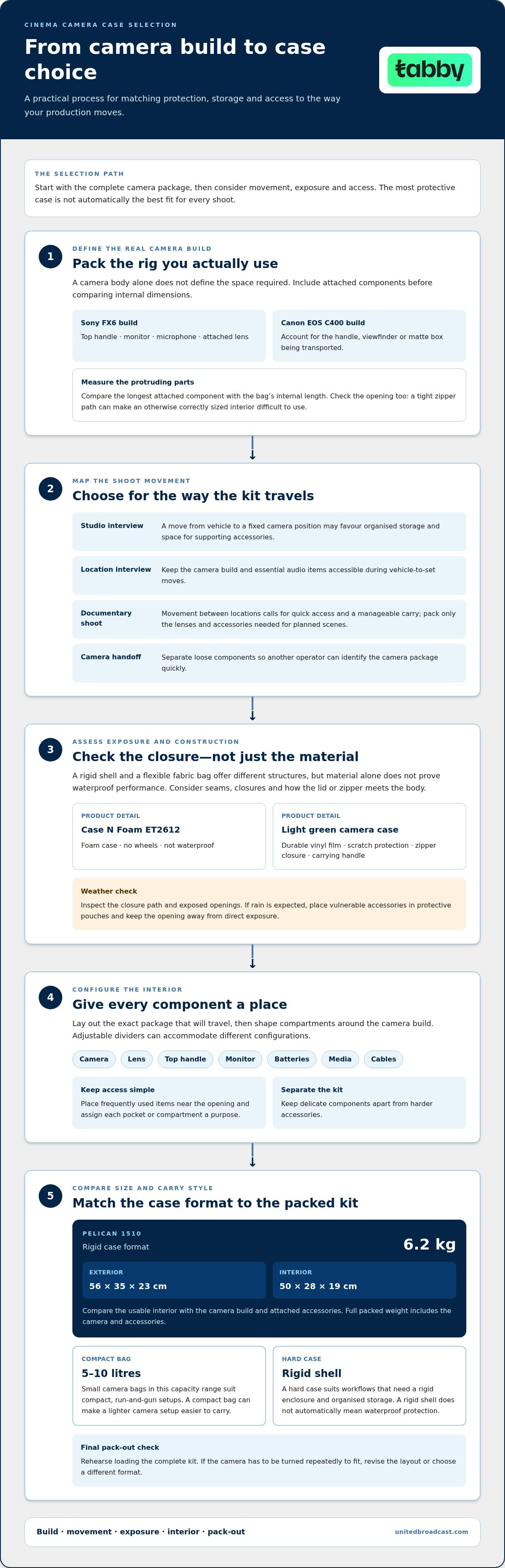
The most protective case isn’t automatically the best fit for every shoot. Choose cinema camera cases by balancing the protection your equipment needs with how you transport and access it. A hard case suits workflows that need a rigid shell and organised storage, while a compact bag can make a lighter camera setup easier to carry.
It’s easy to focus on exterior material alone, but the details inside matter just as much. Divider layout, closures, carrying style and resistance to moisture or dust all affect how well a case supports your production routine.
This comparison explains how those features work together, so you can match a case style to your camera build and shooting conditions in the UAE. Learn what to assess in materials and weather protection, how adjustable storage accommodates a changing kit, and when a compact bag or hard-shell case makes more sense. The goal is to protect the gear you carry without adding unnecessary bulk or limiting access on set.
Key Takeaways
- Match shell and fabric choices to the handling and exposure your production workflow involves.
- Compare closures and protective construction carefully; a rigid case does not automatically provide waterproof protection.
- Arrange dividers around the camera body and accessories you carry, so equipment stays separated and accessible.
- For compact run-and-gun setups, small camera bags typically range from 5 to 10 litres in capacity.
- Use your travel style, kit size and access needs to decide whether a compact bag or a hard case is the more practical fit.
Bag materials and weather resistance
Material affects how a camera bag carries, handles abrasion and responds to outdoor conditions. A rigid case provides a different structure from a flexible fabric bag, but neither material alone proves waterproof performance. Compare the shell, closure and interior together. For production in the UAE, consider where the case travels, how it is loaded and whether dust or rain exposure is likely.
Specific examples show why product details matter. The Case N Foam ET2612 has no wheels and is not waterproof. A light green camera case is made from durable vinyl film and provides scratch protection. It has a zipper closure and a carrying handle. Those details describe its surface protection and carry method, not a sealed weather barrier. Keep that distinction clear when comparing protective claims.
A hard case provides a rigid enclosure, while a soft-sided bag can fit more easily into tight storage spaces. However, weather resistance depends on seams, closures and how the lid or zipper meets the body. Before packing, inspect the closure path and any exposed openings. If rain is expected, place vulnerable accessories in protective pouches and keep the opening away from direct exposure.
Dimensions and weight also affect material choice. The Pelican 1510 measures 56 x 35 x 23 cm externally and 50 x 28 x 19 cm internally. It weighs 6.2 kg. Compare those measurements with the camera build and any handles or accessories attached. A rigid case may offer a defined storage volume, but the full packed weight includes the camera and accessories.
| Option | Material or build detail | Weather information | Carry or size detail |
|---|---|---|---|
| Case N Foam ET2612 | Case with foam | Not waterproof | No wheels |
| Light green camera case | Durable vinyl film | Scratch protection; zipper closure | Carrying handle |
| Pelican 1510 | Rigid case format | Assess closure and exposure needs | 56 x 35 x 23 cm exterior; 6.2 kg |
Use a practical comparison when choosing cinema camera cases: identify likely exposure, inspect the closure, then match the interior dimensions to the packed rig. Choose a case whose documented protection and carrying design suit the shoot, rather than assuming a material name guarantees weather resistance.
Choosing a bag for different production workflows
Start with the camera’s working configuration, not its body alone. A Sony FX6 built with a top handle, monitor, microphone and attached lens needs a different layout from a stripped-down camera body. List the components that travel together, then choose a bag that fits that complete configuration without forcing cables or controls against the walls.
Next, consider how the equipment will move during the shoot. A studio interview may involve carrying gear from a vehicle to a fixed camera position, while a documentary operator may move the camera between changing locations. The first workflow may favour organised storage and room for supporting accessories; the second calls for quick access and a manageable carry. Decide which task is more common.
- Studio setup: Group the camera, lens and monitoring accessories so a repeatable setup is easy to load.
- Location interview: Keep the camera build and essential audio items accessible during vehicle-to-set moves.
- Documentary shoot: Pack only the lenses and accessories needed for the planned scenes.
- Camera handoff: Separate loose components so another operator can identify the camera package quickly.
For a crew working with a Canon EOS C400, account for the camera’s actual rig, including any handle, viewfinder or matte box being transported. These additions change the required shape and usable space. Measure the longest attached component, then compare that measurement with the bag’s internal length. Check the opening too: a tight zipper path can make a correctly sized interior difficult to use.
Transport method also shapes the choice. A hand-carried case must be comfortable to lift through a doorway or across a set. A bag used between several shooting positions should let the operator retrieve a lens or battery without unpacking the camera. Before a shoot, rehearse loading the complete kit. If the camera has to be turned repeatedly to fit, revise the layout or choose a different format.
Production schedules can change the kit from one job to the next. An operator covering a controlled interview may pack a single lens, while a location shoot may require additional lenses, media and support accessories. Avoid carrying every item by default. Assign each pocket or compartment a purpose, keeping frequently used items near the opening and delicate components separate from harder accessories.
Choose between cinema camera cases by matching three factors: the camera’s built configuration, the movement required during the shoot, and the accessories needed for the assignment. Rehearsing a full pack-out reveals access problems more reliably than judging an empty bag.
Configurable dividers and interior storage
For ARRI Alexa, RED, Sony Venice and Blackmagic cameras, measure the fully configured camera and compare its dimensions with the case’s usable interior. Adjustable dividers can shape compartments around each build, but the fit depends on attached accessories as well as the camera body.
Start by laying out the exact package that will travel: camera, lens, top handle, monitor, batteries, media and cables. A RED body packed without rigging may need a different compartment layout from the same camera assembled with a monitor and handle. Measure its longest, widest and tallest points, including protruding parts. Leave enough room to place and remove each component without pressing it against a divider.
Position dividers to keep hard accessories away from delicate surfaces. For example, give a lens its own compartment rather than letting it press against a camera monitor. A battery compartment should hold batteries securely, while cables can go in a smaller space where they won’t cross the camera body. Avoid packing loose components above the camera, where movement could press on controls or connectors.
Use a consistent arrangement for multi-camera work. Set aside one area for camera-specific accessories and another for shared items, such as a media reader or cable set. If an ARRI Alexa and a Blackmagic camera use different accessories, keep their kits clearly separated rather than combining them in one undifferentiated space. Consistent placement also helps crew members return items to their assigned compartments.
- Camera bay: Fit the body with its usual handle and rigging.
- Lens bay: Separate each lens from hard accessories and loose cables.
- Power bay: Group batteries and chargers without placing them over controls.
- Small-item space: Contain media, adapters and cables so they remain easy to locate.
Before choosing among cinema camera cases, test-pack the complete Sony Venice build. Place each component in its planned position, close the lid, then reopen it and remove the camera. Dividers should stay in place, the camera should lift out easily, and small accessories should remain contained. If a lens or handle prevents closure, adjust the layout or choose a case with a more suitable interior.
Interior volume alone doesn’t determine usable storage. A wide compartment may waste space around a narrow camera body, while a well-positioned divider can stop smaller items shifting into the camera bay. Check access from the case opening, too. The layout should let an operator retrieve a battery or media card without removing unrelated equipment during a location change.
For a final fit check, compare the loaded layout with the actual internal dimensions, not the exterior shell. Reassess the arrangement whenever the camera build changes, such as when adding a monitor to a Blackmagic rig or changing the lens attached to an ARRI Alexa.
Cases with adjustable dividers can accommodate ARRI Alexa, RED, Sony Venice and Blackmagic cameras when the usable interior fits the fully configured camera and its accessories. Measure the complete build and test the layout to ensure each component fits securely and can be removed easily.
Compact and run-and-gun camera bags
Cinema camera transport options include rigid hard cases, soft-sided shoulder bags, backpacks and compact camera bags. For run-and-gun work, a compact format can keep a configured camera close while other equipment stays packed separately. The practical choice depends on what needs to stay with the camera between locations.
Small camera bags typically range from 5 to 10 litres in capacity. That size can suit a stripped-down setup, such as a camera body, one lens, batteries and media. It may not accommodate a larger build with a monitor, matte box or several lenses. Lay out the complete working kit before choosing a capacity, then check that the camera enters and exits without catching on the opening.
A shoulder bag offers quick access when an operator moves between nearby setups. A backpack distributes the load across both shoulders, which can help when walking with additional equipment. A hard case provides a rigid enclosure but may be less convenient when the camera needs frequent access. For a documentary shoot, choose the format that keeps essential items reachable without carrying unused accessories.
Airline carry-on fit depends on the carrier’s cabin size and weight limits, plus the packed bag’s dimensions and weight. The Pelican 1510 measures 56 x 35 x 23 cm externally and weighs 6.2 kg; those figures alone don’t establish whether it meets a specific airline’s limits. Compare the case’s exterior measurements and loaded weight with the airline’s rules for your itinerary.
In the UAE, cinema camera case costs depend on construction, capacity, interior layout and carrying features. A basic soft-sided bag and a rigid case with fitted storage serve different needs, so compare their features with your camera build and transport routine. The camera itself doesn’t determine the case cost; the case’s materials and design do.
Before packing for a location shoot, use this quick selection sequence:
- Reduce the load: List the camera, lens, batteries and media needed for the shoot.
- Choose the carry style: Match a shoulder bag or backpack to the route between setups.
- Test access: Remove the camera and a battery without unpacking unrelated items.
- Check travel fit: Compare the loaded dimensions and weight with the airline’s current cabin limits.
A compact bag works best when quick access and a lighter load matter more than carrying the full production package. For a larger camera build or multiple lenses, choose a format with enough usable space rather than forcing equipment into a small bag.
A hard case with a rigid enclosure and an interior layout suited to the camera build and lenses is a practical choice when protection and organised storage matter most. Choose one with enough usable space for the complete kit, bearing in mind that frequent camera access may be less convenient than with a soft-sided bag.
The light green camera case is described as compatible with a wide range of instant-print and film camera brands. Check that the intended camera and its working setup fit before relying on that compatibility.
Weather resistance and protective construction
Protective construction matters when a camera travels between vehicles, locations and sets. Compare the shell, closure, interior support and handling features separately.
Hard Cases for Cameras and Lenses
The best hard case fits the camera and lenses while providing the protection they need during transport. Compare internal dimensions, case weight, closure design and interior layout before choosing a format. A rigid shell differs from a soft bag because its structure is fixed, but that alone doesn’t guarantee waterproof performance or a suitable fit.
For a camera-and-lens kit, measure the complete packed arrangement, including protruding handles and lens length. A case that fits the body but presses against a lens creates a poor layout. Check how the camera lifts out and whether each lens has a separate, secure compartment.
Weather-Resistant Construction
Weather resistance depends on the closure and seams, not just the outer material. A zipper provides access, but its presence doesn’t prove that the case is waterproof. For a location shoot, consider the expected exposure and protect sensitive equipment from direct rain and dust while loading.
Construction claims also need careful interpretation. A light green camera case made from durable vinyl film provides scratch protection, but that description doesn’t establish waterproofing. Treat abrasion resistance and moisture protection as separate criteria. Inspect the lid or zipper path, seams and exposed openings to decide whether the design suits the conditions.
Foam, Waterproofing, and Wheels
Foam helps shape the interior around camera equipment, while wheels affect how a case moves across a production site. These features solve different problems: foam supports separation and fit, waterproof construction addresses moisture exposure, and wheels reduce the need to carry the case by hand.
The Case N Foam ET2612 illustrates why specifications must be assessed individually: it has foam, is not waterproof and has no wheels. Don’t infer one feature from another. For a working kit, match foam compartments to the camera and lens arrangement, assess weather protection independently, and choose wheels according to the route between vehicle and set.
Use this sequence before selecting a protective case: measure the packed camera and lenses, inspect the interior support, assess the closure and seams, then consider how the loaded case will move. A rigid shell with foam can suit organised transport, but moisture resistance and mobility are separate considerations.
United Broadcast & Media Solutions (UBMS): Professional Video Cameras
United Broadcast & Media Solutions (UBMS) supports production teams selecting camera equipment for their shooting requirements. Its Professional Video Cameras and Digital Cinema Cameras help operators choose a camera platform, while Cinema Lenses and Professional Lighting Equipment can complete a broader production setup.
Turn to UBMS when selecting or updating camera equipment and planning how the body, lens and accessories will travel together. That equipment list gives you a clearer basis for choosing case dimensions, interior layout and carrying style. UBMS supplies production gear; use the fit and protection criteria in this guide to choose a case for your workflow.
Contact United Broadcast & Media Solutions to discuss your camera equipment requirements.
Build a case choice into your next gear plan
As your camera package changes, treat its storage setup as part of the production plan. Before your next shoot, record the camera configuration you intend to carry and the accessories that belong with it. This simple reference can make pack-outs more consistent across changing assignments and crew handoffs.
Use the same approach when comparing cinema camera cases: choose for the equipment and movement your upcoming work requires, then reassess the fit when your rig changes. The right case supports an organised workflow without dictating how every future shoot must be packed.
United Broadcast & Media Solutions (UBMS) offers Professional Video Cameras, Digital Cinema Cameras and Cinema Lenses for production teams planning or updating their equipment. Explore the available bag options as you consider how your kit will travel.
A considered pack-out gives your next production a clear starting point. Choose deliberately, and keep your gear plan adaptable.
Frequently Asked Questions
What are the best soft cases or backpacks for cinema camera rigs?
The best option supports your configured rig and carrying routine without forcing equipment into place. Choose a soft case for quick access between nearby setups, or a backpack if you need hands-free movement across a location. For example, an operator carrying a shoulder-mounted camera should test the loaded bag while wearing it, then check that the camera can be removed without catching cables or controls.
How do I protect a cinema camera from shock, dust, heat, and moisture during transport?
Secure the camera so it cannot shift, and keep loose accessories from striking its body during transport. Close exposed ports with their covers, and place small components in separate pouches. In dusty conditions, wipe the case exterior before opening it. After moving equipment through humid or hot conditions, let the camera acclimatise in a dry, shaded area before powering it on, and keep damp cloths separate from the kit.


