





Achieving a Consistent Look with Multiple Cameras: A Practical Guide
A colour grade can refine a camera match, but it can’t replace one built on set. If cuts between angles reveal shifting skin tones, jumps in exposure, or changes in contrast, achieving a consistent look with multiple cameras starts before post-production.
Different cameras can respond differently to the same lighting, and matching every setting isn’t always practical or desirable. The aim is to standardise the choices that affect continuity while preserving useful differences in framing and shot character.
This guide sets out a repeatable workflow, from camera and lighting setup to recording references and post-production. You’ll learn what to align, how to check colour and exposure across angles, and how a colour chart can provide an objective reference. Coordinating cameras, lenses, lighting, and colour management helps reduce corrective grading and makes live switching or editing more predictable.
Key Takeaways
- Define the continuity you need across colour, exposure, contrast, and image character before deciding which settings to standardise.
- Use a pre-shoot checklist to align recording parameters, exposure, white balance, and monitoring, then test how each camera renders the image.
- Compare camera, lens, lighting, and monitoring differences separately to identify the likely source of a mismatch.
- Build a repeatable rehearsal-to-post workflow, supported by camera logs that record each position, lens, settings, white balance, and approved reference.
- For achieving a consistent look with multiple cameras, treat the setup as a coordinated system and review cuts before recording to catch mismatches early.
Why a Consistent Look with Multiple Cameras Starts Before the Shoot
A consistent multi-camera image means continuity in colour, exposure, contrast, and overall image character as the edit moves between angles. If one camera renders skin warmer, another exposes a face more brightly, and a third handles highlights differently, each shot may look good on its own while the cut feels abrupt. Viewers often notice the shift before they notice its cause.
Technical consistency keeps the visual foundation aligned; creative uniformity would make every angle look the same. A wide shot and a close-up should retain their distinct framing and perspective. The goal is to make those deliberate differences feel like parts of one production, not unintended changes in image quality. This applies to studio, live, interview, and other production formats. A multiple-camera setup provides different views of the same action, so visual continuity matters whenever those views are cut together or switched live.
Continuity is easier to establish before recording than to reconstruct later. A shared reference gives the crew a practical standard for judging what should match and what can vary. It also makes professional video camera choices part of a wider system decision, alongside lenses, lighting, monitoring, and the post-production workflow. Camera models alone don’t guarantee a visual match.
Which image differences are most noticeable between camera angles?
Start with differences that change how the scene is perceived: white balance, exposure, contrast, saturation, and highlight rendering. A cool cast on one angle can make skin look less natural beside a warmer view. A brighter face or a background that shifts from neutral to green can draw attention to the edit, even if neither image looks obviously wrong on its own.
Not every difference needs correction. A tighter frame, a changed perspective, or intentional lighting that shapes one angle differently can support the story. The useful test is whether the variation reads as deliberate or as an accidental discontinuity when the shots play in sequence.
What should the crew agree on before recording?
Before cameras roll, agree on a shared visual reference and the delivery format. Clarify how footage will be handled in post-production, including the colour-management approach and who will approve the look. These decisions help the crew judge images against the same target rather than personal monitor preferences.
- Assign each camera a role, such as wide, medium, or close-up coverage.
- Identify which differences in framing, perspective, or lighting are intentional.
- Choose a reference image or test scene for reviewing the angles together.
- Align the crew on the intended delivery and post-production workflow.
Record these decisions in the production notes. With the creative target and technical expectations established, align the camera settings and verify how each system renders the reference.
How to Match Camera Settings for Consistent Multi-Camera Footage
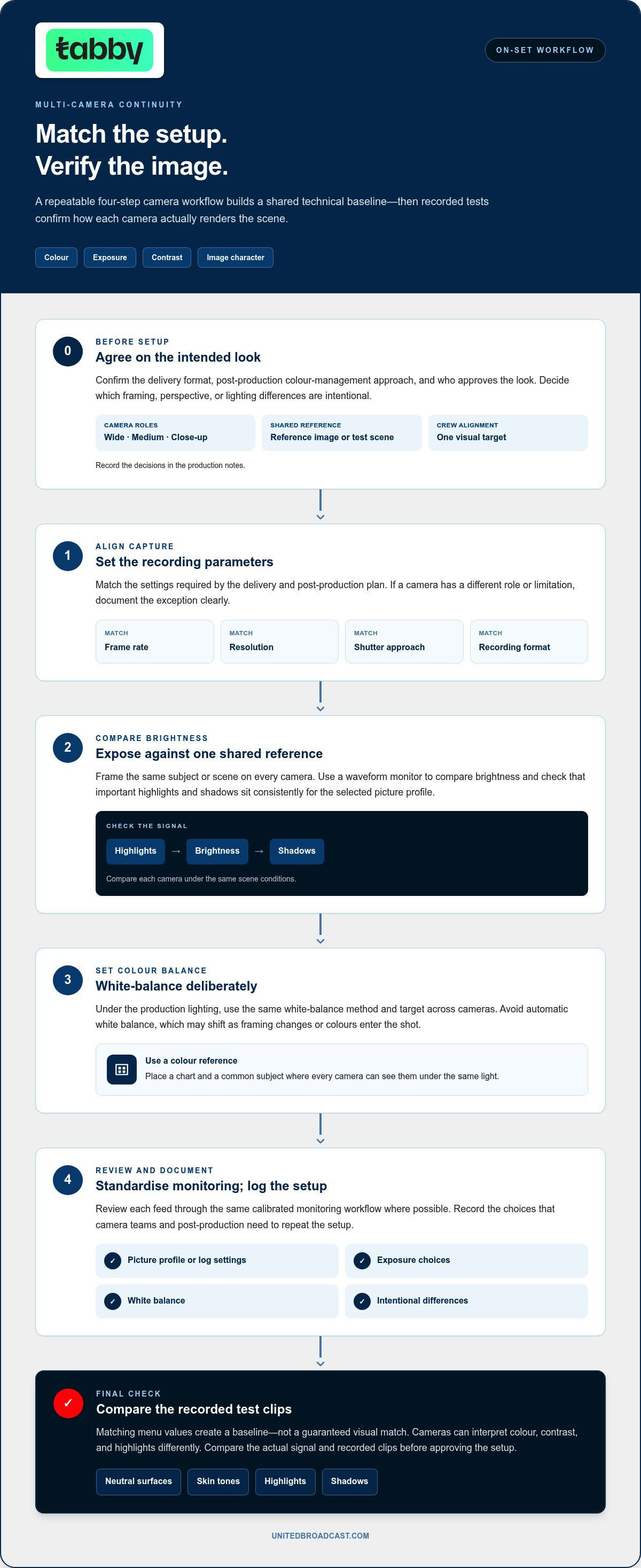
Once the crew agrees on the intended look, translate it into settings that can be checked and repeated. Use this sequence during setup, then review recorded test images together. Fixed, documented settings make camera matching a repeatable process rather than a task based on memory.
- Align recording parameters. Set each camera to the frame rate, resolution, shutter approach, and recording format required by the delivery and post-production plan. If a camera has a different role or limitation, record the exception clearly.
- Set exposure against a shared reference. Frame the same subject or scene on every camera. Use a waveform monitor to compare image brightness and check that important highlights and shadows sit consistently for the selected picture profile.
- Set white balance deliberately. Under the production lighting, use the same white-balance method and target across cameras. Avoid relying on automatic white balance, which may shift as framing changes or colours enter the shot.
- Standardise monitoring and record the setup. Review each feed through the same calibrated monitoring workflow where possible. Log the picture profile or log settings, exposure choices, white balance, and intentional differences for the camera team and post-production.
These steps create a common technical baseline, not a guarantee that the images will look identical. Cameras can interpret colour, contrast, and highlights differently even when their menus show matching values. Check the actual signal and recorded test clips before approving the setup. This distinction is central to achieving a consistent look with multiple cameras: settings guide the match, while comparison confirms it.
Which recording settings should cameras share?
Start with the delivery plan, not a menu-by-menu attempt to make every camera identical. Match frame rate, resolution, shutter approach, and recording format wherever the production requires it. Set white balance consistently under the same lighting, and document each camera’s picture profile or log configuration. These notes tell post-production how the footage was captured and help prevent different image profiles from being treated as interchangeable.
How should crews check exposure and colour on set?
Place a colour reference, such as a chart, and a common subject where every camera can see them under the same light. Compare neutral surfaces, skin tones, highlights, and shadows through a consistent monitoring path. The chart provides known colour patches for comparison; the waveform helps reveal brightness differences that may be difficult to judge by eye. Equipment selection is one part of this chain, and the professional video camera range can help inform the wider system plan.
Capture and review a short test from each camera before recording the full session. When planning a coordinated camera environment, discussing the system requirements can help bring camera, monitoring, and workflow decisions together early.
Comparing Cameras, Lenses, and Lighting for Image Mismatch
A mismatch can come from more than camera settings. The sensor and image processing affect colour response, contrast, sharpness, and highlight transitions. Lenses influence colour, flare, perceived sharpness, and depth of field. Lighting and monitoring can introduce differences of their own or make an existing mismatch harder to diagnose. Separate these variables before adjusting anything, or a correction in one part of the chain may hide a problem elsewhere.
| Source | What may look different | How to isolate it |
|---|---|---|
| Camera rendering | Colour response, contrast, sharpness, and highlight roll-off may vary between cameras, even with matching settings. | Compare recorded test images from each camera using the same subject, light, and monitoring path. |
| Lens behaviour | Colour, contrast, flare, sharpness, and depth-of-field character can change with the lens. Focal length also changes framing. | Test the actual camera-and-lens combination, then compare a shared subject at the intended shot size. |
| Lighting | Different colour temperatures, mixed sources, or changing light levels can shift skin tones and background colour across angles. | Check what each camera sees and whether the subject is lit consistently in every frame. |
| Monitoring | Different display settings or signal paths can make matching images appear inconsistent, or hide a real mismatch. | Review each feed through the same calibrated monitoring workflow before changing camera settings. |
How do camera and lens differences affect the image?
Two cameras set to the same exposure and white balance may still render a scene differently. One may preserve a smoother transition in bright areas, while another produces more pronounced contrast or apparent sharpness. A lens can add its own character, so matching camera brands or headline specifications doesn’t establish a visual match. Test the complete camera-and-lens chains under the intended lighting instead of evaluating bodies or lenses in isolation.
Framing needs a separate check. A different focal length changes the field of view, while moving the camera to compensate changes perspective and the apparent relationship between foreground and background. That variation may be creatively useful, but it should be intentional. Compare the planned angles from their actual camera positions.
How can lighting and monitoring create apparent mismatches?
Inspect the light falling on the shared subject from every angle. A camera facing a window or coloured practical may capture a different mix of colour temperatures than one facing away. A changing source or uneven level can also make one angle look brighter, even when camera exposure settings match. Review the lighting setup alongside the camera feeds to identify the variable responsible.
When planning changes to the lighting environment, professional lighting equipment is one part of a coordinated system. A consistent lighting approach supports camera matching, but it doesn’t remove differences in camera or lens rendering.
Equipment selection can reduce workflow friction when cameras, lenses, lighting, and monitoring are planned together. It can’t replace testing and matching. For achieving a consistent look with multiple cameras, test the intended equipment chain, change one variable at a time, and record what resolves the mismatch.
A Repeatable Multi-Camera Workflow from Rehearsal to Post-Production
Make the camera match a documented production process, not a setup that depends on someone remembering each adjustment. Move from approved camera configurations to a full rehearsal, then hand references and notes to the editor. This gives each department a shared record of the intended image and changes made during the shoot.
- Set and record each camera. Confirm its position, assigned shot, settings, lens, and white balance. Capture a reference frame showing the agreed subject and lighting, then mark whether the team has approved it.
- Rehearse the complete setup. Record all angles at the same time and review cuts on the intended display and monitoring path. Check exposure shifts, focus consistency, reflections, movement through the frame, and practical lights that may affect only some angles.
- Document and retest changes. Note approved corrections and any lighting or camera adjustments. If the setup changes significantly, repeat the relevant test and capture a new approved reference instead of relying on an outdated image.
- Prepare the post handoff. Deliver camera settings, reference frames, shot assignments, and notes on known lighting changes together. Match filenames or labels to the camera log so the editor can identify each angle quickly.
Camera log template: Position | Settings | Lens | White balance | Approved reference. Add a concise note for any planned variation, such as a changed lighting condition or a camera-specific adjustment.
What should the team test during rehearsal?
Review cuts, not just isolated feeds. A camera may look consistent on its own but reveal a noticeable change when the editor switches to another angle. Watch the same action across every position. Check whether focus holds through movement, reflections appear in only one view, or practical lighting changes the subject’s appearance. Record corrections and repeat the test after significant changes.
How should matching information reach post-production?
Include approved references and a clear map of camera positions in the handoff. In the edit, scopes provide a visual readout of signal levels and colour relationships, helping the colourist compare angles rather than rely on memory. Reference frames show the intended result; notes explain why a difference may be deliberate.
A grading pass can refine manageable variations in colour, contrast, and exposure. It can’t reliably restore detail lost to clipped highlights or severely underexposed shadows, so flag those issues during rehearsal or recording. This is how achieving a consistent look with multiple cameras becomes a repeatable workflow from setup through delivery.
Build a Consistent Multi-Camera System with the Right Technical Support
A repeatable match depends on more than choosing cameras with similar specifications. Standardise the settings that matter, test each complete camera-and-lens chain under the intended conditions, preserve approved references, and review the angles together. These steps create a process the crew can apply again as positions, operators, or production requirements change.
For a studio or production managing several camera positions, plan the signal and monitoring environment alongside the cameras. A coordinated plan clarifies how each position serves the production, how feeds reach the required displays or systems, and how operators will assess image consistency. This system-level view helps teams address compatibility and workflow decisions early, rather than treating each camera as a separate purchase.
When does a production benefit from system integration?
System integration is particularly useful for recurring studio workflows, live environments, and projects where cameras, lenses, lighting, signal paths, and monitoring need to work as one setup. United Broadcast & Media Solutions (UBMS) provides integration across planning, consultancy, design, engineering, commissioning, testing, training, and post-project support. This work connects equipment choices with the room layout, operational needs, and how the production will be used.
Planning can account for camera positions and sightlines, signal routing, monitoring locations, and the practical tasks operators need to perform. Commissioning and testing let the team assess the configured system as a whole. Training and post-project support help operators work from the agreed setup as production needs evolve.
What should a useful multi-camera plan deliver?
A useful plan gives the team clear decisions and ownership, not just an equipment list. It should define each camera’s role, the intended image character, recording parameters, monitoring approach, and who is responsible for testing and approving references. It should also explain how the workflow will be documented so camera operators and post-production staff can follow the same guidance.
- Camera positions, shot roles, and any intentional visual differences.
- Shared recording and monitoring requirements, plus documented exceptions.
- Reference capture, review, and approval responsibilities.
- System commissioning, operator training, and post-project support needs.
Those decisions give the production a practical foundation for achieving a consistent look with multiple cameras without forcing every angle into the same framing or character. United Broadcast & Media Solutions (UBMS) brings over 20 years of broadcast systems integration experience to coordinated production environments, with planning through commissioning and post-project support. The aim is a system and workflow suited to the production, not a promise that equipment alone will guarantee a visual match.
Make Your Next Production Easier to Repeat
A dependable multi-camera workflow should keep working as your production changes. New camera positions, revised studio layouts, or updated delivery requirements can affect the whole setup. Treat each change as a reason to review the system plan, test the updated configuration, and keep operational documentation useful to camera operators and post-production.
That planning is valuable for studios and production teams building a coordinated environment rather than solving each camera issue in isolation. United Broadcast supports system integration from planning and design through engineering, commissioning, testing, and training, drawing on over 20 years as a recognised broadcast systems integrator. The goal is a practical system plan that supports production requirements, not a promise that equipment alone will create a perfect match.
If you’re preparing a new setup or refining an existing one, take the next step toward achieving a consistent look with multiple cameras by discussing your production requirements with United Broadcast.
With a clear plan and the right technical support, your team can build a workflow that grows with the production and keeps every angle purposeful.
Frequently Asked Questions
Does genlock make multiple cameras look the same?
No. Genlock synchronises frame timing so camera signals align for live switching or other workflows that require synchronised capture. It doesn’t standardise colour, exposure, contrast, or lens rendering. Treat synchronisation and image matching as separate production checks. A live switch, for example, may need synchronisation even when the cameras are already visually close. Identify timing requirements in the system design, then assess image consistency independently.
Can cameras from different brands produce a consistent look?
Yes. Cameras from different brands can often be matched to a practical standard, although their images may respond differently to the same settings. Test the actual camera and lens combinations with a representative subject and lighting setup. Compare a neutral surface and skin tones in the same scene before adjusting. Record the adjustments so the editor can build on the work already done. This makes achieving a consistent look with multiple cameras more systematic.
Do all cameras need the same picture profile?
No. Choose profiles that suit the cameras’ recording capabilities and the planned post-production workflow, rather than matching profile names for their own sake. A profile with a different contrast curve may need different exposure treatment, even if it is intended for grading. Test the selected profiles in a scene with both bright and dark areas. Note profile choices and any camera-specific exposure guidance for the editor.
What causes a camera angle to look different after switching?
A cut can reveal a difference in white balance, exposure, camera processing, lens rendering, or the light reaching one angle. The change may be easiest to spot on a face, a neutral wall, or a bright window that appears in only one shot. Review the shots in sequence and compare the same subject or background detail. This helps distinguish a camera-specific shift from a lighting or framing change before making corrections.
Can post-production fix mismatched multi-camera footage?
Post-production can often refine moderate differences, but it can’t recreate image information the camera didn’t record. A colourist may bring a slightly warm angle closer to a neutral reference, for example, while a severe mismatch may require compromises elsewhere in the image. Give the editor camera identifiers, profile details, and reference frames with the footage. Clear notes help the grading team understand whether a difference is accidental or part of the intended look.
Should a colour chart be used for every multi-camera shoot?
No. A chart is most useful when precise colour comparison matters, when cameras behave differently, or when lighting conditions may change during production. Capture it where the subject will be, under the same light, and make sure it’s visible in each camera’s frame. If the lighting changes, capture a fresh reference. Keep chart frames with the related camera notes so the editor can identify when and under what conditions they were recorded.
How many cameras are needed for a consistent multi-camera production?
There’s no fixed camera count for visual consistency. Base the number on the coverage the production needs, the role of each shot, crew capacity, and the available monitoring and recording workflow. A two-camera interview may need a wide view and a close-up; a larger live setup may need additional positions for other coverage. Each added camera creates another feed to operate and review, so define its purpose before adding it to the system.


1 comment