





Broadcast Studio Installation: 2026 Practical Guide
The most expensive studio mistake may happen before the first camera is installed: choosing equipment before the production workflow is clear. Planning a broadcast studio installation starts with how your team will create, route, monitor, and deliver content, then matches the systems to those requirements.
It’s easy to feel uncertain about how cameras, audio, control, routing, and infrastructure will work together. Early choices can lead to costly redesign or interrupt operations, while a studio designed only for today may limit future expansion. This guide sets out a practical sequence from defining requirements to commissioning, compares SDI, IP, and hybrid architectures, and highlights integration needs to address before selecting equipment. It also explains why equipment supply, system integration, and technical support belong in the same plan. A workflow-first approach helps you make informed decisions and build a studio that supports current production while leaving room to adapt.
Key Takeaways
- Planning a broadcast studio installation starts with defining productions, users, formats, operating needs, and room for growth before choosing equipment.
- Map signal paths alongside the room layout to see how camera positions, acoustics, lighting, and operator sightlines affect system design.
- Compare centralized, distributed, and hybrid architectures against operational needs, expansion plans, routing complexity, and maintenance access.
- Use a staged process, from approved requirements through integration, testing, and handover, to coordinate equipment, infrastructure, control, and room readiness.
- Coordinate equipment supply with system integration so the selected systems work together as a practical studio environment.
Start Planning a Broadcast Studio Installation with the Production Workflow
A permanent studio installation is more than a collection of cameras, lights, audio equipment, and monitors. Each system must support a defined production workflow, fit the room, and connect reliably with the rest of the facility. Planning a broadcast studio installation around that workflow helps prevent avoidable integration problems later.
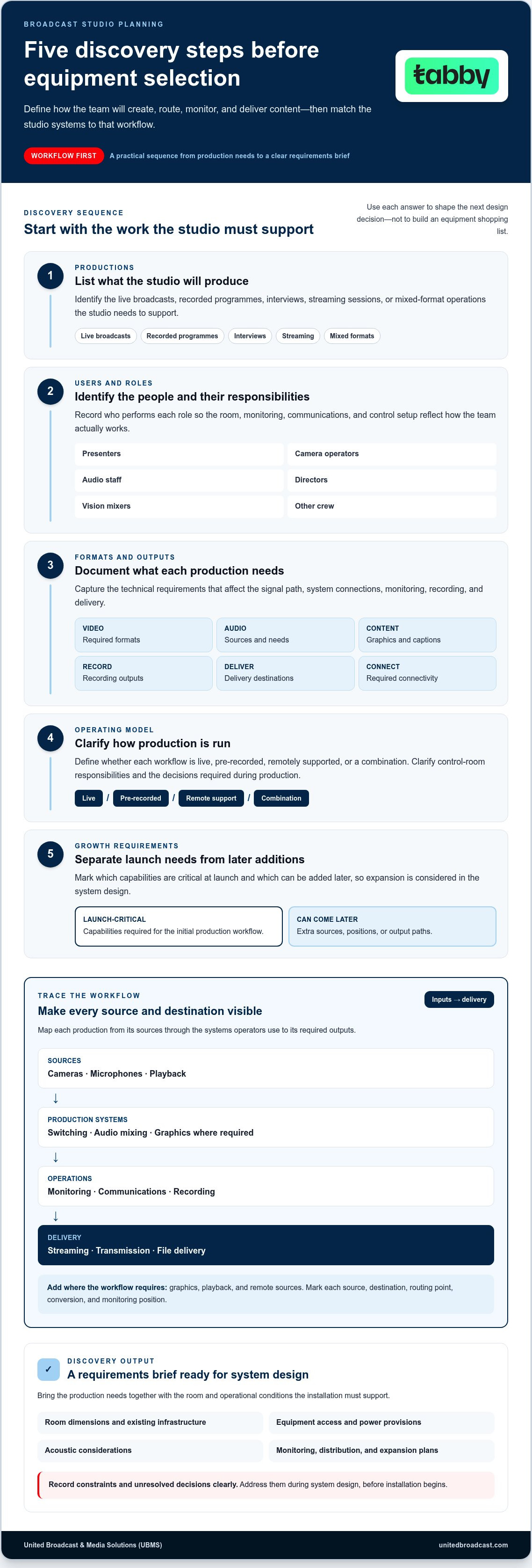
Start with a structured discovery sequence:
- 1. Productions: List the live broadcasts, recorded programmes, interviews, streaming sessions, or mixed-format operations the studio must support.
- 2. Users: Identify presenters, camera operators, audio staff, directors, vision mixers, and other crew, including who performs each role.
- 3. Formats: Document required video formats, audio sources, graphics, captions, recording outputs, and delivery destinations.
- 4. Operating model: Define whether production is live, pre-recorded, remotely supported, or a combination, and clarify control-room responsibilities.
- 5. Growth requirements: Separate launch-critical capabilities from additions that can come later, such as extra sources, positions, or output paths.
Trace each production from input to delivery. A simple map might read: cameras and microphones → switching and audio mixing → monitoring and communications → recording → streaming, transmission, or file delivery. Add graphics, playback, and remote sources where the workflow requires them. This makes dependencies visible: each source must reach the correct switcher or mixer, operators need suitable monitoring, and every required output needs a defined route.
Which productions and operating workflows must the studio support?
Describe what happens during a typical production, not just what equipment is in the room. Note camera positions, presenter movement, microphone use, crew locations, and the control-room decisions required at each stage. An interview setup, for example, may need a different camera arrangement and audio workflow from a live programme with playback and graphics. These details shape the room plan as well as system selection. For a foundational overview of television studio components, consider how the studio floor and production control room work together.
What should a broadcast studio requirements brief include?
A studio requirements brief records the productions, technical needs, room conditions, and operational decisions the installation must support. Capture video formats, audio requirements, connectivity, recording, monitoring, distribution, and planned expansion. Include room dimensions, existing infrastructure, equipment access, power provisions, and acoustic considerations. Record constraints and unresolved decisions clearly so they can be addressed during system design, before installation begins.
Use the brief to compare equipment by its role in the workflow, not as an isolated shopping list. The broadcast studio gear guide can help you identify equipment categories to consider once production requirements are documented.
Design the Broadcast Studio Around Signal Flow, Rooms, and Systems
Plan the room and technical architecture together. Camera positions depend on the set and presenter movement; operator sightlines affect control-room layout; and lighting placement influences the studio floor and equipment locations. Treat these as connected design decisions, not separate fit-out tasks. A useful floor plan shows where people work, what they need to see, and how equipment and signals move between spaces.
How should control-room and studio-room requirements connect?
Position monitors so operators can assess camera feeds and programme output while communicating clearly with the studio floor. Plan practical access to racks and equipment, along with cable pathways, power, ventilation, and space for future service work. Acoustic treatment and sound isolation solve different problems: treatment manages reflections and reverberation within a room, while isolation reduces sound passing between rooms or entering from external sources. Both may matter, depending on the production and building.
Map the signal paths before selecting equipment. A simplified view might look like this:
Video: Cameras and playback → conversion, if required → routing and switching → monitoring → recording → distribution
Audio: Microphones and playback → audio mixing → monitoring and communications → recording and programme output
Control: Operator panels and production systems → devices and routes being controlled
Mark every source, destination, routing point, conversion, and monitoring position. This reveals which signals need to cross rooms, which outputs must be recorded, and how operators will verify the result. It also helps define control around actual tasks rather than assumed equipment choices.
How do signal routing and control choices shape the installation?
Assess SDI, IP-based video, and hybrid transport against the workflow. SDI can suit facilities built around dedicated point-to-point connections; IP can support flexible routing across a configured network; and a hybrid design can connect newer IP systems with existing SDI equipment. Compare the approaches by distance, routing flexibility, current infrastructure, operational skills, and expansion needs. No approach is automatically right for every studio.
Check that formats, interfaces, timing, control, and connected equipment are compatible across the complete signal path. Standards are part of that review: consult SMPTE’s broadcast integration standards when defining relevant interoperability requirements. A shared connection type alone does not guarantee that systems will work together.
Lighting design also affects camera positions, sightlines, power planning, and control. Review the professional lighting guide as you define those needs. For a project-specific system design, discuss your studio integration requirements with United Broadcast & Media Solutions.
Compare Broadcast Studio System Designs Before Committing
Architecture determines where processing and routing happen, how operators access systems, and how the studio can change over time. More equipment does not automatically make a studio more capable. The system works when its components support the required workflows and operate reliably together. When planning a broadcast studio installation, compare operating fit and integration needs before settling on a design.
When does a centralized, distributed, or hybrid design make sense?
A centralized design groups key equipment and control functions around a shared core. A distributed design places systems closer to the rooms or workflows they serve, which can suit facilities with distinct technical needs. A hybrid design combines these patterns, for example, a shared core with selected equipment near a studio or production area. The right balance depends on operating roles, room relationships, infrastructure, and how teams need to access equipment.
| Architecture | Operational fit | Expansion and routing | Maintenance and compatibility |
|---|---|---|---|
| Centralized | Shared operations and equipment core | Central routing can simplify shared access; growth may depend on core capacity | Equipment is grouped for access; check interfaces and dependencies across connected rooms |
| Distributed | Separate rooms or workflows with distinct needs | Local changes may be easier to isolate; routing between areas needs careful planning | Access is spread across locations; verify consistency and compatibility between systems |
| Hybrid | Workflows needing both shared resources and local control | Can accommodate different growth paths; routing and control boundaries need definition | Access depends on equipment placement; assess interfaces across both approaches |
How can the design reduce integration risk and future rework?
Test the design on paper against real production scenarios. Check that formats, interfaces, control dependencies, and routing assumptions align from source to destination. Camera choices are part of this review: required outputs, connectivity, and operating positions influence the surrounding system. Explore professional video cameras in the context of workflow requirements, rather than treating camera selection as a separate decision.
Record planned expansion points, such as additional sources or destinations, and identify changes that could interrupt live operations. A phased implementation can establish essential workflows first, then add capabilities against documented requirements. This keeps future work deliberate: each phase has defined interfaces and dependencies instead of relying on spare equipment or informal assumptions.
Architecture is one part of a coordinated studio project. For a broader view of how scenic, lighting, acoustic, and technical planning relate, see this overview of end-to-end design and construction of broadcast-quality studios.
Move from Broadcast Studio Plan to Integration and Commissioning
Once requirements and system design are approved, move into implementation in controlled stages. Equipment, room infrastructure, routing, and control must come together against the same design. Room readiness matters: installation can be affected if equipment locations, cable pathways, power, or access differ from the plan. Project duration depends on scope, so focus on clear stage approvals rather than assuming a fixed schedule.
- 1. Approve requirements: Confirm supported workflows, system boundaries, interfaces, and operational priorities.
- 2. Finalize system design: Document equipment roles, connections, signal routes, control functions, and monitoring points.
- 3. Prepare the rooms: Coordinate equipment locations, infrastructure, cable pathways, power, ventilation, and safe access with the installation plan.
- 4. Integrate systems: Install and configure equipment, connections, routing, control, monitoring, and interfaces according to the approved design.
- 5. Test workflows: Run representative productions end to end, record issues, resolve them, and retest affected paths.
- 6. Handover: Provide system documentation and operating guidance, then familiarize the team with routine workflows.
These stages connect the technical plan to a working facility. If room readiness changes, equipment access or cable routing may need to be addressed before integration can proceed as designed. Keep approved documentation current as decisions and resolutions are recorded.
What should happen during studio integration and testing?
Configure the system against the design, then test complete production scenarios rather than checking devices in isolation. A representative test should follow sources through switching and routing to monitoring, recording, and the intended output. Include communications and control tasks operators use during a routine session. Document each issue, its resolution, and any design adjustment so the final configuration reflects how the studio will operate.
Commissioning principle: verify complete workflows, not only individual devices. A camera or monitor can pass an individual check while a connection, route, or control dependency elsewhere prevents the production path from working as intended.
What should a useful handover prepare the studio team to do?
Provide operators with clear system documentation, routine operating workflows, equipment and maintenance information, and support pathways. Familiarization should cover common tasks such as selecting sources, checking programme monitoring, confirming recording, and routing outputs. Practicing these steps in the configured studio helps reduce avoidable operating errors and gives the team a practical reference for daily use.
Plan a Broadcast Studio Installation with an Integration Partner
A coordinated approach can simplify planning when a studio needs multiple systems to operate as one production environment. Equipment decisions affect signal paths, control, room infrastructure, and support needs. Considering these elements together helps teams move from an approved workflow to a practical implementation instead of treating equipment supply and integration as separate tasks.
What does system integration contribute to a studio project?
System integration connects production requirements and technical design to the studio’s equipment, infrastructure, routing, and control. Compatibility needs to be considered across the complete system, including how sources reach destinations, how operators control equipment, and how faults or maintenance needs will be handled. This joined-up view helps identify dependencies before they become operational problems.
United Broadcast & Media Solutions supplies professional broadcast studio gear and provides system integration services for broadcast environments and studio setups. UBMS brings equipment solutions and integration together to support the practical requirements of a working studio. Its service center also provides repairs and technical support for professional media equipment, an important part of planning for ongoing technical support.
What information should teams prepare for an initial project discussion?
A clear starting point connects project goals to technical needs. Prepare a concise overview of:
- Production types and outputs: Identify the programmes and formats the studio must support, along with where finished content needs to go.
- Users and roles: Note who operates the studio, control room, and equipment, and how responsibilities are shared.
- Room details: Include available room dimensions, access considerations, and relevant infrastructure information.
- Current systems: List existing equipment and describe how it is connected or used in production.
- Future plans: Capture known expansion needs so the design can account for them.
Existing signal-flow diagrams, connection details, and infrastructure records can clarify how new systems should fit into the environment. Even an informal diagram of sources, destinations, and current routing can make the discussion more productive. Planning a broadcast studio installation is a coordinated process, and clearly documented requirements make it easier to align equipment and integration decisions with the intended workflow.
Share your production requirements and studio plans with UBMS to discuss a studio installation.
Build Your Studio Around a Clear Plan
A dependable studio begins with a defined production workflow, not an equipment list. Map signal paths and room requirements, then compare centralized, distributed, or hybrid designs against the way your team works. During integration and commissioning, test complete production workflows so routing, monitoring, recording, and outputs function together.
Planning a broadcast studio installation also means considering what happens after handover. United Broadcast & Media Solutions provides system integration services for broadcast environments and studio setups. Its dedicated service center supports professional equipment repairs and maintenance, connecting installation planning with ongoing technical support.
Bring your production needs, room details, existing systems, and growth plans into the discussion. A clear starting point helps shape an integrated studio solution around your operational priorities.
With a practical plan and coordinated systems, your team can move forward with confidence and prepare the studio to support production as it evolves.
Frequently Asked Questions
How do you start planning a broadcast studio installation?
Start by documenting the productions the studio must support, then map each workflow from source to output. Identify user roles, formats, operating requirements, room conditions, and future expansion needs before selecting equipment. A live programme, for example, may require camera feeds, audio, graphics, monitoring, recording, and a defined distribution path. A clear requirements brief gives system design and equipment choices a practical foundation and helps expose compatibility or infrastructure concerns early.
What equipment is needed for a broadcast studio installation?
Equipment depends on the production workflow, but a studio may require professional cameras, lenses, lighting, microphones, audio mixing, video switching and routing, monitoring, communications, recording, and output systems. When sets incorporate dynamic backdrops or indoor video walls, specialized display solutions from providers like HTVLED can be integrated into the visual design. Supporting infrastructure matters too, including cabling, equipment locations, power, and control interfaces. Define the sources, destinations, and operator tasks first. This avoids treating the equipment list as a set of separate purchases and helps ensure the selected components work together as a complete system.
How much space does a broadcast studio need?
There’s no single space requirement for every broadcast studio. The footprint depends on production types, set design, camera positions, presenter movement, crew numbers, control-room functions, and equipment access. Include room for safe movement and clear operator sightlines, as well as suitable cable pathways and access to systems for service. Acoustic treatment, sound isolation, lighting positions, and ventilation can also affect the layout. Base the plan on measured room conditions and real operating workflows.
Can a broadcast studio use IP-based video instead of SDI?
Yes. A studio can use IP-based video, SDI, or a hybrid approach, depending on its requirements and existing infrastructure. IP can offer flexible routing across a configured network, while SDI may fit workflows built around dedicated connections. A hybrid design can connect IP systems with existing SDI equipment. Compare each option by workflow, distance, routing needs, compatibility, and operational capabilities. IP systems also require deliberate network design and configuration, so plan integration and control alongside signal transport.
What happens during broadcast studio commissioning?
Commissioning verifies that the integrated studio performs its intended workflows. Systems are configured against the approved design, then tested from source through routing and control to monitoring, recording, and distribution. Tests should include representative production tasks, not only individual equipment checks. For example, confirm that a camera feed reaches the correct switching and monitoring points and that the required programme output can be recorded. Document issues, resolutions, and operating guidance for handover to the studio team.
Should a broadcast studio installation be completed in phases?
A phased installation can work well when the project has clearly defined launch requirements and planned future capabilities. Establish the core workflows first, then document which additional sources, destinations, or functions can be integrated later. Design expansion points into the system from the outset, and identify changes that could affect live operations. Phasing should follow technical dependencies, not simply divide an equipment list. This helps teams prioritize essential production needs while making future integration more deliberate.
Why use system integration for a broadcast studio installation?
System integration connects equipment, infrastructure, routing, control, and monitoring so they support the same production workflows. It helps identify compatibility requirements and dependencies across the signal path before they become operational issues. This is especially useful when a studio combines equipment from different categories or incorporates existing systems. United Broadcast & Media Solutions provides system integration services for broadcast environments and studio setups, alongside broadcast studio gear and a dedicated service center for professional equipment repairs and maintenance.


