





Sony Alpha Series Buying Guide: Choose the Right Camera in 2026
The best Sony Alpha for your work may not be the newest model or the one with the highest resolution. The sony alpha series spans several model families and generations, so start with what you shoot rather than choosing by model name alone.
Sensor format, stills and video priorities, and body-only or lens-kit packaging all affect which listing fits your workflow. This guide helps you narrow your options by practical needs, compare package details, and build a focused shortlist before browsing Sony Alpha cameras at UBMS.
We’ll cover the roles of the a7, a7R, a9, and APS-C categories, using representative models including the a7 IV, a7 III, a7R IV, a9 II, a9 III, and a6400. You’ll also find a checklist for comparing body-only cameras with lens kits.
Key Takeaways
- Choose a camera category around your main workflow, whether you prioritize stills, video, or a mix of both.
- Use the sony alpha series model families to organize your options, not as a ranking where a higher number automatically means a better fit.
- Build a shortlist from the collection’s representative models, then compare each listing against your shooting priorities.
- Check whether a listing is body-only or includes a named lens before comparing packages.
- Use a pre-purchase checklist to narrow your choices and browse the UBMS Sony Alpha collection with clear criteria.
What Is the Sony Alpha Series, and Which Camera Types Are Included?
The sony alpha series is a family of interchangeable-lens cameras, not one camera model. It includes different families and generations, so a model name or higher number alone won’t tell you whether a camera suits your work. Begin with the images or footage you need to make, then compare the specific body, sensor format, and package.
Two sensor formats to compare are full-frame and APS-C. Sensor format can influence system size and how a lens frames a scene, but it is only one part of the decision. Your subjects, shooting conditions, preferred lenses, and balance of stills and video all matter. For background on the system’s development and camera technologies, see Sony Alpha series history and technology.
How do Sony Alpha model families differ?
Family names are useful for organizing options, but treat them as a starting point. Check the description and details for the exact model you’re considering.
- a7: A broad family represented in the UBMS collection across several generations, including a7 and a7 III models. Compare the specific listing with your intended workflow.
- a7R: The collection includes the a7R IV. The “R” family name can indicate a different emphasis from the standard a7 range, but rely on the product description and stated details for the model itself.
- a9: The collection includes a9 models, including the a9 II and a9 III. Compare the features stated for each listing with the demands of your work.
- APS-C options: The collection includes the a6400. Compare its sensor format and package with other shortlisted models rather than treating format alone as a measure of camera quality.
Generations matter, but newer doesn’t automatically mean better for your work. A model that matches your assignments and package needs can be a more practical choice than one selected only by its place in a naming sequence.
What does body-only or lens-kit mean?
A body-only listing identifies a camera body without a lens bundled in the product title. This may suit you if you already own a compatible lens or want to select one separately. A lens-kit listing identifies a camera packaged with a lens. The UBMS collection includes a6400 and a7 III lens-kit options.
Read the full product title and package details before comparing listings. Check whether a lens is included and whether it suits your equipment and intended subjects. The same camera family can appear in different package types, so don’t compare body-only and kit listings as though they include the same items. Review the Sony Alpha camera and lens collection to compare the listed options and package descriptions.
How to Compare Sony Alpha Cameras for Your Photography or Video Workflow
Start with the work, not the model number. Decide whether still photography, video, or a combination is your priority. Then identify the demands that shape your shoots, such as the resolution you need for your intended output, the importance of switching between stills and video, or connectivity requirements in a professional workflow. These criteria give you a practical way to compare the sony alpha series without assuming one camera suits every assignment.
Use product listings as your reference for specifications. Compare sensor format and resolution where the listing states them, and consider how those details relate to your output. A higher megapixel figure may matter for resolution-led work, but it should not outweigh other priorities if your workflow calls for a different balance. Sony’s Official Sony Alpha resources and community can provide manufacturer-focused learning and camera information as you assess your needs.
Which camera priorities should shape your shortlist?
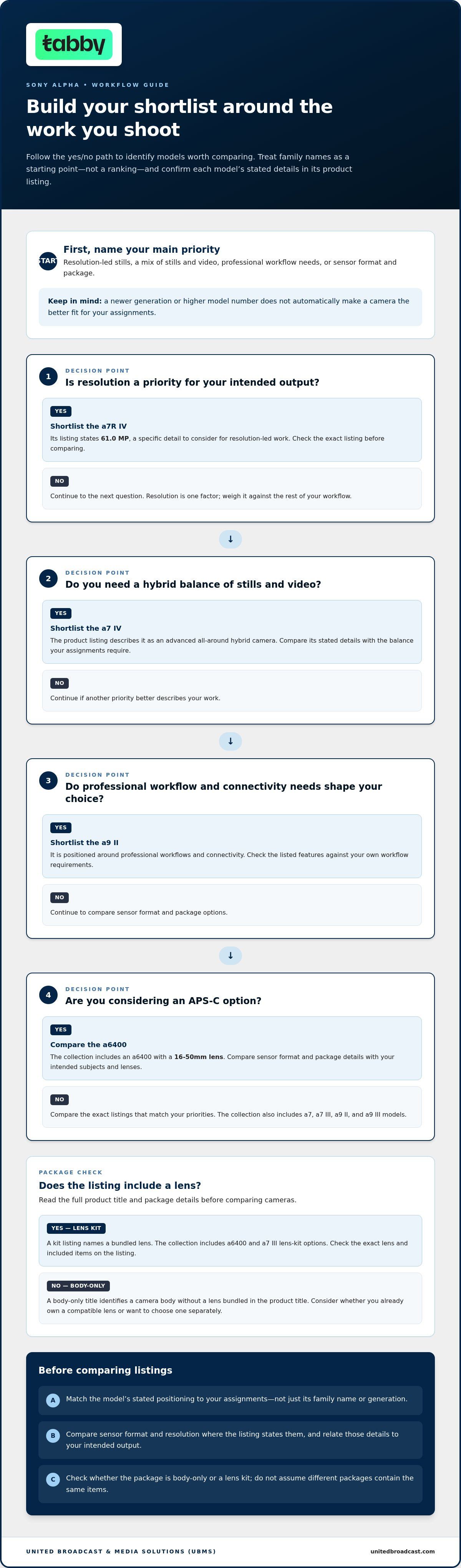
Compare each model’s stated positioning with your assignments. The a7 IV is described as an advanced all-around hybrid camera. The a7R IV listing identifies 61.0 MP, a detail relevant to a resolution-led comparison. The a9 II is positioned around professional workflows and connectivity. These descriptions can help you shortlist options, but the right choice depends on which requirements matter most in your work.
| Model | Stated positioning | Package type | Suitable workflow |
|---|---|---|---|
| a7 IV | Advanced all-around hybrid camera | Compare the individual listing | Stills and video in a hybrid workflow |
| a7R IV | Resolution-led; listing states 61.0 MP | Compare the individual listing | Work where the stated resolution is a priority |
| a9 II | Professional workflow and connectivity positioning | Compare the individual listing | Professional workflows that align with the listed positioning |
| a6400 with 16-50mm lens | Camera and named lens kit | Lens kit | A shortlist that includes a bundled lens |
How should you assess camera and lens packages?
Separate the camera decision from the package decision. A body-only title means no lens is named as part of the bundle. A kit title identifies a bundled lens, as in the a6400 with 16-50mm lens example. Check the package contents on the exact listing, then decide whether they suit the lenses you already use or the setup you’re building. The Sony Alpha camera and lens collection brings camera and lens options together for comparison.
Once you’ve set your workflow priorities and package requirements, browse Sony Alpha cameras. Check each product page for its stated sensor format, resolution, and included items before making your selection.
Sony Alpha Models to Shortlist: a7 IV, a7 III, a6400, a7R IV, and a9
This representative shortlist from the UBMS collection is not a complete catalogue or a ranking. The descriptions below reflect the supplied product listings. Use them to identify models worth comparing, then open the exact listing for package details and specifications that matter to your work.
| Model | Listing description or positioning | Package details | Workflow to consider |
|---|---|---|---|
| a7 IV | Described as an advanced all-around hybrid camera | Check the individual listing | Mixed still photography and video |
| a7 III | Listing describes suitability for photo and video applications | Body-only and 28-70mm lens-kit listings | Photo and video work; compare packages |
| a6400 | Listed as an APS-C model | Body-only and 16-50mm lens-kit listings | Compare the camera-only option with the named lens kit |
| a7R IV | Listing describes a full-frame camera with 61.0 MP | Check the individual listing | Resolution-led work where the stated specification is relevant |
| a9 II | Listing positioning includes professional workflow and connectivity | Check the individual listing | Professional workflows aligned with that positioning |
| a9 III | Consider as a distinct a9-series listing; assess its own description | Check the individual listing | Compare its stated workflow against your assignment needs |
Which Sony Alpha models suit mixed photo and video use?
The a7 IV is the collection’s example of a camera positioned for a blend of stills and video. The a7 III is another option to consider, as its listing describes suitability for photo and video applications. Compare those stated roles with the work you do most often instead of assuming either model is right for every hybrid workflow.
Package choice is part of the comparison. The a7 III appears as a body-only option and as a kit with a 28-70mm lens. If you already have a suitable lens, the body-only listing may fit your setup. Otherwise, compare the kit’s contents with your intended use. Read the individual listing before deciding.
When might APS-C or resolution-focused models make sense?
The a6400 is an APS-C option in the collection, with body-only and 16-50mm lens-kit listings. The a7R IV is a different option: its supplied description identifies a full-frame model with 61.0 MP. Use that figure as a listing detail and decide whether it suits your output. Don’t infer other performance differences from the model name alone.
The a9 II and a9 III are separate options in the collection. The a9 II listing’s professional workflow and connectivity positioning gives you a basis for comparison. For the a9 III, use its own description rather than transferring claims from another model. Across the sony alpha series, checking each listing keeps your shortlist grounded in stated information rather than assumptions about generations or family names.
Common Sony Alpha Buying Mistakes, and a Simple Way to Avoid Them
A model number may look like a quick way to rank cameras, but the highest number is not automatically the best fit. Sony Alpha models and generations have different stated positioning, and a newer model may not match your priorities as closely as another option. Compare the exact listing with your workflow and package requirements instead of choosing by number alone.
Use this checklist to narrow your options in order. It helps you compare practical requirements rather than making assumptions based on a model name.
- Write down your main use. Note whether you primarily shoot stills, video, or both. Use this as a reference when reviewing each model’s stated positioning.
- Match the model name and generation. Check the full product title against your shortlist. Related family names can refer to different models, so don’t rely on a partial name or thumbnail.
- Identify your key priority. Decide which stated attribute matters most, such as a listing’s resolution description or hybrid positioning. Base the comparison on features and specifications provided on that product page.
- Confirm the package configuration. Check whether the listing is body-only or names a bundled lens. These are different purchase configurations, even when they share a camera model.
- Remove mismatches. Set aside listings whose stated positioning or package format doesn’t suit your intended use. Compare the remaining options against your main requirements.
What details should you check on a Sony Alpha listing?
Read the full model name, including its generation, and make sure it matches the camera on your shortlist. Then check the product title and package description for a named lens or body-only configuration. Don’t assume two listings with the same camera name include the same items. For model-to-model comparisons, use the features and specifications stated on each product page rather than inferring them from the family name.
How can you narrow the final choice?
Apply your checklist to the sony alpha series models you’re considering. For a mix of stills and video, prioritize a listing whose description reflects that use. If a particular specification matters to your work, compare it directly with your output requirements. Finally, remove options whose package format doesn’t meet your needs, such as a body-only listing when you want a bundled lens.
For broader context on interchangeable-lens cameras in video workflows, UBMS’s professional video camera range provides a related category reference. If your requirements extend beyond comparing Alpha listings, use that range as a starting point, then return to the exact camera details and package contents to complete your selection.
Find Your Sony Alpha Camera in the UBMS Collection
A useful shortlist turns a broad camera range into a focused decision. Bring together three things: the work you need the camera to do, the model’s stated positioning or relevant specifications, and the package that suits your setup. This keeps your choice grounded in your requirements, not just a model name, generation, or assumption about a camera’s capabilities.
UBMS’s Sony Alpha collection includes a range of camera models and package types. UBMS supplies professional equipment and provides technical services for professional media equipment. Compare the product listings and base your decision on the details stated for each individual product.
How to move from shortlist to product selection
Return to your shortlist and keep the models that meet your main shooting needs. If two remain, identify the distinction that matters most, such as a model’s stated positioning or whether the listing includes a lens. Avoid filling gaps with assumptions. Use each product title and description as your reference, and compare like with like.
- Set your priority. Write down your primary use and the feature or positioning that influenced your shortlist.
- Match the exact listing. Check the full model name and generation to make sure you’re comparing the intended camera.
- Review the package. Read the product title and description to distinguish a body-only listing from one that names a bundled lens.
- Recheck the details. Use the specifications and features stated on the product page. If a detail isn’t stated there, don’t use it to choose between models.
- Choose the closest fit. Select the listing that meets your workflow priority and package needs, rather than the option that simply sounds more advanced.
This final pass can show whether your shortlist is still too broad. If each remaining option meets your core needs, compare the package format and exact listing information. If an option no longer matches your priority, remove it to keep the decision focused.
Where to browse Sony Alpha cameras
The collection page brings Sony Alpha options together. Review the camera listings, then open individual product descriptions to compare their stated details and package configurations. UBMS’s broader Sony Alpha camera and lens collection is useful when you want to consider camera listings alongside lens options.
Keep your shortlist beside you while browsing. It helps you stay focused on the workflow, model priorities, and package choice you identified, rather than getting sidetracked by options that don’t meet your needs.
Choose a Camera That Supports Your Next Step
Consider the work you expect to take on next, not only the shoot in front of you. A camera is part of a wider imaging setup, so think about the assignments you want to handle and how your shooting style may develop. That perspective can help you choose a model you’ll use with confidence, rather than one selected mainly for its place in the sony alpha series.
Before deciding, check that your preferred listing still matches your priorities. You don’t need to compare every model. Focus on the option that aligns with your work and feels practical for the way you plan to shoot.
With your priorities in focus, browse the UBMS Sony Alpha collection and compare the listings to find the camera and package that fit your work.
Frequently Asked Questions
What is the difference between Sony Alpha a7, a7R, and a9 cameras?
The a7, a7R, and a9 names identify different model families, not a simple quality ranking. In the sony alpha series listings, the a7 IV is positioned as an all-around hybrid, the a7R IV is described as a full-frame camera with 61.0 MP, and the a9 II has professional workflow and connectivity positioning. Compare each model’s description with your assignment instead of relying on family names alone.
Is a Sony Alpha camera suitable for both photography and video?
Some Sony Alpha models are positioned for both stills and video. The a7 IV is described in its supplied listing as an advanced all-around hybrid camera, while the a7 III listing describes suitability for photo and video applications. If your projects depend on particular recording functions, review the individual product description rather than assuming every model offers the same capabilities.
Can I use a Sony Alpha camera with a lens I already own?
Confirm that the lens is compatible with the specific camera before selecting a body-only listing. Compare the lens mount and camera mount information, then consult the manufacturer’s compatibility details, especially if the lens is from another system or you’re considering an adapter. Also consider whether the lens suits your subjects and framing. A matching brand name alone doesn’t guarantee compatibility.
What does body-only mean when buying a Sony Alpha camera?
Body-only means the listing is for the camera body without a bundled lens identified in its title. It may suit you if you already have a compatible lens and want to use your existing setup. Check the full product description for package contents, and plan separately for a lens if you don’t own one. This avoids confusing a camera body with a complete camera-and-lens kit.
Should I choose a Sony Alpha camera with a kit lens?
A kit lens can be a practical starting point if you need a camera and lens together, while a body-only option may suit an existing lens setup. Decide based on the subjects you photograph and whether the named lens fits those needs. Read the product title and package details, then compare them with lenses you already own to avoid choosing a bundle that duplicates equipment unnecessarily.
How do I choose between a full-frame and an APS-C Sony Alpha camera?
Start with the sensor format stated on each listing, then consider how it fits your intended work and existing lenses. For example, the supplied descriptions identify the a7R IV as full-frame and the a6400 as APS-C. Sensor format is one part of the decision, not a standalone measure of image quality. Review the individual camera and package details before narrowing your options.
Are Sony Alpha a6400 and a7 III listings available as camera-and-lens kits?
The supplied collection details include lens-kit listings for both models: an a6400 with a 16-50mm lens and an a7 III with a 28-70mm lens. The collection also includes body-only listings, so distinguish the package types by reading each product title. Review the current product page for the exact package details before choosing.


