





Intercoms & Communication: Professional Buying Guide 2026
The system with the most headsets isn’t necessarily the one that will keep a production crew communicating clearly. When comparing intercoms & communication equipment, start with how the crew works: a compact wireless setup can suit a mobile team, while a wired partyline or networked talkback architecture may better fit a fixed studio or a workflow that connects with existing broadcast infrastructure.
Choosing a system can feel complex because wired, wireless, partyline, and IP-based options solve different problems. Match the connection method and operating environment to the workflow, rather than choosing by user count alone. This guide explains the main architectures and the practical decisions around team size, mobility, communication paths, and integration.
You’ll also compare representative options, including Hollyland wireless headset and beltpack systems, Sonifex AoIP talkback portals, and Artist-compatible interface cards. Use the examples to narrow the field to systems suited to your production workflow and identify where broadcast system integration can help communication equipment fit into a wider setup.
Key Takeaways
- Choose a communication architecture around how the production operates, including crew mobility, layout changes, and infrastructure.
- Use crew roles, user count, and communication tasks to define what your intercoms & communication setup needs to support.
- Compare wireless headset systems, AoIP talkback portals, and interface cards by configuration and integration approach.
- Consider the six-person Hollyland Solidcom C1 Air 6S as one example of a complete headset intercom system.
- Shortlist equipment that fits your workflow and wider broadcast environment, rather than selecting by headset count alone.
What Are Professional Intercoms and Communication Systems Used For?
A production intercom gives crew members a dedicated way to coordinate while they work. It carries operational instructions between people in different rooms, on a set, or across an event space. Teams use it to share cues, confirm handoffs, and make decisions during a production. The right setup depends on who needs to communicate, what they need to coordinate, and where each person works.
These systems support broadcast studios, film sets, live events, and theatre productions. A director may cue a camera team, a stage manager may coordinate a changeover, and technical staff may discuss a signal or equipment issue. Each setting brings different communication needs. A fixed control room and a crew moving around a location, for example, may need different equipment and routes. This Intercom systems overview explains common system types, but production decisions should start with the workflow.
Production intercom is for the crew; programme audio is for the audience. This distinction keeps operational instructions separate from the programme mix intended for viewers, listeners, or an in-person audience. Intercoms & communication equipment is part of the production workflow, not a substitute for programme audio or customer-service software.
Which production roles rely on intercom communication?
Directors, camera operators, stage teams, and technical crews use intercoms to coordinate tasks that depend on timing and clear handoffs. In a studio, a director might cue a camera operator to prepare for the next shot while the technical team monitors the control-room workflow. On a film set, a crew member might pass an operational update to another department before a setup changes. At a live event, stage teams can coordinate cues and transitions. These examples show how instructions travel; they don’t guarantee a particular production result.
What is the difference between talkback and programme audio?
Talkback is communication among production personnel. Programme audio is the sound sent to the audience. A control-room director might use talkback to tell a camera operator to prepare for a shot, while viewers hear the programme mix. Keeping these paths distinct lets the crew exchange operational instructions without making them part of the audience-facing content. The communication paths a production needs depend on its roles, tasks, and technical setup.
Wired, Wireless, Partyline, or Networked: How Intercom Systems Differ
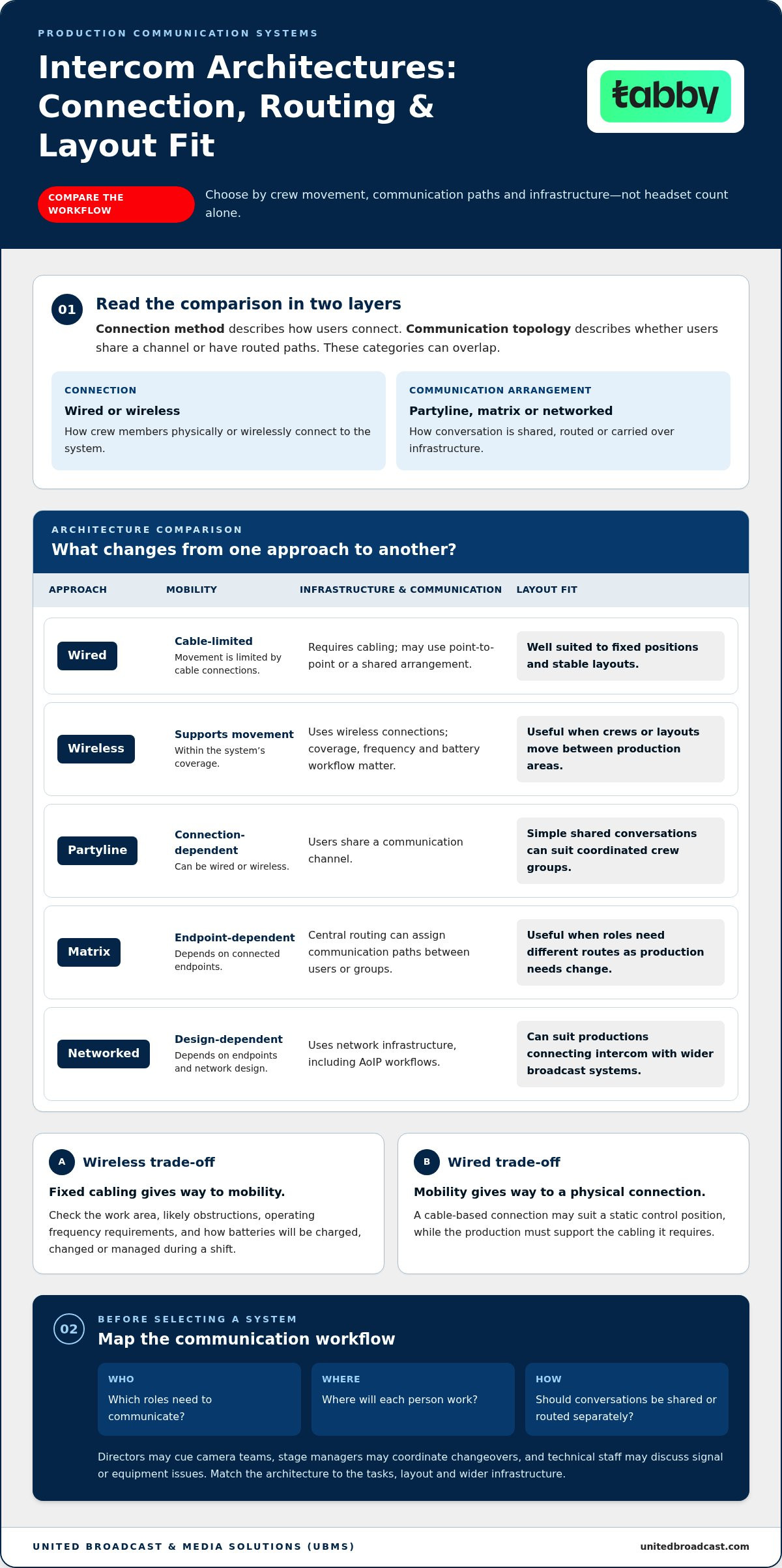
Architecture determines how crew members connect, how communication is routed, and what infrastructure a production must support. These categories can overlap: partyline describes a shared communication arrangement, while wired or wireless describes how users connect. Matrix systems offer configurable routing, and networked systems carry communication over IP-based infrastructure. This Intercom Systems for Production Work primer provides further context on production-specific approaches.
| Approach | Mobility | Infrastructure and communication topology | Layout fit |
|---|---|---|---|
| Wired | Limited by cable connections | Requires cabling; may use point-to-point or a shared arrangement | Well suited to fixed positions and stable layouts |
| Wireless | Supports movement within the system’s coverage | Uses wireless connections; coverage, frequency and battery workflow matter | Useful where crews or layouts move between production areas |
| Partyline | Depends on the wired or wireless connection | Users share a communication channel | Simple shared conversations can suit coordinated crew groups |
| Matrix | Depends on connected endpoints | Central routing can assign communication paths between users or groups | Useful where roles need different routes as production needs change |
| Networked | Depends on endpoints and network design | Communication uses network infrastructure, including AoIP workflows | Can suit productions connecting intercom with wider broadcast systems |
Wireless trades fixed cabling for mobility; wired trades mobility for a physical connection and the infrastructure it requires. Neither is automatically better. A static control position may favour a cable-based connection, while staff moving through changing work areas may value wireless headsets. Before choosing, map who needs to communicate with whom, where they’ll work, and whether conversations need to be shared or routed separately.
When does a wireless headset system suit a production?
Wireless headsets can suit camera teams, stage crews, or technical staff who need to move while staying connected. Assess the actual work area, likely obstructions, operating frequency requirements, and how batteries will be charged, changed, or managed during a shift. Coverage and runtime depend on the specific system and environment, so check the product specifications against the production conditions rather than relying on general assumptions.
When do partyline, matrix, or AoIP workflows make sense?
Partyline provides a shared communication path, while a matrix system can route conversations according to production roles. AoIP carries audio through networked infrastructure and may suit a workflow where intercom needs to connect with a wider broadcast environment. Dante, MADI, and SIP are useful terms in integration discussions, but naming a protocol doesn’t establish compatibility. Match the equipment’s interfaces and routing requirements to the system design. Then use the intercom and communication system collection to compare options by workflow and connection approach.
Intercom System Examples for Different Crew Sizes and Workflows
Product configurations are a useful starting point for comparing intercoms & communication equipment, but the number of headsets or interfaces alone doesn’t define the right system. Consider how many people need to communicate, whether they’ll wear headsets or use a desktop portal, and how the setup fits the production’s wider signal path. The examples below highlight differences to consider, rather than suggesting one configuration suits every workflow.
| Example | Stated configuration | Potential workflow fit |
|---|---|---|
| Hollyland Solidcom C1 Air 6S | Six-person complete headset intercom system | A defined headset configuration for a crew that needs a complete system for six people |
| Hollyland C1 Pro-Hub4S | Five-person configuration | A team comparing a hub-based configuration for a five-person setup |
| Hollyland Roaming Hub 20S | 20-headset configuration | A larger headset setup where the stated user configuration is a key selection factor |
| Hollyland Solidcom M1 Pro | Four-person and eight-beltpack configurations | Teams comparing a smaller headset configuration with a beltpack-based setup |
| Sonifex AVN-TB20AD | 20-button AoIP desktop talkback portal | A workflow built around desktop talkback and an AoIP approach |
The Solidcom C1 Air 6S is described as a complete six-person headset intercom system, making it a useful reference for a crew planning that configuration. The C1 Pro-Hub4S is a five-person option, while the Roaming Hub 20S is listed for 20 headsets. Compare those stated configurations with the crew’s communication roles, operating arrangement, and any routing needs.
How do headset and beltpack configurations change the setup?
The Solidcom M1 Pro is listed in four-person and eight-beltpack configurations. These are two distinct configuration points to compare: a four-person option and a setup specified by its beltpack count. Listed headset variants also include single-ear and dual-ear options. Assess them against how crew members need to hear surrounding activity while communicating. The C1 Air Six-Slot Charging Base is a separate charging accessory with six slots, not another intercom system configuration.
When might an AoIP portal or interface card be relevant?
The Sonifex AVN-TB20AD is a 20-button AoIP desktop talkback portal, relevant when a workflow calls for a desktop talkback interface over AoIP. It differs from a headset-focused system in its stated form and role. For system designs involving interface cards, Dante-108, MADI-108, and VOIP-108 G2 are named options with Dante, MADI, and VoIP conversion roles, respectively. These names indicate integration approaches, not universal compatibility with every intercom or broadcast system. Match the specific interfaces to the wider system design.
Use these examples to shortlist by user configuration and communication approach. UBMS offers broadcast system integration for broadcast environments and studio setups, helping equipment fit into a wider production system.
How to Choose Intercoms: A Practical Evaluation Checklist
Before comparing intercoms & communication systems, write down how your crew works and what the system must connect to. A clear requirements list separates essential functions from optional capacity and makes it easier to compare headset systems, talkback portals, and integration components on practical terms.
- Define crew roles, user count, and tasks. List who needs to communicate, how many people need access, and what each role must coordinate. Note whether users need to speak to everyone or use distinct communication paths.
- Map simultaneous conversations. Identify moments when different groups need to communicate at the same time. This helps determine whether one shared channel is suitable or whether the workflow calls for separate or routed paths.
- Assess mobility and work areas. Mark fixed positions and moving crew members. Note constraints such as distances, walls, or layout changes, and use the actual environment to frame coverage needs rather than relying on a general range assumption.
- Set headset preferences. Record whether users need single-ear or dual-ear headsets, or whether particular roles are better served by a desktop talkback position. Include comfort and awareness of surrounding activity in the decision.
- Document the signal path and infrastructure. Note existing talkback equipment, audio networks, and the connection types the workflow requires. Compare these needs with the interfaces and communication approach of each candidate system.
- Plan for charging and change. Include battery handling and charging accessories in the operating plan. Consider whether team size or production roles may change, so the selected configuration doesn’t restrict a likely workflow.
Which requirements should a team document before comparing systems?
Turn the checklist into a simple production map. Record user roles, expected team size, simultaneous communication needs, fixed and moving positions, and constraints between production areas. Add existing audio networks and talkback equipment, then list required connection types. This shared reference lets technical and production staff evaluate the same workflow instead of comparing systems against different assumptions.
How can a team avoid overbuying or limiting future workflows?
Match the configuration to the people and communication tasks the production actually has. Selecting the largest system by default can add capacity without solving a workflow need. Choosing only by headset count can leave routing, infrastructure, or charging requirements unaddressed. Treat headset style, charging arrangements, and expected team changes as separate criteria, then compare suitable configurations with the documented requirements.
Explore Intercoms & Communication Equipment for Your Production
A useful shortlist starts with the production workflow, not a product name. Bring together crew roles, expected user count, headset preferences, and the communication infrastructure already in place. Then decide whether the main requirement is mobility for a moving crew, a desktop talkback position, or integration with networked broadcast equipment. These priorities help narrow intercoms & communication options to configurations with a defined purpose.
What information helps narrow down a product shortlist?
Before browsing, capture the details that shape how the system will be used:
- Users and roles: Note who needs to communicate and which positions need access.
- Communication tasks: Identify whether users share one conversation or need distinct communication paths.
- Working style: Record which crew members move around and which remain at fixed positions.
- Headset preferences: Include the preferred headset configuration for each role.
- Existing infrastructure: List current talkback equipment, audio networks, and required connection types.
Use this information to compare relevant options by system type and stated configuration. For example, a mobile crew may prioritise wireless headset equipment, while a control-room position may call for a desktop talkback portal. If the workflow depends on network integration, note the required signal path and interfaces so the comparison reflects the wider setup, not just the communication endpoint.
How does intercom fit into a broader broadcast environment?
Crew communication supports production by connecting the people coordinating technical and operational work. Intercom equipment may sit alongside studio systems, talkback workflows, and networked audio infrastructure, so consider its role as part of the overall system design. UBMS provides system integration for broadcast environments and studio setups. For additional context on studio equipment, the related guide, Advanced Broadcast Studio Gear in the UAE, complements this workflow-led selection process.
Before settling on a shortlist, compare the equipment against the infrastructure map: who communicates, from where, through which path, and with what connections? This helps distinguish a self-contained headset configuration from a portal or interface approach intended to work within a larger setup. It also brings charging accessories, headset choices, and possible team changes into the decision before they become afterthoughts.
Browse the collection with those requirements in hand, and compare options by workflow and configuration rather than choosing on a single feature alone.
Move from Requirements to the Right System
Turn your production’s communication needs into a shortlist that can be assessed against the real setup. Compare intercoms & communication options by crew workflow and how each system fits the wider broadcast environment, rather than by one feature in isolation. The examples in this guide include Hollyland wireless intercom configurations and Sonifex AoIP talkback portals. UBMS also offers system integration and technical support for professional media equipment.
A practical shortlist gives your team a clearer basis for selecting equipment that supports current operations and planned workflows. Explore the system types and configurations, then focus on options that align with your production’s needs.
Explore UBMS’s professional equipment and system integration services to plan a setup around your production workflow.
Frequently Asked Questions
Can a professional intercom system connect with existing walkie-talkies?
Yes, but the intercom and radios need a suitable interface or gateway to exchange audio. Check how the radios handle push-to-talk, whether the intercom supports that control method, and which users need to hear or speak to radio users. For example, a production coordinator might need to relay a radio call to a headset group. The connection depends on the specific equipment and interface design, so don’t assume different systems connect directly.
How can wireless interference affect production intercom communication?
Wireless interference can cause intermittent audio, reduced usable coverage, or unreliable connections in certain areas. Sources may include other radio-frequency equipment or the production environment itself. If problems appear, note where and when they occur, then compare the system’s operating channel or frequency with equipment in use nearby. Keep a wired communication option available for fixed critical positions if the production plan requires an alternative path.
What is the difference between noise cancellation and environmental noise cancellation?
Noise cancellation commonly refers to reducing unwanted sound picked up or heard through a headset, but the exact meaning depends on the product’s design. Environmental noise cancellation usually describes processing intended to reduce surrounding ambient sound, particularly in the microphone signal. These terms aren’t applied identically across all equipment. For a loud set or event space, check the specific headset documentation for what is cancelled, whether it affects the microphone or listening path, and any operating limitations.
Can intercom equipment connect to a Dante audio network?
It can if the intercom equipment or an appropriate interface provides a compatible Dante connection and the network is designed for that audio path. An AoIP label alone doesn’t establish Dante compatibility, since audio-over-IP systems can use different protocols and interfaces. For an intercoms & communication setup, map where audio must enter and leave the Dante network, then match those points to the equipment’s documented connections and routing requirements.
What should a crew check when headset audio becomes unclear?
Start with the headset: check its fit, microphone position, mute setting, and cable or connector seating where applicable. Then confirm that the user is listening to the intended channel or route and determine whether the issue affects one headset or several. If multiple users report the same problem, the cause may be upstream in routing or the connection path. Record when the fault occurs and what changes it before adjusting system settings.
Can wired and wireless users communicate within the same production workflow?
Yes, if the system design provides a way to route communication between wired and wireless endpoints. A hybrid setup might place control-room staff at wired positions while mobile crew members use wireless headsets. The connection could depend on a shared system, matrix routing, or an interface between separate systems. Define the required audio paths, user groups, and control method in the system design rather than assuming wired and wireless equipment will connect automatically.


