





ENG Camera Setup for News: Audio, Lenses and Support
Good news coverage depends on more than the camera: the filters, lens, audio path and support all need to work together. An ENG camera setup for news gathering uses electronic equipment to capture television news in the field, ranging from a single reporter with a professional video camera to a full crew working from a truck. Built-in ND filters help manage light, while an integrated zoom lens lets the operator adjust framing without changing lenses.
When a camera needs to be ready for fast-moving coverage, the challenge is building a reliable field workflow around it. This guide explains ENG and how filters, zoom lenses, audio routing, test tones, support and field accessories contribute to a news setup. It also outlines when a compact camera package is sufficient and when a more complex production requires additional equipment and coordination.
Key Takeaways
- Understand how electronic news gathering ranges from a solo reporter’s camera operation to a larger field crew.
- See how built-in ND filters and an integrated zoom lens help manage changing light and framing in the field.
- Learn how camera audio routing, a test tone and monitoring can help identify signal-path problems before recording.
- Match camera support and field peripherals to the crew, location and production workflow.
- Compare broadcast camera considerations, including when 4K capture can provide more flexibility in post-production.
Camera support and field-production peripherals
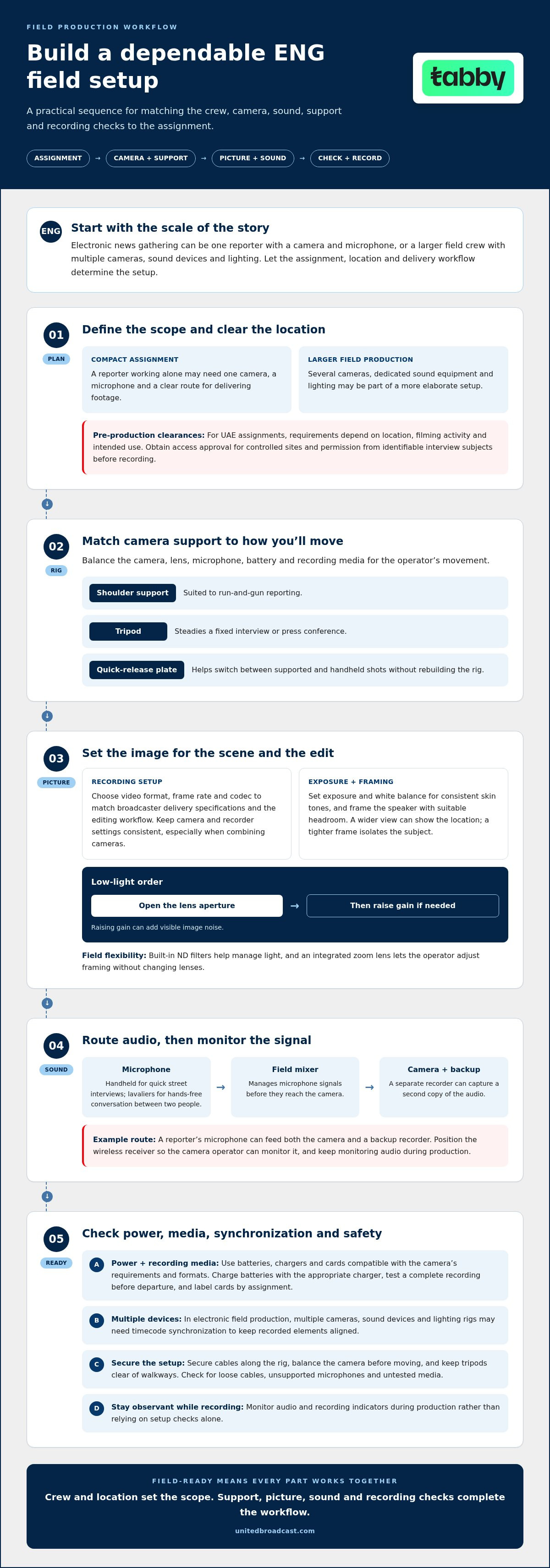
A practical ENG rig balances the camera, lens, microphone, battery and recording media for the operator’s movement. Shoulder support suits run-and-gun reporting, while a tripod steadies a fixed interview or press conference. A quick-release plate makes it easier to switch between supported and handheld shots without rebuilding the rig.
Outside broadcasts and remote field operations benefit from portable, self-contained equipment. ENG camera systems provide audio facilities and lighting options for capturing usable pictures and sound away from a studio. In electronic field production, multiple cameras, sound devices and lighting rigs may need timecode synchronization to keep recorded elements aligned.
A field mixer helps manage microphone signals before they reach the camera, while a separate recorder can provide a backup. Recording a second copy of the audio protects against a problem with the camera’s feed. For example, a reporter’s microphone can feed both the camera and a backup recorder.
Choose a handheld microphone for quick street interviews, or lavaliers when two people need hands-free conversation. Position the wireless receiver so the camera operator can monitor it, and record a backup on a field recorder.
For UAE news assignments, treat location permissions and consent as pre-production clearances. Requirements depend on the location, filming activity and intended use. Obtain access approval for controlled sites and permission from identifiable interview subjects before recording.
Choose batteries, chargers and media cards compatible with the camera and its recording formats. Check the camera’s power and media requirements, charge batteries with the appropriate charger, and test a complete recording before departure. Label cards by assignment to keep footage organized.
Set the video format, frame rate and codec to match the broadcaster’s delivery specifications and editing workflow. Keep camera and recorder settings consistent across the production, especially when combining footage from multiple cameras.
For interviews, set exposure and white balance for consistent skin tones, then frame the speaker with suitable headroom. Run-and-gun coverage benefits from responsive focus and a stable shoulder position. In low light, open the lens aperture before raising gain, which can add visible image noise.
Field of view affects both context and emphasis. A wider shot can place a reporter within the location, while a tighter frame isolates an interview subject. Check the background and camera position before recording, since moving closer changes perspective.
Common setup mistakes include loose cables, unsupported microphones, untested media and mismatched recording formats. Secure cables along the rig, balance the camera before moving, and keep tripods clear of walkways. During production, monitor audio and recording indicators rather than relying on setup checks alone.
Choose batteries and chargers that meet the camera’s power requirements, and media cards compatible with its recording formats. Charge the batteries with the appropriate charger and test a complete recording before departure.
Definition and scope of electronic news gathering
Electronic news gathering, abbreviated ENG, means collecting television news with electronic equipment, such as a portable video camera, instead of a traditional film camera. The work can involve one reporter filming a short interview or a crew covering a live event. Camera, sound and lighting choices follow the assignment, location and broadcast workflow.
ENG emerged as television news departments moved from film-based reporting to electronic field production in the 1970s. Sony introduced its Portapak portable video camera package in 1967, helping bring video equipment into the field. In 1974, KMOX in St. Louis became the first station to abandon film and switch entirely to electronic news gathering. Portable equipment made faster field recording possible.
The setup depends on the story. A reporter working alone may need one camera, a microphone and a clear route for delivering footage. A larger crew can use several cameras, dedicated sound equipment and lighting. Electronic field production, or EFP, often involves more elaborate setups than a compact ENG assignment. Different cameras and audio sources may need timecode synchronization so their signals align during editing.
ENG cameras are designed for field reporting, while mirrorless cameras often serve varied photo and video work. A camcorder is a broader category, and some camcorders are built specifically for ENG workflows. Compare practical operation: integrated audio connections, lens control, recording options and how quickly the operator can move between shots.
Camera settings connect the shoot to the newsroom’s production process. Choose a recording format that fits the broadcaster’s editing and delivery workflow, then manage exposure, focus and white balance for the scene. For example, a reporter moving from a shaded street into bright sunlight needs settings that preserve detail in both conditions. Lighting matters too: a small camera light can help with an interview, while daylight may be sufficient for a street report.
ENG equipment has changed over time. Early cameras and recorders could be heavy and cumbersome, with cables connecting them to trucks and limiting mobility. Portable systems now let a single reporter gather electronic images and sound away from a studio. The distinction remains: ENG describes a news-gathering approach, not a specific camera model.
Choose equipment to match the story, crew and delivery path. For a quick stand-up, a reporter may prioritize a portable camera and clean microphone signals. A multi-camera location production needs coordinated picture and sound, as well as a plan for aligning recordings. These choices define the scope of the ENG operation before recording begins.
Built-in ND filters and integrated zoom lenses
Sony ENG camcorders combine built-in neutral density filters with integrated zoom lenses. An ND filter reduces the light reaching the sensor without changing the lens aperture. This helps crews control exposure in bright locations, such as a sunlit street in the UAE. The operator can retain the chosen aperture while adjusting the amount of light, rather than stopping down and changing depth of field.
That control matters when exposure settings affect the image’s appearance. A wider aperture can separate an interview subject from a busy background. An ND filter reduces incoming light while preserving that aperture choice. It cannot add light in a dark scene, so it does not replace suitable lighting or careful gain settings. When moving from bright areas into shade, adjust the filter as conditions change and check highlights on the camera display.
An integrated zoom keeps the lens connected to the camera, allowing the operator to change framing continuously. A wide view can capture a reporter with location context; a tighter view can show more detail on a speaker or event. The operator can reframe without changing lenses, which helps maintain a mobile setup during fast-moving coverage.
Use the zoom deliberately. A slow move can guide attention during a live report, while a quick adjustment can reframe an unexpected moment. Servo zoom controls support smooth movement, but aggressive zooming can distract from the story. For a stand-up, set the frame before recording. For unfolding action, leave room around the subject to follow movement.
Field of view depends on both the lens setting and camera position. Zooming toward a subject narrows the view and excludes more of the surroundings. Moving the camera changes perspective, affecting how foreground and background elements relate to each other. Before recording, check the frame edges for microphones, cables or other distractions.
Built-in filters and integrated zooms reduce lens changes, but planning still matters. A reporter covering a press conference might start with a wide view of the room, then zoom in for a speaker’s reaction. Check exposure after adjusting the filter, and verify focus after reframing. These checks help maintain consistent footage as the camera moves between subjects.
For a distinct optical character or specialized focal range, interchangeable cinema lenses offer another option. They require lens changes and compatible support, which can slow a mobile news crew. Choose an integrated zoom when speed and continuous operation matter most; use a separate lens when the shot’s optical requirements justify a more involved setup.
Camera audio routing and test tones
ENG audio is often recorded directly to the camera on one or two channels. This keeps sound attached to picture for editing and newsroom delivery. A solo reporter might route a handheld microphone to channel one, leaving channel two for a separate source. Clear channel assignments help editors identify each recording without guesswork.
A camera such as the Sony PXW-X320 has two XLR inputs for external microphones. XLR connections provide a secure route from a microphone or field mixer to the camera. For an interview, one input can carry the reporter’s microphone and the other the guest’s. Label or document the channel plan so the studio team knows what each channel contains.
When a mixer feeds the camera, monitor audio through both the mixer and the camera. The mixer confirms its output, while camera monitoring checks the signal after it enters the recording path. Listen on headphones and watch the camera’s audio meters. A healthy mixer output won’t reveal a muted camera input, incorrect routing or a camera set to record from the wrong source.
Use a 1 kHz test tone when checking the audio signal path to an ENG camera. Send the tone through the same mixer output and camera input used for the microphones. Confirm that it reaches the intended channel and appears on the camera meters. Then speak into each microphone separately, since a tone verifies the path but doesn’t test interview placement or voice clarity.
Microphone choice affects the sound captured. A dynamic handheld microphone suits a reporter moving between interview subjects, while a lavalier keeps a seated guest’s hands free. Position each microphone before recording, then listen for clothing noise, wind and room reflections. A quiet-room interview and a street report require different placement and monitoring.
When using more than one microphone, check the phase relationship between signals to avoid phase cancellation. If two microphones capture the same voice from different positions, their signals can combine unevenly. Compare them while monitoring and listen for a thin or hollow sound. Adjust placement or routing before recording the full interview.
Before a live report, verify the camera’s selected inputs, channel assignments, meters and headphone feed. Speak into each microphone, then pause and listen for hum, distortion or intermittent connections. Confirm that monitoring remains enabled during recording. This brief signal-path check can reveal faults before the crew leaves the location or delivers footage to the newsroom.
Which ENG cameras are best for broadcast news in 2026?
The best ENG camera is the one that fits the newsroom’s delivery workflow and field conditions. Sony ENG camcorders support 4K recording, which can provide a sharper image and more flexibility when cropping or zooming into part of the frame. That flexibility is useful when the final edit needs a tighter shot from a wider capture, provided the production workflow supports 4K footage.
Start with the assignment, not the resolution label. A solo reporter covering fast-moving stories may prioritize direct camera operation, dependable audio connections and quick framing. A crew producing a planned location report may value interchangeable lenses, lighting control and a tailored camera build. The right choice depends on who operates the camera, what they record and how the footage reaches the broadcaster.
Consider these factors before choosing a camera:
- Recording workflow: Confirm that the camera’s recording format fits newsroom editing and delivery requirements.
- Field operation: Assess how easily the operator can move, frame and manage the camera during an assignment.
- Audio routing: Match the camera’s inputs and channel options to the microphones and mixer in use.
- Image requirements: Decide whether 4K capture provides useful cropping flexibility for the intended output.
A 4K camera can support reframing in post-production, but resolution alone doesn’t determine suitability. Editors need compatible media and a workflow that handles the recorded format. If the newsroom delivers a lower-resolution broadcast, capturing at higher resolution may still help with cropping, but it also affects storage and editing demands. Balance those considerations against the story’s framing needs.
Compare the camera as part of a complete ENG setup. The lens affects shot coverage, while audio inputs determine how microphones and mixers connect. Support, batteries, media and monitoring also shape field usability. A camera may meet the newsroom’s image needs yet slow production if operators struggle with its controls or the rest of the rig.
Before choosing a model, map a typical assignment from recording through editing and broadcast delivery. Check whether the camera’s recording options, lens approach and audio routing fit that workflow. Assess it with a real interview or field report, not only a specification comparison. For news crews, the strongest choice supports consistent operation and usable footage across their assignments.
United Broadcast & Media Solutions (UBMS): Professional Video Cameras
United Broadcast & Media Solutions (UBMS) helps news teams match professional video cameras to field assignments and broadcast workflows. When comparing an ENG camcorder with a digital cinema camera, consider the required recording format, audio connections, lens operation and how quickly operators need to work on location.
Professional video cameras and digital cinema cameras serve different production needs. Cinema lenses can support specific framing requirements, while professional lighting equipment helps shape interviews and controlled field setups. For a camera package that needs to integrate with other production equipment, UBMS also provides system integration services. These options can help when planning a new setup or adapting equipment to a newsroom workflow.
Contact United Broadcast & Media Solutions to discuss professional camera requirements for your news operation.
Turn your camera plan into a dependable newsroom workflow
The next step is to make the setup repeatable across assignments. Define how crews prepare, operate and hand over equipment, then document the decisions that matter to your newsroom. A shared approach helps operators focus on the story instead of rebuilding their workflow at each location.
Use a representative assignment to assess whether your ENG camera setup for news gathering suits the people using it and the way footage moves through your team. Note where handovers slow down, which choices vary between operators and what needs clearer coordination. These observations can guide future equipment decisions and workflow improvements without adding unnecessary complexity.
For guidance on professional camera requirements, contact United Broadcast & Media Solutions (UBMS).
With a clear plan and consistent workflow, your crew can approach the next assignment with confidence and stay focused on delivering the story.
Frequently Asked Questions
But wait, what is ENG?
ENG means electronic news gathering: collecting television news using electronic equipment rather than traditional film cameras. It describes a reporting workflow, not a particular camera model. A solo reporter recording an interview and a larger crew covering a location event can both work in ENG. Equipment and crew size vary by assignment, but the purpose is the same: capture news electronically for broadcast.
Is 4K necessary?
No, 4K isn’t automatically necessary for every news assignment. It can provide a sharper image and more room to crop or reframe footage, which helps when the original shot needs a tighter edit. The deciding factor is the broadcaster’s delivery specification and newsroom workflow. If those call for another format, prioritize compatibility and reliable operation over recording at a higher resolution without a clear production need.
What equipment is included in a basic ENG camera setup for news gathering?
A basic setup usually combines a professional video camera, lens, microphone, headphones, camera support, batteries and recording media. The exact combination depends on the assignment. For a reporter conducting a stand-up, a handheld microphone and shoulder support may suit the job; a seated interview may call for a tripod and lavalier microphone. Include only what the crew needs to capture, monitor and hand off usable footage.
What lens focal length and zoom range are suitable for ENG news coverage?
Choose a lens range that covers both location context and tighter interview framing. A wider view can establish a scene, while a longer view can isolate a speaker from farther away. The useful range depends on the camera’s sensor format, working distance and assignment. For example, a crew covering a press conference from a fixed position may need more reach than a reporter filming nearby interviews.
What accessories improve ENG camera mobility, stabilization, and live transmission?
A shoulder rig or monopod can help an operator move between locations, while a tripod supports steady, fixed shots. A quick-release plate makes it easier to switch between supported and handheld operation. For live transmission, connect the camera’s compatible output to the crew’s encoder or transmission system, and secure cables so movement does not interrupt the signal. A field monitor can help assess framing when the camera display is difficult to view.
Which batteries, chargers, and media cards are recommended for an ENG camera?
Choose batteries and chargers that meet the camera’s power requirements, and media cards compatible with its recording formats. Test a complete recording before departure.


