





Complete Sony fx3 Guide for Success
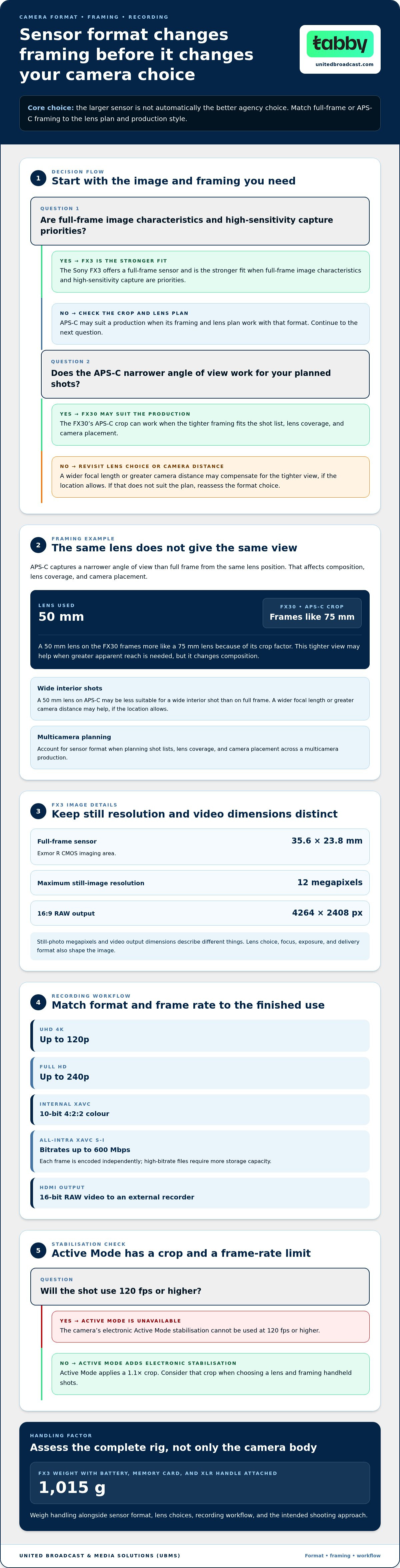
The camera with the larger sensor isn’t automatically the better agency choice. If full-frame image characteristics and high-sensitivity capture are priorities, the Sony FX3 is the stronger fit; the FX30’s APS-C crop may suit productions whose framing and lens plan work with that format. Handling matters too: the FX3 weighs 1,015 g with its battery, memory card and XLR handle attached.
It makes sense to weigh more than resolution when choosing a cinema camera. You need to know how the Sony FX3 responds across different lighting conditions, what recording options and limits shape a shoot, and how it works in your rig or handheld setup. This guide breaks down those factors so you can assess its fit for your production requirements.
We’ll cover the Sony FX3’s full-frame image characteristics, ISO modes, recording formats and frame rates, then look closely at body design, controls and audio connections. The goal is a practical view of where this camera fits in a professional workflow, and when the FX30’s APS-C format may be the more suitable match.
Key Takeaways
- Compare full-frame and APS-C framing against your lens choices and production style before deciding between the FX3 and FX30.
- Match resolution, frame rate, codec and bit depth to your delivery and post-production workflow.
- Use the dual base ISO modes to plan exposure for changing light, while considering how log recording affects your workflow.
- Factor in the camera’s cooling and power conditions when planning extended recordings, including long-form events.
- Assess the weight, XLR handle, screen and stabilisation crop in the context of your rig and shooting approach.
Camera overview and launch
A compact cinema camera combines motion-picture recording tools with a compact body. Sony announced the Sony FX3, a full-frame interchangeable-lens camera, on February 23, 2021; it became available in March 2021. Its place in the Cinema Line reflects a focus on video production, while still photography remains available.
The BIONZ XR is the image processor that handles camera operations and image data. The Sony FX3 records UHD 4K at frame rates up to 120p, or Full HD up to 240p for slow motion. Internal XAVC recording supports 10-bit 4:2:2 colour, while All-Intra XAVC S-I reaches bitrates up to 600 Mbps. HDMI output also supports 16-bit RAW video to an external recorder.
Five-axis in-body image stabilisation is the camera’s sensor-shift system for reducing shake. Active Mode adds electronic stabilisation, but applies a 1.1x crop and is unavailable at 120 fps or higher. That difference matters when choosing a lens and framing handheld shots. The camera also captures still photographs continuously at up to 10 frames per second.
The FX3A is a later version introduced in May 2025. It has a better rear screen and omits IR connectivity. In the UAE, assess camera pricing against the exact model designation and what the package includes. Distinguish the camera body from a bundle with lenses or accessories, and compare the same configuration in AED. This keeps comparisons relevant without confusing different versions or package contents.
Sony E-mount lenses are compatible with the FX3’s interchangeable-lens mount. Choose focal length, aperture and stabilisation according to the shot and lighting plan; a wide lens supports confined interiors, while a telephoto lens frames distant subjects.
Useful accessories support power, monitoring, audio and recording media. Choose compatible cards for the camera’s two slots, which support SD, SDHC, SDXC and CFexpress Type A. Pack a spare battery for location work, and use the supplied top handle’s two full-size XLR/TRS combo inputs to connect professional audio. A tripod or camera cage can provide stable support or extra mounting points.
For production planning, match the recording format to the edit. XAVC S-I’s maximum bitrate affects storage needs, while HDMI RAW requires an external recorder. These choices shape the complete camera package, not just the body. Assess the Sony FX3 by its recording workflow, lens requirements and accessory load before selecting it for a project.
Full-frame and APS-C image characteristics
Sensor format affects angle of view, framing and lens choice. Set the recording format and frame rate to suit the shot and intended delivery.
To record, choose a codec and frame rate, set exposure and focus, then select the audio input. Capture a test clip and check the framing and sound before the take.
Full-Frame Sensor Resolution
A full-frame sensor uses a large imaging area to capture each frame. The Sony FX3 has a 35.6 mm × 23.8 mm Exmor R CMOS sensor and a maximum still-image resolution of 12 megapixels. For 16:9 RAW output, its full-frame image resolution is 4264 × 2408 pixels. These figures distinguish still-photo resolution from video output dimensions.
Resolution describes image dimensions, not the complete picture-making result. Lens choice, focus, exposure and delivery format also shape the image. For UHD 4K delivery, plan capture and post-production around that target rather than treating still-photo megapixels as video resolution. The Sony FX3’s RAW output dimensions also matter when planning an external-recorder workflow.
APS-C Image Characteristics
APS-C is a smaller sensor format that captures a narrower angle of view with the same lens position. The FX30 offers a practical comparison: a 50 mm lens frames more like a 75 mm lens because of its crop factor. That tighter view can help when a production needs greater apparent reach, but it changes composition.
For example, a 50 mm lens on an APS-C body may be less suitable for a wide interior shot than on full frame. The crew can compensate with a wider focal length or greater camera distance, if the location allows. Account for format when planning shot lists, lens coverage and camera placement across a multicamera production.
Video recording formats are the codecs and colour-sampling options used to store footage. The Sony FX3 supports internal 10-bit 4:2:2 XAVC recording and All-Intra XAVC S-I. With All-Intra, each frame is encoded independently, which can suit editing workflows that benefit from frame-by-frame access. High-bitrate files require more storage capacity.
Frame rate is the number of recorded frames captured each second. The camera records UHD 4K up to 120p and Full HD up to 240p. Use higher frame rates when slow motion is required, then select a playback frame rate in post-production to create the intended effect. For standard-speed interviews or dialogue, choose a rate suited to delivery.
Build a reliable recording setup around the finished use. Select a codec and frame rate, set exposure and focus, then confirm audio levels and card space. For external RAW recording, connect a compatible recorder through HDMI and plan for its mounting and power needs. A test recording can reveal framing or sound issues before the production take.
High Base ISO and dynamic range
ISO controls how the camera responds to light during exposure. The FX3 offers two base ISO modes for S-Log recording, giving productions options across different lighting conditions.
ISO Range and Dual Base ISO
ISO range describes the camera’s available sensitivity settings. Standard video ISO runs from 80 to 102,400, while the expanded range spans 80 to 409,600. For movies, the expanded ISO range reaches 409,600.
Dual base ISO means the camera has two base sensitivity settings for S-Log 2 and S-Log 3: 640 and 12,800 ISO. Choose the lower base for brighter scenes, then consider the higher base when available light falls. These settings give operators a practical starting point, not a replacement for exposure control.
Dynamic Range
Dynamic range is the span of brightness values a camera can capture between shadows and highlights. The FX3 has an extended dynamic range of more than 15 stops. That range can help preserve tonal detail across scenes containing bright areas and deep shadows.
Exposure determines which details remain usable. For example, a bright window behind a subject may force a choice between protecting highlights and lifting shadows. Use the camera’s monitoring tools and a test recording to judge how the selected exposure renders the scene.
For a controlled setup, first identify the scene’s brightest and darkest areas. Set exposure for the essential subject, then review highlight and shadow detail. If the scene is bright, the 640 base ISO gives a lower starting point for S-Log. In dimmer conditions, compare the 12,800 base mode before raising sensitivity within the lower mode.
The standard ISO range covers routine sensitivity choices, while expanded settings extend the available range. The highest setting does not guarantee clean results in every scene. Image quality also depends on exposure, lighting, lens aperture and the shadow detail you need to retain. Test your intended settings under the actual lighting before recording important footage.
S-Log 2 and S-Log 3 are log gamma profiles designed to capture a broad tonal range for grading. A consistent exposure approach helps keep shots matched across a scene. Record a test, inspect skin tones and highlights, then adjust exposure or lighting before the main take. This is especially useful when one setup includes both practical lights and bright daylight.
For post-production, keep ISO, exposure and log-profile choices consistent across shots that need to cut together. The two base settings can support a planned change in sensitivity, but they do not eliminate the need to control contrast on set. Adjust the lighting or reposition the subject when the scene’s brightness range exceeds the look you need to preserve.
Active cooling and recording duration
Thermal management affects how long a camera can record continuously. Ambient temperature, power source, recording format and camera setup all matter when planning extended takes.
Recording Duration
Recording duration is the time a camera can capture footage continuously under a given setup. Sony’s internal test specifies uninterrupted FX3 4K 60p recording with USB power and XAVC S-I at 25°C. Treat that as a defined test condition, not a universal runtime promise for every production environment.
For a long event, such as a three-hour theater show, plan the recording workflow before doors open. Confirm the format, power method and available card space. A short test with the actual setup can reveal whether cables, support equipment or camera placement restrict airflow.
Treat recording duration, battery endurance and storage capacity as separate considerations. USB power addresses the camera’s power source, while XAVC S-I affects how footage is recorded and stored. Check the recording display during rehearsal, and plan to monitor power and card capacity throughout the take.
Overheating and Recording Limitations
Overheating occurs when internal heat reaches a level that affects operation. Concerns during long takes include thermal interruption, recording-mode constraints and autofocus performance that varies with subject movement and settings. Conditions matter, so test the intended setup before relying on an uninterrupted take.
Assess autofocus by checking whether the selected focus mode keeps the subject sharp through the planned movement. A presenter crossing a stage requires a different test from a static interview. To manage heat, keep the camera’s vents clear and test the setup before enclosing the body in a tight rig.
Use a practical pre-shoot sequence: select the required frame rate and codec, connect the planned power source, then record a test for the expected take length. Check that the camera remains stable and that focus behaves as intended. A room at 25°C matches Sony’s stated internal test condition; a warmer location changes the thermal environment.
High-bitrate recording also affects card planning. XAVC S-I can reach 600 Mbps, so estimate storage from the chosen format and recording schedule. For a long event, divide coverage into planned segments if the production allows, and assign an operator to monitor camera status. This gives the crew a clear response plan if recording stops or focus needs adjustment.
Evaluate autofocus against the shot rather than drawing conclusions from a single test. Rehearse with the actual subject, movement and lens. For a fixed shot, verify focus before recording; for moving subjects, watch tracking along the complete path. Combine this with thermal and media checks to assess whether the camera suits sustained professional recording.
Body design and handling
Body design describes how a camera’s shape, controls and connections support operation. The FX3 measures 129.7 mm × 77.8 mm × 84.5 mm, giving crews a compact body to position within a handheld or supported rig. Those dimensions matter when fitting a camera into tight spaces, balancing it on a stabiliser, or planning a compact shoulder setup.
Operating weight is the camera’s weight with essential accessories attached. The FX3 weighs 1,015 g with its battery, memory card and XLR handle. This figure helps assess the complete working setup, rather than the camera body alone. Add the lens and any rig components when judging balance, especially for handheld shots that require sustained camera movement.
The top handle provides a high grip and audio connections. Its two full-size XLR/TRS combo inputs let you connect compatible audio sources directly to the camera. For an interview, the crew can connect microphones through the handle and carry the camera from above. This can simplify a compact build, although the full setup still needs balancing.
The variable-angle screen is a monitor that pivots for different viewing positions. The FX3 has a 3.0-inch touchscreen with 1.44 million dots. Angle it outward to check framing while filming low, high or forward-facing shots. Touch operation supports direct interaction with camera controls, while the screen’s movement makes it easier to view compositions when the camera sits away from eye level.
For a handheld interview, attach the handle and connect audio before balancing the camera. Hold the top grip and check that the lens and cables allow a secure carry. Route cables so they do not pull on the connectors during a pan. Adjust the screen angle for a clear view without changing the planned camera position.
For a tripod setup, position the camera and open the screen before final framing. Confirm that the screen clears the tripod head, plate and any nearby accessories. The FX3’s compact dimensions can help in confined locations, but an attached lens or handle changes the rig’s overall footprint. Check clearance before placing the camera in a tight position.
Handling suitability depends on the complete setup and shooting method. A shoulder operator may value the top handle’s grip and audio inputs, while a low-angle operator may rely more on screen positioning. For a moving shot, rehearse the planned route with the full setup. This reveals balance, cable interference and monitor visibility before recording.
United Broadcast & Media Solutions (UBMS): Professional Video Cameras
United Broadcast & Media Solutions (UBMS) helps production teams assess professional camera equipment for their workflows. If the FX3’s image format, recording options and handling suit your requirements, UBMS offers professional video cameras and digital cinema cameras to support equipment selection. Cinema lenses can help complete a camera setup, while professional lighting equipment supports planned image-making conditions. Consider your delivery format, lens requirements, audio setup and rig before choosing equipment. This practical comparison can clarify whether the FX3 fits a production or whether another camera configuration better matches the brief. For guidance on camera equipment and related production needs, contact United Broadcast & Media Solutions or visit unitedbroadcast.com.
Plan Your Next Production Setup
Make your next camera decision against the demands of a real production, not a specification list alone. Define the visual style, delivery workflow, crew setup and operating conditions first. Then decide which equipment choices support those requirements and which introduce unnecessary complexity. This keeps the Sony FX3 assessment connected to practical production needs, from pre-production planning through the final edit.
For a broader equipment decision, United Broadcast & Media Solutions (UBMS) offers professional video cameras, digital cinema cameras and cinema lenses. Considering camera and lens requirements together can help clarify your options. Bring your production priorities into the discussion, including the footage you create, how your crew works and what your workflow requires. This gives you a clearer basis for choosing equipment for your next project.
Use your next planning session to turn those requirements into a focused equipment decision, and move forward with confidence in your production workflow.
Frequently Asked Questions
Which camera should a professional production agency buy: the Sony FX3 or the FX30?
Choose the Sony FX3 when your production calls for full-frame image characteristics; consider the FX30 when APS-C framing better suits the lens plan. For example, a 50 mm lens on the FX30 frames closer to 75 mm because of its crop factor. Agencies should compare framing, available lenses, recording workflow and camera handling against their typical assignments, rather than choosing by sensor size alone.
What are the Sony FX3's key specifications and features?
Key features include a full-frame Exmor R CMOS sensor, BIONZ XR processor and five-axis in-body stabilisation. The body has two card slots and supports up to four audio channels. Its shutter-speed range runs from 1/8000 second to 30 seconds, plus bulb mode. For production planning, these specifications help assess lens framing, sound connections, storage workflow and exposure control within a compact camera setup.
How much does the Sony FX3 cost in the UAE?
This figure refers to the FX3A model designation, so distinguish it from other FX3 versions when comparing listings in the UAE. Also compare what each package includes, such as whether it is a camera body or a bundle. That keeps a price comparison focused on equivalent models and configurations.
How does the Sony FX3 compare with the Sony FX30 and Sony A7S III?
The clearest distinction between the FX3 and FX30 is sensor format: the FX3 is full frame, while the FX30 uses APS-C framing. For the A7S III comparison, start with the needs of your shoot: camera handling, audio connections, recording workflow and how the body fits your rig. Match those requirements against each model’s specifications and your existing lenses before selecting a system.
What video resolutions, frame rates, and codecs does the Sony FX3 support?
The camera records UHD 4K up to 120p and Full HD up to 240p. Internal XAVC recording supports 10-bit 4:2:2, and All-Intra XAVC S-I reaches 600 Mbps. For external recording, HDMI supports 16-bit RAW output to a compatible recorder. Select the format and frame rate based on delivery needs, editing workflow, recording media and whether slow-motion footage is required.
How long does the Sony FX3 battery last, and what media cards does it use?
Battery runtime depends on the recording setup and how the camera is operated, so plan power for the intended take rather than assuming a fixed duration. Sony’s stated continuous-recording test uses USB power. The camera has two slots that support SD, SDHC, SDXC and CFexpress Type A cards. Match the card choice to the recording format, then plan power and media for the shoot.


