





Camera Support Options for Comfortable Long Shoots
The most stable setup isn’t always the best choice for a long shoot. The right camera support options for long shoots depend on where you’re filming and how you need to move: flexible tripods and clamps suit creative mounting positions, shoulder rigs support extended handheld work, and suction cup mounts attach to smooth surfaces for car shots. A tripod or monopod is often more practical when steady framing matters.
It’s easy to focus on camera weight alone, but the shooting situation matters just as much. A support that works for a locked-off landscape shot may restrict movement during an event or documentary sequence.
This guide explains how each option handles stability, mobility and mounting needs, then matches the choices to common shoot scenarios. You’ll learn what to consider for long handheld filming, smooth-surface mounting, creative angles and fast-paced work, so you can choose a setup that supports both the camera and the way you plan to shoot.
Key Takeaways
- Match support to the shooting environment: flexible tripods and clamps help position a camera where a conventional tripod may not fit.
- Choose a shoulder rig when handheld movement matters and you need the camera’s weight supported across your shoulder.
- Reserve suction cup mounts for smooth, non-porous surfaces, such as a clean car window or tabletop.
- Use a tripod for a stable, fixed frame, or a monopod when you need quicker repositioning during events and sports.
- Compare stability, mobility and the shot you want before selecting support for a long filming session.
Flexible tripod mounts for creative angles
Flexible supports help position a camera where a conventional tripod cannot stand. The right choice depends on the mounting surface, the framing and the head movement required.
Flexible Mount Positioning
A flexible tripod has bendable legs that can wrap around suitable objects to support a camera. For example, a Joby GorillaPod can attach to a lamppost or tree branch to create an elevated or offset viewpoint.
Choose a mounting point that gives you the framing you need, then shape each leg around the object. A branch can place the camera above a path, while a post can hold it beside a scene. This approach can help when floor space is limited or a standard tripod cannot reach the angle.
Before recording, check that the legs grip the object and the camera stays in position. Review the frame on the camera’s display, then adjust the legs or camera angle. A flexible mount can work well for a fixed composition, but repositioning it changes the framing and may take longer than panning a head.
Consider the equipment attached to the camera, too. A larger camera or added accessories increase the load on the flexible legs. Keep the setup simple on a narrow branch or railing, and don’t treat a flexible mount as a substitute for a stable, full-size support when a shot needs to stay locked off for an extended period.
Tripods and Camera Heads
A tripod is a three-legged support that holds a camera above the ground. A camera head connects the camera to the tripod and controls its movement.
For a static interview or landscape composition, position the tripod legs on a firm surface and adjust the head until the frame is level. The head lets the operator tilt or pan without moving the tripod itself, helping preserve the camera’s position during controlled framing adjustments.
Match the head’s movement to the shot. A fluid head supports smooth pans and tilts for video, while a ball head allows quick changes in camera direction. A presenter moving across a set may need a controlled pan; a locked product shot may need no head movement after setup.
Compare a flexible tripod with a conventional tripod before choosing a camera angle. Use flexible legs when an object provides the mounting point, and tripod legs when there’s room for a stable, adjustable base. A camera head adds precise framing control, while the tripod establishes the support position. Together, these choices make camera support options for long shoots easier to match to the composition and location.
Shoulder rigs for longer handheld filming
A shoulder rig carries camera weight on the operator’s shoulder, helping reduce arm fatigue during extended handheld filming. When filming on location, follow the site’s filming and equipment instructions, secure permission from the responsible location, and keep access routes clear. Quick-release plates speed camera changes between supports, while support vests help distribute rig weight across the operator’s body.
Shoulder Rig Support
A shoulder rig rests against the operator’s shoulder during handheld filming. By shifting some of the camera’s weight from the arms to the shoulder, it can help the operator continue filming for longer periods.
Set the camera against the shoulder, then adjust the rig’s contact points and handgrips to suit the operator’s stance. Keep the viewfinder or monitor accessible and position controls within comfortable reach. For a documentary interview that moves between locations, this arrangement keeps the camera ready without requiring a tripod at every stop.
A shoulder rig also allows controlled, natural camera movement. That slight movement may suit narrative scenes or documentary footage where a fully locked frame feels too static. It won’t deliver the same fixed composition as a tripod, so use it when the shot benefits from following action or responding to a subject.
Long-Shoot Support Accessories
A quick-release plate connects the camera to a compatible support head, allowing it to be detached and remounted without undoing its main attachment. A support vest is a wearable rig component that helps distribute camera-system weight across the operator’s torso.
For a shoot that alternates between handheld footage and a tripod, secure the quick-release plate to the camera before filming. Check that it sits firmly, then practise moving the camera between supports before the take. Consistent plate positioning can make it easier to return the camera to the same support without rebuilding the mounting arrangement.
A support vest can help during extended handheld sequences, particularly when the camera rig feels tiring to hold directly. Adjust its fit before recording and check that it doesn’t restrict movement or access to camera controls. A vest and shoulder rig serve different roles: the rig establishes shoulder contact, while the vest distributes support across the body.
Plan handheld operation around the movement in each shot. For a presenter walking through a set, keep elbows controlled, hold the rig close and rehearse the route before recording. For a stationary interview, a shoulder rig still permits subtle reframing, but a tripod may better suit a composition that must remain fixed.
Balance the rig before a long take. Position the camera and accessories so the operator can maintain the intended framing without continually correcting the rig. Check viewfinder access, hand placement and cable routing. A cable crossing a handgrip, for example, can interrupt a camera move or distract the operator.
Use a shoulder rig when the shot requires mobility and operator-led framing. Choose a support vest when distributing the rig’s load is a priority, and a quick-release plate when changing mounting systems is part of the workflow. These practical choices make handheld operation more consistent during long filming sessions.
Suction cup mounts for smooth surfaces and car shots
A suction cup mount attaches a camera to a smooth, non-porous surface, such as a car window, mirror or clean tabletop. On uneven ground or in wind, supports can shift or tip, so choose a stable position and reassess the setup if conditions change.
For a car shot, clean and dry the mounting area, press the cup firmly, then check that the camera remains fixed before filming. A suction mount can provide a stable camera platform where a tripod cannot be used. It suits a view through a car window or a close interior angle, but requires a suitable smooth surface.
Keep the intended frame and camera movement in mind when positioning the mount. A camera attached to glass captures a fixed viewpoint, so it won’t follow action across a scene. For a tabletop product shot, place the cup where the lens can frame the subject without the mount blocking the camera’s view.
A sandbag is a weighted support used to steady equipment or help hold a camera in position for low-angle shots. Place it beneath a camera resting on the ground, a rock or a tabletop to create a more stable low viewpoint. For wildlife photography, a sandbag can also stabilize a telephoto lens on a car window, helping support the lens as you frame a distant subject.
Check the surface before relying on either setup. Loose ground, a sloping rock or a gust reaching an exposed camera can cause unwanted movement. A sandbag may help steady equipment on a suitable surface, but it doesn’t make every position secure. Reposition the camera if its base shifts, the mount loses grip or the wind affects framing.
A wire-camera shot suspends or guides a camera along a cable to capture movement through a defined path. The cable setup provides the movement, unlike a suction cup mount, which holds a fixed position. For example, a cable-guided view can travel above a set, while a suction mount records from one selected point.
A drone shot uses an airborne camera platform to capture views from above or along a moving route. Ground-mounted suction cups and sandbags don’t support a camera during flight; they can help stage equipment before or after the aerial take. Match the camera support to the shot rather than treating a ground mount as an aerial solution.
For long shoots, choose support according to the surface and movement: use suction cups for smooth mounting points, sandbags for stable low angles, and a cable or drone setup when the shot itself needs to travel. Before recording, check the camera’s position and framing again after any change in surface, wind or equipment placement.
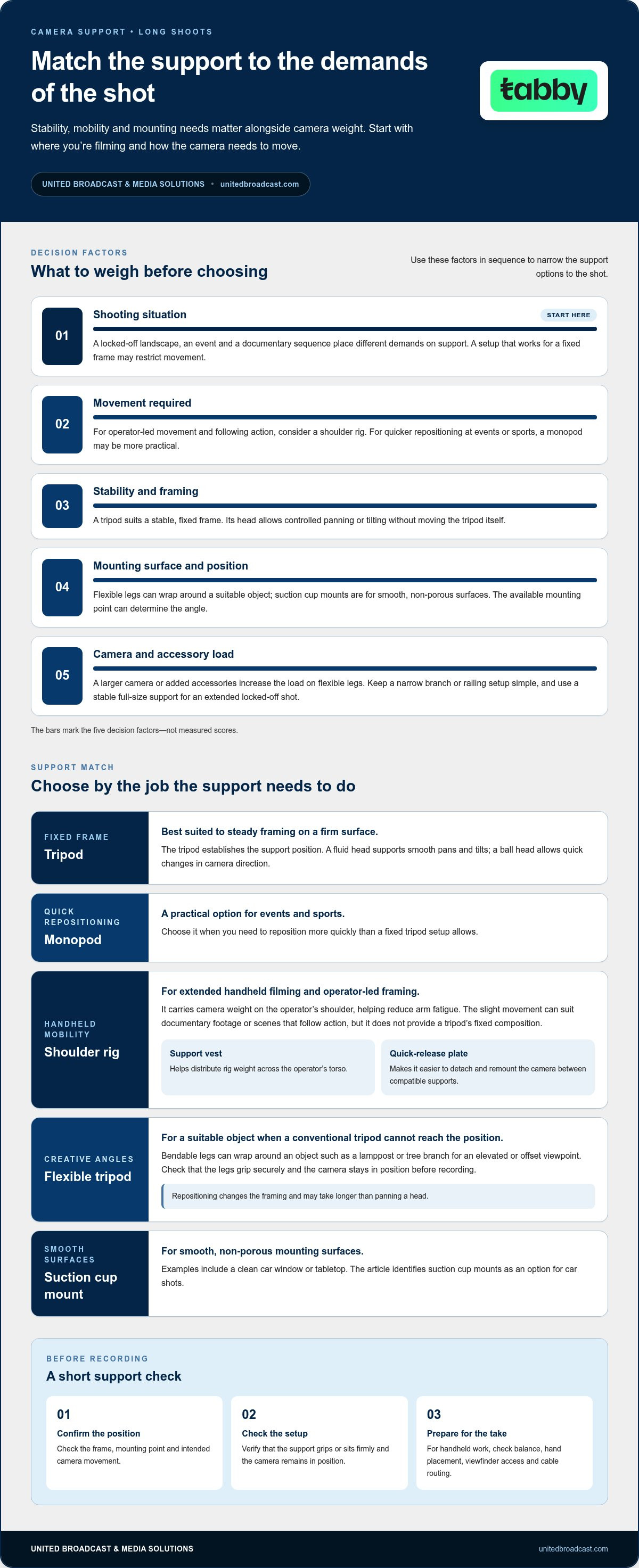
Choosing support based on shooting situation
Choose support according to the movement, framing and location the shot requires. A stable base suits a fixed composition, while mobile support helps follow changing action.
A tripod is a three-legged support for holding a camera in a fixed position. Landscape and astrophotography benefit from that stability when longer shutter speeds and lower ISO sensitivities help capture sharp images with minimal noise. A tripod also supports slow-shutter work when the goal is an artistic blurred image, such as flowing water.
A monopod is a single-legged camera support that steadies the camera while allowing quick repositioning. It can reduce camera shake and allow slower shutter speeds than handheld shooting, while remaining less stable than a tripod and more stable than handheld operation. Its quick setup and adjustment can suit events or sports, where action changes direction or location.
For a high-magnification lens, a tripod or monopod can provide extra stability when needed. Consider the subject’s movement as well as lens magnification: a tripod suits a fixed wildlife observation point, while a monopod can be easier to reposition when following a moving subject. Support won’t replace careful framing, but it can make the camera easier to hold steady.
A shoulder rig is a handheld support that rests on the operator’s shoulder. It suits documentary or narrative footage where the camera needs to move with the operator, and its controlled, natural shake can fit the scene. A tripod is better for a locked composition, such as a static interview frame.
A flexible tripod mount has bendable legs that can grip suitable objects. Use it when a railing or branch offers a useful camera position but a conventional tripod won’t fit. For smooth surfaces, a suction cup mount can hold a fixed viewpoint, such as a car-window shot. Match the mount to the surface and the movement planned for the shot.
For long shoots, transport support gear so legs, plates and heads stay together. Set it on a firm surface and inspect joints and attachment points before filming. During the shoot, keep moving parts clear of grit and check that the framing and support remain steady after repositioning.
At the location, secure the camera and tripod or phone stand so they don’t move, according to the European Union. Select the support only after identifying the shot’s main demand: long exposure stability, quick movement, shoulder-held operation or a mounting point that a tripod cannot reach.
How do tripods, monopods, shoulder rigs, and gimbals compare for long filming sessions?
A tripod is a three-legged support that holds a camera in a fixed position. A monopod uses one leg, while a shoulder rig rests against the operator’s shoulder. A gimbal is a handheld support that uses a stabilizing mechanism to control camera movement. Each suits a different balance of stability, mobility and operator effort during an extended shoot.
For a locked interview or landscape frame, a tripod provides the most stable base of these four options. It can also support slow-shutter images, where camera movement would affect the intended blur. The trade-off is slower repositioning between setups. At a location with several interview angles, allow time to move and level the tripod rather than expecting it to follow action quickly.
A monopod is less stable than a tripod but more stable than handheld shooting. It can reduce camera shake and let photographers use slower shutter speeds than handheld operation. Its single support point makes it quicker to reposition for event coverage or sports, where subjects move across the frame. The operator still needs to hold and guide the camera.
A shoulder rig supports the camera’s weight on the operator’s shoulder, helping reduce arm fatigue during longer handheld periods. It also permits controlled movement that may suit documentary footage or narrative scenes. Unlike a tripod, it won’t hold a locked frame without operator input. Choose it when the shot needs to travel with the operator or maintain a natural handheld quality.
A gimbal is a handheld camera support designed to stabilize movement as the operator travels. It can suit a walking follow shot through a corridor, where a tripod restricts movement and handheld footage may feel too unsettled. A gimbal requires operator attention and handling practice. It doesn’t replace a tripod for a static frame or a shoulder rig when shoulder-supported operation suits the shot.
Make the decision by identifying what the take demands. For a fixed product shot, use a tripod. For sideline event coverage, consider a monopod. For a moving documentary sequence, compare a shoulder rig with a gimbal, then choose the movement style that fits the scene. For a gimbal move, rehearse the route and camera turns before recording. Keep the planned camera movement, operator mobility and desired framing in view.
Before recording, secure the camera and tripod or phone stand so they don’t move, according to the Európai Unió. Check the mounting points after repositioning, then review the frame. This simple setup check helps keep the selected support aligned with the shot rather than introducing unwanted movement during a long take.
United Broadcast & Media Solutions (UBMS): Professional Video Cameras
United Broadcast & Media Solutions (UBMS) supplies professional camera equipment for production teams planning extended shoots. If you’ve chosen a support but need to refine the camera setup, consider how camera size, lens choice and shooting style work together.
UBMS offers professional video cameras and digital cinema cameras, alongside cinema lenses and professional lighting equipment. These categories can help you plan a balanced kit, whether you need a camera for tripod-based interviews or a configuration suited to handheld operation. The support itself should still match the shot: a camera purchase doesn’t determine whether a tripod, shoulder rig or other support is right for your workflow.
For guidance on professional camera equipment for your production, contact United Broadcast & Media Solutions (UBMS).
Plan your next shoot with the full camera setup in mind
Before your next production, define how each shot should look and how the operator will move through it. Include camera support options for long shoots in that plan, alongside framing, lens choice and camera handling. A setup that works for one scene may slow down another, so consider how the equipment will transition between shots.
United Broadcast & Media Solutions (UBMS) offers Professional Video Cameras, Digital Cinema Cameras and Cinema Lenses. These can help you build a camera package around your production requirements and chosen support method. Think through the workflow before making equipment decisions, including who will operate the camera and how the shot needs to change.
A considered setup gives your crew a clear starting point and helps keep production decisions aligned. Contact UBMS to discuss equipment for your next shoot.
Take the next step with a camera setup shaped around your production goals.
Frequently Asked Questions
What camera support options are best for long shoots?
Among camera support options for long shoots, the best fit depends on whether each take needs a fixed frame, operator movement or a camera mounted to a surface. For a shoot that moves between interview setups and walk-through footage, plan for the changeover as well as each shot. A quick-release plate can help transfer a camera between compatible supports, while a dedicated support for each setup can reduce repeated adjustments.
What tripod head types and load capacities suit a camera setup for extended shoots?
Choose a tripod head according to the camera movement required, then match its load rating to the complete mounted setup. A fluid head suits controlled video pans and tilts; a ball head allows fast repositioning, while a three-way pan-and-tilt head adjusts each axis separately. Include the camera, lens, battery, monitor and other mounted accessories when assessing total payload. For example, a monitor-heavy interview rig needs a rating that covers the entire rig, not just the camera body.
How can a camera operator reduce fatigue during long handheld shoots?
Reduce strain by balancing the rig close to the operator’s body and adjusting handgrips before recording. For example, position a shoulder rig so the camera doesn’t pull forward, then check that the viewfinder and focus controls remain reachable. Use a support vest if it suits the rig, and alternate handheld takes with supported setups where the shot allows. Rehearse camera moves without recording to identify awkward handling before a take.
How do you choose camera support based on camera weight, lens, and shooting location?
Start with the complete camera package, including the lens and accessories, then consider the surface and movement required at the location. A heavy telephoto setup may benefit from a tripod or monopod, while a narrow interior may favour a shoulder-mounted configuration. For a car-window viewpoint, assess whether the surface is smooth and suitable for a suction mount. Also consider how quickly the operator needs to reposition between shots.


