





10-bit vs 8-bit Color Depth: Compare Color Capacity and HDR
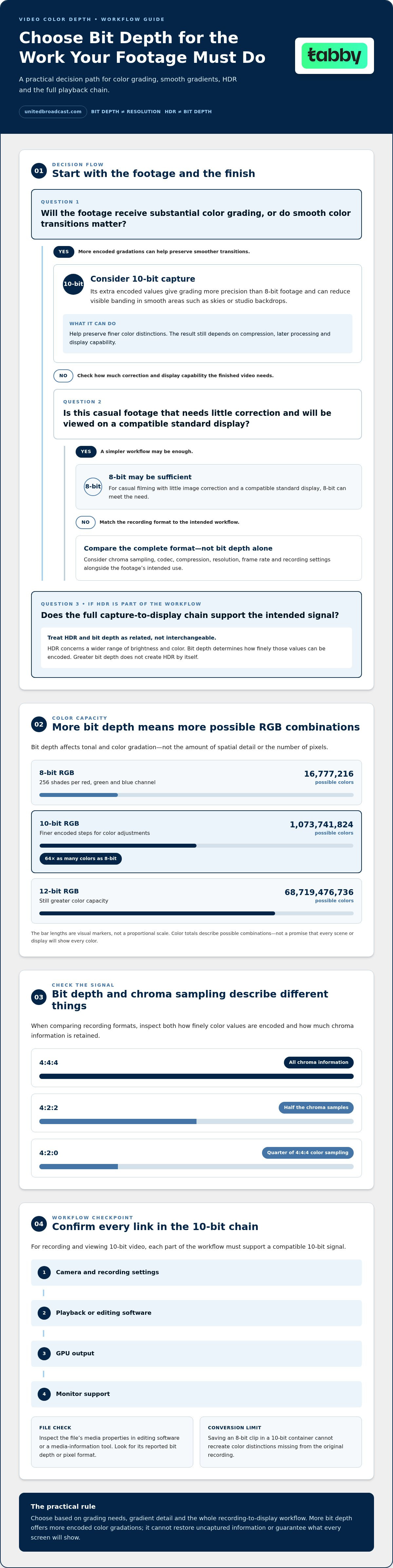
For 10-bit vs 8-bit color depth for video, the key difference is how many color gradations the image can represent. An 8-bit RGB system provides 256 shades per red, green and blue channel, or 16,777,216 colors in total. A 10-bit system can produce 1,073,741,824 colors, 64 times as many, while a 12-bit system can produce 68,719,476,736.
Higher color depth can preserve smoother gradients and give you more latitude when adjusting footage in post-production. It is not the same as image resolution: bit depth affects tonal and color gradation, not the amount of spatial detail captured.
HDR and bit depth are closely related, but they aren’t interchangeable. HDR concerns how a picture represents a wider range of brightness and color, while bit depth determines how finely those values can be encoded. This guide explains how 8-bit, 10-bit and 12-bit color capacity compares, where chroma sampling fits into the signal, and what to consider when choosing a camera or workflow for HDR and detailed image work.
Key Takeaways
- Distinguish color gradation from resolution so you can assess what a bit-depth upgrade will change in your footage.
- Consider chroma sampling alongside bit depth when evaluating how much color information a video signal retains.
- Understand why HDR workflows depend on more than bit depth, including how footage is captured, processed and displayed.
- Identify the conditions that can make banding visible and how greater tonal precision can help preserve smoother gradients.
- Compare recording formats and codecs as part of the full workflow, not as a standalone guarantee of image quality.
What is 8-bit, 10-bit and 12-bit color depth?
Bit depth describes how many values each color channel can encode, not how many pixels an image contains. To record and view 10-bit video, the camera, recording settings, playback software, GPU and monitor must support a compatible 10-bit workflow.
Bit Depth Across RGB Channels
In RGB video, bit depth sets the number of available values for red, green and blue separately. An 8-bit channel provides 256 shades, so each pixel combines a red, green and blue value to create its displayed color.
Moving to 10-bit or 12-bit increases the range of possible values per channel. This gives finer steps between dark, midtone and bright shades, which matters when footage contains subtle gradients or receives extensive color adjustments. Bit depth does not increase spatial resolution; a higher-resolution image can still use 8-bit color.
For the full recording and viewing chain, match the camera’s recording mode with the editing software, GPU output and monitor support. A device that cannot process or display the signal at its recorded precision may limit the visible benefit, even if the original file is 10-bit.
The total color capacity illustrates the difference between channel precision and the final RGB combinations. An 8-bit RGB system can represent 16,777,216 colors. A 10-bit system can produce 1,073,741,824 colors, 64 times as many as an 8-bit system. A 12-bit system can produce 68,719,476,736 colors.
These totals describe possible color combinations, not a promise that every scene will show more detail. Lighting, exposure, color processing and the display chain all affect what viewers see. More encoded gradations can preserve smoother transitions, but they cannot restore color information that was never captured.
When 10-Bit Video Is Worthwhile
10-bit video is most valuable when the footage will undergo substantial color grading, or when smooth color transitions are important. Its extra gradations give editing adjustments more encoded values to work with than 8-bit footage.
For casual filming, 8-bit may be sufficient when the image needs little correction and the finished video is viewed on a compatible standard display. Streaming value depends on the recording, encoding and playback chain; 10-bit capture alone doesn’t ensure a viewer receives a 10-bit stream.
To check whether a video is 8-bit or 10-bit, inspect the file’s media properties in editing software or a media-information tool. Look for the reported bit depth or pixel format, then distinguish the file’s recorded precision from the project and display settings.
Color capacity of 8-bit, 10-bit and 12-bit systems
Color capacity is the number of distinct RGB combinations a system can encode. Comparing the totals shows why greater bit depth can preserve finer color distinctions.
Gradient Banding and 10-Bit Video
Gradient banding appears when a smooth color transition breaks into visible steps, and 10-bit encoding can reduce it compared with 8-bit. The extra encoded values allow more gradations between nearby shades, which can help in skies, studio backdrops and other smooth areas.
The result depends on the whole image pipeline. Strong compression, later processing or limited display capability can affect how those gradations appear. A 10-bit source gives more color information to work with, but it cannot ensure every screen will show a visibly smoother gradient.
The difference in RGB capacity is substantial. An 8-bit RGB system can represent 16,777,216 colors in total. A 10-bit system can produce 1,073,741,824 colors, 64 times the number in an 8-bit system. A 12-bit system can produce 68,719,476,736 colors.
These totals describe possible combinations, not a guarantee that a scene contains or displays every color. A plain blue sky, for example, may use a narrow range of hues, while a graded image with subtle transitions can benefit from finer encoded steps. The right choice depends on the footage and how much adjustment it will receive.
Limits of Converting 8-Bit Footage
Converting an 8-bit file to a 10-bit container does not restore color values missing from the original recording. It changes the file’s encoding capacity, but the source footage still has its original captured gradations.
For example, editing software can save an 8-bit clip in a higher-bit-depth format, but that conversion cannot recreate distinctions absent from the source. It may help maintain precision during later processing, depending on the workflow, yet it should not be treated as a way to recover lost image information.
Bit depth can also affect storage and transmission needs. A 10-bit file may require more data than an otherwise comparable 8-bit file, but actual file size and bandwidth depend on codec, compression, resolution, frame rate and recording settings. Compare the complete recording formats rather than judging capacity from bit depth alone.
Chroma sampling also changes how much color detail a file stores. A 4:4:4 image gives each pixel its own color value with all chroma information; 4:2:2 retains half the chroma samples, and 4:2:0 retains a quarter of the color sampling of 4:4:4. Bit depth and chroma sampling describe different parts of the signal, so inspect both when comparing formats.
HDR and image detail
HDR describes a picture’s brightness and color range, while bit depth describes how finely those values are encoded. In an HDR shot of a bright window and a shaded room, both highlight and shadow information matter. Greater bit depth can provide finer gradations across that range, but it does not create HDR by itself.
Think of HDR and bit depth as related parts of an image pipeline, not interchangeable specifications. HDR concerns the image’s tonal range; bit depth determines the number of digital steps available to represent tonal and color changes. A 10-bit recording can encode more gradations than an 8-bit recording, yet the result still depends on capture, processing and display.
Image detail means something different. Resolution describes the spatial sampling of an image, such as the clarity of fine text, hair or fabric texture. Bit depth doesn’t add pixels or reveal detail absent from the source. A high-resolution 8-bit image and a lower-resolution 10-bit image therefore differ in separate ways: one may preserve more spatial detail, while the other encodes finer color gradations.
Video signals can represent brightness and color through YCbCr rather than RGB. In this model, Y represents pixel brightness, while Cb and Cr carry chroma information. These components describe signal structure, not image resolution or HDR status. They also show why bit depth alone does not describe every aspect of color information.
For example, footage of a sunset may contain gradual changes from a bright region to darker tones. Bit depth affects how finely those changes can be encoded, while exposure and image processing shape the captured result. Chroma sampling affects color information separately. A 4:4:4 image gives each pixel its own color value with all chroma information, unlike subsampled formats.
Viewing also matters. A compatible file may carry HDR information, but a display’s capabilities and playback settings influence how that signal appears. A standard display may not reproduce the intended tonal range, just as a 10-bit file viewed through an 8-bit output path may not show all its encoded gradations. Assess capture, processing, output and display as one chain.
When comparing footage, separate three questions: what brightness range the image represents, how finely color values are encoded, and how much spatial detail the frame contains. More pixels will not automatically smooth a gradient, just as more bit depth will not sharpen a soft subject. Keeping these distinctions clear makes camera and post-production specifications easier to interpret.
Does 10-bit video reduce banding in gradients compared with 8-bit?
Yes. 10-bit video can reduce visible banding in gradual transitions compared with 8-bit footage. Banding appears when a smooth change, such as a blue sky fading toward the horizon, breaks into distinct strips. More tonal steps give the image finer increments to represent those transitions, especially after color grading.
The difference is easiest to spot in large, nearly uniform areas, such as a studio backdrop, a dusk sky or a soft shadow across a wall. Small changes between neighbouring shades create the gradient. If the recorded signal or later processing has too few usable steps, those changes can appear as abrupt bands rather than a continuous blend.
Bit depth is only one influence. Exposure choices can leave a sky or shadow with little usable tonal information, while strong adjustments in an editing timeline can make existing steps more visible. Compression can also affect fine transitions. A 10-bit source provides more encoded precision to work with, but it cannot restore gradations lost during capture or later processing.
Chroma sampling is a separate part of the signal. For example, a 4:4:4 image retains full chroma information for each pixel, while 4:2:2 retains half of those chroma samples. The 4:2:0 format retains a quarter of the color sampling of 4:4:4. These formats affect color sampling, not the number of tonal steps available through bit depth.
To assess an actual clip, compare the same frame throughout the recording and viewing workflow. Choose a shot with a clear gradient, such as a sunset or plain backdrop. Keep the display, playback settings and grading consistent, then look for stepped boundaries instead of relying on the file label. This helps separate capture, processing and playback effects.
- Inspect the original: View the ungraded clip before strong contrast or saturation adjustments.
- Compare the grade: Apply the same correction to 8-bit and 10-bit versions of the same scene.
- Check playback: Review the export on the intended display, since output settings affect visible transitions.
If the 8-bit version shows bands after grading, the 10-bit recording may preserve a smoother result through that workflow. If both versions look similar, the scene may not contain challenging gradients, or another part of the image chain may be limiting the difference. A useful comparison therefore considers the scene, recording format, processing and display together.
What video formats and codecs support 10-bit color depth?
A file extension alone doesn’t tell you whether footage is 10-bit. MP4 and MOV are containers, while a codec and its encoding profile determine how video is compressed and stored. The camera’s recording mode, encoder and playback software must support the chosen combination.
Several codec families can carry 10-bit video, including H.264/AVC, H.265/HEVC, Apple ProRes and Avid DNxHR. Support depends on the specific profile or variant, the encoder implementation and the device or application reading the file. A codec name by itself doesn’t prove that a particular recording uses 10-bit precision.
For example, two MOV files can use different codecs and bit depths despite sharing the same extension. Likewise, an MP4 label doesn’t identify the file’s bit depth. Check the camera’s recording mode and the recorded file’s media properties, including codec, profile, pixel format and bit depth, rather than relying on the container name alone.
Compatibility matters at each stage. A camera may record a 10-bit mode, but editing software must decode it correctly. Export settings must preserve the intended precision, and playback hardware must handle the resulting file. If an application converts footage to a lower-bit-depth project or output, the final result may not retain the source’s full precision.
Use this short review when comparing recording options:
- Camera settings: Read the selected resolution, frame rate, codec and bit-depth details in the recording menu.
- Original file: Inspect its media properties to identify the actual codec, profile and pixel format.
- Editing project: Confirm the software supports decoding the source and preserving its precision during export.
- Delivery playback: Review the exported file’s properties and test playback on the intended system.
These checks also distinguish capture capability from workflow support. A camera specification describes the available recording modes, but does not establish that every mode works with every codec, container or editing setup. In professional workflows, test a representative clip through import, grading and export before standardising settings for a production.
Codec choice also affects storage and bandwidth alongside bit depth. Compression method, image dimensions, frame rate and recording settings influence data requirements, so compare complete recording modes rather than assuming every 10-bit file has the same size. A 10-bit label identifies color precision, not a universal bitrate or file size.
United Broadcast & Media Solutions (UBMS): Professional Video Cameras
United Broadcast & Media Solutions (UBMS) supplies professional video and digital cinema cameras for production workflows. When comparing recording options, consider how each camera’s available formats fit your editing and delivery process. Bit depth is one part of that decision, alongside lens selection and lighting requirements.
UBMS also supplies cinema lenses and professional lighting equipment, helping you plan key image-making components together. Explore its camera range when building a professional video or digital cinema setup and assessing your workflow requirements.
Contact United Broadcast & Media Solutions or visit unitedbroadcast.com to discuss your camera requirements.
Plan Your Next Camera Workflow
Choosing 10-bit vs 8-bit color depth for video is a workflow decision, not a specification to assess in isolation. Before selecting a camera, define the kind of footage you’ll capture, how much grading it will receive, and how it will be edited and delivered. That gives you a practical basis for comparing recording options against your production needs.
United Broadcast & Media Solutions (UBMS) supplies professional video cameras, digital cinema cameras and cinema lenses for production workflows. If you are planning a camera setup or refining your equipment choices, start by aligning capture requirements with your wider production approach.
With a clear workflow in mind, you can make focused equipment decisions and build a setup suited to the work ahead.
Frequently Asked Questions
What is the difference between 8-bit and 10-bit color depth in video?
10-bit video encodes more distinct gradations per color channel than 8-bit video. That difference can matter when adjusting exposure or color in post-production: a heavily graded shot may show smoother transitions with more source precision. It doesn’t increase resolution or add detail to the scene. Compare original camera files, rather than judging from an exported copy, because export settings can change the bit depth.
How many colors can 8-bit and 10-bit video represent?
An 8-bit RGB system can represent 16,777,216 colors, while a 10-bit system can produce 1,073,741,824. These are possible RGB combinations, not a count of colors guaranteed to appear in every frame. For example, a close-up of a single-color object may use a limited palette, while a complex scene with varied lighting can draw on a broader range.
How does 10-bit color depth affect HDR video?
10-bit encoding gives HDR workflows more gradation steps for representing tonal and color changes. That can help preserve transitions in challenging footage, such as a bright window beside a dim interior. Bit depth alone doesn’t make footage HDR: capture, processing, export and display all affect the result. Confirm that each stage supports the intended HDR signal, or the viewer may not see its full range.
What cameras, monitors, and GPUs are needed to record and view 10-bit video?
The camera, recording settings, GPU output, playback software and monitor must all support a compatible 10-bit workflow. Match the camera’s recording mode with the editing and display chain.


