

Samyang 24-70 2.8 Sony: How It Compares on Price and Value
A constant f/2.8 aperture alone doesn’t settle whether a standard zoom is good value. The Samyang 24-70mm f/2.8 for Sony E gives you a full-frame 24-70mm range with autofocus and a constant maximum aperture, but its appeal depends on how its optical performance and handling compare with alternatives. The samyang 24-70 2.8 sony is worth assessing as a complete working lens, not by its headline specification alone.
It’s reasonable to expect a standard zoom to deliver dependable sharpness, responsive focus and manageable distortion across its range. This comparison examines those practical factors alongside the lens’s specifications and price context, so you can judge where it fits your camera setup and shooting priorities.
You’ll see what the Samyang does well, where its optical characteristics may call for correction, and how it compares with competing standard zooms. The aim is a clear, UAE-relevant view of value, without treating a lower purchase price or a longer feature list as proof that a lens is the right choice for every production.
Key Takeaways
- Assess autofocus and manual-focus handling against your shooting style, especially when shifting between stills and video.
- Understand how distortion varies across the zoom range and where in-camera correction can help.
- Use the lens’s size, weight, close-focus capability and filter diameter to judge how it will fit your camera setup.
- Compare sharpness at different focal lengths and apertures rather than relying on a single performance impression.
- Weigh the Samyang’s overall performance against competing standard zooms to decide whether its feature set suits your production priorities.
Autofocus, manual focus, and parfocal behavior
The Samyang AF 24-70mm f/2.8 FE combines autofocus with image quality suited to general photography and some video work. Its key trade-offs include measurable vignetting and colour fringing, while zooming during a take requires attention to focus.
Autofocus performance
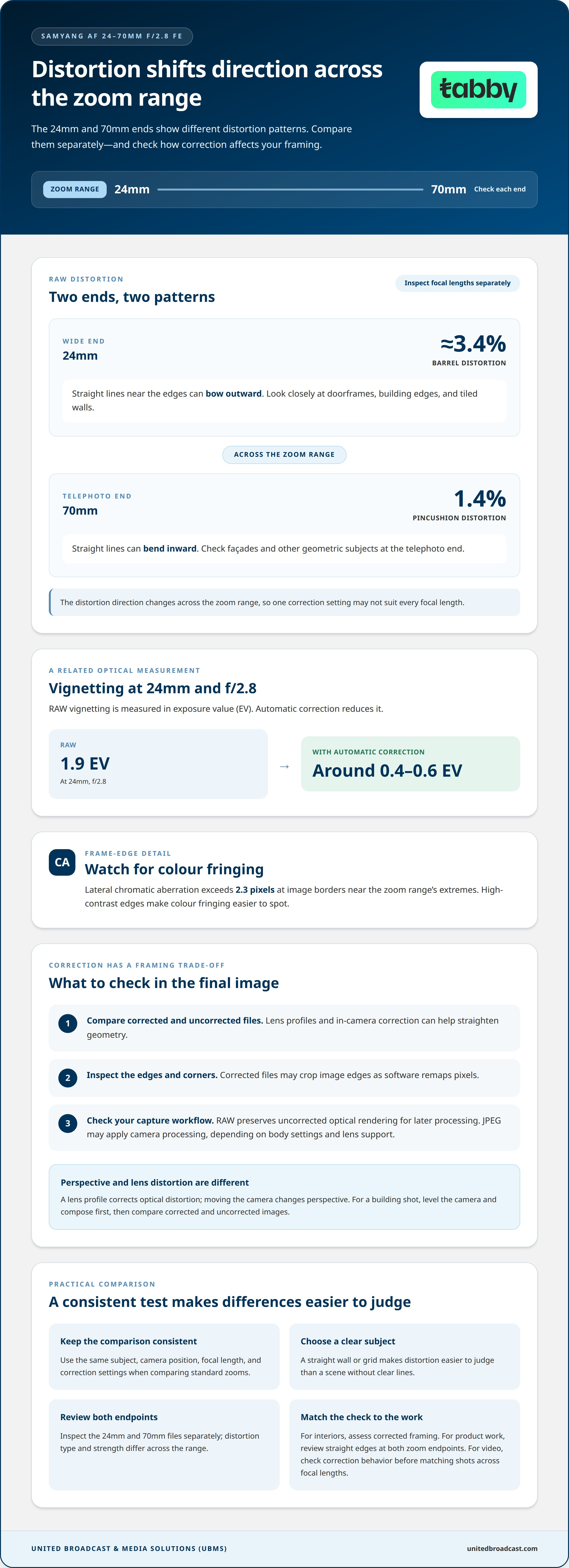
For stills, autofocus lets you acquire focus without making every adjustment manually. The lens is a full-frame Sony E autofocus zoom, and a cited review recommended it for video with 24/33Mpix cameras when 24mm coverage is needed. Image quality still varies by setting: at 24mm and f/2.8, RAW vignetting reaches 1.9 EV, while lateral chromatic aberration exceeds 2.3 pixels at image borders near the zoom range’s extremes.
These measurements matter most in scenes with bright skies, plain walls, or high-contrast edges. Automatic correction reduces vignetting to around 0.4-0.6 EV. A 4.0-out-of-5-star listing based on 68 ratings offers one indicator of user reception, but it doesn’t replace assessing focus and image results for your own work.
Manual focus and parfocal behavior
Manual focus gives the operator direct control over the focus point, which is useful for repeatable marks and deliberate focus pulls. Parfocal behavior means the lens keeps the subject in focus as you zoom. Don’t assume an autofocus zoom will hold focus during a zoom move: test it before planning a shot around that movement.
For a practical check, frame a detailed subject at 70mm, focus, then zoom toward 24mm while watching the subject. If focus shifts, you may need to refocus during the move or avoid zooming while recording. This separates focus control from framing: manual focus can support a planned pull, but it doesn’t itself make a lens parfocal.
| Approach | Focus control | Best fit | Key consideration |
|---|---|---|---|
| Autofocus | Camera-driven focus acquisition | Stills and changing subjects | Review focus in the intended shooting conditions |
| Manual focus | Operator-controlled adjustment | Planned focus pulls | Rehearse marks and timing |
| Zoom during a take | Focus must hold or be adjusted | Continuous reframing | Test for focus shift across the zoom range |
Choose autofocus for responsive stills, manual focus for controlled pulls, and test any zoom move before recording.
Potential drawbacks include vignetting at wide apertures, lateral chromatic aberration near the frame edges, and copy variation reported by forum participants. Their effects differ: correction can reduce vignetting, while high-contrast edges make colour fringing easier to spot. If a clean zoom transition matters to your shot, test the full move for focus shift before recording.
Distortion and in-camera correction
Distortion changes straight lines near the frame edges, especially in architectural scenes. The Samyang AF 24-70mm f/2.8 FE shows barrel distortion of about 3.4% at 24mm in RAW mode. At 70mm, its RAW files show 1.4% pincushion distortion. The direction changes across the zoom range, so one correction setting may not suit every focal length.
Barrel distortion makes straight lines bow outward from the centre of the frame. It is easiest to notice in wide-angle shots of doorframes, building edges or tiled walls. Pincushion distortion bends lines inward and can affect façades or other geometric subjects at the telephoto end. Portraits and natural landscapes may make either pattern less noticeable than carefully aligned architectural compositions.
In-camera correction and lens profiles can help straighten geometry, but the final result depends on the camera and processing workflow. Corrected files may crop the image edges, because software remaps pixels to counter the lens’s distortion. That trade-off matters when framing tightly at 24mm or positioning important details near the corners.
RAW capture preserves the uncorrected optical rendering for later processing. This gives editors more control over profile use and crop decisions. JPEG capture may apply camera processing, depending on the body’s settings and lens support. Compare both formats on the same Sony E camera: photograph a straight-edged subject at 24mm and 70mm, then inspect the corners and framing.
- For interiors: Keep vertical lines away from extreme edges when possible, then assess corrected framing.
- For product work: Align the camera carefully and review straight edges at both zoom endpoints.
- For video: Check the camera’s correction behavior before matching shots across focal lengths.
Distortion correction cannot replace careful camera placement. Moving the camera changes perspective; a lens profile corrects optical distortion. For a building shot, level the camera and compose the frame first, then compare corrected and uncorrected images. This helps distinguish converging perspective lines from barrel or pincushion distortion.
When evaluating the Samyang against another standard zoom, compare identical subjects, camera positions, focal lengths, and correction settings. A straight wall or grid makes distortion easier to judge than a scene without clear lines. Review the 24mm and 70mm files separately, since the distortion type and strength differ across the range.
For a Sony camera setup intended for precise framing, discuss your camera requirements alongside your correction workflow. That context helps clarify whether distortion correction, framing flexibility, or consistent geometry matters most for your work.
Optical construction and lens specifications
The Samyang AF 24-70mm f/2.8 FE is a full-frame autofocus zoom for Sony E. It weighs 1,096 g, measures 128.5 mm long, and has a maximum diameter of 88 mm. Its 82 mm filter thread and 24-70 mm range help define its fit within a camera kit.
The lens is compatible with Sony full-frame and APS-C cameras that use the Sony E mount. The lens offers different angles of view depending on the sensor format. The focal length remains 24-70 mm, while the smaller sensor records a narrower angle of view.
Optical design and aperture
The optical construction uses 17 elements in 14 groups, with nine diaphragm blades. Its aperture range runs from F2.8 to 22, giving a constant maximum aperture across the zoom range. That consistency means exposure settings don’t need to change simply because you zoom from 24mm to 70mm.
For a scene with changing light, the fixed F2.8 maximum aperture supports the same wide-aperture setting at both ends. The nine-blade diaphragm shapes out-of-focus highlights, while the number of elements and groups describes the lens’s optical arrangement. These specifications help identify the design, but don’t replace evaluating rendered detail in your intended shooting conditions.
Weight, dimensions, and construction
At 1,096 g and 128.5 mm long, the lens adds a substantial component to a handheld or shoulder-mounted setup. Its 88 mm maximum diameter and 82 mm filter size also affect how it fits beside other equipment. If a production uses filters across multiple lenses, the 82 mm thread is a practical point to include in the kit plan.
The lens has weather sealing at 7 spots. That construction detail is relevant for location work, but it isn’t a substitute for protecting camera equipment in demanding conditions. For a compact rig, balance the 1,096 g lens with the camera body and support system before committing to extended handheld operation.
Close focus and framing
Minimum focusing distance is 0.35 m, and the listed magnification range is 0.1x-0.27x. Maximum magnification is 1:3.7. These figures support tighter framing than a standard wide-to-short-telephoto zoom might suggest, such as photographing a tabletop object without changing lenses.
For Sony APS-C bodies, the 36˚-62˚ angle of view makes the lens’s framing tighter than on full-frame cameras. On full-frame, the 53˚-86˚ angle of view covers a broader view at the wide end. Match the sensor format, filter setup, and 1,096 g weight to the camera configuration before deciding whether this zoom suits your work.
The 128.5mm length is useful to consider when checking how the lens will sit with a camera body and support system. Alongside its listed weight and diameter, it gives a clearer sense of the space the lens occupies in a configured kit, rather than relying on focal length alone.
The 9 diaphragm blades are another fixed part of the optical design to keep in view when comparing this lens’s specifications. Together, these details describe physical and optical characteristics that may help determine whether the lens suits a particular setup.
Price and value compared with competing standard zoom lenses
Value depends on what a standard zoom contributes to your Sony E setup, not its price alone. The Samyang AF 24-70mm f/2.8 FE combines full-frame coverage, autofocus, and a constant F2.8 maximum aperture. Compare those capabilities with competing standard zooms against your actual shooting needs and the total demands of your kit.
When comparing prices in the UAE, use current local listings rather than figures from other markets. Retail prices and promotions can change, and imported listings may not reflect the final local purchase terms. Compare the amount payable for lenses in the same class, taking into account the features and support your workflow requires.
Compare like with like
Start with the Samyang’s 24-70mm range and constant F2.8 aperture. Then compare each alternative standard zoom on the same criteria: focal-length coverage, maximum aperture, autofocus, and compatibility with your Sony E camera. A lens with a different range or aperture may serve another role, so its price alone does not establish better value.
For example, a production that frequently moves between wide establishing shots and tighter interviews may benefit from one standard zoom covering both framings. If low-light shooting or consistent exposure through zooming matters, weigh the constant F2.8 aperture against alternatives’ specifications. The deciding feature is the one that addresses a real requirement, not the longest specification list.
| Option | Coverage | Aperture consideration | Value question |
|---|---|---|---|
| Samyang AF 24-70mm f/2.8 FE | 24-70mm, full-frame | Constant F2.8 maximum | Do these features fit your shooting plan? |
| Competing standard zoom | Compare its stated range | Compare its stated maximum aperture | Does its difference improve your workflow? |
Optical trade-offs also matter when assessing value. The Samyang exhibits distortion and vignetting, and correction can affect the finished frame. If your work depends on architectural lines, edge detail or tight compositions, factor correction and cropping into your workflow comparison. A lower initial price may be less compelling if the lens adds unwanted post-production steps.
Build a shortlist using three checks: match the focal range to typical shots, compare aperture and autofocus requirements, then review image corrections in your camera workflow. For a Sony E user who needs 24-70mm coverage and F2.8 throughout, the Samyang may offer a useful feature balance. A competing zoom may be better value when its particular range or handling better supports the job. Judge value by fit, not price in isolation.
These figures offer a reference for comparing the lens with other standard zooms, but a sale listing is not a price every buyer will find. Check that the offer is for the same Sony E-mount version, and weigh its terms against the features you need.
Treat these as separate price references, not a single expected cost. To assess value, compare the price available to you with competing lenses that meet the same coverage, aperture and workflow needs.
Sharpness across focal lengths and apertures
Sharpness should be judged across the Samyang’s 24-70mm range and its F2.8-to-22 aperture range. A consistent camera setup helps distinguish lens performance from changes in focus, framing, or processing.
Sharpness across focal lengths
Compare the 24mm and 70mm ends first, then assess an intermediate framing. Keep the Sony E camera, subject distance, focus point, and lighting consistent. A detailed subject, such as printed text or fine fabric, makes differences easier to see than a smooth wall.
Inspect the centre and corners separately. An image may look crisp in the centre while detail near the edges appears softer. Repeat each frame after refocusing so a missed focus point is not mistaken for a difference between focal lengths.
For a practical comparison, photograph the same static subject at 24mm and 70mm. Keep framing as similar as possible by adjusting camera position carefully. Review images at the same display size, then inspect a crop at matching magnification. This avoids judging one focal length from a larger on-screen image.
Sharpness across apertures
At each focal length, compare a frame made at F2.8 with one stopped down within the lens’s F2.8-to-22 aperture range. Use a tripod or stable support, fixed lighting, and the same focus point. This isolates aperture changes from camera movement and shifting subject distance.
Wide-open performance matters for available-light work and shallow depth of field. Stopping down increases depth of field, so check whether apparent gains in detail come from more of the subject being in focus. For a portrait, compare the focused eye; for a flat chart, inspect detail across the frame.
Use this sequence to keep the assessment repeatable:
- Set the Sony E camera to RAW capture and disable changing picture effects.
- Focus on a stationary, detailed subject at 24mm, then capture the aperture comparisons.
- Repeat the same process at 70mm, keeping camera position and subject lighting stable.
- Review centre and edge detail at equal magnification before drawing conclusions.
RAW files help make comparisons more controlled because processing can affect perceived detail. Apply the same sharpening and noise-reduction settings to every file, or inspect neutral conversions. Don’t compare a sharpened 24mm image against an untouched 70mm image. Matching settings makes the lens, rather than editing differences, the focus of the test.
For video, assess fine textures in motion as well as still frames. A fabric pattern or fine foliage can reveal whether detail remains clear during a focus adjustment. Use the same camera, framing, and exposure settings for each take. The Samyang’s constant F2.8 maximum aperture allows that aperture to remain available across the zoom range.
United Broadcast & Media Solutions (UBMS)
United Broadcast & Media Solutions (UBMS) helps you connect lens choices with the wider requirements of a camera setup. If you’re weighing the Samyang against other standard zooms, consider how focal range, autofocus, image correction, and handling fit your production workflow. Those requirements also inform decisions about compatible professional video cameras, digital cinema cameras, cinema lenses, and lighting equipment.
UBMS can help when you’re planning a camera system or assessing which equipment categories support your work. A clear understanding of your shooting needs helps focus the discussion on relevant equipment and system requirements.
Choose the lens that fits your next production
Use your own shooting priorities to make the final call. A lens that suits controlled interviews may not be the best fit for fast-moving documentary work, and a stills-focused setup can place different demands on autofocus and handling. Consider how the Samyang 24-70mm f/2.8 for Sony E would fit your camera, shooting style, and post-production workflow before settling on a standard zoom.
For a broader setup, United Broadcast & Media Solutions offers professional video cameras, digital cinema cameras and cinema lenses. Matching equipment to your workflow can help you make a more considered camera-system decision.
Take the next step by defining your production needs and planning a setup around them.
Frequently Asked Questions
What is the Samyang AF 24-70mm F2.8 FE lens for Sony E-mount?
It’s an autofocus standard zoom lens for Sony E-mount cameras, designed for full-frame coverage. Its 24-70mm range suits varied subjects, from wider environmental frames to tighter portraits, without changing lenses. For a Sony E-mount kit, consider how the zoom’s framing range fits your usual shots and whether its size and weight suit your camera support. The lens is also usable on APS-C Sony E-mount bodies.
What is the Samyang 24-70mm F2.8 price in the UAE?
The UAE price is the current local amount in AED shown by the seller. Compare the listed price with what the purchase includes, such as the lens and any stated accessories, and consider the delivery terms. Overseas prices are not a direct UAE comparison because they may use another currency and different purchase terms. Assess value based on the features your Sony E-mount setup needs, not an overseas figure alone.


