





RAW vs ProRes Video Formats Explained: The Professional’s Guide to 2026 Workflows
In the high-stakes environment of 2026 digital cinema, choosing the highest possible bitrate can actually be a strategic error that compromises your project's delivery. You likely understand the pressure of balancing pristine image quality with the crushing reality of storage costs and tight post-production deadlines. It's a common frustration to see a powerful sensor's potential throttled by hardware incompatibility or a bottlenecked grading suite.
This guide provides the RAW vs ProRes video formats explained in a way that empowers you to master these technical differences, ensuring you optimize both production quality and workflow efficiency. We'll examine the storage-to-quality ratio of these formats, clarify the distinction between ProRes RAW and traditional RAW, and provide a clear decision framework for your next acquisition. Whether you're configuring a Sony cinema camera or an ARRI broadcast rig, understanding these fundamentals is essential for any modern professional. We'll explore how to align your capture settings with your delivery goals to ensure your hardware performs at its peak without breaking your infrastructure.
Key Takeaways
- Understand the fundamental architectural differences between unprocessed RAW sensor data and the high-performance intra-frame compression of the ProRes codec family.
- Evaluate how bit-depth and chroma subsampling choices, ranging from 10-bit 4:2:2 to 16-bit RAW, dictate your latitude for professional color grading and VFX compositing.
- Use the RAW vs ProRes video formats explained in this guide to calculate the storage-to-quality ratio that best suits your camera sensor and project delivery requirements.
- Learn to leverage ProRes RAW as a powerful hybrid solution that combines the flexibility of a digital negative with the playback efficiency of a standard mezzanine format.
- Identify the necessary system integration and storage infrastructure needed to manage high-bitrate media without creating costly post-production bottlenecks.
Demystifying RAW and ProRes: The Core Logic of Professional Acquisition
Professional acquisition in 2026 has moved beyond simple image capture; it is now a strategic exercise in data management. For high-end productions, the choice between RAW vs ProRes video formats explained here centers on the distinction between raw sensor data and a finished, compressed image. While consumer codecs like H.264 and H.265 prioritize small file sizes at the expense of processing power, professional workflows demand the color latitude and editing performance found in higher-tier formats. Choosing the right acquisition path ensures that your footage retains the necessary information for HDR delivery and complex post-production tasks.
What is RAW Video Acquisition?
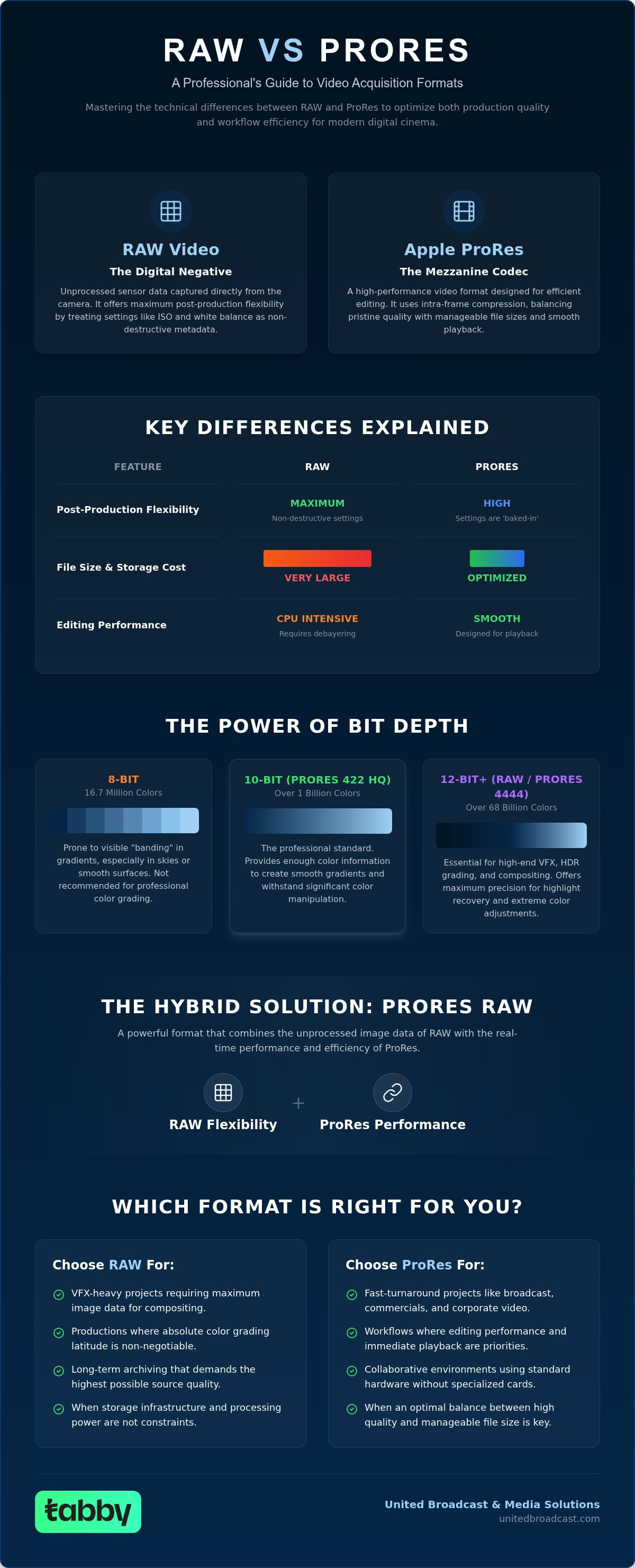
RAW is often described as a digital negative because it is not technically a video file yet. When you record in RAW using professional video cameras, the device captures the electrical signals from the sensor before they undergo debayering. In a standard Bayer pattern sensor, each pixel only records a single color value: red, green, or blue. The full-color image does not exist until your software interpolates these values during the debayering process in post-production.
The primary advantage of this workflow is the role of metadata. Since the image processing hasn't happened in-camera, settings such as ISO and White Balance are non-destructive. You can adjust these parameters in your grading suite without degrading the underlying image quality. However, this flexibility requires a massive data footprint. Uncompressed RAW files can quickly overwhelm standard storage arrays, necessitating high-speed media and robust backup infrastructure to manage the sheer volume of data generated on set.
What is Apple ProRes?
Apple ProRes is a mezzanine codec designed to bridge the gap between the heavy processing requirements of RAW and the low-quality limitations of delivery formats. Unlike long-GOP codecs that compress data across multiple frames, ProRes utilizes intra-frame compression. This means every frame is compressed individually, which significantly reduces the load on your workstation's CPU during the editing process. You can find detailed Apple ProRes technical specifications that outline the performance benefits across its various versions.
The ProRes family is hierarchical, ranging from ProRes 422 Proxy for lightweight editing to ProRes 4444 XQ for high-end VFX work. Unlike RAW, ProRes "bakes in" several sensor settings. While you have significant latitude to adjust colors, the White Balance and ISO are largely fixed at the moment of capture. This trade-off results in files that are much easier to play back and edit without specialized hardware, making it the industry standard for fast-turnaround commercials and broadcast environments.
In 2026, the industry has standardized on high bit depths to support modern displays. While 8-bit video only offers 256 shades per color channel, 10-bit and 12-bit formats provide thousands of shades, preventing banding in gradients and sky detail. Whether you choose the absolute control of RAW or the streamlined efficiency of ProRes, ensuring your format supports at least 10-bit color is non-negotiable for professional results.
Technical Architecture: Color Science and Data Handling
The efficiency of a production often hinges on the technical architecture of the chosen file format. While the previous section defined the nature of these files, understanding the RAW vs ProRes video formats explained requires a deeper look at data handling. The allocation of bits and color information directly impacts the final image's noise floor and artifacting. In 2026, professional workflows prioritize formats that can withstand the rigors of HDR mastering and intensive color manipulation.
Bit Depth and Color Grading Flexibility
Bit depth is the primary metric for color precision. A 10-bit format like ProRes 422 HQ provides 1,024 values per color channel, which is usually sufficient to prevent banding in complex gradients. However, high-end HDR grading often requires the 12-bit depth of ProRes 4444 or the 16-bit linear data found in professional RAW formats. This extra headroom is vital for highlight recovery. When using ARRI lighting to maximize a sensor's dynamic range, a 16-bit RAW file ensures that subtle tonal shifts in the shadows and highlights are preserved rather than crushed. RAW data is typically linear, meaning it records light as the sensor sees it, whereas ProRes uses logarithmic encoding to pack that data more efficiently.
Chroma Subsampling and Post-Production Precision
Chroma subsampling is the compression of color information relative to brightness for bandwidth efficiency. In a 4:2:2 workflow, which is common for ProRes 422, the color resolution is halved horizontally. While the human eye rarely notices this in natural scenes, it becomes a major obstacle during heavy post-production. For VFX-heavy projects or green screen work, the 4:4:4 color space found in ProRes 4444 or RAW is essential. It provides full color information for every pixel, allowing for cleaner keys and more precise edge detection. If your project involves complex compositing, the 4:4:4:4 variant of ProRes also includes an alpha channel for transparency, a feature not available in standard RAW formats.
Balancing these requirements is key to maintaining image integrity across the entire pipeline. If you're designing a studio environment to handle these high-bitrate requirements, you can consult with our technical team for a tailored infrastructure assessment. By aligning your acquisition format with your post-production needs, you prevent technical debt that can stall a project during the final grade.
The ProRes RAW Evolution: Bridging the Gap
The introduction of ProRes RAW represented a significant shift in acquisition logic by combining the metadata flexibility of a digital negative with the playback performance of a mezzanine codec. This hybrid format addresses the primary pain point for many creators: the massive processing overhead associated with traditional RAW files. By understanding the RAW vs ProRes video formats explained in this context, you can better appreciate how ProRes RAW streamlines the path from high-end sensors to the editing timeline.
Apple provides two tiers within this format: ProRes RAW and ProRes RAW HQ. The standard version offers a balance of quality and file size, while the HQ variant provides higher data rates for projects requiring the lowest possible noise floor. Unlike standard ProRes, which performs debayering in-camera, ProRes RAW preserves the sensor's original color information. This allows you to adjust parameters like ISO and White Balance during post-production, provided your software supports the specific metadata implementation of your camera.
ProRes RAW vs. Traditional RAW Formats
Efficiency is the defining characteristic of ProRes RAW. It is specifically optimized for multi-stream editing, often allowing for smooth playback on modern workstations without the need for proxies. When you compare this to proprietary formats like REDCODE or ARRIRAW, the performance gains are substantial. However, the 'Partial RAW' debate persists because NLE compatibility is not universal. While Final Cut Pro and Adobe Premiere Pro offer robust support, DaVinci Resolve users currently lack native compatibility, often necessitating a transcode to CinemaDNG or Blackmagic RAW. For mirrorless shooters, ProRes RAW is often the only path to 12-bit acquisition, making it a vital tool for high-end commercial work.
Hardware Requirements for ProRes RAW
Capturing this format typically requires an external recorder, such as those from Atomos, to receive the RAW data stream over HDMI or SDI. This setup is highly effective when paired with Sony Alpha cameras and lenses, which can output high-quality RAW signals to external devices. Offloading the recording process also helps manage the heat generated during high-bandwidth acquisition, reducing the risk of thermal shutdowns on set.
Sustaining the necessary data rates for ProRes RAW HQ requires high-speed media. CFexpress Type A and Type B cards are the industry standard here, providing the write speeds essential for 4K 60p or 8K recording without dropped frames. Ensuring your hardware and media are properly matched is the only way to maintain a stable professional workflow.
Hardware and Infrastructure: Impact on Professional Workflows
The technical choice between RAW and compressed codecs dictates the physical infrastructure of your production. While the previous sections focused on image data, the RAW vs ProRes video formats explained here must also account for the logistical burden of storage and hardware. A 4K 60p RAW stream typically requires significantly higher bandwidth than a compressed alternative. For instance, shooting uncompressed RAW can generate over 600 GB of data per hour, whereas ProRes 422 HQ at the same resolution might require closer to 400 GB. This 50% increase in data volume directly affects your media budget and the speed of your offloading process on set.
Camera Compatibility and Sensor Optimization
Modern professional video cameras often distinguish between internal and external recording capabilities. Many mid-range cinema cameras record ProRes internally to SD or CFexpress cards but require an external recorder to output a RAW signal. This distinction is critical because RAW acquisition records the sensor's output without the 'baked-in' noise reduction or sharpening found in compressed formats. Consequently, any dust or debris on the sensor becomes a permanent part of the image. Regular camera sensor cleaning is vital for RAW shooters to ensure a clean signal. Additionally, using high-output ARRI lighting becomes even more important in RAW workflows to maximize the signal-to-noise ratio, as you won't have in-camera processing to mask exposure deficiencies.
Data Management and Archiving
Managing these massive files requires a tiered storage strategy. While SSDs are necessary for active editing, long-term archiving often involves a debate between LTO tape and Cloud solutions. RAW files are typically kept as 'master' assets, while ProRes remains the gold standard for fast-turnaround broadcast due to its smaller footprint and ease of playback. For media houses handling multiple high-resolution streams, professional system integration is essential. Building a robust SAN or NAS environment ensures that your editors can access high-bitrate media without network bottlenecks. Environmental factors like humidity and dust also pose risks to high-end storage and camera gear, necessitating climate-controlled server rooms and protective equipment on location.
Strategic Selection: Aligning Your Format with Production Requirements
Selecting the right acquisition format is a critical business decision that impacts every stage of the production pipeline. Having the RAW vs ProRes video formats explained in technical detail allows you to match the data density of your capture to the specific needs of your project. For cinema and feature films, RAW or ProRes 4444 XQ remains the non-negotiable standard. These formats provide the maximum color information required for theatrical projection and high-end 4K HDR streaming, where every bit of sensor data is utilized in the final grade.
In contrast, broadcast and live event environments prioritize stability and speed. ProRes 422 serves as the primary backbone for broadcast studio gear because it offers a high-quality image that is easily handled by standard hardware. Many productions also utilize a proxy workflow. In this scenario, lightweight ProRes Proxy files are used for the creative edit before the system relinks to the high-resolution RAW masters for the final color grade. This approach combines the speed of a compressed codec with the technical latitude of a digital negative.
The RAW Use Case: When Flexibility Wins
RAW is the essential choice for VFX-heavy scenes where pulling a clean key requires the highest possible color resolution. It's also the safest option for productions filmed in unpredictable lighting environments. The ability to recover highlights or adjust exposure in post-production without introducing artifacts can save a project that might otherwise require expensive reshoots. High-budget cinema intended for global streaming platforms often mandates RAW acquisition to meet strict quality control standards for dynamic range.
The ProRes Use Case: When Efficiency Wins
ProRes excels in documentary and long-form content where the sheer volume of footage would make RAW storage costs prohibitive. It's the ideal format for quick-turnaround social media or corporate branding projects that need to move from set to delivery in a matter of days. In professional broadcast facilities, video switchers and routers are designed to process standard mezzanine codecs, making ProRes the most reliable choice for live-to-tape workflows. By choosing ProRes, you reduce the strain on your post-production infrastructure while maintaining an image quality that exceeds standard delivery requirements.
Optimizing Your 2026 Production Pipeline
Mastering the technical nuances of modern acquisition is a prerequisite for any high-stakes media environment. As this guide has demonstrated, the decision isn't about finding a single "best" format; it's about aligning your capture strategy with your project's specific logistical and creative requirements. Whether you require the absolute flexibility of a digital negative for HDR grading or the streamlined performance of a mezzanine codec for broadcast, your choice defines the efficiency of your entire workflow.
With the RAW vs ProRes video formats explained, you can now evaluate your current infrastructure to ensure it supports these high-bitrate demands. From maintaining a clean sensor at our authorized service center for Sony and ARRI to building a robust SAN through our expert system integration services, the right technical support ensures your gear performs as intended. We maintain a comprehensive broadcast studio gear inventory to help you scale your operations with precision.
We look forward to helping you achieve your technical and creative goals with the industry's most dependable tools and expertise.
Frequently Asked Questions
Is RAW video always better than ProRes?
No, the superiority of a format depends entirely on your specific project requirements. While RAW offers maximum metadata control for highlight recovery and color precision, ProRes provides better playback performance and faster turnaround. For broadcast or corporate work, the efficiency of ProRes 422 HQ often outweighs the benefits of RAW. RAW is generally the better choice for high-budget cinema or projects requiring heavy VFX compositing.
Can I convert RAW video to ProRes without losing quality?
You can transcode to a high-quality mezzanine format like ProRes 4444 XQ with minimal perceptual loss, but you'll lose the non-destructive metadata control unique to RAW. Once the image is debayered and baked into a ProRes file, you can't revert to the original sensor data. This makes the conversion a one-way process regarding the flexibility for ISO and White Balance adjustments in post-production.
Which format takes up more storage space, RAW or ProRes?
Uncompressed or lossless RAW typically takes up significantly more space than compressed codecs. When evaluating the RAW vs ProRes video formats explained in storage terms, 16-bit linear RAW can be up to 50% larger than a ProRes 422 HQ file at the same resolution. However, some compressed RAW variants like ProRes RAW can actually be smaller than ProRes 4444 XQ, depending on the compression ratio used.
Does ProRes RAW work in DaVinci Resolve in 2026?
Native support for ProRes RAW in DaVinci Resolve remains a common industry hurdle due to ongoing licensing differences between software developers. While Final Cut Pro and Premiere Pro support it natively, Resolve users often utilize third-party plugins or transcode their footage to Blackmagic RAW or CinemaDNG. This allows them to maintain a RAW-based workflow while utilizing the advanced grading tools found within that specific software environment.
What is the difference between ProRes 422 and ProRes 4444?
The primary difference lies in color resolution and transparency support. ProRes 422 uses chroma subsampling to compress color data, whereas ProRes 4444 provides full color information for every pixel, resulting in 4:4:4 color. Additionally, the 4444 variant supports an alpha channel for transparency. This makes it the industry standard for motion graphics and VFX composites that need to be layered over other footage during the final assembly.
Do I need a special camera to shoot in RAW?
Yes, you need a camera with a sensor and processor designed to output unprocessed data. Most digital cinema cameras from brands like Sony and ARRI support internal RAW recording, but many mirrorless systems require an external recorder to capture ProRes RAW. You'll need to verify your camera's output specifications to ensure it can deliver the necessary signal to your recording media or external hardware.
How does bit depth affect my choice between RAW and ProRes?
Bit depth determines the number of color shades available in each channel. While ProRes 422 is limited to 10-bit, high-end RAW formats offer up to 16-bit linear data. This provides thousands of additional tonal values, which is essential for preventing banding in HDR deliverables. If your project requires heavy color manipulation or high-dynamic range mastering, the higher bit depth of a RAW workflow is generally the preferred option.
Is ProRes RAW considered 'True' RAW?
In the context of the RAW vs ProRes video formats explained earlier, ProRes RAW is technically a true RAW format. It preserves the original sensor data before the debayering process occurs. This allows for non-destructive adjustments of metadata parameters in post-production. While it uses compression to manage file sizes, it maintains the fundamental characteristics of a digital negative, distinguishing it from standard ProRes codecs that bake in sensor settings.


