





Professional Video Monitor Buying Guide 2026
Your high-end cinema camera is only as accurate as the professional video monitor you use to judge its output. It's a common frustration to spend hours perfecting a color grade only to find that the image shifts significantly when viewed on a different screen or fails a rigorous broadcast QC check. You've likely experienced the confusion of matching SDI feeds with emerging IP-based workflows or struggled to monitor HDR highlights accurately while staying within a production budget.
We understand that consistency is the foundation of professional trust. This guide will help you master the technical specifications and specific use cases of modern displays to ensure your work meets global Netflix and broadcast standards. We will break down the differences between production and master reference monitors, examine essential connectivity options, and provide a roadmap for achieving flawless color accuracy from the initial shoot through to post-production. By the end of this article, you will have the technical knowledge required to select equipment that serves as a reliable partner in your creative process.
Key Takeaways
- Learn why a professional video monitor is a precision measurement tool rather than a standard screen, utilizing integrated tools like Waveform and Vectorscope for accurate image evaluation.
- Identify the critical technical differences between OLED and High-Brightness LCD panels to choose the right technology for your specific environment, whether in a dark grading suite or on a bright outdoor set.
- Understand how to categorize displays by production role, from lightweight on-camera units for framing to high-end master reference monitors for final color grading.
- Explore the capabilities of industry-leading hardware like the Sony BVM-HX3110 to ensure your content meets the strict HDR delivery requirements of global platforms like Netflix.
- Discover the importance of scheduled professional calibration and system integration to maintain long-term color accuracy and a cohesive broadcast workflow.
What Defines a Professional Video Monitor?
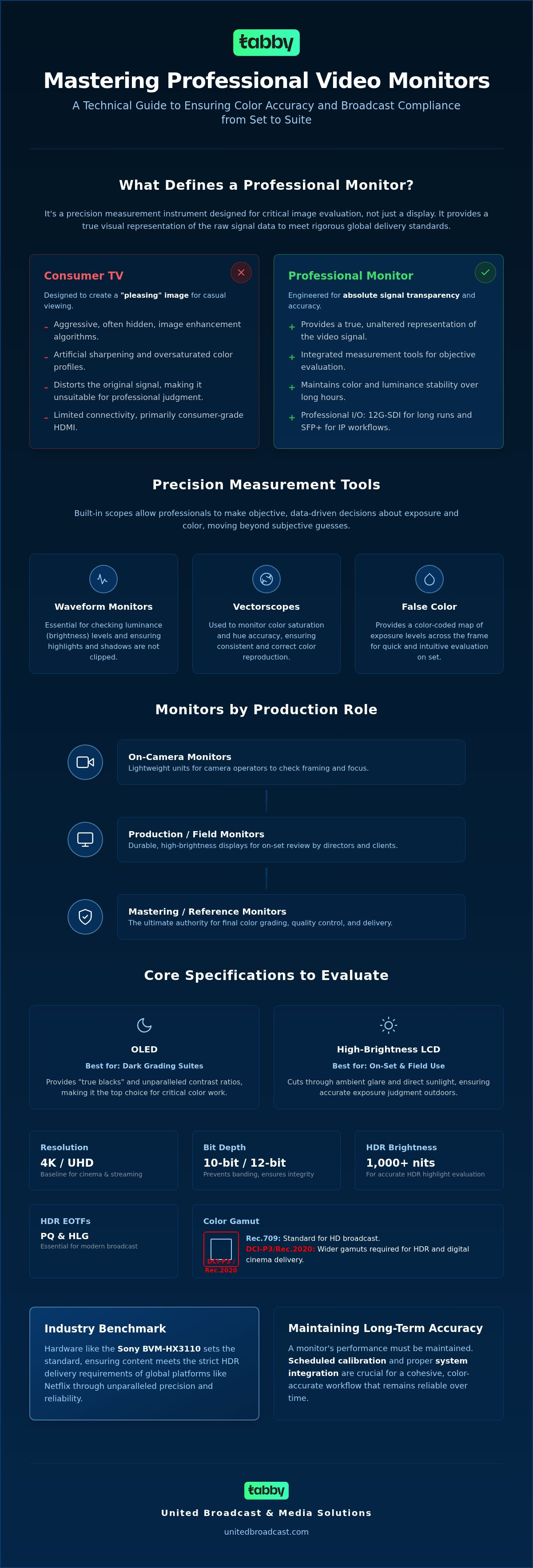
A professional video monitor is far more than a standard display; it's a precision measurement instrument designed for critical image evaluation. While a standard screen shows you a picture, a professional unit provides a visual representation of the raw signal data. This distinction is vital for ensuring that your production meets the rigorous delivery standards set by global broadcasters and streaming platforms. Reliability is equally important. These displays are engineered for consistent performance over long operational hours, maintaining color accuracy and luminance stability that consumer hardware simply cannot match.
One of the defining characteristics of a high-end display is the inclusion of integrated evaluation tools. Professionals rely on these to make objective decisions rather than subjective guesses. Key tools include:
- Waveform Monitors: These are essential for checking luminance levels and ensuring your highlights don't clip.
- Vectorscopes: Professionals use these to monitor color saturation and hue accuracy across the signal.
- False Colour: This provides a quick, color-coded map of exposure levels across the entire frame, which is invaluable on a busy set.
High-grade components and advanced cooling systems also ensure that the panel doesn't suffer from thermal drift. This means the colors you see at the start of a twelve-hour shift remain identical to those you see at the end.
The Difference Between Consumer TVs and Pro Monitors
Consumer televisions are designed to make content look "pleasing" to the average viewer. They often use aggressive image enhancement algorithms, artificial sharpening, and saturated color profiles that distort the original signal. In contrast, a professional video monitor prioritizes transparency. It shows the signal exactly as it's recorded, without hidden processing. Connectivity also sets them apart. While TVs rely on consumer HDMI, professional units feature 12G-SDI for high-bandwidth, long-distance cable runs and SFP+ ports to support modern IP-based workflows.
Reference Monitors vs. Production Monitors
Not all professional displays serve the same purpose. Reference monitors, often called mastering monitors, are the final authority in a color grading suite. They offer the highest possible color precision and bit depth for quality control and final delivery. Production monitors are built for the rigors of the set. They prioritize durability, high-brightness panels for visibility in sunlight, and versatile mounting options for directors and clients. If you're building out a complete kit, choosing the right display is as critical as selecting your camera body. You can explore our range of professional video cameras to see how these tools work together in a professional ecosystem.
Core Specifications to Evaluate When Buying a Professional Monitor
Selecting the right professional video monitor involves more than just picking a screen size. You must align the display's technical capabilities with your specific delivery requirements. For most modern productions, 4K/UHD resolution is the baseline, particularly for projects destined for cinema or premium streaming platforms. However, Full HD monitoring remains a cost-effective and reliable choice for newsrooms and field-based ENG crews where speed and portability are prioritized over pixel density.
Panel technology is another critical factor. OLED panels provide "true blacks" and exceptional contrast, making them the preferred choice for color grading and dark room environments. In contrast, high-brightness LCD panels are often better suited for field use. Their ability to cut through ambient glare ensures that directors and cinematographers can judge exposure accurately even under direct sunlight. You should also consider the color gamut coverage; while Rec.709 is the standard for HD broadcast, projects requiring HDR delivery must support DCI-P3 or the wider Rec.2020 color space.
High Dynamic Range (HDR) evaluation requires high peak brightness, often measured in nits. A reference-grade display typically needs at least 1,000 nits to accurately represent HDR highlights. Support for Electro-Optical Transfer Functions (EOTF) such as Perceptual Quantizer (PQ) and Hybrid Log-Gamma (HLG) is non-negotiable for anyone working in modern broadcast environments.
Bit Depth and Colour Accuracy
Professional workflows demand 10-bit or 12-bit processing to maintain image integrity. Lower bit-depth displays often suffer from banding, where smooth gradients in skies or shadows appear as distinct steps. A 12-bit panel enables billions of colour combinations for HDR. This depth ensures that every nuance of the signal is preserved. Additionally, support for 3D LUTs allows you to apply creative looks or technical transforms directly on the monitor, ensuring the entire crew sees an image that closely resembles the final grade.
Inputs, Outputs, and Latency
Signal transmission has evolved rapidly. While quad-link 3G-SDI was once the standard for 4K, modern setups prefer 12G-SDI for its simplicity and reduced cable clutter. For those integrating displays into a larger ecosystem of broadcast studio gear, ensure the monitor supports the latest IP-based protocols. Low-latency modes are also essential for critical tasks like focus pulling or live switching. If you're unsure which configuration fits your facility, you can consult our technical team for a tailored recommendation.
Categorising Monitors by Production Use Case
A professional video monitor serves different masters depending on where it sits in the production pipeline. Understanding these categories is essential for investing in the right tool for the job. On-camera monitors are typically 5 to 7 inches, prioritizing high brightness and lightweight construction. These are indispensable for focus pullers and solo operators who need to see fine detail and exposure tools like peaking or false colour in bright environments. Studio or production monitors usually range from 17 to 31 inches. These displays act as a central hub on set, allowing directors and clients to review takes with higher fidelity than a small on-camera screen can provide.
Master reference monitors represent the absolute peak of display technology. These are the final arbiters of colour in grading suites, used to ensure that the final product meets the strict quality control requirements of global broadcasters. In the world of live production, multi-viewer displays are the backbone of broadcast control rooms and OB vans. These large-format screens allow engineers and directors to monitor dozens of incoming signals simultaneously, ensuring every angle of a live event is perfectly captured and switched.
Field Monitoring and Portability
Monitoring in the field requires hardware that can withstand national environmental challenges. High ambient heat and dust resistance are mandatory for equipment used in outdoor locations. Reliability in these conditions is what separates professional gear from consumer-grade alternatives. Power management is another key consideration for portability. Most field units integrate seamlessly with V-mount or Gold-mount battery systems, providing hours of untethered operation. When designing your mobile setup, remember that monitoring is just one piece of the puzzle. Integrating your display with high-quality professional lighting equipment ensures you're seeing an accurately lit scene before the signal even reaches the recorder.
Post-Production and Colour Grading
In the grading suite, the requirements shift from durability to absolute precision. The Sony BVM-HX3110 has emerged as an industry leader for HDR mastering, offering the luminance and colour accuracy required for high-end delivery. Choosing between technologies like dual-layer LCD and OLED often comes down to your specific mastering needs. While OLED offers perfect blacks, dual-layer LCD technology provides the sustained high brightness necessary for demanding HDR workflows. Regardless of the panel type, a controlled lighting environment is essential. Even the best reference monitor cannot compensate for glare or incorrect ambient light temperatures in a post-production suite. Achieving a consistent look requires both a top-tier display and a meticulously managed workspace.
Featured Professional Monitors for 2026: Standout Recommendations
Selecting a professional video monitor in 2026 requires a balance between cutting-edge HDR performance and practical studio utility. Sony continues to set the industry benchmark for display technology, offering a tiered range that addresses everything from high-end mastering to cost-effective field monitoring. You can browse the full Monitor Collection to view real-time availability and technical specifications for these models.
The current landscape is defined by the need for higher peak brightness and wider colour gamuts. Whether you are building a new grading suite or upgrading a mobile production unit, the following recommendations represent the most reliable hardware currently available for professional media workflows.
Best for Master Grading: Sony BVM-HX3110
The Sony BVM-HX3110 is widely considered the ultimate 4K HDR master monitor. It utilizes Sony's TRIMASTER HX technology to ensure consistent colour reproduction and luminance across the entire panel. With a peak brightness of 4,000 nits, this display provides the luminance headroom required for the most demanding HDR mastering tasks. Its 1,000,000:1 contrast ratio delivers deep, true black levels that were once exclusive to OLED panels; however, this dual-layer LCD technology offers superior sustained brightness. The high-speed pixel response is particularly beneficial for sports and action content, ensuring that motion remains fluid and clear for precise quality control.
Best for Versatile Production: Sony PVM-X2400
For DIT carts, edit suites, and production galleries, the Sony PVM-X series offers an ideal balance of size and performance. The PVM-X2400 is a 24-inch high-grade picture monitor that supports 4K HDR and SDR monitoring simultaneously. This is a critical feature for modern workflows where multiple deliverables are required from a single shoot. The user-friendly interface includes quad-view capabilities and integrated waveform features, allowing operators to monitor four different signal paths or evaluation tools on a single screen. For those requiring different sizes, the PVM-X1800 and PVM-X3200 provide the same high-fidelity processing in 18-inch and 32-inch form factors respectively.
For setups that require reliability without the premium investment of a master reference monitor, the Sony LMD series remains a staple. These lightweight LCD monitors are designed for studio walls and field monitoring. They provide clear, accurate images and essential tools like peaking and markers, making them a dependable choice for general monitoring tasks in OB vans or control rooms where durability is as important as image quality.
Technical Support and Professional Integration
Investing in a high-end display is only the first step toward achieving visual excellence. To maintain the integrity of your image over time, a professional video monitor requires consistent technical oversight. Panels naturally drift in color and luminance as they age, meaning that a display which was accurate on day one will likely show subtle shifts within several months of heavy use. We recommend professional calibration every 6 to 12 months to ensure your production remains compliant with global broadcast standards.
The United Broadcast & Media Solutions (UBMS) Service Center provides specialized maintenance for cinema and broadcast equipment. This is particularly vital when operating in a national climate where high humidity and ambient temperatures can stress sensitive electronic components. Proper housing and regular internal cleaning help protect your investment from these environmental factors, preventing premature hardware failure and maintaining the consistency of your signal evaluation.
System Integration for Broadcast Studios
A monitor doesn't operate in isolation. In a modern facility, it's a critical node within a complex signal chain that includes routers, switchers, and distribution amplifiers. Successful system integration ensures that your monitoring remains low-latency and high-fidelity regardless of the routing path. For future-proof studio builds, we specialize in IP-based monitoring solutions using the SMPTE ST 2110 standard. This transition from traditional SDI to IP allows for greater scalability and flexibility in large-format productions. For mobile applications, you can read more about how these systems are deployed in our guide to OB Van System Integration.
After-Sales Support and Calibration
Achieving true color accuracy requires more than a simple menu adjustment. It involves the use of professional-grade colorimeters, spectrophotometers, and specialized profiling software to map the panel's performance against target gamuts like Rec.709 or Rec.2020. As an authorized partner for global brands, United Broadcast & Media Solutions (UBMS) provides the local technical expertise necessary to support high-end Sony hardware through its entire lifecycle. We don't just sell equipment; we provide the technical infrastructure to keep it performing at a reference level. Browse our full range of professional monitors and request a technical consultation here.
Investing in Long-Term Visual Excellence
Selecting a professional video monitor is a commitment to image integrity and technical precision. Throughout this guide, we've examined the critical differences between consumer displays and reference-grade instruments, the importance of 10-bit processing, and the role of calibration in maintaining color accuracy. By aligning your hardware choices with global broadcast standards, you ensure that your production remains consistent from the first frame captured on set to the final grade in the suite.
United Broadcast & Media Solutions (UBMS) remains a dedicated technical partner for the national media community. As an authorized Sony Professional Dealer with deep expertise in system integration and in-house technical support, we provide the infrastructure necessary for high-stakes production environments. Whether you're building a new control room or upgrading a grading suite, our team is equipped to support your journey toward flawless visual delivery.
Shop the Full Collection of Professional Video Monitors
We invite you to explore our extensive range of displays and experience the difference that true reference monitoring makes in your professional workflow.
Frequently Asked Questions
What is the main difference between an SDI and HDMI video monitor?
SDI is the professional standard because it uses BNC connectors with a locking mechanism, preventing accidental disconnection on set. It supports much longer cable runs, often up to 100 meters for 3G-SDI, without signal degradation compared to HDMI. While HDMI is common in consumer gear, it lacks the robustness and metadata handling required for high-end broadcast workflows where reliability and signal integrity are the primary concerns for technical operators.
Do I really need a 4K monitor if I am only delivering in Full HD?
Investing in a 4K professional video monitor is highly recommended even for Full HD deliverables. A 4K panel allows you to view your source material with greater pixel density, making it easier to spot focus errors or sensor noise that might be invisible on a standard HD screen. It also future-proofs your studio as industry standards continue to shift toward higher resolutions and premium streaming requirements for global distribution platforms.
What does "1000 nits" mean for a professional video monitor?
A nit is a unit of measurement for luminance, and 1000 nits represents the minimum peak brightness required for accurate HDR monitoring. Most standard displays peak at 100 to 300 nits, which is insufficient for judging HDR highlights correctly. A professional video monitor capable of 1000 nits ensures that specular highlights are reproduced without clipping, which is essential for meeting strict Netflix and broadcast delivery specifications in modern production workflows.
How often should a professional reference monitor be calibrated?
You should calibrate your professional reference monitor every 6 to 12 months. Over time, internal components and panel phosphors age, leading to subtle shifts in color temperature and luminance levels. Regular profiling with professional probes ensures that the display remains a true reference point. If you work in high-stakes environments like color grading suites, more frequent checks every 3 months might be necessary to maintain absolute visual consistency.
Can I use a high-end consumer OLED TV for professional colour grading?
High-end consumer OLED TVs are not suitable replacements for dedicated professional monitors in a grading suite. While they offer deep blacks, consumer sets use aggressive auto-brightness algorithms and image processing that cannot be fully disabled. They lack the precision bit-depth, 3D LUT support, and specialized evaluation tools like Waveform or Vectorscope. Professional units prioritize signal transparency over pleasing consumer-grade enhancements, which is required for accurate quality control and mastering.
What is a LUT and how do I use it on a professional monitor?
A Look-Up Table (LUT) is a mathematical formula that transforms the color and tone of a video signal. On a professional display, you use technical LUTs to convert Log footage from a camera into a viewable color space like Rec.709. This allows the crew to see a finished look on set while the camera records the flat data. Most professional displays allow you to load custom 3D LUTs via USB for creative look management.
Is 12G-SDI necessary for my 4K production workflow?
12G-SDI is the most efficient way to handle 4K signal transmission because it carries a full 4K 60p signal over a single BNC cable. Older workflows require Quad-link 3G-SDI, which uses four separate cables to achieve the same result. Moving to 12G-SDI significantly reduces cable clutter and simplifies routing within your studio or OB van, making it a standard requirement for modern high-bandwidth 4K production environments and live events.
What is the difference between Sony BVM and PVM series monitors?
The main difference lies in their intended application and precision levels. Sony BVM (Broadcast Video Monitor) units are master reference displays designed for the most critical color grading and quality control tasks. Sony PVM (Picture Video Monitor) units are high-grade production monitors. While PVMs offer exceptional accuracy and durability for general studio and on-set use, they don't reach the absolute luminance and color consistency levels found in the top-tier BVM series.


