





Mastering Multi-Camera PTZ Setups: The Professional 2026 Integration Guide
A professional multi-camera PTZ setup is an integrated ecosystem where network stability and control ergonomics are as vital as the camera sensor itself. You've likely experienced the frustration of managing mismatched image profiles or battling the subtle latency issues that can derail a live production. In a high-stakes broadcast environment, these technical inconsistencies aren't just minor annoyances; they're risks to your professional reputation. We understand that a truly successful installation should feel invisible to the operator, allowing for total focus on the creative output rather than the hardware constraints.
This 2026 integration guide provides the technical roadmap you need to design, configure, and maintain a broadcast-grade system for seamless remote efficiency. You'll discover how to leverage the latest NDI 6.3.2 protocols to achieve a stable, low-latency video network while ensuring synchronized control across multiple units. We'll examine the specific infrastructure required to maintain consistent image quality and explore the logistical standards necessary for high-tier production within the UAE. By the end of this guide, you'll have the expertise to transform a collection of cameras into a unified, professional-standard broadcast studio.
Key Takeaways
- Learn why a robust network backbone using NDI or PoE++ is essential for maintaining stability and low latency in a modern multi-camera PTZ setup.
- Understand the technical advantages of 1-inch sensors and high-quality optical zoom for achieving broadcast-standard image clarity across all units.
- Discover the operational benefits of integrating physical hardware controllers and software automation to ensure precise, synchronized camera management.
- Identify the critical role of professional system integration and technical support in building a future-proof broadcast studio within the UAE.
Understanding the Multi-Camera PTZ Ecosystem
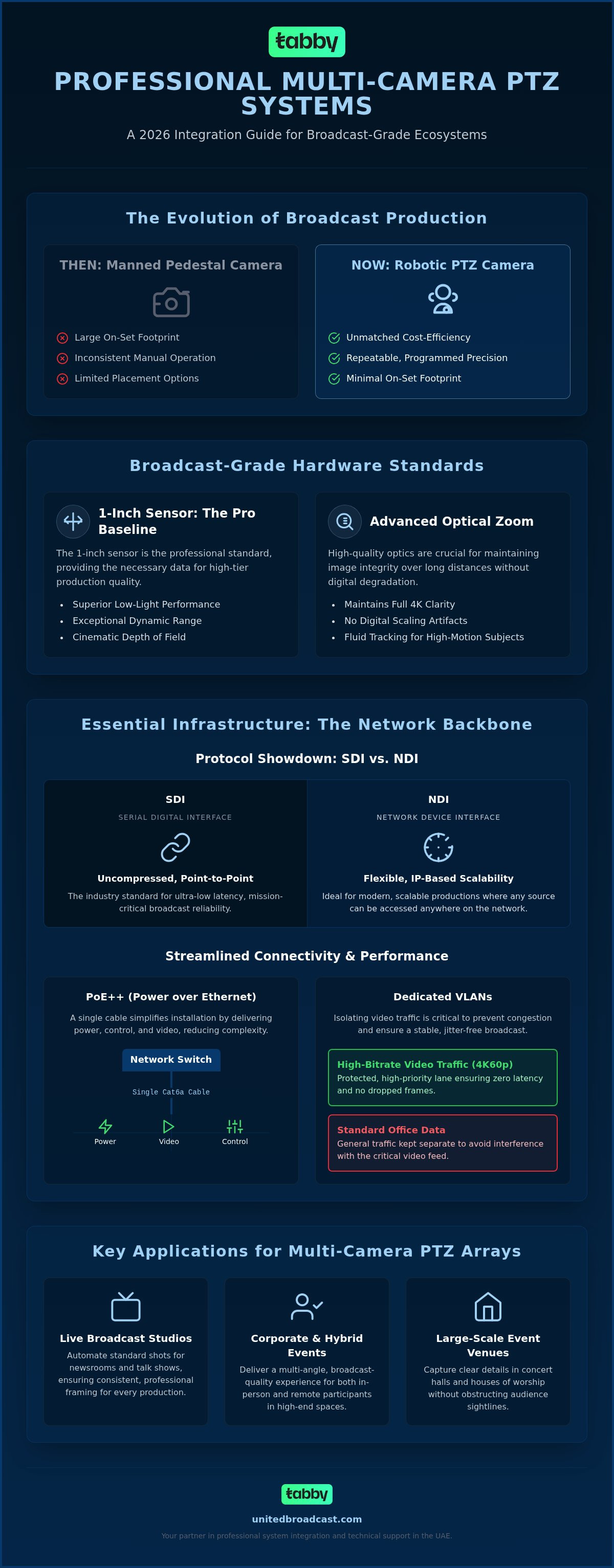
A professional multi-camera PTZ setup represents a significant evolution in how visual content is captured and distributed. While traditional broadcast environments once relied exclusively on manned pedestals, the 2026 landscape has shifted toward high-precision, remote-operated ecosystems. A Pan-tilt-zoom (PTZ) camera today is a sophisticated robotic imaging tool that offers the same sensor quality and color science found in high-end studio units. This transition isn't just about replacing operators; it's about expanding creative possibilities through a reduced on-set footprint and the ability to place cameras in locations where a human operator simply couldn't fit.
The core advantages of these systems include unmatched cost-efficiency and repeatable precision. Technicians can now program complex move sequences that are executed with identical timing every time. Many broadcasters also utilize hybrid configurations, integrating these units with professional video cameras to maintain cinematic depth for hero shots while PTZs handle the wider coverage and specialized angles. This blended approach ensures that the production retains a high-end aesthetic while benefiting from the logistical flexibility of remote control.
Why PTZ Technology has Become a Broadcast Standard
The rise of PTZ technology as a primary choice for broadcasters stems from massive improvements in sensor technology. The 1-inch sensor has become the professional baseline, providing the low-light performance and dynamic range required for high-tier production. Modern units also feature advanced optical zoom capabilities that maintain 4K clarity without the artifacts associated with digital scaling. In high-motion environments, such as sports or live news, 2026-era PTZs offer the responsiveness and low-latency control needed to track subjects with the same fluidity as a manual operator. This allows for lean studio operations where a single technician can manage an entire multi-camera array from a centralized control room.
Key Applications for Professional Multi-Camera Arrays
The versatility of a multi-camera PTZ setup makes it ideal for several high-stakes environments:
- Live Broadcast Studios: Newsrooms and talk shows use PTZ networks to automate standard shots, ensuring consistent framing for every episode.
- Large-Scale Event Venues: Houses of worship and concert halls benefit from the high-magnification optical zoom, capturing clear details from the back of the hall without obstructing audience sightlines.
- Corporate Communication: High-end hybrid event spaces use these arrays to provide a professional, multi-angle experience for both in-person and remote participants.
Essential Infrastructure: Networking, Protocols, and Connectivity
The backbone of a professional multi-camera PTZ setup relies on a robust network architecture designed for high-bitrate video. Unlike standard corporate conferencing, broadcast-grade production demands infrastructure that can handle 4K60p streams without dropping frames. This starts with choosing the right connectivity standards. While HDMI is common in prosumer gear, professional environments favor SDI for its locking connectors and long-range uncompressed signal, or NDI for its immense scalability over IP networks.
Power over Ethernet (PoE++) is a significant advancement for these installations. By delivering power, control, and video over a single Cat6a cable, it reduces cabling complexity and installation time. However, the network itself must be managed with precision. To achieve zero latency, it's essential to implement dedicated VLANs. This isolates heavy video traffic from standard office data, preventing the congestion and packet loss that leads to visual jitter.
SDI vs. NDI: Choosing the Right Protocol for Your Workflow
SDI remains the industry standard for uncompressed, ultra-low latency video in traditional broadcast. It's reliable and point-to-point, but it lacks the bidirectional flexibility of IP-based systems. Conversely, NDI (Network Device Interface) allows any camera to be accessed by any switcher on the network, making it ideal for scalable, modern productions. For those transitioning between eras, hybrid workflows utilize high-quality converters to bridge legacy SDI hardware with modern IP-based systems. This approach is often detailed in a comprehensive Television Studio Environment guide, which highlights how control rooms manage these disparate signals effectively.
Sync and Genlock in Multi-Camera Environments
Timing is critical in a multi-camera array. Without precise synchronization, switching between cameras can cause visual "flicker" or "tearing" as the switcher waits for the next frame. Implementing external sync in high-end PTZ configurations ensures that every sensor in the room captures data at the exact same micro-moment. Genlock is the process of locking the vertical and horizontal timing of multiple video sources to a single master reference signal to ensure seamless, glitch-free switching. Building this level of infrastructure requires technical precision. If you're designing a new facility, consulting with a specialist in system integration services can prevent costly networking bottlenecks before they occur.
Selecting Hardware for Broadcast-Grade PTZ Production
Choosing the right hardware for a multi-camera PTZ setup requires looking beyond basic 4K resolutions. In 2026, the 1-inch CMOS sensor has established itself as the professional baseline for broadcast environments. Unlike smaller sensors common in entry-level units, a 1-inch sensor offers significantly better dynamic range and superior low-light performance. This is critical in studio environments where you need to handle deep shadows and bright highlights without introducing digital noise or grain. High-end units also incorporate advanced noise reduction algorithms that maintain image cleanlines even when the gain is pushed in challenging lighting conditions.
Optical zoom is non-negotiable for broadcast-grade production. While digital zoom can extend a camera's reach, it inevitably degrades image clarity by cropping the sensor's data. Professional units typically offer 20x to 30x optical zoom, allowing for crisp close-ups even from the back of a large venue. Additionally, professional-grade hardware includes tally light integration and internal recording capabilities. Tally lights are vital for on-camera talent to identify the active unit, while internal SD or CFexpress slots provide a necessary redundant backup if the network or main recorder fails.
Optics and Image Quality Standards
Lens quality and aperture ranges are central to achieving cinematic depth of field. A wider aperture allows for better subject separation, which helps PTZ footage blend seamlessly when used alongside traditional professional video cameras in a hybrid array. The mechanical quality of the pan-tilt motors is equally essential. Professional systems utilize high-torque, variable-speed motors that provide smooth, fluid movements for live on-air pans. This eliminates the jerky starts and stops that often plague lower-tier equipment during live tracking.
External Connectivity and Control Ports
Hardware must provide the physical ports required for a rigorous broadcast workflow. While IP protocols are the future, physical switcher compatibility often relies on 12G-SDI for uncompressed 4K signals. High-fidelity sound is another key differentiator; look for cameras with professional XLR audio inputs to ensure audio stays in sync with the video signal at the source. Standardizing on VISCA over IP ensures universal control compatibility across different hardware brands. This allows you to manage multiple units from a single interface, ensuring a more flexible and future-proof studio design.
Workflow Integration: Control Systems and Operation
Operating a high-end multi-camera PTZ setup requires a sophisticated control interface that balances tactile precision with automated efficiency. While entry-level software can manage basic pan and tilt, professional broadcast environments necessitate hardware controllers equipped with high-quality joysticks and physical dials. These tools provide the micro-adjustments required for tracking live subjects smoothly. In a "One Operator" workflow, a single technician can effectively manage between four and six cameras, provided the control surface is logically mapped and presets are programmed for primary talent positions.
Image consistency across different units remains one of the greatest challenges in remote production. To address this, vision mixers use Remote Control Panels (RCPs) or "Paint Boxes" to standardize color profiles across the entire array. This hardware allows for real-time adjustments to iris, gain, and black levels, ensuring that PTZ footage matches the color science of traditional broadcast or cinema cameras. This level of control is what separates a professional studio from a basic streaming setup.
Mastering the Remote Control Surface
Configuring a remote control surface involves more than just mapping movement. It requires setting up repeatable presets that can be recalled instantly without the "searching" motion often seen in cheaper systems. By grouping cameras into logical sequences, operators can execute complex, multi-angle switches with a single button press. Tactile feedback is essential here; the resistance in a professional joystick allows for the nuanced speed control necessary during long-form productions where operator fatigue can impact shot quality.
Lighting for PTZ Cameras
Lighting a PTZ-enabled studio presents unique challenges because the cameras often move through a 360-degree range. To maintain image quality, you must utilize flicker-free professional lighting equipment that provides even coverage across the entire set. Shadows that look acceptable from a static front-facing angle can become problematic when a PTZ camera pans to a side profile. Integrating high-end ARRI lighting into an automated studio environment ensures that the color temperature remains consistent, regardless of the camera's position or the specific unit being switched to air.
Professional System Integration and Support in the UAE
Designing a professional multi-camera PTZ setup requires more than just high-tier hardware; it demands a strategic approach to system integration. A system integrator acts as the technical architect for your studio, ensuring that networking, control protocols, and signal routing function as a unified ecosystem. Within the UAE, production standards are world-class, making it essential to partner with an expert who understands national broadcast requirements. UBMS provides a full suite of technical services, moving from the conceptual design phase to the physical installation of complex robotic arrays. This ensures your facility is built on a foundation of reliability and logistical excellence.
Custom Broadcast Solutions and System Design
UBMS tailors every installation to the specific needs of the client, whether you're building a corporate boardroom or a national newsroom. We provide turnkey solutions that integrate broadcast studio gear into a cohesive workflow. Hardware longevity is another critical factor. The unique climate of the UAE necessitates specific considerations for cooling and dust management within the studio rack. Our design process accounts for these environmental variables to protect your investment over the long term. It's about more than just setting up cameras; it's about building a future-proof environment that can scale with your production needs.
Long-term Maintenance and Technical Support
Uptime is the most critical metric in live production. To maintain a reliable multi-camera PTZ setup, regular firmware updates and network optimization are mandatory. UBMS supports its clients through a dedicated service center that handles expert repairs and technical troubleshooting. This local presence is vital for broadcast gear, as it eliminates the long lead times associated with international shipping for repairs. Our technical support framework includes:
- Regular firmware synchronization across all PTZ units.
- Network stress testing to prevent latency spikes during high-bitrate transmission.
- On-site hardware calibration for color consistency.
- Direct access to our dedicated regional service center for rapid repairs.
You can learn more about professional equipment maintenance to ensure your studio remains operational at all times. We also provide comprehensive onboarding and training to ensure your technical team can confidently manage these advanced IP networks and control surfaces. Even the most advanced PTZ network is only as effective as the team operating it. We focus on hands-on training that covers everything from basic joystick operation to complex network troubleshooting and color matching. This ensures your staff can maximize the utility of the system from day one. By choosing a partner with deep regional expertise, you gain access to a technical infrastructure that supports your production goals long after the initial installation is complete.
Future-Proofing Your Broadcast Infrastructure
Achieving a broadcast-grade multi-camera PTZ setup requires a meticulous balance of high-performance hardware and robust network architecture. By prioritizing 1-inch sensor technology and low-latency IP protocols like NDI 6.3.2, you ensure your studio meets the rigorous standards of 2026 production. Precise synchronization and professional lighting integration remain the final steps in creating a seamless, one-operator environment that doesn't compromise on image quality. Consistency across your camera array is the hallmark of a professional installation.
UBMS has provided expert system integration since 1997, serving as a trusted advisor for professional filmmakers and broadcasters across the region. As an authorized service center for global brands, we offer the technical infrastructure and comprehensive national support required to maintain maximum uptime in the UAE. Our team is dedicated to ensuring that every component of your studio functions as a unified, reliable ecosystem.
We look forward to helping you build a high-tier production environment that delivers precision, dependability, and creative excellence for years to come.
Frequently Asked Questions
What is the maximum distance for a PTZ camera over NDI?
The maximum distance for a PTZ camera over NDI is typically 100 meters when using standard Cat6 cabling. This limitation is based on the Ethernet standard rather than the protocol itself. To extend this range for a larger multi-camera PTZ setup, you'll need intermediate network switches, repeaters, or fiber optic converters. Maintaining signal integrity over these distances is vital to prevent packet loss and ensure a stable broadcast feed.
Can I mix different PTZ brands in one multi-camera setup?
You can mix different brands within a single multi-camera PTZ setup, provided they support universal protocols like VISCA over IP or NDI. However, this often introduces significant challenges with color matching due to variations in sensor science and lens coatings. Standardizing on a single manufacturer is generally recommended for professional environments to ensure that all camera angles maintain a consistent visual aesthetic and simplified control mapping.
How do I synchronize the colours of multiple PTZ cameras?
Synchronizing colors requires a combination of hardware and calibration tools. You should use a Remote Control Panel (RCP) to adjust the shading, iris, and black levels of each unit in real-time. It's also essential to use gray cards and vectorscopes during the setup phase to calibrate every camera against a master reference. Consistent lighting across the studio set is equally critical to ensure that sensor responses remain identical.
Do PTZ cameras support 4K at 60 frames per second?
High-end professional PTZ cameras in 2026 fully support 4K resolution at 60 frames per second. This frame rate is the industry standard for capturing smooth motion in sports and live broadcast environments. To handle the high data rates associated with 4K60p, your network infrastructure must be optimized for 10Gbps speeds or utilize high-bandwidth NDI protocols to prevent compression artifacts or frame drops during the production.
What is the difference between a PTZ controller and a video switcher?
A PTZ controller is dedicated to managing the mechanical movements and internal settings of the camera, such as pan, tilt, zoom, and focus. A video switcher, conversely, is used to select which camera feed is sent to the live output or recording device. While some modern switchers include basic software-based PTZ controls, a dedicated hardware controller is necessary for the precise, multi-axis movement required in professional broadcast studios.
Is PoE++ required for all professional PTZ cameras?
PoE++ (Type 3 or Type 4) is required for most professional PTZ units because they feature high-torque motors and internal cooling systems that exceed the wattage limits of standard PoE+. Without sufficient power, the camera may fail to move at its maximum speed or experience stability issues. Always verify the specific power requirements of your hardware to ensure your network switch can provide the necessary overhead for all connected units.
How many PTZ cameras can one operator realistically control?
A single skilled operator can realistically manage between four and six cameras in a standard broadcast environment. This efficiency is achieved by using pre-programmed presets and automated sequences for common shots. For high-stakes events with significant subject movement, it's often better to limit the ratio to three cameras per operator. This ensures that every shot remains precisely framed and that the operator can react quickly to unscripted moments.
What are the benefits of using SDI instead of NDI for PTZ setups?
SDI offers uncompressed, ultra-low latency video through a physical locking connector that is highly reliable in traditional broadcast environments. It doesn't suffer from the network congestion or packet loss issues that can occasionally impact IP-based systems. For studios that don't require the bidirectional flexibility of a network, SDI remains the gold standard for signal stability and simple, point-to-point connectivity that works without complex IT configuration.


