





Field Audio Mixers: How to Choose the Right Setup in 2026
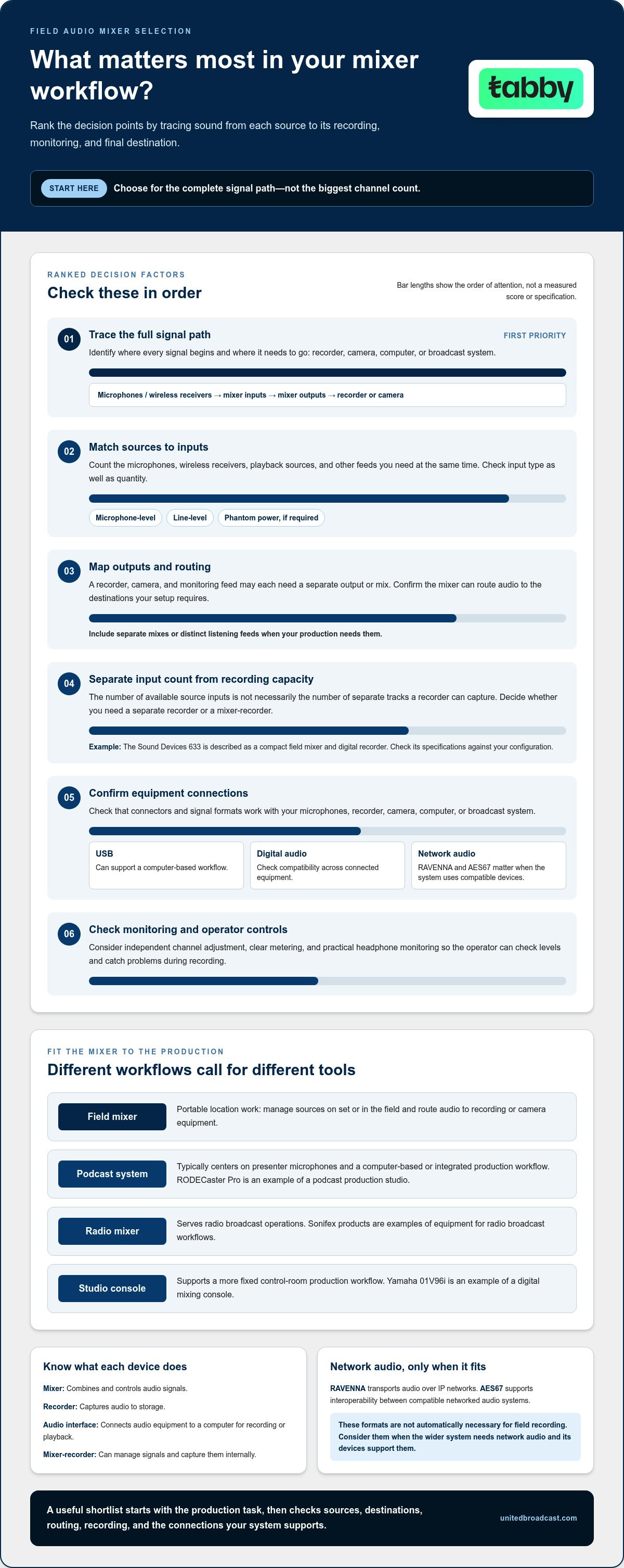
The mixer with the most inputs isn’t automatically the right choice for your production. If you’re comparing filed audio mixers, start by tracing how sound moves through your setup: from microphones and wireless receivers to a recorder, camera, computer, or broadcast system.
Channel counts are easy to compare, but they don’t tell you whether a mixer suits your workflow. A portable field mixer is built for a different job than a podcast production system, studio console, or radio mixer, even when their features overlap. The right fit depends on your sources, required outputs, recording needs, monitoring, and the connections your other equipment supports.
This guide explains how to match a mixer category to your production, assess signal flow and connectivity, and compare the capabilities that matter for field recording, podcasts, radio, and broadcast work. Examples such as the Sound Devices 633, RODECaster Pro, Yamaha 01V96i, and Sonifex radio mixers illustrate distinct workflows, helping you build a shortlist based on intended use.
Key Takeaways
- Choose filed audio mixers by tracing the full signal path, from each source to its recording, monitoring, and destination requirements.
- Use your microphones, wireless receivers, and other sources to determine the input types and capacity your setup needs.
- Compare field, podcast, radio, and broadcast mixer categories by workflow, portability, routing, and integration needs rather than by label alone.
- Build a practical shortlist to avoid choosing equipment based only on channel count or an impressive feature list.
- Compare mixer options by intended production use and consider how each fits into your wider media system.
What Is a Field Audio Mixer, and Which Production Problem Does It Solve?
A field audio mixer manages and combines audio signals during location production. It gives the sound operator control over sources such as microphones and wireless receivers, then routes the audio to a recorder, camera, or other destination. This helps keep levels and monitoring under control when the crew is working away from a fixed studio setup.
A mixer isn’t necessarily a recorder. A recorder captures audio to storage, while an audio interface connects audio equipment to a computer for recording or playback. A fixed studio console is designed around a more permanent control-room workflow. Some equipment combines these roles: the Sound Devices 633, for example, is a compact field mixer and digital recorder. Its design and connections, not its label alone, determine how it can fit into a production.
At a glance
- Portable location mixing: Manage audio sources on location and route them to recording or camera equipment.
- Studio or broadcast mixing: Control audio as part of a more fixed production system, with routing and integration shaped by that workflow.
How does a field mixer fit into a production signal path?
A straightforward signal path is microphones or wireless receivers → mixer inputs → mixer outputs → recorder or camera. At the mixer, the operator sets gain to bring each source to a usable level, controls channels independently, and routes audio to the intended destination. Headphones or another listening output help the operator catch problems before they reach the recording.
These stages can overlap in one device. A mixer-recorder can manage signals and capture them internally, while a device connected to a computer may also provide interface functions. For a foundation in how signals are combined and controlled, see these principles of audio mixing. To choose a setup, identify where each signal needs to go and which device performs each task.
Which production workflows use different mixer types?
Location sound prioritizes a manageable setup for capturing audio on set or in the field, with practical connections to recording and camera equipment. Podcast production typically centers on presenter microphones and a computer-based or integrated production workflow. Radio mixers serve broadcast operations, while studio consoles support control-room production. These categories can share functions, but they’re designed for different working environments.
The collection illustrates the differences: the Sound Devices 633 is a field mixer and recorder; RODECaster Pro is a podcast production studio; Yamaha 01V96i is a digital mixing console; and Sonifex products serve radio broadcast workflows. They aren’t interchangeable just because each handles audio. When comparing filed audio mixers, begin with the production task, then trace the complete signal path before settling on a category or product.
Which Mixer Features Matter Most for Your Recording Workflow?
Start with the sources and destinations in your production, then compare mixer features against them. A long specification list won’t help if the mixer can’t accept your microphones, provide the outputs your recorder needs, or let the operator monitor the right signals. A useful comparison of filed audio mixers considers the complete setup, not just the headline channel count.
How many inputs, outputs, and recording tracks do you need?
Count the sources you need to capture at the same time. Include each microphone, wireless receiver, playback source, or other feed, then allow for any additional sources your location setup may require. Check input types as well as quantity: microphone-level and line-level sources may need different connections or settings.
Next, map every destination. A recorder, camera, and monitoring feed may each need a separate output or mix. Keep physical connections distinct from recording capacity: the number of inputs available for sources isn’t necessarily the number of separate tracks a recorder can capture. A mixer-recorder may combine mixing and recording. The Sound Devices 633 is described in the collection as a compact field mixer and digital recorder; compare its specifications with the needs of your particular configuration.
Which connectivity and control features should you compare?
Match the mixer’s connectors and controls to the rest of your equipment. Check that microphone inputs suit your mics, including whether phantom power is required, and that line-level connections work for other sources. Confirm that outputs can feed the recorder, camera, computer, or broadcast system without an unsuitable adapter or unplanned signal conversion.
USB connectivity can support a computer-based workflow, while digital audio connections and networked audio are useful in setups designed for them. RAVENNA transports audio over IP networks; AES67 is a standard that supports interoperability between compatible networked audio systems. Neither is automatically necessary for field recording. Consider these options when the wider system needs network audio and its devices support the relevant formats.
Assess monitoring and controls in the context of the operator’s work. Independent channel adjustment can help manage changing sources, while clear metering and practical headphone monitoring support level checks during recording. If several people need distinct listening feeds, or the production requires separate mixes, include those needs in your output and routing plan.
Checklist: Match each microphone or receiver to an input type, every recorder or camera to an output, track capacity to simultaneous recordings, monitoring to operator needs, and USB, digital, or network connections to a real system requirement.
Use this checklist as you compare audio mixer options by workflow and connectivity.
Field Mixer vs Podcast, Radio, and Broadcast Console: How to Compare
Choose by production environment and signal path, not by the word “mixer” in a product name. Filed audio mixers serve a different working context than podcast production systems or fixed broadcast consoles, although some functions overlap. Compare how each option handles your sources, outputs, operator position, and recording or system-integration needs.
Workflow comparison
- Location sound: Supports mobile operation, source control, and connection to a recorder or camera. Portability and access to controls matter during production.
- Podcast production: Organizes a presenter-focused workflow. A production studio may combine mixing with other production functions, so assess how it fits your recording and computer setup.
- Radio broadcast: Serves a broadcast operation where source routing and integration with the station’s signal path are central considerations.
- Fixed studio or broadcast control: Suits a more permanent working position, where routing and connection to the wider system may matter more than portability. For fixed workflows, also consider how the mixer fits within your wider broadcast studio gear setup.
This is a comparison of intended use, not a ranking. A console, interface, or production studio may suit a production better than a compact field unit if its workflow and connections match the job. A fixed console, in turn, may add unnecessary complexity to a location recording kit.
When is a compact field mixer the more relevant choice?
For location recording, the operator may need to manage sources close to the production while sending audio to a separate recorder or camera. A compact design can suit mobile operation, but portability alone doesn’t establish compatibility. The Sound Devices 633 is a collection example described as a compact field mixer and digital recorder. Before shortlisting a field unit, compare its connections, routing, monitoring, and recording functions with the production’s requirements.
When do podcast, radio, or studio products fit better?
The RODECaster Pro is described as a podcast production studio, so assess it in that context rather than treating it as a generic field-mixer equivalent. The Yamaha 01V96i is a digital mixing console with USB 2.0 connectivity, which may matter to workflows that use that connection. Neither description alone establishes a fit for every setup; the surrounding equipment and required signal flow still matter.
For radio, Sonifex S1 and Sonifex S0v2 are examples of radio broadcast mixers. Compare each model’s documented connections and functions against the station’s system instead of assuming the products are interchangeable. This keeps the decision grounded in requirements rather than labels.
How to Shortlist a Mixer and Avoid Common Buying Mistakes
A strong shortlist starts with the production, not the product category. Write down what needs to connect, where each signal must go, and how the equipment will be operated. This keeps searches for filed audio mixers focused on the workflow instead of channel counts or features that may not apply to the job.
What should you confirm before making a shortlist?
Use this five-step process to turn your requirements into a practical comparison:
- 1. Map your sources. List the microphones, wireless receivers, playback sources, and other feeds used at the same time. Note the connection type each source provides.
- 2. Define your destinations. Identify whether audio must reach a recorder, camera, computer, broadcast system, or more than one destination. Include monitoring feeds in the plan.
- 3. Choose the workflow category. Decide whether the setup is for mobile location recording, podcast production, radio, or fixed studio and broadcast control. Compare products within a suitable category before considering cross-category options.
- 4. Compare the required features. Match inputs, outputs, routing, monitoring, and recording functions to the sources and destinations you mapped. Separate must-have capabilities from optional conveniences.
- 5. Validate integration. Review the product’s stated specifications against the connections and operating context of your existing equipment. Consider who will operate the mixer and whether the setup is mobile, fixed, or networked.
Which common mixer-buying mistakes can you avoid?
Channel count is only one part of the decision. A mixer may have enough inputs on paper but still lack a connection or output route the production needs. Trace the full signal path, including how the operator will monitor sound and how audio reaches each recording or broadcast destination.
Don’t assume that a mixer and recorder are interchangeable. Some products combine both roles, while others require a separate recorder or interface. Check each product’s stated functions rather than inferring them from its category name. A podcast production studio, radio mixer, and location mixer may all handle audio, but they’re designed around different operational requirements.
Also distinguish essential requirements from features that would simply be convenient. A network connection, for example, should solve a defined integration need rather than appear on the checklist by default. Keep the shortlist focused on products that support the required workflow and connections, then compare their relevant controls and routing. This helps you spot compatibility issues before making a choice.
Browse the audio mixer collection to compare options against your production requirements.
Top Audio Mixers in the Collection and Next Steps
A useful shortlist reflects distinct production workflows, not a universal ranking. The examples below represent field recording, podcast production, console operation, and radio broadcast. Use each description as a starting point, then compare the product’s stated functions and connections with the requirements of your system.
Which collection products illustrate different audio workflows?
- Sound Devices 633: A compact field mixer and digital recorder for production sound. It’s the field-oriented example here, combining mixing and recording functions in a product described for location work.
- RODECaster Pro: A podcast production studio. Consider it for a podcast workflow rather than as a generic equivalent to a portable location mixer.
- Yamaha 01V96i: A digital mixing console suited to studio-control workflows. Its console role makes it a different category from a compact field mixer.
- Sonifex S1: A radio broadcast mixer example for buyers assessing equipment intended for radio operations.
These products aren’t interchangeable just because they all handle audio. A podcast production studio and a radio mixer serve different working contexts, while a console may suit a fixed control position better than mobile location recording. Compare filed audio mixers by how they support production sound, not just by the category wording in a listing.
How can buyers move from shortlist to a complete system?
Once a product fits the intended workflow, assess the surrounding system. Confirm that microphones and other sources connect appropriately, operators can monitor the audio they need, and outputs reach the intended recorder, camera, computer, or broadcast destination. If the selected mixer also records, account for that function when planning how audio is captured and managed.
For a mobile broadcast system, such as an OB van, consider how the mixer fits into the broader system design and how its connections support the other equipment. UBMS provides technical support, repairs, and system integration for professional media workflows. Integration planning can align components and signal paths across a larger setup, rather than treating the mixer as an isolated purchase.
Before finalizing your shortlist, summarize the production role, source requirements, destination equipment, monitoring needs, and operating environment. Compare product information against that list. This keeps the decision grounded in practical fit and helps distinguish a field-oriented mixer-recorder from podcast, studio, and radio options.
Turn Your Mixer Shortlist Into a Working Setup
Before selecting filed audio mixers, turn your production plan into a practical system outline. Note where audio will be captured, who will operate the equipment, and how signals need to reach the next stage of your workflow. This gives you a clear basis for comparing options across field recording, podcast production, radio, and broadcast without assuming one mixer category suits every job.
The collection covers these different workflows, while UBMS technical support and system integration can help with professional equipment decisions and wider system planning. A well-matched setup should serve the production you run now and work with the equipment already in place.
Choose a setup around your signal path. Explore the audio mixer collection to compare options for your production workflow.
Frequently Asked Questions
What is the difference between a field mixer and an audio recorder?
A field mixer shapes and routes live audio sources, while a recorder captures audio for later editing or playback. For example, a production may use a mixer to prepare a feed for a camera while a separate recorder saves tracks independently. Some units combine both roles. Check whether a product records internally, what signals it can capture, and whether it provides the controls your operator needs during the take.
Can a field audio mixer connect directly to a camera?
Yes, if the mixer’s output and the camera’s input are compatible with the intended signal. Compare their connection types and signal requirements, then consider whether the camera can receive the mix at the level it expects. A cable that physically fits doesn’t prove that levels or routing are correct. Plan how the camera operator will monitor incoming audio and whether a separate recording destination is part of the setup.
How many inputs should an audio mixer have?
Choose enough inputs for every source you need to use simultaneously, plus any planned additional source. A two-person interview, for instance, may need separate microphone inputs, while a production with wireless receivers or playback sources needs to account for those too. Check connector and signal-type compatibility as well as quantity. For filed audio mixers, the useful input count is the one that supports the actual shoot, not the largest number on a product page.
Can one mixer work for field recording and podcasting?
Sometimes, but the best fit depends on how each production is operated. A location crew may prioritize mobile handling and connections to production recording equipment, while a podcast setup may be organized around presenters and computer-based production. A product described as a podcast production studio, such as the RODECaster Pro, has a distinct intended role. Compare its documented functions with your field workflow before treating it as a substitute.
What is AES67 in audio production?
AES67 is a standard for interoperability in audio-over-IP systems. It can matter when compatible devices need to exchange audio over a network, such as in a facility with networked routing between production spaces. Its value depends on the system design and the formats supported by connected equipment. If your recording chain is a self-contained mobile setup without network audio, AES67 may not affect your mixer choice.
Is a USB audio interface the same as an audio mixer?
No. An interface connects audio equipment with a computer-based recording or playback system; a mixer provides controls for handling and routing audio signals. Some products combine these capabilities, so assess the specific workflow rather than relying on the name. The M-Audio M-Track Duo HD is described as an audio interface, making computer connection a key consideration. Check its stated inputs, outputs, and software requirements against your recording setup.
What should I check before integrating a mixer into a broadcast system?
Document how audio travels from sources through the mixer to monitoring and destination equipment, including any networked links. Then assess how the mixer fits the wider system’s routing and operating requirements. In a larger broadcast environment, integration involves more than selecting a console: the equipment needs to work as part of a coordinated setup. United Broadcast & Media Solutions provides system integration services for broadcast environments, alongside technical support for professional equipment.


