





Long-Term Value of Professional Broadcast Gear: A Buyer’s Guide
What if the equipment with the lowest purchase price costs more to own over time? For broadcast teams, the long-term value of professional broadcast gear depends on more than the initial invoice. A camera, lens or studio component can become an expensive choice if it disrupts established workflows, limits practical upgrade options or contributes to avoidable downtime.
Purchase price is a useful starting point, but it doesn’t show the full ownership picture. To compare equipment fairly, consider how it will fit the workflow, connect with existing systems, be maintained and adapt as production needs change.
This guide covers how to match equipment to current and planned production needs, evaluate upgrade paths and assess integration as broadcast workflows evolve from SDI toward IP-based systems. It also explains how technical support and system integration can factor into operational continuity, so you can make a decision based on how the equipment will work in your environment, not just its specifications.
Key Takeaways
- Assess the long-term value of professional broadcast gear by considering its contribution to the workflow and the demands of owning and supporting it, not purchase price alone.
- Map production requirements to equipment features, interfaces, formats, controls and signal-chain compatibility.
- Compare new gear, used equipment and extending an existing system by reviewing condition evidence, supportability, integration effort and upgrade flexibility.
- Use a structured procurement checklist to identify operational implications before making an equipment decision.
- Consider how equipment sales, integration and repair support fit into your broader workflow and ownership plan.
What Does Long-Term Value Mean for Professional Broadcast Gear?
The long-term value of professional broadcast gear reflects the useful service equipment provides, how it contributes to the workflow and the effort involved in owning and supporting it. It isn’t a promise of a fixed service life or a particular financial return. It’s a way to judge whether a camera, lens, lighting fixture or studio component continues to meet real production needs without creating avoidable friction.
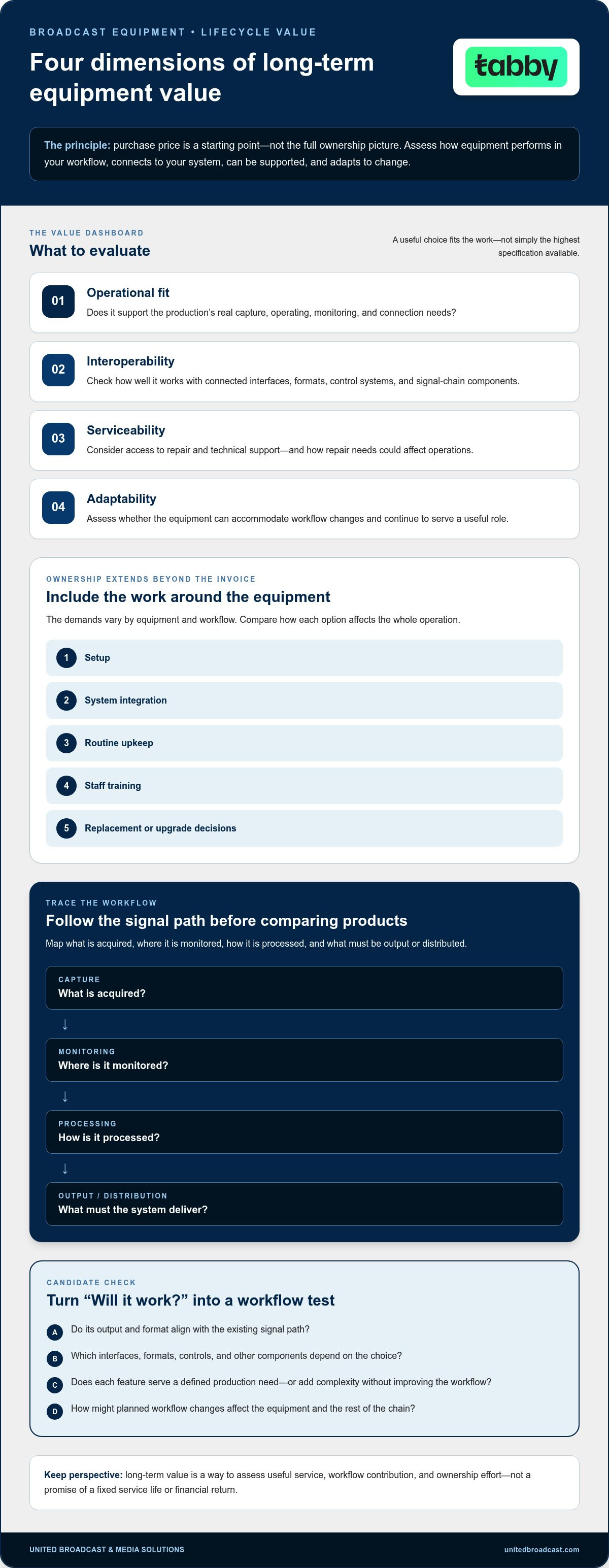
Four dimensions make that assessment practical: operational fit, or how well the equipment serves the production; interoperability, or how effectively it works with connected systems; serviceability, including access to repair and technical support; and adaptability, or how well it can accommodate workflow changes. Long-term value comes from choosing the right specification for the work, not simply the highest specification available.
Why purchase price alone gives an incomplete picture
Purchase price is only one part of ownership. Planning also needs to account for setup, system integration, routine upkeep, staff training and eventual replacement or upgrade decisions. The demands vary by equipment and workflow, so compare how each option affects the whole operation rather than focusing on one line of the budget.
Consider a camera feeding a monitoring setup. It may meet the image requirements, but if its output or format doesn’t align with the existing signal path, additional configuration or equipment may be needed. A lower initial outlay can therefore bring compatibility trade-offs or extra work. Trace the route from capture to monitoring before purchase to identify those requirements early.
What makes equipment valuable across a working life?
Useful equipment performs against the requirements of its working environment. A camera selected for a controlled studio workflow may face different demands from one used in changing production conditions. In either case, ask whether its capabilities support the required capture, operation and connection to the rest of the system. A specification sheet that leads in every category isn’t the goal if those features don’t serve the production.
Compatibility and service access matter, too. Check how equipment connects with existing interfaces, formats, control systems and signal-chain components, then consider how a repair could affect operations. The wider discipline of Broadcast Engineering Principles helps explain why capture equipment is part of a connected technical system, not an isolated purchase.
For camera-specific considerations, explore the professional video camera range. Assessing a camera alongside its supporting gear helps clarify which capabilities are essential and which may add complexity without improving the workflow. That distinction gives procurement teams a stronger basis for comparing options and planning for change.
How Workflow Fit, Interoperability, and Support Shape Equipment Value
Equipment earns its place in a broadcast system by doing the work the production requires. A feature matters when it supports a defined task, such as capturing the required image, enabling monitoring or fitting a control-room operation. If it adds complexity without serving a workflow need, it may have limited operational value, even if it looks impressive on a specification sheet.
Workflow fit is a practical starting point for assessing the long-term value of professional broadcast gear. Map the signal path before comparing products: what is acquired, where it is monitored, how it is processed, and what must be output or distributed? Include the people operating the system and the procedures they rely on. This reveals dependencies that a standalone product comparison can miss.
Match capabilities to the real production workflow
Consider a broadcast camera feeding a studio chain. Its output must suit the monitoring path, connect to the relevant processing equipment and support the studio’s operating and control requirements. A mismatch at any point can require extra configuration or disrupt a familiar workflow. List essential requirements first, then separate them from optional features that don’t solve a current production need.
For each candidate, trace the path from acquisition to output. Record the interfaces and formats involved, how operators control the equipment and which other components depend on those choices. This turns “Will it work?” into a more useful question: “Will it work with this signal chain, for this production, and remain manageable as the workflow changes?”
Assess integration and future adaptability
Interoperability is a lifecycle criterion, not just an installation detail. It affects whether equipment can continue to contribute as connected systems and workflows evolve. Review current interfaces, formats and control requirements alongside planned changes. The SMPTE Standards for Interoperability provide a reference point for understanding how industry standards support connections between professional media systems.
Technical evolution doesn’t mean every new standard requires immediate replacement. Identify which changes affect your productions, which components sit at the relevant transition points and whether existing equipment can continue to serve a useful role. A planned move to a different signal or network architecture calls for an assessment of the full chain, not an assumption that every connected device must be replaced at once.
System integration can align equipment choices with the broader broadcast environment, including signal flow, control and the way operators use the system. For studio planning, compare the camera and its connected components with the needs described in this broadcast studio gear guide. Bringing workflow requirements into the equipment discussion can clarify integration needs before they become operational obstacles.
How to Compare Professional Gear by Lifecycle Value
New equipment, used gear and targeted upgrades can each be sound choices. None is automatically the best option. The right decision depends on the production requirement, the evidence available about condition and compatibility, and the operational work needed to put the choice into service.
Compare options against the same criteria. Record what is known, what still needs testing and which assumptions inform the evaluation. This keeps an appealing feature list or lower acquisition cost from outweighing practical concerns such as integration effort, operator readiness and supportability.
New, used, or upgrade: compare the trade-offs
For new gear, assess how it meets current production requirements, fits the existing system and can be supported. For used equipment, review inspection findings, functional test results, service history and compatibility with connected components. For an upgrade, define the specific workflow limitation first, then determine whether a targeted change addresses it without creating new dependencies.
A camera decision should account for its role in the production chain, not just its image capabilities. Compare the professional video camera range against your team’s capture requirements, connected equipment and support needs.
Use a like-for-like evaluation table
Use a consistent scale, such as “meets,” “partly meets” or “evidence needed.” Add notes to explain each rating. Standards documentation, including IEEE Broadcast Technology Standards, can also inform technical discussions about interfaces and system requirements. Treat the table as a decision aid, not a substitute for testing equipment in its intended workflow.
| Criterion | New equipment | Used equipment | Extend existing system |
|---|---|---|---|
| Workflow suitability | Does it meet current needs without unnecessary complexity? | Can it perform the required role in the actual workflow? | Does the targeted change resolve a defined limitation? |
| Condition evidence | Document configuration and acceptance testing. | Review inspection, testing and service records. | Assess the condition of the equipment that will remain in use. |
| Supportability | Understand available support arrangements. | Establish what repair and technical support can be accessed. | Consider the support needs of both existing and added components. |
| Integration effort | Map setup, configuration and operator training. | Check interfaces, formats, control and signal-chain fit. | Identify dependencies and configuration changes. |
| Upgrade flexibility | Assess how it can fit planned workflow changes. | Document constraints that may affect future use. | Check whether the change leaves a practical path for later updates. |
Include operational impact in the comparison: setup and testing requirements, staff familiarisation, workflow disruption and dependencies on other equipment. These considerations help reveal the long-term value of professional broadcast gear without relying on unsupported lifespan benchmarks or assumed savings. To apply the same evaluation to a planned purchase or system change, discuss your workflow requirements with UBMS.
A Practical Checklist for Assessing Long-Term Equipment Value
A procurement discussion is more productive when each option is judged against the same operational evidence. Use this sequence to document requirements, dependencies, ownership considerations and the assumptions behind a decision. It can help your team compare equipment purchases and system changes without reducing the discussion to headline specifications.
Build a requirement and compatibility baseline
- Define the production task. Describe what the equipment must do, who will operate it and which production conditions it must support. Separate essential requirements from useful but nonessential features.
- Record technical requirements. List required formats, interfaces, control functions and operating conditions. Include connected equipment and the item’s role in the signal chain rather than assessing it in isolation.
- Separate current and anticipated needs. Identify what the workflow requires now, then note planned changes that could affect the choice. Treat future possibilities as assumptions to document, not reasons to replace equipment pre-emptively.
- Map integration dependencies. Trace how the equipment connects to other components, how it is configured and whether staff need additional training. Note dependencies that could complicate installation or normal operation.
- Compare evidence for each option. Record what supports the decision: specifications, system documentation, test results, inspection findings, service history or repair considerations. Mark unknowns clearly so they don’t become unexamined assumptions.
Record lifecycle risks and decision triggers
- Assess operating implications. Consider setup, upkeep, operator familiarisation and the effect of a fault or repair on the workflow. Describe potential downtime in operational terms, such as which production tasks or connected components would be affected.
- Document upgrade paths and constraints. Note whether the option can accommodate relevant workflow changes, which components might need adjustment and what could limit continued use. Avoid assuming that a possible future standard requires immediate replacement.
- Set review triggers. Agree what would prompt the team to reassess the choice, such as a change in production requirements, a shift in support needs or recurring operational limitations. Tie the trigger to observable workflow evidence.
- Summarise the decision. Capture the preferred option, why it fits, key risks, evidence still needed and who owns follow-up actions. This record makes the decision easier to revisit as the system changes.
Apply the checklist to the full production chain. If lighting is part of the evaluated system, consider how fixtures and control fit the operating setup alongside cameras and studio components. The professional lighting equipment range is a relevant category to include in that assessment. A documented process helps teams judge the long-term value of professional broadcast gear against current work and realistic operational needs.
How UBMS Supports a Better-Informed Broadcast Gear Decision
Choosing equipment is easier when the decision includes the system around it. United Broadcast & Media Solutions (UBMS) supplies professional video cameras, digital cinema cameras, cinema lenses, professional lighting equipment and broadcast studio gear. Its system integration services and service center repairs add two practical considerations to procurement: how equipment fits into the broader environment and how repair support factors into ownership planning.
Founded in 1997, UBMS brings professional equipment sales, integration and repair support together. That history is useful context, not a promise of a particular equipment lifespan or uninterrupted operation. Buyers still need to define their production requirements and assess how each option fits their workflows.
Connect equipment selection with system integration
System integration considers how components relate across a broadcast environment. A camera needs to fit its production role and connect appropriately with monitoring and studio equipment. Lighting also affects the operating setup, while other broadcast studio gear may shape signal flow and control. Considering these relationships early helps buyers assess system fit before narrowing decisions to individual components.
In a procurement discussion, describe the work the equipment must support, the components it needs to connect with and any planned workflow changes. UBMS can connect equipment choices with system-level needs through its professional equipment sales and integration services. This frames the decision around the intended configuration rather than evaluating a camera or lighting component in isolation.
Include technical support in the ownership conversation
Repair support is another part of lifecycle planning. UBMS’s service center provides repairs and technical support for professional media equipment, giving buyers a relevant resource to include when considering ownership requirements. Support doesn’t remove operational risk or guarantee continuous availability, but it can be part of a plan for maintaining equipment and responding to repair needs.
Before deciding, identify which equipment is critical to the workflow, how a repair could affect operations and what support considerations belong in the ownership plan. These questions connect procurement choices with practical continuity planning. They also give teams a clearer basis for weighing the long-term value of professional broadcast gear alongside integration needs and the role each component plays in production.
UBMS brings equipment sales, system integration and service center repairs into the same conversation. Share the intended workflow, connected equipment and integration requirements to make the discussion specific to your system. Discuss your broadcast equipment requirements with UBMS.
Make Your Next Equipment Decision a Workflow Decision
Turn procurement into an ongoing planning practice. As production priorities change, revisit whether each system component still serves its intended role and whether upcoming projects introduce new demands. A short decision record shared across technical and operational teams keeps assumptions visible and helps identify when it’s time to discuss upgrades or integration.
This approach keeps the long-term value of professional broadcast gear connected to the work it needs to support, rather than treating a purchase as a one-time specification exercise. Start with an upcoming equipment decision and define the operational outcome your team needs. That gives everyone a clear basis for discussing options and planning the next stage of the workflow.
With a clear view of your requirements, you can move forward with greater confidence and build a system plan that supports your team’s next steps.
Frequently Asked Questions
Is professional broadcast equipment worth the investment?
Professional broadcast equipment can be worth the investment when its capabilities address real production demands and its operation fits the team’s workflow. Before deciding, identify the work it must support, who will use it and which connected systems depend on it. A feature that improves a recurring task may be more useful than a higher specification that has little effect on the productions your team delivers.
How do I calculate the total cost of ownership for broadcast equipment?
Build a total cost of ownership estimate by listing the purchase outlay and expected ownership requirements over a planning period chosen by your organisation. Include integration, setup, training, upkeep, repairs and eventual replacement planning. Use internal records or project estimates for each item, label uncertain figures and compare options using the same assumptions. The result is a planning tool, not a guaranteed prediction of future costs.
Can older broadcast gear still provide long-term value?
Yes, older broadcast gear can remain useful if its condition and capabilities suit the work assigned to it. Age alone doesn’t establish whether equipment fits a production. Review image or output consistency, test its controls and connections in the intended setup, and examine service records. If it supports a stable task without complicating the wider system, continued use may be a reasonable option.
What makes broadcast equipment future-ready?
Future-ready equipment fits current operations while offering a workable path for relevant changes. Look for clearly documented interfaces and formats, manageable configuration and compatibility with the system’s planned direction. Consider whether the team can maintain the equipment and operate it as workflows evolve. For teams following shifts in creator tech and AI innovations that could influence future workflows, media platforms like g3ar4ub.com offer useful context on modern production gear. No purchase can remove every future risk, so connect “future-ready” to specific, realistic plans rather than assuming every emerging technology will be required.
When should broadcast equipment be repaired instead of replaced?
Repair may be appropriate when a technical assessment identifies a fixable fault and the equipment can still meet its assigned production role. Compare the repair scope and expected operational disruption with the work required to replace and integrate another unit. Also consider whether the same issue is recurring and whether the equipment’s connections remain suitable. A qualified service assessment can help inform the decision without presuming the outcome.
How does system integration affect the value of broadcast gear?
System integration affects value by determining how well a component functions alongside the rest of the broadcast environment. A camera may meet production needs but still require configuration to work with monitoring, control or processing equipment. Reviewing those dependencies before deployment can expose training needs and workflow changes. Integration is especially relevant when a purchase affects multiple connected components rather than a single operator’s workstation.
Does technical support contribute to equipment’s long-term value?
Yes, technical support can contribute by helping teams address repair needs and understand equipment requirements during ownership. It’s one part of lifecycle planning, not a guarantee that operation will be uninterrupted. Consider how a fault would affect scheduled work, what repair support is relevant to the equipment and how a service decision fits the system plan. UBMS provides service center repairs and technical support for professional media equipment.
To discuss professional cameras, studio equipment, system integration or repair support for your workflow, contact UBMS.


