





When to Repair vs. Replace a Professional Camera: A Decision Guide
A camera failure doesn’t automatically mean it’s time to replace the body. If the fault is repairable and the camera still meets production requirements, repair may be the more practical choice. But when to repair vs replace a professional camera depends on more than the fault: downtime risk, serviceability, reliability, and fit with your workflow all matter.
It’s understandable to hesitate. A repair may seem like the lower-risk option, yet repeated faults or missing capabilities can create bigger problems on set. This guide gives you a practical way to compare repair with replacement, assess the camera against current production needs, and account for the operational cost of downtime.
You’ll also learn how specialist diagnostics can clarify the camera’s condition and inform the next step. United Broadcast & Media Solutions provides professional equipment repairs and support through authorized ARRI and Sony service centres, alongside professional camera sales. The aim is to make a decision based on the camera’s condition and production demands: repair a fault when the camera still fits the work, and consider replacement when it doesn’t.
Key Takeaways
- Start with the fault’s effect on the camera’s production role. A repairable fault is different from a capability gap that affects delivery.
- To decide when to repair vs replace a professional camera, weigh serviceability and reliability against the capabilities your workflow requires.
- Compare repair, replacement, and further assessment by considering downtime exposure and production disruption.
- Record symptoms, operating conditions, and recurring error messages to give a specialist useful diagnostic context.
- A professional assessment can clarify the fault’s scope and help you choose based on the camera’s condition and production needs.
When to Repair vs. Replace a Professional Camera: Start With the Production Problem
Start by identifying the fault’s effect on production, then compare that impact with the camera’s required role. A malfunction that interrupts a camera which otherwise meets the brief may justify service. A capability gap that prevents the camera from meeting delivery requirements may point toward replacement. This keeps the decision tied to production rather than age or upgrade pressure alone.
In production terms, repair when a fault interrupts a camera that still meets the brief; consider replacement when limitations or reliability prevent it from meeting the brief. A camera can remain useful in an assigned role if it performs that role reliably. A newer body, on the other hand, may still be the wrong fit if it cannot support the workflow.
For broader context on camera categories and roles, explore United Broadcast & Media Solutions’ professional video cameras.
Is the fault isolated, recurring, or affecting image capture?
Describe what the camera does and how it affects the shoot. Note whether the issue happened once or keeps returning, and whether it interrupts recording, controls, connections, or image capture. For example, a fault that can be worked around during a noncritical setup has a different operational impact from one that repeatedly stops a critical take or makes footage unusable.
These observations help define the production impact, but they don’t establish the internal cause. Avoid opening the camera or attempting internal repairs. A specialist inspection and testing can distinguish an external symptom from a fault that needs technical assessment.
Does the camera still meet the production brief?
Compare the camera’s actual capabilities with the project’s delivery specifications and operating demands. Consider the required formats, recording duration, integration with existing equipment, and conditions in which the camera must operate. If it meets these requirements reliably, a preference for a newer interface or feature alone may not justify replacement.
A capability gap is different from a fault: if the camera cannot produce the required deliverable or fit the established workflow, repair won’t resolve that limitation. The Digital Camera Technology overview provides background on camera components and types, useful context when considering how equipment serves different roles.
Age is context, not a verdict. An older camera may remain suitable in a secondary or specialist role, while a newer unit with recurring interruptions may undermine a time-sensitive production. Assess the specific camera against the work it must do, rather than relying on a general lifespan estimate or the arrival of newer technology.
Before choosing, write down:
- The symptom and when it occurs.
- Whether the issue has recurred or disrupted scheduled work.
- Which production requirement, if any, the camera no longer meets.
- How the fault affects recording, controls, connections, or captured images.
This concise record creates a useful starting point for specialist assessment. It also keeps the central question practical: does the camera need a fault corrected, or does production need equipment with different capabilities?
What Determines Whether a Professional Camera Is Repairable?
A camera’s repair prospects depend on the fault, how far it extends, and whether the model can be serviced effectively. A visible symptom doesn’t reveal whether the cause is isolated, whether other functions are affected, or whether repair is practical. Specialist inspection and testing help establish the fault’s scope before you weigh repair against replacement.
A repair decision depends on the diagnosed fault and the camera’s operational requirements. Assess more than whether the camera powers on: the result must support the reliability and workflow the production needs.
Which camera faults warrant specialist diagnostics?
Intermittent operation, recording failures, unresponsive controls, connection problems, and physical damage are all reasons to seek an assessment, especially when they disrupt work. Symptoms alone don’t prove that a particular component has failed or that repair is feasible. A technician can inspect and test the camera to clarify what is happening instead of drawing a conclusion from a symptom description alone.
Sensor cleaning is a maintenance task, not a substitute for repair diagnosis. If image issues continue or appear alongside other operating problems, a service assessment can help distinguish a cleaning requirement from a fault that needs further investigation. Avoid opening the camera or attempting internal repairs, which can complicate assessment or cause additional damage.
How do serviceability and system compatibility affect the decision?
Serviceability includes the scope of the work and the availability of suitable parts and service support. These factors affect whether repair is a workable option, but they can’t be determined from the camera’s age alone. A specialist assessment can clarify the service considerations and provide findings to inform the repair-or-replace decision.
Also account for the camera’s place in the wider system. Replacing a body may affect compatibility with lenses, accessories, media, monitoring, or an established workflow. Retaining compatible equipment can matter operationally, while a replacement that better fits current requirements may justify changes elsewhere in the setup.
Production urgency makes clarity especially valuable. If the camera is needed for scheduled work, uncertainty about the fault can complicate planning. A defined service assessment helps decision-makers consider the findings alongside the camera’s role, required reliability, and any workflow changes a replacement would involve.
- Fault scope: Is the issue isolated, or does testing identify wider concerns?
- Serviceability: What do the findings indicate about the required work, parts, and service support?
- System fit: What existing equipment or workflow depends on this camera?
- Production urgency: How does the decision affect upcoming operational requirements?
United Broadcast & Media Solutions provides broadcast equipment repair and support through authorized ARRI and Sony service centres. For a professional camera assessment to help inform your next step, get in touch with UBMS.
Compare Repair and Replacement Against Reliability, Downtime, and Workflow
A useful comparison looks beyond the immediate fault. Consider how each option affects dependable operation, exposure to production delays, required capabilities, and the systems and people around the camera. Further assessment is also a valid option when the fault or its operational impact isn’t clear enough to support a decision.
Age alone is a weak reason to replace a camera; its value depends on whether it can perform its production role reliably. The question of when to repair vs replace a professional camera is best answered by comparing the equipment’s condition and fit with the work and risk involved in each path.
| Decision factor | Repair | Replace | Further assessment |
|---|---|---|---|
| Reliability | May suit a camera with a defined fault and a useful ongoing role. | May suit a camera whose reliability no longer supports the work. | Clarifies fault scope and informs reliability expectations. |
| Downtime exposure | Service work may interrupt access to the camera. | Transition and setup can also affect scheduled work. | Helps plan around the issue before committing to either path. |
| Required capabilities | Addresses a fault, not a capability gap. | Can address a persistent gap affecting delivery or operation. | Compares current performance with the production brief. |
| Workflow disruption | May preserve familiar settings, accessories, and operator practices. | May require migration, compatibility work, or training. | Identifies what could be affected by either choice. |
Think in terms of total ownership, not just the immediate service task or purchase. Include repeat interruptions, future support considerations, setup and integration work, operator learning, and how long the camera is expected to remain useful in its assigned role. You don’t need to assume a price threshold. Instead, build a clear picture of operational consequences across the equipment’s working life.
When can repair preserve a camera’s useful production role?
Repair may be appropriate when assessment identifies a defined fault and the camera still meets the production brief. Keeping it in service can preserve established settings, compatible accessories, and operator familiarity, reducing the need to change a known workflow. These are potential advantages, not a promise of restored performance. A qualified service assessment must establish the fault and inform what repair may achieve.
When does replacement better address the production requirement?
Consider replacement when a persistent capability gap materially affects delivery or operation, or when the camera no longer fits the workflow. Compare the intended improvement with the work of migrating accessories and media, updating system integration, and preparing operators to use the new equipment. If replacement is the considered option, review the professional video camera range against the production requirements rather than treating newer equipment as an automatic upgrade.
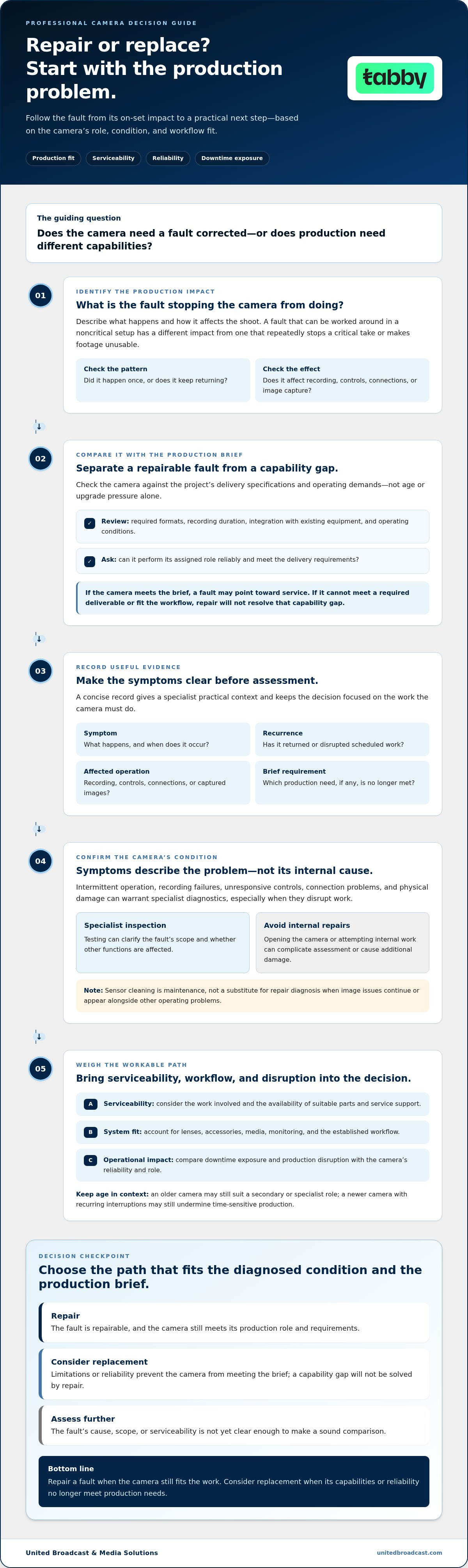
Use This Decision Framework Before Authorizing Repair or Replacement
Use a consistent sequence before committing to service or new equipment. It turns a vague equipment concern into a production decision supported by observed symptoms, operational requirements, and specialist findings. The question of when to repair vs replace a professional camera becomes easier to answer when you separate what’s wrong from what the job requires.
- Define the failure. Describe what the camera does, when the behaviour occurs, and whether it happens consistently or intermittently. Record error messages exactly as they appear.
- Assess production impact. Identify which tasks are interrupted, delayed, or at risk. Consider the consequences of losing this camera during a critical production activity, without assuming a particular financial cost.
- Confirm the requirements. Write down the camera’s required role, delivery needs, and dependencies, including connected equipment and established workflows. Separate essential requirements from future upgrade preferences.
- Obtain a service assessment. Use specialist findings to understand the fault’s scope, serviceability, and implications. Keep the assessment distinct from assumptions based only on symptoms or equipment age.
- Choose the operationally sound path. Compare the assessment with production needs, realistic downtime exposure, and the work involved in changing equipment. If important information remains unclear, defer the decision until it can be evaluated.
What information should you prepare for an equipment assessment?
Provide the camera model, a clear description of each symptom, and when it occurs. Note relevant operating conditions, recurring error messages, and any prior service history available. Explain the camera’s production role, required capabilities, and workflow dependencies, such as connected lenses, accessories, media, or other system components. Service history adds context, but it doesn’t determine the outcome of a new assessment.
How should teams weigh operational risk?
Consider whether a failure would interrupt a critical task, and identify what contingencies actually exist in the workflow. Don’t assume a spare camera or alternate setup is available. Compare the practical effect of service-related downtime with the work required to transition to replacement equipment, including configuration, compatibility, integration, and operator familiarization. Use the assessment to separate an immediate production need from a longer-term upgrade plan.
Decision matrix: Repair indicators include a defined fault, continued suitability for the production role, and a workflow that benefits from retaining the current setup. Replacement indicators include a persistent capability gap, repeated operational disruption, or a camera that no longer supports required work. If neither case is clear, further assessment is the prudent next step.
Get a Professional Camera Assessment Before Making the Final Decision
A specialist assessment can replace guesswork with a clearer view of the camera’s condition, the fault’s scope, and the options relevant to its production role. That information helps you compare repair with replacement on practical grounds: whether the issue can be addressed, whether the camera remains suitable for the work, and what each path means for the wider workflow.
An assessment isn’t a promise that a camera can be repaired or that it will meet every operational requirement afterward. Its value is in establishing informed next steps. For teams weighing when to repair vs replace a professional camera, a grounded technical view helps separate a repair decision from a capability or reliability concern.
What to expect from a clear service assessment
Prepare a concise account of the symptoms, when they occur, and how they affect operation. Include recurring error messages and relevant prior service history if available. Explain the camera’s production role and the requirements it must meet. This context helps relate the reported behaviour to the equipment’s practical use.
A service assessment can evaluate the equipment’s condition and clarify the fault’s scope and relevant next steps. Findings can inform whether repair is a practical option or whether the production requirement calls for a different solution. The assessment doesn’t predetermine the result. Manufacturer warranty obligations rest with the manufacturer; United Broadcast & Media Solutions acts as a retailer.
How to move forward with UBMS
Share the camera model, symptoms, and production requirements when discussing support. Describe whether the issue is intermittent or recurring, which functions are affected, and any constraints the camera’s role places on your team. Clear information connects the technical concern with the operational decision, rather than treating the camera as a fault in isolation.
United Broadcast & Media Solutions provides broadcast equipment repair and support through its authorized ARRI and Sony service centres. Its technical services support an informed assessment, while the decision to repair or replace remains guided by the camera’s condition and the work it needs to perform.
Use the assessment to clarify the immediate issue and its implications for production. If repair is considered, the findings can inform the next service steps. If replacement appears more appropriate, the same production requirements provide a practical basis for evaluating the change and its effect on your equipment setup. Neither option should be assumed before considering the camera’s condition and operational needs together.
For a focused discussion, have the model, reported symptoms, and production brief ready. This gives the assessment a useful starting point and keeps the decision connected to real requirements, not age or upgrade pressure alone.
Make the Next Camera Decision With Confidence
Use the decision as an opportunity to align equipment with the work ahead, not simply to react to the latest fault. A clear production brief can help your team distinguish an immediate repair need from a longer-term change in capability or workflow. That perspective keeps the question of when to repair vs replace a professional camera connected to operational priorities.
United Broadcast & Media Solutions brings more than 20 years of experience as a recognized broadcast systems integrator. That systems perspective can help frame camera support within the needs of your production setup, so the next step reflects the equipment’s role as well as its condition.
Share the camera model, its symptoms, and the requirements it needs to meet to begin a focused discussion about support.
A considered decision helps your team move forward with greater clarity and keeps production needs at the centre of the plan.
Frequently Asked Questions
Is it worth repairing a professional camera?
It can be, depending on the diagnosed fault, serviceability, production role, reliability needs, and whether the camera still meets its brief. A camera used for a noncritical angle may have different demands from one responsible for continuous coverage. Before authorizing work, compare the assessment findings with operating conditions and delivery expectations. There’s no universal age or price threshold; deciding when to repair vs replace a professional camera should be based on evidence and actual use.
How do I know when to replace a professional camera?
Consider replacement when the camera can’t meet an essential delivery or operating requirement, or recurring problems make dependable use difficult. For example, if the required format or workflow can’t be supported, servicing alone may not address the production gap. Include the work involved in migrating settings and media, maintaining compatibility with connected equipment, and training operators. Newer technology by itself isn’t a sufficient reason to replace a camera that still meets the brief.
Can a professional camera be repaired after repeated failures?
Repeated failures warrant specialist diagnosis, but they don’t prove that a camera is beyond repair. Similar symptoms can have different causes, and the outcome depends on the fault, affected components, serviceability, and the camera’s production role. Keep a record of when failures occur, what functions are affected, and any displayed messages. An equipment assessment can inform the options, but symptoms alone can’t establish the cause or guarantee a repair outcome.
Does camera age alone mean it should be replaced?
No. Age is one consideration, not a decision rule. A camera may remain suitable if it operates reliably and meets the current requirements for its assigned work. A newer model may still be necessary if the existing camera lacks an essential capability. Compare the actual delivery specification with what the camera can produce, rather than treating its purchase date or the release of a newer model as the deciding factor.
What should I tell a camera service centre about a fault?
Share the camera model, a clear description of the symptoms, when they occur, and any recurring error messages. Explain the camera’s production role and which operations are affected, such as recording, controls, or connections. Include prior service history if available, along with relevant operating conditions. These details give the service assessment useful context, but they don’t establish a diagnosis or guarantee that a specific repair will be appropriate.
Should I replace a camera if newer models have better features?
Not automatically. A feature improvement matters when it resolves a real production limitation or supports a required workflow. Compare the practical benefit with the work of migrating settings and media, maintaining compatibility with existing equipment, and preparing operators to use the new system. If the current camera continues to meet the brief, newer specifications may offer little operational value. Base the choice on requirements, not a model comparison alone.
Can a repair restore a camera to dependable production use?
That depends on the diagnosed fault, repair scope, and appropriate testing. A symptom description cannot confirm whether the camera will perform dependably after service, so avoid making production plans around an assumed result. Review the assessment in light of the camera’s assigned role and required operating conditions. A setup used for critical or sustained work may need a different reliability assessment from equipment used occasionally or for less demanding tasks.


