

Steadimate-S stabilization for camera operators
The Steadimate-S 15 System’s defining capacity is a 15 lbs (6.8 kg) payload, including the stabilizer, camera, lens and accessories. The Steadimate-S combines a single-handed stabilizer with body-worn support, pairing movement control with an arm that supports the setup. For operators assessing a Steadimate-S configuration, that full-build payload is a practical starting point.
Choosing a camera support system involves more than the camera body. Your lens and accessories affect the complete build, while the Steadimate-S collar and weighted base shape the rig’s configuration. This guide explains the system’s purpose, kit options, capacity and setup components so you can assess whether the Steadimate-S suits your camera workflow.
Key Takeaways
- Assess the complete camera build against the 15 System’s payload limit, counting the stabilizer, camera, lens and accessories.
- Understand how the support arm and stabilizer work across different axes, and what that can mean for operator movement.
- Review the kit components and mounting details to understand how the system fits into a camera setup.
- See how the collar and weighted base contribute to rig configuration and balance.
- Learn which factors shape the system’s cost and how to assess its value for your workflow.
Reducing operator fatigue
Handheld operation places the rig’s weight in the operator’s hands and arms. The Steadimate-S pairs a single-handed stabilizer with a body-worn stabilizer and support arm, changing how the load is carried during a take. It can reduce the effort of holding a camera continuously, especially during moving shots that require steady control.
What are the advantages and disadvantages of using the Steadimate-S? Advantages include arm support, panning and low-mode operation, and stabilization across different axes. Trade-offs include wearing and balancing additional equipment and staying within the selected system’s payload capacity.
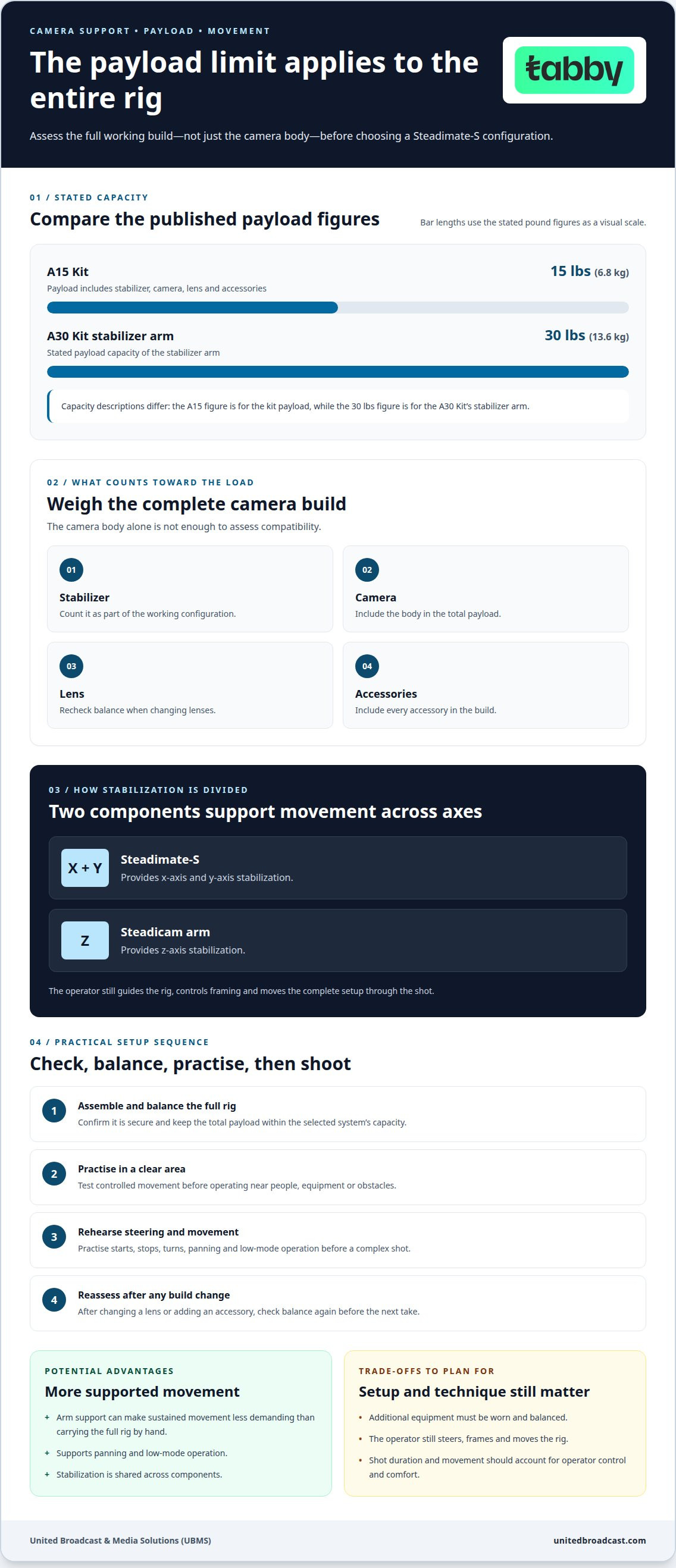
The system divides stabilization between components: the Steadimate-S provides x-axis and y-axis stabilization, while the Steadicam arm provides z-axis stabilization. This can help operators manage camera movement without relying on their wrists alone. It does not eliminate physical effort. The operator still guides the rig, controls framing and moves the complete setup through the shot.
During a tracking shot, the arm supports the stabilizer while the operator steers it with one hand. This can make sustained movement less demanding than carrying the full rig by hand. Paired with a single-handed stabilizer and body-worn stabilizer, the Steadimate-S also enables panning and low-mode operation. These options can help operators plan varied movement without switching to a separate handheld technique mid-shot.
- Fit the complete rig before a long take, including the stabilizer and camera accessories.
- Practise steering, panning and low-mode movement before filming a complex shot.
- Reassess balance after changing a lens or adding an accessory.
- Plan shot duration and movement around the operator’s control and comfort.
What safety and operating precautions should you follow with the Steadimate-S? Confirm the rig is securely assembled and balanced before use, and keep its total payload within the selected system’s capacity. Practise controlled movements in a clear area before operating near people, equipment or obstacles.
Payload matters because the arm supports a defined load, not just the camera body. The A15 Kit supports 15 lbs (6.8 kg), including the stabilizer, camera, lens and accessories. The A30 Kit’s stabilizer arm supports 30 lbs (13.6 kg). Weigh the full working configuration, then select the system that accommodates it without exceeding its stated capacity.
Comfort also depends on setup and technique. Keep the camera configuration consistent during practice, then test deliberate starts, stops and turns. If a lens or accessory changes, reassess balance before the next take. First presented at NAB 2019, the Steadimate-S supports panning and low-mode operation for movement-heavy shots.
Reducing operator fatigue
Handheld operation places the rig’s weight in the operator’s hands and arms. The Steadimate-S pairs a single-handed stabilizer with body-worn support and an arm, changing how the load is carried during a take. It can reduce the effort of holding a camera continuously, especially during moving shots that demand steady control.
What are the advantages and disadvantages of using the Steadimate-S? Advantages include arm support, panning and low-mode operation, and stabilization across different axes. Trade-offs include wearing and balancing extra equipment and staying within the selected system’s payload capacity.
The system divides stabilization between components: the Steadimate-S provides x-axis and y-axis stabilization, while the Steadicam arm provides z-axis stabilization. This can help operators manage camera movement without relying on their wrists alone. It does not eliminate physical effort. Operators still guide the rig, control framing and move the complete setup through each shot.
During a tracking shot, the arm supports the stabilizer while the operator steers it with one hand. This can make sustained movement less demanding than carrying the full rig by hand. Paired with a single-handed stabilizer and body-worn stabilizer, the Steadimate-S also enables panning and low-mode operation. These options let operators plan varied camera movement without switching to a separate handheld technique mid-shot.
- Fit the complete rig before a long take, including the stabilizer and camera accessories.
- Practise steering, panning and low-mode movement before filming a complex shot.
- Reassess balance after changing a lens or adding an accessory.
- Plan shot duration and movement around the operator’s control and comfort.
What safety and operating precautions should you follow with the Steadimate-S? Confirm the rig is securely assembled and balanced before use, and keep its total payload within the selected system’s capacity. Practise controlled movements in a clear area before operating near people, equipment or obstacles.
Payload matters because the arm supports a defined load, not just the camera body. The A15 Kit supports 15 lbs (6.8 kg), including the stabilizer, camera, lens and accessories. The A30 Kit’s stabilizer arm supports 30 lbs (13.6 kg). Weigh the full working configuration, then choose the system that accommodates it without exceeding its stated capacity.
Comfort also depends on setup and technique. Keep the camera configuration consistent during practice, then test deliberate starts, stops and turns. If a lens or accessory changes, reassess balance before the next take. First presented at NAB 2019, the Steadimate-S provides panning and low-mode options for operators planning movement-heavy shots.
Steadimate-S 15 System capacity
The A15 Kit’s stabilizer arm supports a payload of 15 lbs (6.8 kg). That total includes the stabilizer, camera, lens and accessories, so the camera body’s weight alone isn’t enough to assess compatibility.
How does the Steadimate-S compare with the Steadicam AERO and other camera stabilizers? The useful comparison here is the A15 Kit’s stated 15 lbs (6.8 kg) payload and its stabilization arrangement. It pairs a single-handed stabilizer with a body-worn arm; the available figures don’t establish equivalent payload limits for the AERO or other models.
Calculate the complete working payload before selecting the A15 Kit. Add the stabilizer, camera, lens and each accessory that will remain attached during the take. A camera build that fits under the limit without accessories may exceed it after adding a monitor, microphone or other equipment. Count the actual configuration, not a stripped-down version.
Use this checklist to estimate your production build:
- Record the weight of the stabilizer and camera in their operating configuration.
- Add the selected lens and every accessory mounted for the shot.
- Compare the combined payload with the 15 lbs (6.8 kg) arm capacity.
- Recalculate after changing the lens or adding equipment.
This assessment differs from judging a stabilizer by camera compatibility alone. The 15 lbs limit applies to the combined payload, including the stabilizer. For example, a camera and lens that appear manageable separately must still be counted alongside the stabilizer and attached accessories. Keep the configuration consistent between weighing and filming.
How do you set up and balance a Steadimate-S? Assemble the support components, mount the stabilizer and camera, then configure the intended lens and accessories. Balance the complete rig before moving and reassess it after any equipment change. Balance the setup you will actually operate, not a lighter test build.
The roles of each component also matter when comparing systems. The Steadimate-S provides x-axis and y-axis stabilization, while the Steadicam arm provides z-axis stabilization. This differs from assessing a single-handed stabilizer on its own: the operator uses both the stabilizer and body-worn support. The capacity figure describes the supported payload, not a guaranteed shot or operating result.
Is the Steadimate-S still manufactured or supported, and what warranty is offered? Payload specifications don’t establish current manufacturing status, support availability or warranty terms. Don’t infer a production status or warranty duration from the A15 Kit’s capacity information.
For a cinema camera build, record the components and their combined payload before configuring the rig. That gives operators a clear basis for assessing the 15 lbs limit and deciding whether the A15 setup fits their intended configuration.
Steadimate-S gimbal collar and weighted base
The gimbal collar and weighted base connect the stabilizer setup and provide adjustment points for configuring the rig. The collar fits stabilizer arm posts measuring 1/2 inch in diameter. Check the post size first, because compatibility depends on matching that measurement. The collar’s yoke handle also provides a ¼-20 accessory mounting option.
The collar measures 10.5 inches long, 5.1 inches wide and 1.2 inches thick. It weighs 1 lb. Those dimensions help operators plan how the collar will sit within their rig and account for its weight when assessing the assembled setup. Treat the collar as part of the working configuration, rather than an accessory outside the system.
The weighted base measures 9.7 inches long, 3.9 inches wide and 1.5 inches high. Its rods measure 15 mm in diameter and 60 mm long. The base also provides ¼-20 accessory mounting options at the clamp knob and rod ends. These are separate mounting locations, so consider which point suits the accessory arrangement.
Balance weights are supplied in two stated sizes: 1/4 lb (0.11 kg) each and 1/2 lb (0.22 kg) each. The available weight increments let the operator configure the base using the supplied pieces. Account for the assembled base weight when planning the complete camera rig.
- Measure the stabilizer arm post and compare it with the 1/2-inch collar fit.
- Identify whether an accessory will use the yoke handle, clamp knob or rod ends.
- Choose between the supplied 1/4 lb and 1/2 lb balance weights as needed.
- Include the collar and weighted base in the full rig’s weight assessment.
For example, an operator mounting an accessory at the rod end should first consider how that placement affects the overall arrangement. The ¼-20 points offer mounting options, while the rods and weights form the base assembly. Keep these functions distinct: mounting points attach accessories, and balance weights configure the weighted base.
During setup, assemble the collar and base with the intended stabilizer and camera configuration. Add the required balance weights, then assess the assembled rig before operating. If an accessory moves from the yoke handle to a base mounting point, reassess the configuration. A change in placement or added weight can alter the balance of the complete setup.
The dimensions also support practical packing decisions. Store the weights with the base components and keep track of each ¼-20 mounting location during disassembly.
How much does the Steadimate-S cost in the US?
The cost depends on whether you need the adapter alone or a complete kit. The adapter is available separately for existing arms and vests, while a complete kit is intended for a broader setup. Your existing support equipment affects what you need to budget for.
For a purchase in the UAE, first identify which system components are already in your camera package. An operator with a compatible arm and vest may need a different configuration from someone assembling those components as part of a complete setup. Compare equivalent packages: an adapter-only option and a complete kit are not the same.
Build a useful estimate by separating the equipment into three groups: the adapter, support equipment you already own, and components still needed for your intended setup. This prevents you from treating existing gear as part of a new-kit cost. It also makes it easier to compare options based on the actual configuration, not just the product name.
- List the arm and vest already available for your rig.
- Decide whether the adapter alone fits that existing setup.
- Identify the additional components needed if assembling a complete kit.
- Compare package contents before evaluating the total purchase cost.
For example, an operator with an existing arm and vest can assess the adapter separately. A camera team building its support system from scratch should consider a complete kit. The right comparison depends on which components you already own and which your planned workflow requires.
Also define the camera configuration before comparing purchase options. A compact stabilizer build and a more extensively equipped camera rig may lead to different system requirements. The A15 Kit’s arm capacity is 15 lbs (6.8 kg), counting the stabilizer, camera, lens and accessories. That capacity helps determine whether the configuration suits the system, but it does not establish a purchase price.
Keep the cost decision separate from the payload decision. First choose a package based on the support components you need. Then assess whether your complete working rig fits the selected system’s capacity. Adding a lens or accessory, for example, can change the payload calculation even if your choice between an adapter and a kit stays the same.
A clear comparison records what each package contains and which equipment your team already owns. Use those details to compare equivalent configurations, rather than an adapter-only option with a complete kit. This links the purchase decision to your actual camera setup and avoids budgeting for the same components twice.
United Broadcast & Media Solutions (UBMS): Professional Video Cameras
United Broadcast & Media Solutions (UBMS) offers Professional Video Cameras and Digital Cinema Cameras for production workflows. When assessing a Steadimate-S setup, consider the camera alongside its lens and accessories, since the complete build determines payload. UBMS also offers Cinema Lenses and Professional Lighting Equipment to support camera-package planning.
Turn to UBMS when selecting or configuring professional camera equipment for a production system. Considering the camera body, lens and intended accessories together can help clarify your stabilization setup’s requirements.
Contact United Broadcast & Media Solutions or visit unitedbroadcast.com to explore its professional camera offerings.
Plan the next camera setup with confidence
Turn the intended camera move into a practical rig plan. Define what the shot needs to do, identify the camera build you expect to operate, then rehearse in conditions close to the production. This helps you assess the setup against the operator’s movement and workflow, rather than choosing support based on the product label alone.
Consider the Steadimate-S as one part of a wider camera-system decision. Handling, lens choice, accessory placement and the operator’s movement all shape how a rig functions on set. A focused rehearsal can reveal adjustments to make before they interrupt a take. Align the equipment plan with the production team’s planned locations, schedule and creative requirements.
If you’re refining a camera package, UBMS can help you consider the equipment together and identify a practical next step. Contact the team with your intended setup and production needs.
With a clear plan, you can start your next shoot prepared to make informed decisions about the rig.
Frequently Asked Questions
What is it?
The Steadimate-S is an adapter-based support system that pairs a single-handed stabilizer with a body-worn arm and vest. Operators use it for moving camera work, including panning and low-mode shots, rather than carrying the stabilizer entirely by hand. During a moving shot, for example, the arm supports the rig while the operator guides the stabilizer to control framing.
What is Steadimate-S and what is it used for?
It connects a compatible single-handed stabilizer to a body-worn support arrangement. The adapter is a separate option for operators who already have an arm and vest; a complete kit suits those building a broader setup. Before choosing, inventory the components in your rig and identify which connections or support components your planned configuration still requires.
Where can I buy the Steadimate-S in the US?
United Broadcast & Media Solutions serves customers nationally across the UAE, so it is not a US-based purchasing location. Its UAE business does not establish US retail, shipping, or warranty arrangements. For a US purchase, use a seller operating in the US and evaluate the exact kit configuration and its terms for that market.
What accessories and replacement parts are available for the Steadimate-S?
System details include ¼-20 accessory mounting points on the collar or yoke handle, weighted-base clamp knob and rod ends. Listed kit hardware includes anti-rotation screws and balance weights. These kit components and mounting options don’t establish that every part is sold individually. When identifying a replacement component, note its assembly and mounting interface to distinguish it from similar camera-rig hardware.
What cameras and gimbals are compatible with the Steadimate-S?
The Steadimate-S pairs with a single-handed stabilizer and body-worn support, and is compatible with stabilizer arm posts measuring 1/2 inch in diameter. The complete setup must stay within the selected kit’s payload: 15 lbs for the A15 Kit or 30 lbs for the A30 Kit, including the stabilizer, camera, lens and accessories.


