

Ray 60c Color and Compact Design for Content Creators
A compact light still has to earn its place in a creator’s kit. The amaran Ray 60c has an average TM-30 Rf rating of 94, and weighs approximately 529 g. At 14.5 × 11.5 × 4.4 cm, it’s sized for portable setups where every item needs to justify the space it takes up.
Color figures offer a useful starting point, but skin tone also depends on the scene, camera settings and how the light is shaped. For interviews, talking-head videos and other people-focused content, the practical question is how those figures translate into footage and a workable setup.
This article explores the Ray 60c’s color rendering, skin tones and customer feedback, then looks at how its size and weight fit different portable workflows. You’ll get a clearer sense of what to consider when weighing color performance against the demands of a compact kit.
Key Takeaways
- Learn how color-rendering measurements can inform your assessment of skin tones, and why reviewing footage in your intended lighting setup matters.
- Consider how a compact light’s footprint and weight affect packing, positioning and the balance of a portable rig.
- Understand which factors shape the UAE price comparison, without treating the listed product price as a complete measure of setup cost.
- Use a methodical troubleshooting approach: isolate the power source, connection and control settings to narrow down common operating issues.
- See how camera, lens and lighting choices work together when planning a content-creation setup.
Color rendering and skin tones
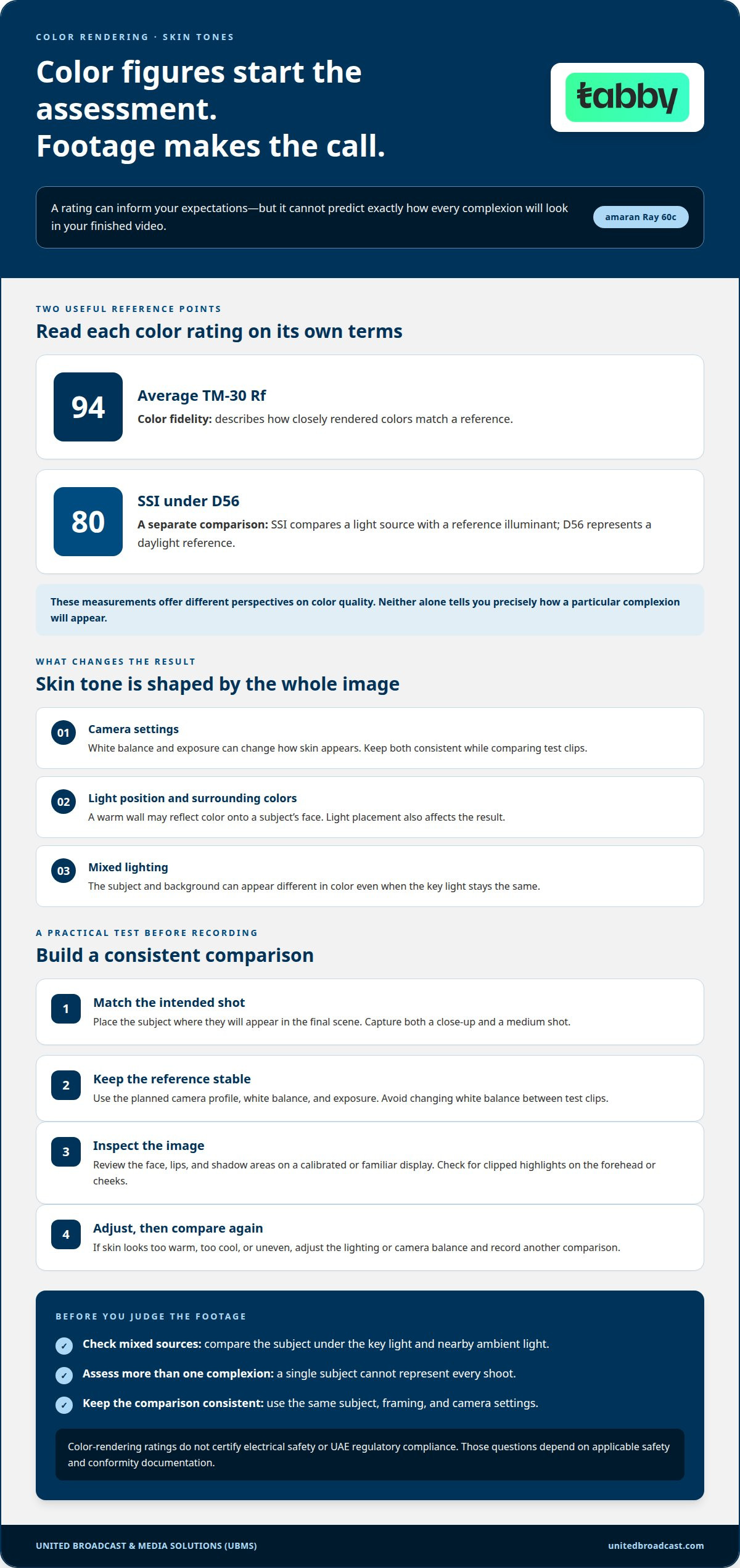
The amaran Ray 60c has an average TM-30 Rf rating of 94. Rf describes color fidelity, or how closely rendered colors match a reference. It offers a useful measure when comparing lights, but it does not guarantee identical skin tones across cameras, locations, or settings. Treat it as one part of a color assessment, then judge actual footage under your intended conditions.
The light also has an SSI rating of 80 under D56. SSI compares a light source with a reference illuminant, and D56 represents a daylight reference. That figure gives a second perspective on color quality, distinct from TM-30 Rf. Neither rating alone tells you precisely how a particular complexion will appear in a finished video.
Skin tone is affected by the entire image pipeline. White balance, exposure, surrounding colors and light position can all change the result. For example, a warm wall may reflect color onto a subject’s face. Mixed lighting can also make the subject and background appear different in color, even when the key light stays the same.
Run a short test before recording. Place the subject where they’ll appear in the final shot, then frame a close-up and a medium shot. Keep the camera profile, white balance and exposure consistent with the planned production. Review the face, lips and shadow areas on a calibrated or familiar display. If skin looks too warm, cool or uneven, adjust the lighting or camera balance and record another comparison.
- Keep the reference stable: Avoid changing white balance between test clips.
- Check mixed sources: Compare the subject under the key light and nearby ambient light.
- Review exposure: Look for clipped highlights on the forehead or cheeks.
- Assess more than one complexion: A single subject cannot represent every shoot.
For a useful evaluation, compare the same subject, framing, and camera settings under consistent conditions. The rating of 94 supports a measured expectation of color fidelity, while the D56 SSI value adds a separate reference point. Neither replaces a practical camera test. In particular, color-rendering ratings do not certify electrical safety or UAE regulatory compliance. Those questions depend on applicable safety and conformity documentation, not color metrics; the listed color figures cannot establish compliance status.
Compact design and portability
The Ray 60c weighs approximately 529 g and measures 14.5 × 11.5 × 4.4 cm. Those measurements can help you plan a portable kit for a home studio, client location, or travel setup. The light itself is only one part of the packed load. Include the stand, modifier, power source, and cables when deciding how much space your complete setup needs.
Start with the shoot location. For a desk recording, consider where the light will sit beside the camera and whether the support fits your available space. For location work, plan how the light and its accessories will travel with the rest of your equipment. A Ray 60c kit may pack compactly, but the assembled setup still needs room for mounting and positioning.
Power choices also affect portability. The EU version supports USB-C PD 3.0, DC, or Amaran Ace E-Lock. Its maximum power consumption is 75 W over USB-C. Choose the power route for the location and plan the cable path before setting up. A short desk arrangement has different cable needs from a stand placed across a room.
For wireless use, the EU version can operate at full power for up to one hour when used with the Amaran Peak via USB-C. That can suit a short recording block where a cable would cross the frame. Plan the session around that stated runtime, including breaks and access to the chosen power option. The Ray 60c’s Bluetooth operating range is up to 80 m, which can help when the operator controls the light from farther away.
- Pack for the shot: Group the light with the support and modifier needed for the planned setup.
- Choose power in advance: Select USB-C PD 3.0, DC, or Amaran Ace E-Lock based on the workflow.
- Schedule wireless use: Account for the stated full-power operation time with Amaran Peak.
- Plan control position: Consider Bluetooth range and obstacles between the light and operator.
Before packing, identify the location, mounting position, power route, and control position. Then compare the complete kit with the space available in your case or vehicle. This reveals whether the light’s compact form helps your workflow or whether accessories take up most of the room. The Ray 60c is easiest to assess as part of the assembled setup, not as a standalone item.
Dimensions and weight
The amaran Ray 60c measures 14.5 × 11.5 × 4.4 cm and weighs approximately 529 g. Use those specifications to assess storage space and handling for your own kit. The figures describe the light, not the space occupied by a case, padding, mounting hardware, or connected cables. Measure the usable compartment inside your bag before deciding where the light will fit.
Consider orientation as well as clearance. A case may have room for the light’s overall dimensions but still make access awkward if its shape blocks another item. Place the Ray 60c beside the camera or lens it will travel with, then test whether you can remove each item without disturbing the rest. This packing check helps identify a more practical layout before a shoot.
Weight also needs context. The approximate 529 g figure applies to the light itself, so include the mount and support when thinking about the load. For example, a desk-mounted setup involves different handling from a kit packed with a stand for a location shoot. Assess the combined equipment before lifting, carrying, or positioning it.
- Check internal clearance: Compare the compartment with 14.5 × 11.5 × 4.4 cm.
- Account for protection: Include padding when planning the available space.
- Estimate the complete load: Add the support, mount, and cables to the light’s weight.
- Test access: Pack the items in the order you’ll need them during setup.
For a fixed workspace, measure the intended storage location and mounting area separately. The Ray 60c may fit on a shelf while its stand or power cable needs a different place. Check cable clearance around the chosen position, too. A measurement of the light alone cannot show whether nearby equipment or furniture will obstruct the complete arrangement.
For transport, pack the light as you would for a real production day. Add the protective material and accessories you normally carry, then check how the case handles and opens. The amaran Ray 60c’s listed size and approximate weight are useful planning references, but the bag, support, and packing method determine the full carrying experience. This practical test can help you decide whether the light fits your personal or location-production kit.
Ray 60C price in the UAE
Budgeting for the amaran Ray 60c starts with understanding what a displayed product price represents. A UAE listing can show a tax-exclusive amount, so distinguish the displayed price from the final amount payable. Keep the tax wording visible in your comparison. Don’t treat a tax-exclusive listing as though it already includes VAT.
Next, define the setup you’re budgeting for. A light in a fixed desk setup may need different supporting equipment from one used on location. List the components your workflow requires, such as a stand, modifier, power arrangement and protective case. Treat these as separate planning considerations, rather than assuming the light’s listed price covers a complete kit.
Compare equivalent listings carefully. Check the product version, tax basis and included items before comparing prices. For example, compare an EU-version listing with another listing for the same version, not a different configuration. If the tax wording differs, note it alongside each amount instead of comparing the figures without context.
- Match the version: Compare listings for the same amaran Ray 60c configuration.
- Read the tax basis: Record whether the displayed amount excludes VAT.
- Separate equipment needs: List required supports, modifiers, power components, and protection.
- Review included items: Compare what each listing includes before judging its value.
Use your shooting plan to decide which accessories belong in the budget. For desk recording, note the mounting and power components needed for that position. For location work, consider what you need to pack and set up the light. This keeps the product comparison focused while accounting for the wider equipment requirements of your workflow.
A simple comparison sheet can help prevent confusion. Record the product version, displayed price, tax wording and included items in separate fields, then list any additional equipment your setup requires. This lets you compare listings on consistent terms without assuming the displayed price covers every part of your production kit.
Before settling on a budget, revisit the Ray 60c’s role in your planned workflow. Decide whether your priority is a stationary setup, a portable kit, or a configuration that needs different support equipment. Then compare relevant UAE listings using the same criteria. A clear record of product version, tax basis, and included components makes the comparison more useful than a headline amount alone.
Ray 60C common problems and troubleshooting
Start troubleshooting by identifying the symptom and changing one variable at a time. For a Ray 60c that won’t power on, inspect the connection first. Confirm the selected power method, then reseat the cable or connector. If using USB-C, check that the power source supports the required USB-C PD 3.0 setup. Avoid assuming every USB-C source can operate the light as intended.
If the light powers on but appears dim, inspect its brightness setting before changing other parts of the setup. The EU version provides continuous brightness control from 0 to 100 percent. Check the control position, then test a higher setting. Also verify the selected power arrangement. The light’s maximum power consumption is 75 W over USB-C, so the source and connection matter when diagnosing output.
For wireless control problems, separate a control connection issue from a power issue. The amaran Ray 60c has a Bluetooth operating range of up to 80 m. Move the control device closer and test again, especially if walls or equipment sit between the device and light. If control returns nearby, distance or the surrounding setup may be affecting communication. If not, recheck the control settings and connection process described in the product instructions.
Unexpected effects or a changing look can also come from the selected mode. The EU version supports 12 light effects. Return to a standard lighting mode when checking ordinary output, then adjust one control at a time. For example, test brightness separately from the effect selection. This helps isolate whether the behavior comes from a setting or the power connection.
- No power: Check the chosen power route and reseat its connection.
- Low output: Inspect the brightness control and USB-C power setup.
- Wireless control drops: Move within the stated Bluetooth range and test again.
- Unexpected effect: Select a standard mode before assessing output.
For wireless operation at full power, the EU version can run for up to one hour with the Amaran Peak via USB-C. If operation stops during a session, check the power arrangement and remaining runtime before assuming there is a fault. To test it, use a known-working power source and cable, then see whether the issue persists. Change only one component at a time.
If the issue continues, record the symptom, power method, control mode and settings. This creates a clearer troubleshooting history than making several adjustments at once. Stop testing if a connector appears damaged or the unit behaves abnormally, and follow the manufacturer’s safe-handling instructions. This approach helps distinguish a setup issue from a fault without guessing at the cause.
United Broadcast & Media Solutions (UBMS): Professional Video Cameras
United Broadcast & Media Solutions (UBMS) can help creators align camera, lens, and lighting choices with their production requirements. If you’re building a setup around the Ray 60c, consider how its output will work alongside your camera and the look you need to capture. UBMS offers Professional Video Cameras, Digital Cinema Cameras, Cinema Lenses, and Professional Lighting Equipment.
Turn to UBMS when selecting equipment for a new content workflow or refining an existing camera and lighting setup. Matching components to your shooting needs helps you make informed decisions about the complete imaging system, rather than considering each item in isolation.
Contact United Broadcast & Media Solutions (UBMS) or visit unitedbroadcast.com to explore your options.
Build a setup around your next shoot
Use your next production as the test for a repeatable lighting workflow. Decide how the ray 60c will fit the camera position, subject distance, and available space, then consider how the rest of the imaging system supports that plan. A consistent setup makes it easier to move from equipment decisions to deliberate, polished content.
United Broadcast & Media Solutions (UBMS) offers Professional Video Cameras, Digital Cinema Cameras and Cinema Lenses. These products help creators plan camera and lens choices alongside their lighting requirements, whether refining a solo setup or developing a broader production workflow. Choose equipment with the finished image and practical shooting process in mind.
Take the next step with a clear picture of the content you want to create. A thoughtful equipment plan gives every part of your setup a defined role and purpose.
Frequently Asked Questions
Where can I buy Ray 60C in the UAE?
The article lists the Amaran Ray 60c (EU) through United Broadcast & Media Solutions (UBMS) in the UAE.
Ray 60C compared with similar models


