





Professional Camera Service Center UAE: 2026 Guide
One camera fault can put a production schedule under pressure. Finding a professional camera service center UAE production teams can turn to is about more than having equipment looked at. Specialist knowledge matters when a camera is part of a professional workflow, and general electronics repair may not account for the demands of broadcast and digital cinema systems.
When equipment needs attention, it helps to know what information to provide, which accessories relate to the issue, and how to prepare for support. United Broadcast & Media Solutions provides repairs and technical support for professional media equipment through its dedicated service center.
This guide explains what specialist camera servicing involves and how to prepare a useful service request. You’ll learn what to record about the camera model, symptoms and circumstances in which a fault occurs, so you can describe the issue clearly without trying to diagnose it yourself.
Key Takeaways
- Specialist servicing focuses on production-grade camera systems, where equipment faults can affect a wider workflow.
- Describe symptoms clearly and distinguish whether they involve the camera body, lens, recording media or a connected accessory. Treat symptoms as observations, not confirmed diagnoses.
- Before requesting support, note the camera model, serial details, when the fault occurs and any error messages. These details give the technical team useful context.
- A professional camera service center UAE production teams can rely on provides specialist support for professional media equipment. UBMS offers repairs and technical support through its dedicated service center.
- Clear equipment details and fault descriptions help make the service discussion more focused and support production planning.
When a Professional Camera Service Center in the UAE Makes Sense
A camera fault can interrupt a scheduled shoot, delay a studio setup or leave a team without a dependable imaging system. Specialist support is useful when equipment behaves inconsistently, a problem keeps returning or damage affects operation. A professional camera service center focuses on equipment used in production environments and the workflows it supports.
A professional camera service center is a specialist technical resource for assessing, repairing and maintaining camera equipment used in production environments. This differs from general consumer-device repair, which may cover a wider range of electronics. The right expertise depends on the equipment and the work it supports. Teams seeking a professional camera service center UAE productions can access benefit from support focused on professional media equipment.
What does professional camera servicing cover?
Repair and maintenance address different needs. Repair responds to reported damage, abnormal operation or a recurring fault. Maintenance supports equipment care and readiness, even when there is no obvious failure. A technical assessment determines what attention is appropriate. A symptom alone does not confirm its cause.
Camera systems bring together imaging components, controls and connections that operate within a larger production workflow. A camera issue may affect a lens setup, recording routine or connection to other equipment, not just image capture. For background on the history and components of cameras, readers can explore how camera systems have developed. Specialist support adds professional-equipment context to the technical discussion.
Which production teams may need specialist support?
Filmmakers may seek an assessment when a fault appears during preparation for a shoot. Broadcasters and studio teams may need support when equipment behaves inconsistently during routine operation. Production companies and equipment managers can also benefit from recording recurring issues to make informed decisions about readiness and service needs.
Consider seeking an assessment if the same fault returns, controls or image capture behave abnormally, or equipment has been damaged. If an issue appears during a critical setup, record what happened rather than treating a suspected cause as a diagnosis. Clear observations help explain what needs attention and how the equipment fits into the workflow.
United Broadcast & Media Solutions provides repairs and technical support for professional media equipment through its dedicated service center, serving customers nationally across the UAE. Whether equipment supports a scheduled shoot or ongoing studio operations, a clear account of its behaviour gives the service team a useful starting point.
How Specialist Camera Diagnosis Differs from General Repair
A camera that powers on but behaves unpredictably can be difficult to describe as a simple “fault.” Useful assessment starts with context: what the camera was doing, how it was configured and what changed. A specialist approach considers the equipment as part of an imaging and recording workflow. General repair may focus more narrowly on the device’s basic operation.
| Specialist camera assessment | General repair approach |
|---|---|
| Considers the camera’s role in production, its operating setup and connected equipment. | May focus on the reported device issue without the wider production context. |
| Uses the operator’s observations to understand when and how a fault appears. | Often begins with a broad description of the device’s malfunction. |
| Separates assessment, potential repair work and routine maintenance as distinct needs. | May treat the request primarily as a repair task. |
Why camera symptoms need production context
When describing an issue, note the recording format or mode, operating conditions and connected accessories. For example, say whether recording stops with a particular media card, lens or external connection, without assuming that component is the cause. Include whether the symptom happens every time or only under specific conditions.
Precise symptom details help technical teams assess a camera in the context of how it is configured and used. A short log can help: record when the issue occurred, relevant camera settings, what you observed and whether it repeated. For broader engineering context on consumer electronics, the IEEE publications on consumer electronics offer a reference point, although a specific camera fault still needs equipment-specific assessment.
What a service assessment can clarify
An assessment helps establish how the reported issue relates to the equipment and what next steps may be appropriate. It is distinct from repair work, which addresses a fault, and routine maintenance, which supports equipment care without necessarily responding to a malfunction. Clear reporting gives the assessment a useful starting point but does not replace technical evaluation.
There is no single duration for every camera service request. Assessment and repair time depend on the issue and equipment involved. An occasional recording interruption may require a different assessment from repeated abnormal operation or visible damage. Avoid opening the camera or attempting internal repairs. Record what you observe and leave technical assessment to the service process.
If you’re experiencing a fault, share the camera details and a clear description of its behaviour with the service team.
Camera, Lens or Accessory? Describe the Fault Clearly
A camera system works as a group of components, so a problem noticed during a shoot doesn’t automatically point to a fault in the camera body. Start by identifying what was in use and what you observed. Whether you’re using a cinema camera or another type of professional video camera, describe symptoms by component instead of guessing at the cause.
Camera-body and recording symptoms to report
Describe the behaviour in plain language. Note whether the camera fails to power on, stops recording, shows an unexpected display or produces an image that looks different from the expected result. Include the exact wording of any warning message. These observations provide context, but they are not a technical diagnosis.
Record when the issue began, whether it followed a change in setup or operating conditions, and whether you can reproduce it. If it occurs only in a particular recording mode or after a certain amount of operation, include that detail. Don’t treat a symptom as proof that a specific internal part has failed.
When the concern may involve a lens or accessory
Describe each part of the setup separately. For example, report that the camera powers on and the display works, but the image changes after a lens is attached. This separates what you observed from the cause, which still needs assessment. If the concern seems related to lens operation or optical performance, include the lens details alongside the camera information.
For connected accessories, note what was attached and what it was doing when the problem appeared. This might include recording media, an external monitor, a microphone or another connection in the setup. Don’t open the camera, lens or accessory to investigate. Record the behaviour and leave internal inspection to the technical service process.
Use this checklist to structure your report:
- Camera body: Note the model, serial details, power behaviour, display messages and image or recording symptoms.
- Lens: Identify the lens and describe any unusual behaviour you can observe, without assigning a cause.
- Recording media: State what media was in use and whether the issue appeared during recording, playback or another part of the workflow.
- Connected accessories: List relevant equipment and connections, and describe what changed when the symptom occurred.
- Timing and repetition: Record when the issue first appeared, what was happening at the time and whether it occurs consistently or intermittently.
Keep the description factual: “recording stopped after the accessory was connected” is more useful than naming a component as faulty. A professional camera service center UAE production teams rely on can use these details to understand the reported setup and begin an informed assessment. Clear notes keep the technical discussion focused on the equipment and its observed behaviour.
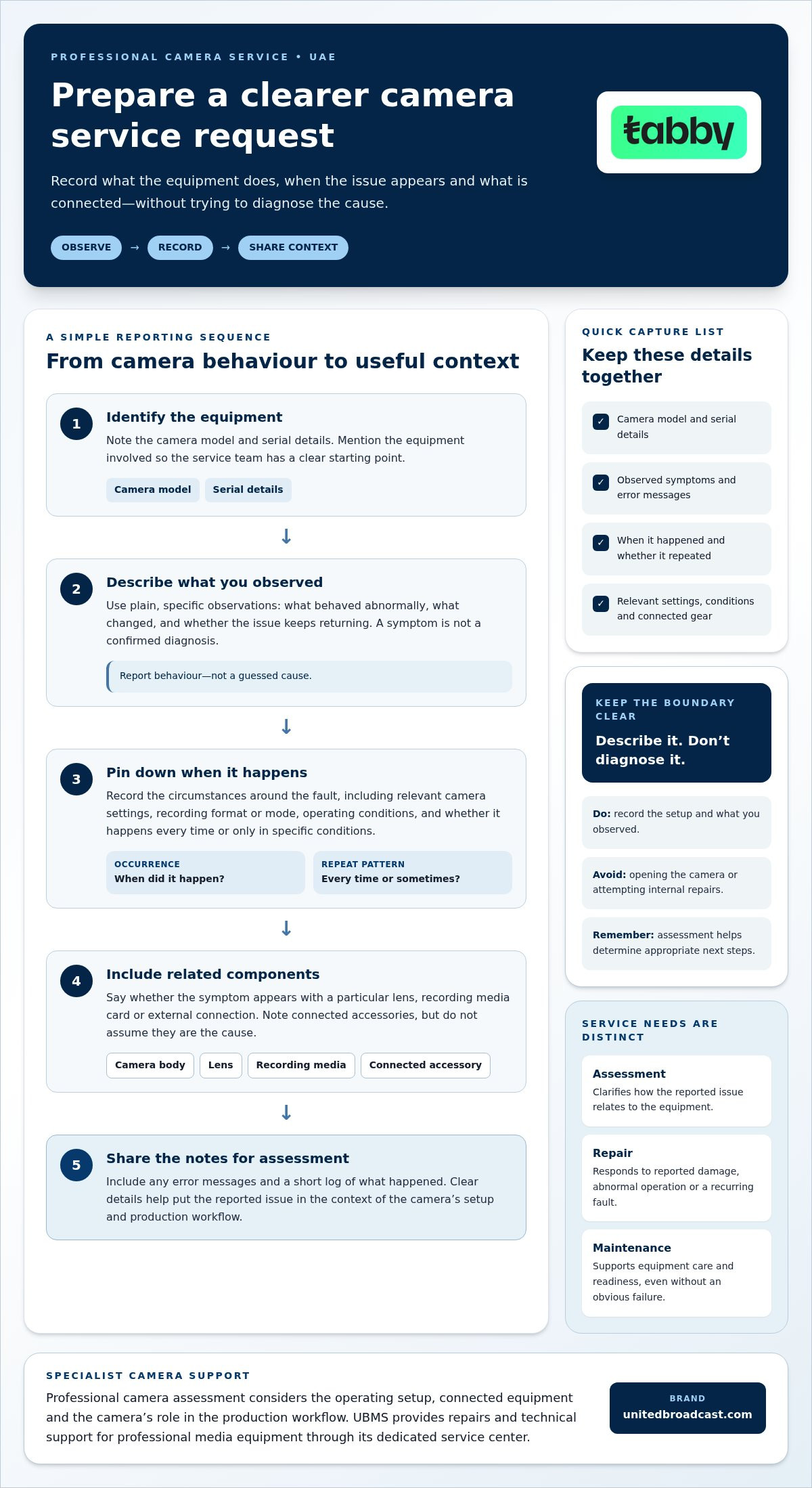
How to Prepare Professional Camera Equipment for Service
A well-prepared service request gives the technical team a clearer picture of the equipment and issue. Before arranging support, gather essential details, consider any production data stored on the equipment and identify accessories relevant to the fault. You don’t need to diagnose the problem yourself.
Information to gather before requesting support
Use this checklist to record the facts before contacting a professional camera service center UAE teams can access for specialist equipment support. If a fault is intermittent, a short recording of the behaviour may help, provided you can capture it safely without risking the equipment or production data.
- Identify the equipment. Write down the camera model and serial details. If the concern involves a lens or accessory, record its make and model as well.
- Describe the observed issue. State what happens in plain language, such as recording stopping unexpectedly or a warning appearing on the display. Separate your observation from any theory about the cause.
- Record timing and frequency. Note when the issue first appeared, whether it occurs every time or intermittently, and what the camera was doing at the time.
- Copy relevant messages. Record the exact wording of any error or warning. A clear photo of the display may also help, provided it doesn’t expose sensitive production information.
- Note recent changes. Include relevant changes to the setup, connected accessories, recording media or operating conditions before the fault appeared.
Preparing equipment and production data
Before transporting equipment, consider recordings and other information stored on its media. Back up material you need to retain, and remove sensitive media when appropriate for your workflow. If media may be relevant to reproducing the issue, explain its role instead of assuming it should accompany the camera.
List any accessories that will accompany the equipment and explain why they matter. Include items relevant to describing or reproducing the behaviour, such as a lens or connection involved when the symptom occurs. Record what is included so the equipment and its context are clear at handover.
Protect the camera, lens and accessories during transport. Use suitable protective packing to limit movement and reduce exposure to knocks, dust or moisture. Keep small components together and avoid putting pressure on delicate controls or optical surfaces. Don’t open equipment or attempt internal adjustments while preparing it.
A concise handover note can bring the details together: equipment identification, reported behaviour, timing, messages, recent setup changes, data considerations and included accessories. This gives the service team a practical starting point while leaving diagnosis to technical assessment.
UBMS Professional Camera Service Center Support Across the UAE
Professional camera issues call for support grounded in media equipment and production workflows. United Broadcast & Media Solutions provides repairs and technical support for professional media equipment through its dedicated service center, serving customers nationally across the UAE. Filmmakers, broadcasters and equipment managers can access specialist support for camera faults and maintenance needs within a wider professional media-solutions business.
UBMS has operated since 1997 and focuses on professional equipment rather than general household electronics. Equipment readiness can matter to scheduled shoots and ongoing operations, so describing the issue from the operator’s perspective helps frame the technical discussion.
Professional equipment expertise within a wider media-solutions business
UBMS works across professional video and digital cinema cameras, broadcast equipment and related media solutions. Its dedicated service center provides repairs and maintenance for professional media equipment. System integration is another part of the business, distinct from camera repair: it concerns broadcast environments and studio setups, while service-center support addresses equipment repair and maintenance.
This professional context can help when describing a camera issue. A camera body may be used with a cinema lens, recording media and other equipment as part of a production setup. Explain how the camera is used, what symptoms appeared and whether connected equipment was involved. No symptom alone confirms a diagnosis.
The next step for UAE camera owners
Before requesting support, bring together a concise account of the equipment and its behaviour. Include the camera model and serial details, any relevant lens or accessory, a plain-language description of the fault, when it occurs and whether it repeats. Note error messages and the production context, such as whether the issue appeared during recording or while preparing for a shoot.
A professional camera service center UAE production teams can turn to should understand the importance of clear technical information and specialist equipment support. UBMS’s service team can use the details you provide to guide the next steps. Assessment, repair and maintenance needs depend on the equipment and concern described, so a factual report is a useful starting point.
The practical path is straightforward: identify the equipment, describe what you observed and share the circumstances in which it occurred. This keeps the conversation focused on the camera and its role in your workflow, supporting an informed discussion about service needs without guessing at the cause.
Keep Your Production Plans Moving Forward
Make equipment support part of production planning, not an afterthought. A clear record of the issue and its impact on upcoming work helps you discuss practical next steps with a professional camera service center UAE teams can access for professional media equipment support.
Explain what the camera needs to do in your workflow and what the fault affects. That frames the issue around operational priorities, whether you’re preparing for a shoot or maintaining equipment used in ongoing production work.
UBMS provides dedicated support for professional media equipment. Share your camera concern with the team to discuss the technical assistance needed.
With technical support, you can make an informed plan for your equipment and prepare for upcoming work.
Frequently Asked Questions
What does a professional camera service center do?
A professional camera service center provides repair, maintenance and technical support for equipment used in media production. It can assess reported problems with professional cameras and related equipment, then help clarify appropriate service steps. For example, if a camera behaves differently after a setup change, its configuration and use can be considered alongside the symptom. A report is a starting point, not a diagnosis.
Can a professional camera service center help with cinema cameras?
Yes. UBMS provides technical support and repairs for professional media equipment, including equipment used in digital cinema workflows. Describe how the camera is being used and what you’ve observed, such as a problem during a particular recording task or production setup. Equipment details and specific symptoms help frame the request. A technical assessment determines the relevant next steps.
How long does professional camera repair take?
Repair duration depends on the equipment and issue being assessed, so there isn’t one timeframe for every service request. A reported fault and a complex operational problem may require different attention. If the camera is needed for a scheduled production, explain the date and the equipment’s role when discussing support. This gives the service team useful planning context without assuming a completion date.
What information should I provide when requesting camera service?
Provide the camera’s make and model, serial details if available, and a concise account of what happens. Mention when the behaviour started, how often it occurs and what task was underway, such as recording or reviewing footage. Include relevant error messages and recent setup changes. Keep your wording observational: “the display went blank” is more useful than guessing which internal component failed.
Should I send camera accessories with the equipment for repair?
Include accessories when they are relevant to the reported behaviour or needed to explain the setup. If a symptom appears while using a particular lens, media card or connected device, record its make and model and describe how it was involved. For unrelated accessories, note that they are not part of the reported issue rather than packing them automatically. Protect each item and make a clear record of what accompanies the camera.
Is professional camera service available across the UAE?
Yes. United Broadcast & Media Solutions serves customers nationally across the UAE with a dedicated service center for professional equipment repairs and maintenance. Share production context, such as whether the equipment is used in a studio workflow or for a scheduled shoot. Clear information about the equipment and fault helps the service team guide the next step.
Can I keep using a camera that has an intermittent fault?
It depends on the behaviour and the risk to your equipment, recordings or production. If the fault affects recording, power or safe operation, avoid relying on the camera for critical work until you’ve sought technical guidance. Don’t repeatedly provoke the issue just to capture an example. Instead, note when it occurs and what the camera was doing, then share those observations with the service team for informed advice.


