

Maintaining Cinema Lenses for Longer Life and Reliable Focus
A lens can lose reliable performance long before visible damage appears. In the UAE, maintaining cinema lenses for longevity means limiting exposure to humidity, dust and abrupt temperature changes, while treating inconsistent focus marks as a sign that inspection may be needed. Store lenses at 40-50% relative humidity; during extended storage, remove them every 2-3 months and operate the focus and zoom rings. Fungus left untreated can etch coatings and permanently mark glass.
Clean glass and careful handling are essential, but they’re only part of dependable lens care. Mechanical wear, impact, or a mismatch with the camera setup can also affect focus, so routine cleaning alone won’t resolve every performance issue.
This guide explains how to protect lenses in UAE conditions, clean them without risking coating damage, and recognise when preventive maintenance should give way to repair or recalibration. You’ll also learn what a service assessment can examine, from mechanical movement and back focus to projection across the image circle, so you can make a more informed decision about what to do next.
Key Takeaways
- Recognise how UAE heat, humidity, dust and coastal air can affect lens condition, and adjust handling and storage accordingly.
- Use changes in focus marks or ring movement as clues that mechanical inspection may be needed.
- Choose gentle cleaning methods and avoid practices that can damage lens coatings.
- Distinguish routine preventive care from the repair or recalibration needed to address persistent performance issues.
- Understand what a thorough lens service assessment can examine to help restore reliable optical and mechanical performance.
Lens exposure to dust, humidity, rain, and temperature changes
Yes. Maintenance can vary according to a lens’s coatings, mount design, and manufacturer guidance. Follow the maker’s cleaning and handling instructions, since the wrong method can mark coatings or stress mount contacts.
UAE conditions can expose lenses to hot, humid air, fine dust, rain, and coastal salt. Dust can enter through worn seals, while salt air can corrode exposed parts and fasteners. Weather sealing helps reduce risk in imperfect conditions, but it is not a reason to expose a lens recklessly. After a humid exterior shoot, don’t seal a warm lens in its case immediately.
Temperature changes matter mechanically as well as optically. Heat cycling can affect lubrication, changing how focus and zoom rings feel during a shoot. Let a warm lens acclimatise before packing it away, and note any new stiffness or uneven resistance. A change in ring movement is a good reason to arrange an inspection rather than force the mechanism.
For storage, aim for 40-50% relative humidity and use a dry cabinet or a case with active humidity control. These conditions help reduce moisture-related problems and the chance of fungus returning. Fungus left untreated can etch coatings and permanently mark glass, so visible growth calls for prompt attention rather than repeated surface cleaning.
During extended storage, remove each lens every 2-3 months and operate its focus and zoom rings. This refreshes internal air and helps prevent moisture stagnation. Keep caps, pouches, and cases dry and clean; a damp cap placed back over the front element can undermine careful storage. Record the lens’s storage conditions if a problem develops.
Mechanical restoration may be needed when focus resistance or marks become inconsistent. Possible causes include shifted optical groups, helicoid wear, impact-related spacing changes, or back focus mismatch with the camera setup. For example, if one lens in a set no longer reaches the marked focus point, don’t compensate by forcing its geared ring. Gear engagement and repeated handling can add strain when a mechanism is already binding.
Transport habits also shape long-term ownership. Secure the lens in a clean, dry case, protect exposed mount surfaces, and avoid leaving equipment in changing conditions after a location shoot. For crews working with advanced camera and lens combinations, United Broadcast & Media Solutions (UBMS) provides relevant system references for maintaining cinema lenses for longevity.
Mechanical stability and consistent focus marks
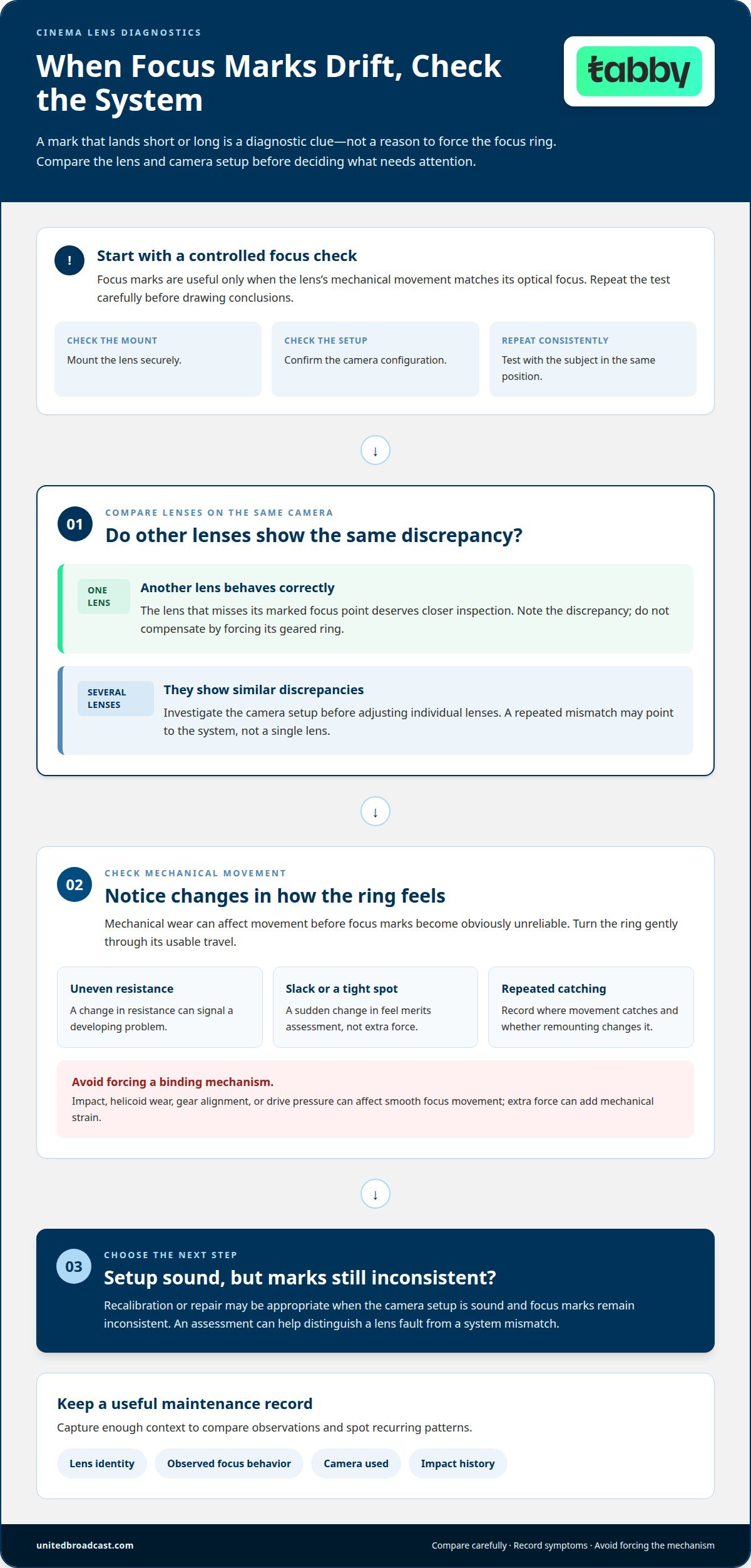
Focus marks are useful only when the lens’s mechanical movement matches its optical focus. On a cinema camera, the witness mark should bring the intended subject into focus at the marked distance. If the mark repeatedly lands short or long, the issue may involve the lens, camera setup, or both. Treat that difference as a diagnostic clue, not a reason to force the focus ring.
Check the setup before drawing conclusions about the lens. Mount it securely, confirm the camera configuration, and repeat the focus test with the subject in the same position. If another lens behaves correctly on that camera, the first lens deserves closer inspection. If several lenses show similar discrepancies, investigate the camera setup before adjusting individual lenses. This comparison helps distinguish a lens fault from a system mismatch.
Mechanical wear can change how focus feels before the marks become obviously unreliable. A ring that develops uneven resistance, slack, or a sudden tight spot may indicate a developing problem. Impact can also shift internal spacing, while helicoid wear can affect smooth movement. These symptoms call for assessment rather than extra force, which can worsen mechanical strain.
Gear engagement matters during repeated follow-focus work. A poorly aligned or loose gear can interrupt smooth rotation, while excessive pressure from a drive mechanism can strain the focus assembly. Inspect engagement during camera preparation and turn the ring gently through its usable travel. If movement catches at the same point, record where it happens and whether the symptom changes after remounting.
For a lens set, compare performance with the same camera and focus workflow. A matching set should let the operator work predictably across focal lengths, even though each lens may have different travel or ring placement. Note any lens that requires a different technique to reach a marked distance. Identifying that mismatch before a critical focus pull helps production run smoothly.
Keep a maintenance record with the lens identity, observed focus behavior, camera used, and any impact history. Compare new observations with earlier entries to distinguish a recurring pattern from a one-time setup error. When the camera setup is sound but marks remain inconsistent, recalibration or repair may be appropriate. Discuss persistent focus drift with the technical team for a suitable assessment.
Preventive maintenance, corrective repair, and recalibration
Preventive care addresses contamination and wear before they disrupt a shoot. Repair and recalibration address existing faults, with diagnosis distinguishing optical, mechanical, and camera-setup issues.
Preventive Maintenance and Corrective Repair
Preventive maintenance is planned inspection and care; corrective repair addresses a fault already affecting performance. A routine for maintaining cinema lenses for longevity helps crews identify changes before they interrupt a production. Record symptoms, impacts, storage conditions, and previous servicing before an assessment. For example, intermittent focus resistance after an impact calls for mechanical inspection, not repeated force on the ring.
Service records also help identify patterns across a lens set. Record the symptom, camera setup, and when the issue appeared, then compare these notes with earlier observations. This history helps technicians distinguish a recurring fault from a setup issue and focus on the relevant checks.
Recalibration and Maintenance Costs
Recalibration restores alignment between focus markings and actual optical performance after a discrepancy has been diagnosed. A service assessment can include projection testing, back focus verification, mechanical inspection, and metadata checks when relevant. Testing should establish whether the lens projects correctly, holds calibration, and performs across the image circle.
Maintenance costs cannot be compared with repair or replacement using one fixed figure. The deciding factors include the diagnosed fault, the work required, and whether the lens can return to the required performance. A minor adjustment differs from work involving shifted optical groups or worn mechanics. For crews maintaining cinema lenses for longevity, an assessment helps guide the decision without assuming every focus issue requires replacement.
Safe Lens Cleaning After Use
Safe cleaning removes visible contamination without adding abrasion or stressing optical surfaces. Begin with a manual squeeze blower to dislodge loose particles; avoid rubbing grit across the glass. If no contamination is visible, don’t use cleaning solution. This restrained approach matters because aggressive cleaning can damage lens coatings.
Inspect the front and rear elements under suitable light. If residue remains, use a clean lens cloth with light, controlled movements, following the manufacturer’s care guidance. Stop if a mark doesn’t lift easily. Persistent internal haze or fungus requires more than surface wiping, which cannot restore affected internal glass or coatings.
Cleaning Tools and Solutions
A manual squeeze blower provides controlled airflow to remove loose dust. Use a clean, lint-free lens cloth for dry wiping when a visible mark remains. Apply cleaning solution only when needed, and follow the lens maker’s instructions because coatings and construction can differ. Avoid strong pressure or improvised materials that may scratch glass or damage coatings.
Keep cleaning tools separate from dusty accessories, and don’t reuse a cloth that has collected grit. If a lens remains hazy after careful external cleaning, professional inspection is more appropriate than repeated wiping. Request a lens service assessment when cleaning no longer resolves the symptom.
Weather sealing and everyday environmental protection
Weather sealing reduces exposure risk; it doesn’t make a cinema lens impervious to weather. During outdoor shooting in the UAE, treat sealing as a protective layer, not permission to keep filming through rain, blowing dust, or salt spray. A covered camera position and careful handling still matter because moisture and particles can reach vulnerable points during lens changes or through worn seals.
Plan lens changes around the environment. Before changing lenses in a dusty location, move to a sheltered area, keep the replacement lens capped, and avoid pointing the camera mount into the wind. For example, a crew moving from an air-conditioned vehicle to a dusty exterior can prepare the next lens before opening the camera system. This shortens exposure and reduces the chance of particles reaching the mount or rear element.
Rain requires a different response from dust. If drops reach the lens barrel, stop shooting, shield the equipment, and dry the exterior with a clean cloth before storing it. Don’t rub wet grit across the front element. After coastal work, inspect exposed fasteners and mount surfaces for salt residue, then carefully clean accessible exterior areas. Corrosion risk concerns exposed parts, so prompt, controlled care is more useful than forceful wiping.
Temperature transitions also deserve careful handling. A lens moving between a cool interior and a hot exterior can experience changing conditions across its body and optical assembly. Keep it protected during transit, allow it to acclimatise before critical focus work, and watch for changes in ring movement or image clarity. If condensation appears, pause use and let the equipment stabilise rather than wiping internal surfaces.
Check protective parts before a location day. Inspect caps, case interiors, and visible seals for grit, moisture, or wear. Replace a dirty cap with a clean one rather than pressing debris against the glass. A loose cap or damaged seal can undermine careful handling. Keep cleaning materials separate from used accessories so dust from a case pocket doesn’t transfer back onto the lens.
Build environmental checks into the shooting workflow. At wrap, account for each lens, fit clean caps, inspect the exterior, and note any rain, impact, or unusual exposure in the service record. Don’t seal a warm lens in its case immediately after a humid exterior shoot. This pause supports safer transport and gives the equipment time to adjust before storage.
Use weather sealing as one part of a broader protection strategy, alongside sheltered lens changes, clean handling, and timely inspection. If a shoot exposes a lens to water or impact and its focus movement changes afterward, don’t assume the seal means the mechanism is unaffected. Document the event and arrange an assessment before the lens returns to demanding production work.
How should cinema lenses be cleaned safely after use?
Use a gentle sequence after each shoot: inspect first, remove loose particles, then address visible residue. This order helps prevent dust or grit from being dragged across optical surfaces. Work in a clean area, with the lens stable and its mount protected. If the glass looks clean, stop there; unnecessary wiping adds avoidable contact with coatings.
Begin with the lens exterior and accessories. Remove dust from the barrel and clean and dry the caps before fitting them. Check the front and rear elements under good light for fingerprints, droplets, or visible particles. A mark on a cap doesn’t mean the glass needs cleaning, so inspect each surface separately. Keep used accessories away from the clean work area.
- Use a manual squeeze blower to move loose particles off the glass. Its controlled airflow is suitable for gentle surface cleaning; avoid touching the nozzle to the element.
- Inspect the lens again under light. If there’s no visible contamination, no cleaning solution is needed, and dry wiping is sufficient only when a mark remains.
- For a visible mark, use a clean lens cloth and light pressure. Follow the lens manufacturer’s care instructions, and stop if residue persists instead of rubbing repeatedly.
- Finish by checking the front and rear elements, mount area, and caps. Store the lens with clean, dry accessories so residue isn’t transferred back.
Coatings require restraint. Aggressive cleaning can damage them, even if a mark seems stubborn. Avoid pressing hard, scrubbing repeatedly, or using improvised materials that may carry grit. If a fingerprint remains after a gentle pass, inspect the cloth before trying again. A dirty cloth can turn a small surface mark into a larger cleaning problem.
After an exterior shoot, treat water, dust, and salt residue differently. First remove loose particles with the blower; don’t wipe across wet grit. Carefully dry the lens exterior, then inspect the glass and accessories separately. If haze or fungus appears to be inside the lens, surface cleaning won’t address the affected internal components. Persistent residue or a change in optical performance calls for a service assessment, not stronger cleaning.
Keep a small cleaning record for production equipment. Note the lens, visible contamination, and whether cleaning restored a clear image. For example, recurring haze on the same lens after careful external cleaning may indicate an internal issue. This record gives a technician useful context and helps distinguish routine post-shoot care from a problem that needs diagnosis.
United Broadcast & Media Solutions (UBMS): Cinema Lenses
United Broadcast & Media Solutions (UBMS) supplies cinema lenses for professional production workflows. When selecting a lens for a digital cinema camera or reviewing your equipment needs, consider how focus behaviour, optical requirements, and shooting conditions fit your setup. Careful storage and cleaning help protect equipment, while persistent focus inconsistencies or internal haze indicate that routine surface care may not be enough. UBMS also supplies professional video cameras, digital cinema cameras, and professional lighting equipment for a range of production requirements.
For guidance on cinema lens and camera options, contact United Broadcast & Media Solutions.
Build a Reliable Lens Care Routine
A consistent ownership plan for maintaining cinema lenses for longevity should connect daily handling with clear decisions about inspection and service. Record changes in performance as they arise, so the next step is based on observed symptoms rather than guesswork. When a lens behaves differently from the rest of the setup, that information can help guide a focused assessment.
United Broadcast & Media Solutions (UBMS) supplies Cinema Lenses, Professional Video Cameras, and Digital Cinema Cameras for production equipment needs. If you’re planning a camera setup or considering lens options for your workflow, the team can help you explore relevant equipment.
Make lens care part of your production routine, and approach each shoot with greater confidence in your equipment.
Frequently Asked Questions
How should cinema lenses be stored to prevent dust, fungus, and moisture damage?
Store lenses capped in a clean, dry cabinet or a case with active humidity control. Keep the storage space clean, since dust from a case can transfer to lens surfaces during handling. After a humid shoot, let a warm lens adjust before closing it inside its case. For example, keep it protected in a sheltered area during the transition, then store it once it has cooled and dried.
What humidity and temperature ranges are best for storing cinema lenses?
A relative humidity of 40-50% is recommended for lens storage. No single temperature range applies to every cinema lens, so prioritise stable conditions and avoid rapid temperature changes. For example, don’t move a lens directly from a cool storage room into strong exterior heat and immediately begin critical focus work. Give it time to adjust, and follow the manufacturer’s storage guidance for the specific lens.
How should lens mounts, gears, and contacts be inspected and maintained?
Inspect the mount, gear teeth, and visible contacts under good light before attaching a lens. Look for dust, residue, loose gear movement, or visible damage, then keep the surfaces clean and dry. Align the mount carefully rather than twisting against resistance. For example, if a gear catches at the same point during rotation, stop forcing it and record the symptom for technical assessment.
How often should cinema lenses receive professional servicing or calibration?
There isn’t a universal service interval for every cinema lens; servicing should reflect use, condition, and performance symptoms. Arrange an assessment after an impact, recurring focus drift, unusual ring resistance, or optical changes that careful external cleaning doesn’t resolve. Crews can log these observations alongside camera setup and usage history. That record helps distinguish a new fault from an existing behaviour and supports a more targeted service decision.
What are common signs that a cinema lens needs repair or collimation?
Inconsistent focus marks, uneven ring resistance, or focus that repeatedly misses its intended distance can signal a problem. A lens that behaves differently after an impact also warrants inspection. To isolate the cause, repeat the focus test using the same camera setup and subject position. If the discrepancy persists on that lens, document the result; a technician can assess alignment and mechanical condition.
How can focus and iris gears be protected from wear during use?
Keep gear engagement aligned and avoid applying excessive force through a follow-focus or iris control. Before a take, rotate each ring gently through its working range and note any binding or sudden change in resistance. For example, if the gear skips during a focus pull, pause and inspect alignment instead of increasing drive pressure. Smooth, controlled operation helps avoid adding strain to a mechanism that may already need attention.
What precautions protect cinema lenses during transport and on set?
Use a clean, padded case with separate compartments so lenses cannot strike each other during transport. Fit caps before packing, secure loose accessories, and keep the case out of direct heat where possible. On set, prepare the next lens before opening the camera mount, especially in dusty conditions. After a location move, inspect the case and lens exterior before the next setup, noting any impact or exposure.
What are the risks of cleaning or lubricating a cinema lens yourself?
Aggressive wiping can damage coatings, while unsuitable lubricants can alter ring movement or contaminate internal optical components. A tight focus ring is not a reason to apply oil externally; the cause may involve internal wear or damage. Restrict routine care to gentle external cleaning with appropriate tools. If resistance, focus accuracy, or image quality changes, stop and arrange professional diagnosis instead of opening the lens.


