





House of Worship Video Streaming Setup: A Practical Buying Guide
What if the camera isn’t the part that makes your worship livestream fail? A dependable house of worship video streaming setup relies on every link working together, from sanctuary audio and camera feeds to switching, encoding, the internet connection, and the streaming platform. A strong camera can’t compensate for weak audio or a workflow volunteers find difficult to operate.
Choosing equipment can feel complicated when you’re balancing production quality, budget, staffing, and gear you already own. A reliable system doesn’t need to be more complex than your congregation requires. This guide explains the signal chain, compares practical setup types, and outlines decisions such as operated cameras versus PTZ systems, hardware switching versus software production, and networked video. You’ll also learn how to assess cameras, lighting, and broadcast gear before buying, so the setup fits your services and team.
Key Takeaways
- Map every handoff from source equipment to streaming destination to spot compatibility gaps before purchase.
- Choose a house of worship video streaming setup based on service format, volunteer capacity, and the flexibility you need, not camera count alone.
- Assess sightlines, lighting, cable routes, and operator position before deciding where equipment belongs.
- Test the complete workflow and train operators so service-day tasks are clear and repeatable.
- Align camera, lighting, and broadcast equipment through system integration to support a coherent, maintainable setup.
What a House of Worship Video Streaming Setup Needs to Deliver
A house of worship video streaming setup is the connected equipment and operating workflow that carries a service from the sanctuary to online viewers. It includes more than a camera: audio sources, video switching, encoding, network transport, and the streaming destination all affect what viewers can watch and hear. A mismatch or failure at any stage can interrupt the service or reduce its clarity.
The goal is a consistent viewing experience: intelligible speech, stable video, and a stream that reaches its destination without avoidable interruptions. Image quality matters, but it can’t make up for unclear sound or an unreliable delivery path. As a broad introduction to the technology, Understanding Streaming Television describes how video is delivered over networks for playback on viewers’ devices.
What viewers experience in a basic worship livestream
A single-camera service can provide a steady view of the speaker or stage with a straightforward operating workflow. A multi-camera production can add useful angles, such as a closer view during a sermon or a wider shot for music, but it also requires more coordination. Neither approach is universally best. The right fit depends on the service format and the team available to operate the system.
Room sound, framing, and pacing all shape the viewing experience. Reverberant audio can make speech difficult to understand, while a poorly positioned camera may obscure the action. Deliberate shot changes can help viewers follow transitions between readings, music, and the message.
How the live video signal reaches viewers
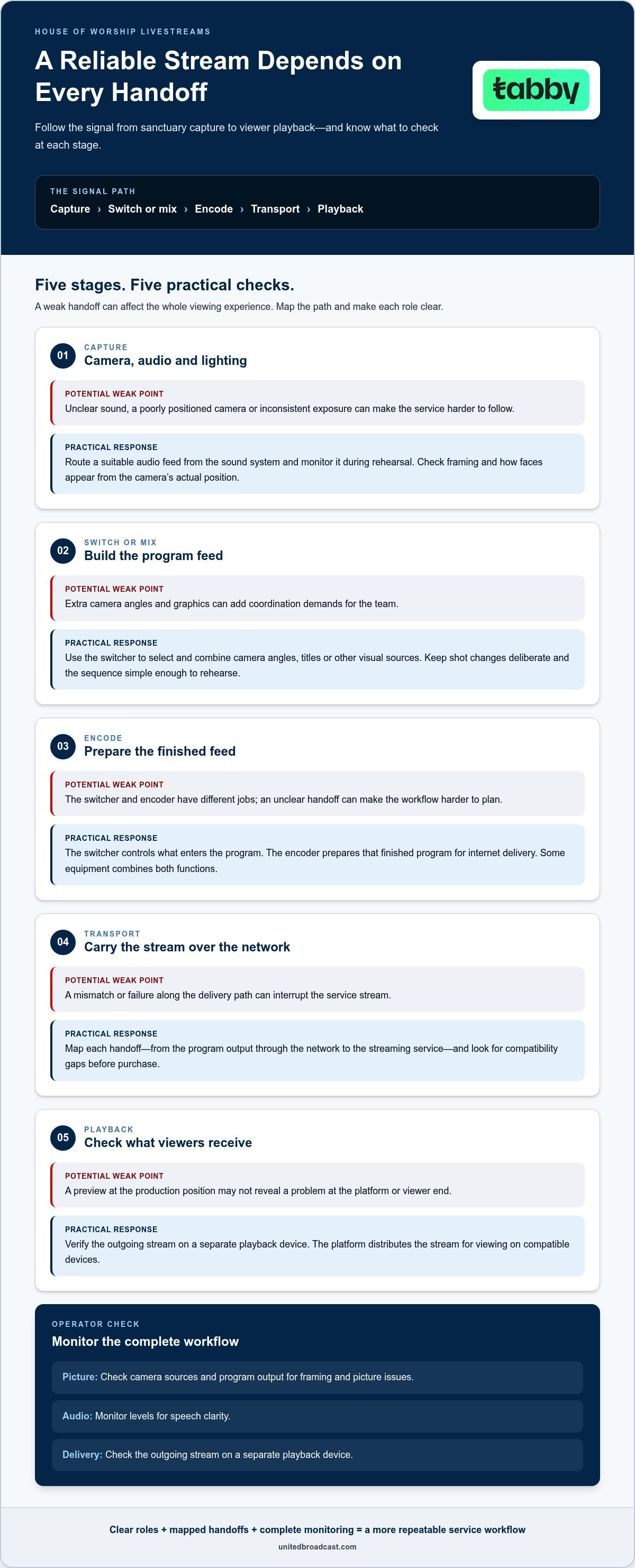
Planning is easier when each stage of the signal path has a defined job. In a typical workflow, the signal moves through these steps:
- Capture: Cameras produce the video feed, while microphones or a feed from the sound system provide audio.
- Switch or mix: A video switcher selects and combines camera angles, titles, or other visual sources into the program feed.
- Encode: An encoder prepares the finished feed in a digital format for delivery over the internet. A switcher chooses what viewers see; an encoder prepares the selected output for streaming. Some equipment combines both functions.
- Transport: The network carries the encoded stream from the venue to the streaming service.
- Playback: The platform distributes the stream for viewers to watch on compatible devices.
Monitoring helps operators catch problems before they affect the full service. Check camera sources and the program output for framing and picture issues, monitor audio levels for speech clarity, and verify the outgoing stream on a separate playback device. A preview at the production position may not reveal a problem at the platform or viewer end.
A worship livestream depends on every stage of its signal chain working together. Mapping that chain in advance clarifies equipment roles, helps the team spot weak points, and gives operators a practical foundation for a repeatable service workflow.
How the Main Components Work Together During a Service
A reliable house of worship video streaming setup depends on clear handoffs between capture, control, and delivery. Each component has a distinct role, and the operator’s decisions connect those roles during the service. A camera captures a view; audio equipment supplies a mix that online listeners can understand; switching and encoding prepare the program for delivery. Extra camera angles and on-screen graphics can add context, but they should support the core workflow rather than complicate it.
Camera, audio, and lighting in the capture stage
Camera placement and control determine both coverage and staffing. A fixed camera offers a consistent view with little intervention, while an operated camera lets a volunteer reframe as speakers or service elements change. A remotely controlled camera can provide more than one preset view without an operator beside it, though someone still needs to select shots at the right moments. Compare professional video cameras based on the room, required coverage, and how the team will operate them.
Audio needs its own planned signal path. A camera-mounted microphone may capture room ambience, but distance, reflections, or nearby noise can make speech less clear. Route a suitable feed from the sound system and monitor it during rehearsal. This helps operators catch muted sources, uneven levels, or an unintended mix before the stream is underway.
Lighting supports consistent exposure across the areas viewers need to see. If a speaker moves between a brightly lit stage and a darker lectern, the image may become distracting or difficult to read. Check how the camera renders faces and backgrounds from its actual position, then adjust lighting or framing as needed. Prioritize clear coverage and stable exposure over equipment the team can’t manage.
Switching, encoding, and delivery to the platform
A switcher selects among live camera and graphic sources, then assembles them into one program feed. During a sermon, an operator might stay on a medium shot; during a transition, they could use a wide view or display a service slide. Extra angles and graphics help only when they clarify the moment and can be operated reliably. A simple, rehearsed sequence is often easier for a volunteer team to repeat.
The encoder prepares a finished video program for delivery to a streaming platform. It may be a separate device or a function within a production system. The platform is a separate stage: it receives the encoded stream and makes it available for playback. The switcher controls what enters the finished program; the encoder prepares that program for transport.
Plan the network path as carefully as the equipment path. Upload capacity, connection reliability, and competing network activity can affect stream continuity, so test the complete workflow under realistic conditions before service. Monitor the program output, audio, and platform playback to locate issues at the correct stage. Broadcast studio gear and system integration can bring these connections together in a coherent signal flow. To align equipment with an operating plan, discuss your system integration requirements with United Broadcast & Media Solutions.
Compare Single-Camera, Multi-Camera, and Integrated Streaming Setups
These setup types are planning archetypes, not fixed price tiers or universal recommendations. A single-camera workflow can be dependable and effective; a larger system can offer more coverage but also adds operating decisions. Compare each option against the service format, available volunteers, and production tasks your team can sustain from week to week.
The trade-off is straightforward: more production options require more coordination, training, and testing. Choose a workflow the team can operate consistently, not simply the largest system. A well-managed simple setup is more useful than a complex one volunteers struggle to run.
| Setup type | Operational complexity | Staffing needs | Flexibility and expansion |
|---|---|---|---|
| Single-camera | Lower; fewer live choices to manage. | Can suit a small team, with one operator monitoring the stream. | Limited viewpoint changes; can expand, but additional sources require more control and testing. |
| Multi-camera | Higher; operators coordinate camera coverage and shot changes. | Benefits from trained operators for camera control and switching. | More coverage options for speakers, musicians, and transitions. |
| Integrated production | Depends on how equipment and controls are combined into the workflow. | Can centralize tasks, but volunteers still need clear procedures and practice. | Designed to connect production functions and support planned growth. |
When a simple single-camera workflow is a practical fit
A fixed camera position and a streamlined operator role can work well for services built around a central speaker or stage area. The operator can focus on framing, audio, and stream monitoring instead of choosing among several live sources. This may suit teams with limited staffing or modest production needs. The main limitation is coverage: one view can’t readily move from the speaker to musicians or show separate areas of the room.
When multi-camera or integrated production adds value
Additional angles can show a speaker, musicians, and service transitions without relying on one wide view. Coordinated switching, graphics, and monitoring can make those changes more deliberate, but the team must rehearse the sequence and know who handles each task. An integrated system can connect controls and equipment around a shared workflow. Standalone components may offer flexibility, but the team must manage their handoffs and support needs.
Before expanding, list the views or production tasks that would materially improve the service. Then identify who will operate each function and how the team will practise. For a house of worship video streaming setup, expansion works best when it solves a defined coverage or workflow need and remains manageable with the available volunteers.
Plan the Setup Around Your Room, Team, and Streaming Workflow
Plan the workflow before selecting equipment. A clear picture of the service, room, and volunteer roles helps you avoid gaps between what the congregation needs and what the team can reliably operate. Use this sequence to plan a house of worship video streaming setup around real conditions, then refine it through rehearsal.
Map service requirements and the room
Start with the service itself: note its format, key moments, online audience needs, existing equipment, and who can fill each operating role. Then assess the room from the camera’s perspective. Sightlines, stage activity, lighting, and the location of the sound-system feed all influence equipment choices. Sketch camera views, the control position, equipment placement, and safe cable routes before deciding what to add.
- Define service needs. Identify the moments viewers should see clearly, such as a sermon, music, or readings. Record current gear and realistic volunteer availability.
- Assess the room. Check sightlines from possible camera positions, avoid blocking in-person worship, and choose an operator location with a clear view of monitors and controls. Route cables away from walkways and congregation movement.
- Review capture conditions. Observe how room lighting changes across the stage and service areas, and locate a usable audio feed. Consistent exposure may call for adjustments to camera position or professional lighting equipment.
Test, operate, and grow the workflow
Turn the room plan into a signal-flow map that names each source, connection, control point, and destination. This makes it easier to locate problems and clarifies who is responsible for each task. Keep the initial workflow manageable, then expand only when doing so addresses a defined need and the team can support the added operation.
- Map and test the full path. Rehearse camera framing, audio checks, switching, encoding, network delivery, and platform playback. Watch the stream on a separate device, not only on the production monitor, and test from the actual operator position.
- Train the team. Assign clear responsibilities for camera operation, switching, audio monitoring, and stream checks. Create a concise checklist for startup, service transitions, and shutdown. Train backups for critical roles so the workflow doesn’t depend on one volunteer.
Use rehearsal findings to adjust the plan before the next service. If a role feels overloaded or a connection is hard to troubleshoot, simplify the workflow or clarify the handoff. Select components that can support realistic future growth without adding controls or tasks the current team can’t manage consistently.
Build a Reliable Setup with Equipment and Integration Support
A dependable system is planned as a whole. Cameras, lighting, audio connections, switching, and streaming equipment must work together in the room and fit the team’s operating plan. United Broadcast & Media Solutions supplies professional cameras, lighting, and broadcast studio gear, and provides system integration to align components into a coherent, maintainable signal chain. Planning at the system level helps reduce the risk of choosing equipment that works individually but doesn’t support the intended workflow.
What system integration contributes to a worship setup
Integration means planning how components connect and how operators use them as one workflow. A system review can clarify source routing, monitoring points, control locations, and the connections needed to move video and audio through the production chain. Recommendations should account for the room, production goals, current equipment, and volunteer roles. That context helps distinguish a genuine equipment need from an added feature that would increase complexity without serving the service.
For example, adding another camera may require a switching plan, a suitable route to the production position, and clear operator responsibilities. Matching those requirements with the rest of the system helps the team maintain and troubleshoot its setup over time.
What to prepare before discussing an equipment plan
A useful planning conversation starts with details about the service and room, not a shopping list. Gather information about how the current workflow operates and where it needs to improve. Include existing equipment, even if some components may be reused, so the proposed signal path accounts for what is already in place.
- Room and coverage: Share a room layout, likely camera positions, sightline limits, and the stage or service areas viewers need to see.
- Service and workflow: Note the service format, streaming destination, audio sources, desired graphics, and any known connection or operating constraints.
- Team and equipment: List available volunteer roles, current cameras and broadcast gear, and who will monitor or control each part of the setup.
These details connect equipment choices to practical operation. They also help identify requirements for routing, monitoring, camera control, and future changes without designing beyond the team’s current capacity.
Reliability also depends on care after installation. Regular checks of connections and equipment condition can help identify issues before a service. United Broadcast & Media Solutions’ professional service center provides repairs and technical support for professional media equipment, helping keep production gear in working order over time.
Bring your room plan and workflow requirements into a focused discussion about equipment and integration, rather than treating the stream as a camera purchase alone.
Make Your Next Streaming Decision with Confidence
Let the service workflow guide your next step. Before changing equipment, identify where the team loses time, struggles to maintain consistent picture or sound, or needs a clearer view for online viewers. Those observations can turn a broad upgrade idea into a focused priority for your house of worship video streaming setup.
After each service, record issues and the adjustments that helped. Over time, these notes give your team a practical reference for refining procedures, onboarding volunteers, and deciding which improvements will make a meaningful difference. A dependable system should support the way your congregation worships and the people responsible for operating it.
Bring your current setup and priorities into a project discussion to develop a practical equipment and integration plan.
With a clear plan and a workflow your team can sustain, you can build confidence one service at a time.
Frequently Asked Questions
Is a single camera enough for a house of worship livestream?
Yes, a single camera can be enough if its position keeps the main activity in frame and the composition remains useful throughout the service. Before relying on it, test focus and exposure from the actual mounting point, including movement between the lectern and stage. Check whether a fixed wide view makes faces too small on phones. If it does, reposition the camera or adjust its framing before adding another camera.
What equipment do you need to livestream a worship service?
A typical system needs a camera, a clear audio source, a way to prepare the program, encoding, internet access, and a streaming platform. Before purchasing, draw a connection map and note each device’s input and output type. Confirm that the camera feed can reach the production or encoding equipment and that audio can be synchronized with picture. This helps reveal compatibility gaps in a house of worship video streaming setup.
Can a church livestream with its existing camera?
Possibly, if the camera provides a suitable live output and can operate reliably in the planned workflow. Check its documentation for output connections, supported video formats, and power requirements for the expected service length. Then confirm that the output can connect to the production equipment without an unsuitable adapter or cable run. Test audio and video together, since a usable camera image alone doesn’t confirm that the full system will work.
How many cameras does a worship livestream need?
There’s no universal camera count. Start by listing the views that would help online viewers follow the service, such as a close view of the speaker and a wider view of musicians. Check whether the room allows those angles without obstruction and whether the team can operate them. If one camera already provides clear coverage, adding cameras may create extra tasks without solving a meaningful viewing problem.
What internet connection is needed for a worship livestream?
The required connection depends on the streaming platform, encoding settings, and other network activity. Check the platform’s current recommendations against the stream’s chosen resolution and bitrate, then assess available upload capacity while the venue network is in normal use. A wired connection may help provide a more consistent path where practical. Test during a representative busy period, since an empty-network test may not reflect service-day conditions.
Do we need a video switcher to livestream a service?
No, a standalone switcher isn’t required for every service. A single camera may feed an encoding workflow directly, while multiple cameras or visual sources call for a way to select what appears in the program. Count the sources and planned graphics, then consider how the operator will make changes without losing the live picture. A switching function built into another system may also meet the workflow need.
How can a worship team make its livestream easier to operate?
Reduce avoidable decisions during the service. Label cables and controls, use repeatable camera positions, and keep the live sequence focused on transitions the team can execute confidently. Document what to do if a source disappears, audio becomes unclear, or the platform stops receiving the stream. A simple fallback, such as returning to a stable camera view, gives operators a clear response while they resolve the issue.


