

Professional Video Data Wrangling for Analysis
Clean footage can still produce unreliable analysis if its files, metadata and structure aren’t ready for the task. Best practices for professional video data wrangling start with discovering what the data contains, then transforming and organizing it into a usable form before analysis. Data cleaning addresses errors and inconsistencies; wrangling is the wider process, with cleaning as one part of it.
That distinction matters in professional workflows. A dataset can be free of obvious errors yet still be difficult to analyze if formats do not align, metadata is inconsistent, or the structure does not suit the intended model. Wrangling clarifies these relationships and makes the data more useful.
This guide explains what video data wrangling involves and how it differs from cleaning. It also covers practical ways to transform and normalize video data, validate quality and consistency, and prepare reliable datasets for analysis.
Key Takeaways
- Structure video files and standardize formats so datasets can be combined and used for the intended analysis.
- Think of data cleaning as one part of wrangling: cleaning fixes errors, while wrangling also reshapes and organizes data.
- Validate file integrity, metadata, consistency, and access controls before relying on video data for analysis.
- Transform and normalize data to suit the analytical task, and record changes so the workflow can be reviewed or repeated.
- Choose cameras and related production equipment that support the requirements of the footage and its downstream use.
What is data wrangling?
Video data wrangling turns raw footage and related information into a structured dataset for analysis. It involves identifying what files contain, organizing them, transforming formats, validating results, and preparing the data for its intended use. Applying best practices for professional video data wrangling means making each decision serve a defined production or analytical purpose.
Structuring Video Data for Its Intended Use
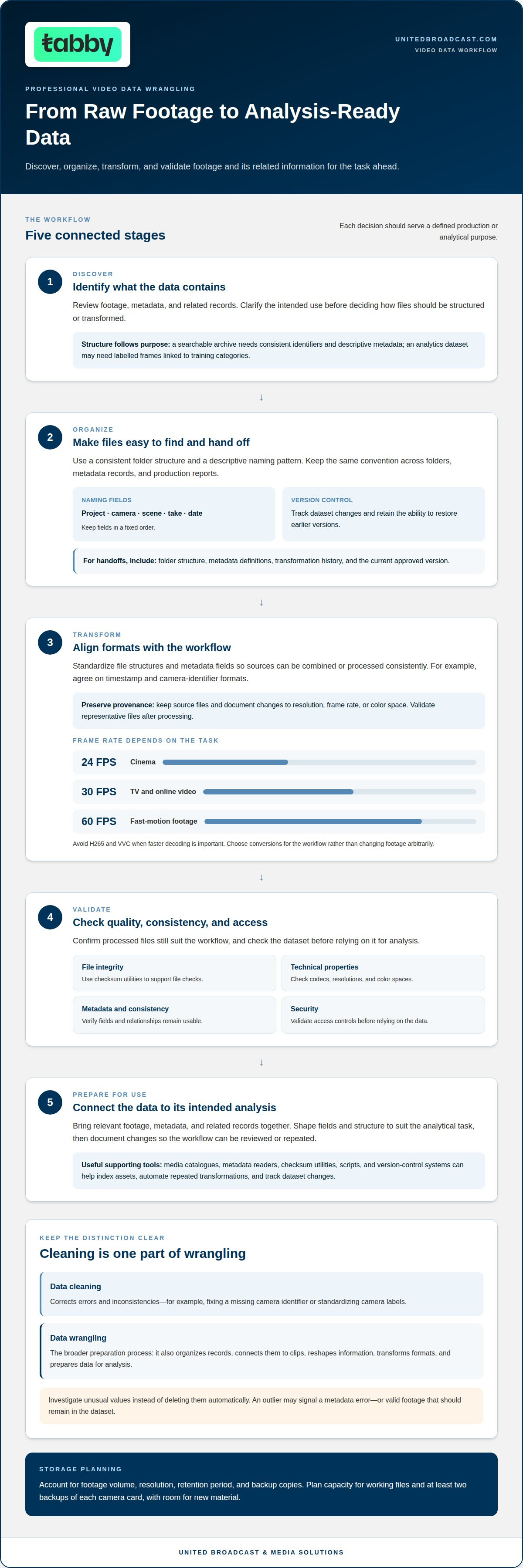
Structuring video data means organizing footage, metadata, and related records to suit a specific task. A searchable archive needs consistent identifiers and descriptive metadata, while a video analytics dataset may need labelled frames linked to training categories. This structure helps teams find relevant material and connect it with other records.
Archive costs depend on footage volume, resolution, retention period, and the number of backup copies. Storage plans should account for working files and at least two backups of each camera card, with enough capacity to accommodate new material.
Standardizing Data Formats
Standardizing formats means aligning file structures and metadata fields so different sources can be combined or processed consistently. For example, a dataset might use one agreed format for timestamps and camera identifiers. Compatible structures help analysts merge footage records or prepare data for a model.
Choose conversions to suit the workflow rather than changing footage arbitrarily. Preserve source files and document changes to resolution, frame rate, or color space. This record distinguishes originals from transformed files and explains how each asset was prepared for analysis.
Organizing and Naming Video Files
A consistent folder structure and descriptive filenames make professional video files easier to identify, retrieve, and hand off. A naming pattern can combine project, camera, scene, take, and date fields in a fixed order. Apply the same convention to folders, metadata records, and production reports.
One of the best practices for professional video data wrangling is to maintain dataset version control, so teams can track changes and restore earlier versions. For handoffs, include the folder structure, metadata definitions, transformation history, and current approved version. This helps collaborators work from the same assets without overwriting useful revisions.
Managing Video Properties and Tools
Managing video properties means recording and standardizing technical attributes for the intended analysis. Frame-rate choices depend on the task: 24 FPS is listed for cinema, 30 FPS for TV and online video, and 60 FPS for fast-motion footage. Avoid H265 and VVC when faster decoding is important.
Media catalogues, metadata readers, checksum utilities, scripts, and version-control systems support video data management. Teams use them to index assets, automate repetitive transformations, and track dataset changes. Validate representative files after processing to confirm that codecs, resolutions, color spaces, and metadata still suit the workflow.
Differences between data wrangling and data cleaning
Data cleaning corrects problems in a dataset; data wrangling is the broader process of preparing it for analysis. In video work, cleaning might fix a missing camera identifier, while wrangling also organizes clip records, joins them with production notes, and reshapes them for an analytical model. Cleaning is one part of wrangling, not a substitute for the full workflow.
Consider a footage log with blank scene fields, duplicate clip entries, and inconsistent camera labels. Cleaning can remove duplicate records, standardize labels such as “Cam A,” and handle missing values. Wrangling then determines how those records connect to the actual clips and which fields the intended analysis needs. Keeping these tasks distinct clarifies the scope of each correction.
Different errors call for different treatments. A mistyped timecode may be corrected against a reliable production record, while an empty field may need a defined missing-value marker. Investigate an outlier, such as a clip duration far outside the expected range, rather than deleting it automatically. It could indicate a metadata error, or it could be valid footage that needs to remain in the dataset.
Cleaning methods should preserve meaning as well as consistency. For example, deleting records as duplicates because they share a filename could remove valid material if they refer to different camera cards. Match records using relevant identifiers and metadata, then document corrections so later analysts can distinguish source values from edited ones. For unusually large datasets, automated cleaning can handle repeated checks, while review focuses on ambiguous cases.
The terms “data cleaning,” “data wrangling,” “data munging,” and “data remediation” are sometimes used interchangeably. Teams should define them in project documentation. A useful workflow treats cleaning as error correction, then continues through restructuring, transformation, validation, and preparation for analysis. Shared terminology helps camera, editorial, and analytics teams understand what a completed dataset contains.
For example, a cleaned dataset may have consistent camera labels but still lack the structure needed to compare footage with production reports. Wrangling brings those records together and prepares relevant fields for analysis. The distinction matters because accurate individual values alone do not guarantee that the data can answer the production question.
If camera-system choices affect the information captured in your workflow, discuss professional video camera requirements with United Broadcast & Media Solutions.
Raw data may contain errors, inconsistencies, missing values, or unstructured information. In a footage workflow, cleaning can standardize inputs, remove duplicates or empty cells, address outliers, correct inaccuracies, and address bias. Choose each action to suit the issue: check an unusual value before removing it, while inconsistent labels may be standardized to make records comparable.
Data cleaning is a step within data wrangling that addresses inaccurate and inconsistent data. It supports accuracy and completeness, while wrangling reorganizes data into a more usable format. Once records are cleaned, wrangling arranges the remaining information to support the intended analysis. This distinction helps teams avoid treating corrections as the whole preparation process: reliable values matter, but they also need a usable structure.
Validation of consistency, quality, and security
Validation tests whether transformed video data is consistent, usable, sufficiently complete, and protected. It catches problems that could distort analysis or expose footage to avoidable risks.
Checking Data Quality and Consistency
Quality validation checks whether records meet defined requirements and remain consistent across a dataset. For example, compare clip IDs, camera labels, durations, and timestamps across footage logs and metadata.
Removing duplicate entries can prevent one clip from being counted twice, but first confirm that the records identify the same source asset. Add a value to an empty field only when a reliable source supports it. Otherwise, mark the value as missing rather than guessing. These checks keep the dataset usable without concealing uncertainty in the source records.
Verifying Metadata and Integrity
Metadata validation confirms that each clip’s descriptive and technical fields accurately represent its contents. Check fields such as timecode, running time, resolution, and camera identifier against the media file or production record.
Integrity checks determine whether a copied file matches its source. A checksum comparison can identify changes or corruption during transfer. To verify the source, read files on a camera card twice during one offload job and compare the resulting hashes. Investigate any mismatch before the file enters an editing or analysis workflow.
Ingesting, Verifying, and Backing Up Footage
Ingestion is the controlled transfer of footage from camera media into organized storage, followed by verification and backup. A reliable workflow records the source card, destination, file count, and transfer status for each offload.
After copying, use checksum verification to confirm that destination files match their source copies. Keep the original camera media unchanged until verification is complete, and investigate missing files or hash mismatches before reusing the card. These controls reduce the risk of loss from interrupted transfers, damaged media, or accidental deletion.
Managing Retention, Privacy, and Security
Retention and privacy management define who can access footage, why it is kept, and when it should be archived or deleted. For UAE productions, set these practices according to the project’s purpose, permissions, and the nature of the recorded material; no single retention period suits every production.
Limit access to people who need the assets, and protect storage with appropriate permissions and secure transfer methods. Document retention decisions and deletion actions so teams can trace how footage was handled. These controls help address risks such as unauthorized access, accidental sharing, and keeping identifiable footage longer than the project requires.
Data transformation and normalization
Transformation reshapes video data for a defined analytical task, while normalization makes its values consistent and comparable. Each change should preserve the information needed to interpret the footage accurately.
For model preparation, teams can select frames at a rate suited to the task. A lower frame rate reduces the number of frames processed, but should still capture the motion the model needs to identify. For example, analyzing a slow-moving object may require fewer frames than tracking rapid movement. Keep each selected frame clearly linked to its source clip.
Transition detection can help divide continuous footage into meaningful segments. A wipe detector, for example, can use a threshold of 0.3 to identify possible transitions. Treat detected boundaries as candidates, then validate them against the footage and the analysis goal. A false boundary may split an important action across segments, while a missed one may combine distinct scenes.
Normalization can also place numerical variables on a common scale, typically between 0 and 1. This helps prevent differences in measurement ranges from dominating a model’s calculations. For video, transformations may standardize frame dimensions or reshape metadata tables; denormalization can combine related tables when quicker analysis is needed. Choose each operation for the dataset’s intended use, and retain source material separately.
Logging Transformations
A transformation log records each operation, its inputs, and its output. It makes a dataset easier to review, reproduce, and correct if a processing decision changes. Record details such as frame-selection rules, resizing, normalization ranges, and transition thresholds. When an enriched dataset adds information from another source, repeat the relevant wrangling and validation steps for those new fields.
Creating Proxies and Relinking Media
Proxy creation generates lighter working copies for editing, while transcoding converts media into another format for a defined workflow. Associate each proxy with its source using stable clip identifiers or metadata, and preserve the original files. Reliable relinking requires matching identifiers and an unambiguous path to the source media. Confirm that linked clips resolve correctly before using them downstream.
For a video analytics dataset, publish transformed files in a format the team can share and process. Record the transformation settings alongside the output, then validate representative clips for correct dimensions, frame selection, and metadata. This final comparison helps establish that the dataset remains accurate after processing, rather than merely confirming that files were created.
Definition and purpose of data wrangling
Data wrangling converts raw data into a usable form before analysis. For video, it involves understanding what footage and associated records contain, organizing them around a defined question, and preparing the resulting dataset for analysis or sharing. The aim is not simply to process files, but to make the evidence suitable for producing meaningful insights.
The work begins with discovery: understanding the available material and how it might be used. Profiling and visualizing a dataset can reveal its distributions, relationships, inconsistencies, and missing values. For example, a team studying movement can check whether clip records include consistent timestamps and useful labels. That initial understanding helps identify relevant data and the preparation the analysis requires.
Purpose determines the shape of the workflow. An analyst looking for patterns across labelled frames needs data arranged for comparison; a team reviewing production activity may instead need footage records connected to reports. Wrangling can reshape information, merge datasets, and prepare selected fields for the intended analytical model. Without that fit, analysts may waste time interpreting incompatible records or draw conclusions from incomplete material.
Data wrangling also connects collection with data mining, where analysts look for patterns or relationships that can inform action. Handling missing information is part of this preparation: a blank label might be filled from a reliable record, kept as missing, or excluded if it prevents the planned analysis. The right choice depends on what the field represents and how its absence affects the question being studied.
Responsibility varies by organization. Where a data team exists, a data scientist or another team member typically handles wrangling; in smaller organizations, non-data professionals often prepare information before use. Manual work may suit a small, straightforward dataset, while scripts or tools can automate repetitive tasks. Automation supports repeatable processing, but the workflow still needs clear decisions about inputs and intended outputs.
When new information enriches a dataset, repeat the relevant wrangling steps for that data. For instance, joining footage records with another dataset can introduce different fields, formats, or gaps. Review the combined structure before analysis. Once prepared, publish the validated result as a suitable file or written report so others can use it to support the organization’s stated goals.
Data wrangling commonly involves discovery, transformation, validation, and publishing. These activities provide a practical sequence: understand the material, prepare it for its intended use, check that the result is sound, and make the prepared output available. Wrangling typically happens before analysis to help ensure data is reliable and complete. This matters because analyzing raw data without addressing its issues can lead to inaccurate conclusions, wasted time, and flawed decisions. Preparation may be manual or automated, depending on the material and task. Manual work can address individual issues, while automated processing applies defined transformations consistently. In either case, validation remains essential: check the prepared result before publishing it or using it for analysis. This sequence keeps preparation tied to the purpose of the inquiry.
United Broadcast & Media Solutions (UBMS): Professional Video Cameras
United Broadcast & Media Solutions (UBMS) helps production teams select professional video cameras and digital cinema cameras suited to their capture requirements. Camera choice shapes the footage and metadata entering a later wrangling workflow, so consider the intended analysis alongside production needs.
When lens choice and lighting also affect the captured material, UBMS supplies cinema lenses and professional lighting equipment. These equipment categories can help teams plan a coherent capture setup before footage moves into post-production, archiving, or analysis.
When you’re aligning production equipment with a data workflow, contact United Broadcast & Media Solutions (UBMS) to discuss your requirements.
Build Your Next Video Data Workflow with Confidence
Make the next step a clear project decision: identify the analysis the footage must support, assign responsibility for the dataset, and define how teams will use the resulting outputs. These choices give production and analytics teams a shared direction before new material enters the workflow.
The best practices for professional video data wrangling are most useful when they become part of routine planning, not a separate task after production. A documented approach helps teams carry decisions forward as projects, collaborators, and analytical needs change. Review the workflow when those needs shift, and keep each dataset’s intended use visible to everyone handling it.
For equipment planning that supports your production requirements, United Broadcast & Media Solutions can help you consider the next step.
A well-considered workflow gives your team a practical foundation for its next project.
Frequently Asked Questions
What is data munging?
Data munging is another term commonly used for preparing and cleaning data before analysis. In a video project, it can mean mapping inconsistent column names from separate camera logs into one shared schema. For example, records labelled “camera,” “cam ID,” and “unit” can be aligned under a common field after their meanings are checked. This makes the data easier to query without assuming similar labels always represent identical information.
What metadata should be captured and embedded in professional video workflows?
Capture metadata that helps identify, interpret, and manage each asset, such as project and clip identifiers, recording date, camera, scene, take, timecode, and technical properties. Add production-specific fields, such as the shot’s subject or intended use, when they support retrieval or analysis. Keep metadata linked to the correct media through stable identifiers. In shared workflows, document field meanings so editorial, archive, and analytics teams interpret values consistently.
What storage formats and folder structures work best for video projects?
The right storage format depends on whether an asset is a camera original, an editing proxy, or an analysis-ready derivative. Preserve originals separately from generated files, and choose formats compatible with the receiving workflow. A practical folder hierarchy might group assets by project, then production date, camera, and media type. Keep naming rules consistent, and place documentation or metadata exports where collaborators can find them without confusing them with source footage.


