





Professional AV Equipment: Building the Right System
A dependable production system starts with the workflow, not the camera. Choosing professional AV equipment one device at a time can leave gaps in the signal chain, create compatibility problems, or make future upgrades more difficult. Start by defining what the production needs to do, from capture through monitoring and delivery.
It’s natural to focus first on the equipment you know you need. But cameras, lenses, lighting, audio, monitoring, and signal management must work together to support the finished production. The right choices depend on your format, crew, operating environment, and plans for growth.
This guide explains the role of each key equipment category and how to plan a compatible system around real requirements. You’ll learn what to prioritize, where integration matters, and how to leave room for expansion without overbuilding. UBMS supplies professional equipment, integrates broadcast and studio systems, and provides service-center support for production teams across the UAE.
Key Takeaways
- Identify the equipment categories your production depends on, from capture to delivery.
- Plan the signal flow and confirm that interfaces and formats align before selecting devices.
- Compare studio, live broadcast, and location workflows to understand how their equipment priorities differ.
- Use a practical system plan to choose professional AV equipment that fits current needs and allows for realistic growth.
- Consider how equipment selection, system integration, and technical support contribute to a dependable setup.
What Does Professional AV Equipment Include in a Production Workflow?
Professional AV equipment is a coordinated set of tools for capturing, processing, monitoring, and delivering media. The broader term Audiovisual (AV) covers the combination of sound and images. A production system also depends on how each device and operator fits into the workflow.
Professional production and broadcast setups are designed around defined tasks, consistent operation, and control across connected equipment. A consumer device may suit a simple standalone use, while a production environment often needs devices to exchange signals reliably, support monitoring and adjustment, and meet specific delivery requirements. The right system depends on the format, crew, operating environment, and intended output.
Which equipment categories make up a professional AV system?
Each category has a distinct role. Cameras capture images, and lenses shape framing and perspective. Lighting controls how subjects and spaces appear on camera. Audio equipment captures speech and other sound, while monitoring tools help operators assess picture and sound during production.
- Capture: Professional video or digital cinema cameras paired with suitable lenses.
- Lighting: Fixtures and related equipment to shape illumination for the space and image.
- Audio: Microphones and associated equipment to capture sound for the production.
- Monitoring and signal management: Displays, routing, and processing tools that help teams assess and direct signals.
- Broadcast studio gear: Infrastructure that connects sources, operators, control points, and outputs in a studio workflow.
These categories work as a system, not as an isolated shopping list. For example, UBMS supplies professional video cameras alongside cinema lenses, lighting equipment, and broadcast studio gear.
How does a workflow-first approach improve equipment selection?
Document what you produce, where the system operates, who uses it, and where the finished media must go. A studio setup, live broadcast chain, and location-based shoot place different demands on equipment and signal flow. Before selecting devices, map the path from image and sound capture through processing and monitoring to the final output.
One choice can affect several others. A camera’s intended use influences the lens, how operators monitor the image, the lighting approach, and how its signal connects to downstream equipment. Check that interfaces and formats align across the chain using current manufacturer information rather than assuming devices will work together.
Professional AV equipment is the connected set of capture, control, monitoring, and delivery tools that enables a production workflow to operate as intended.
How Professional AV Equipment Works Together Across the Signal Chain
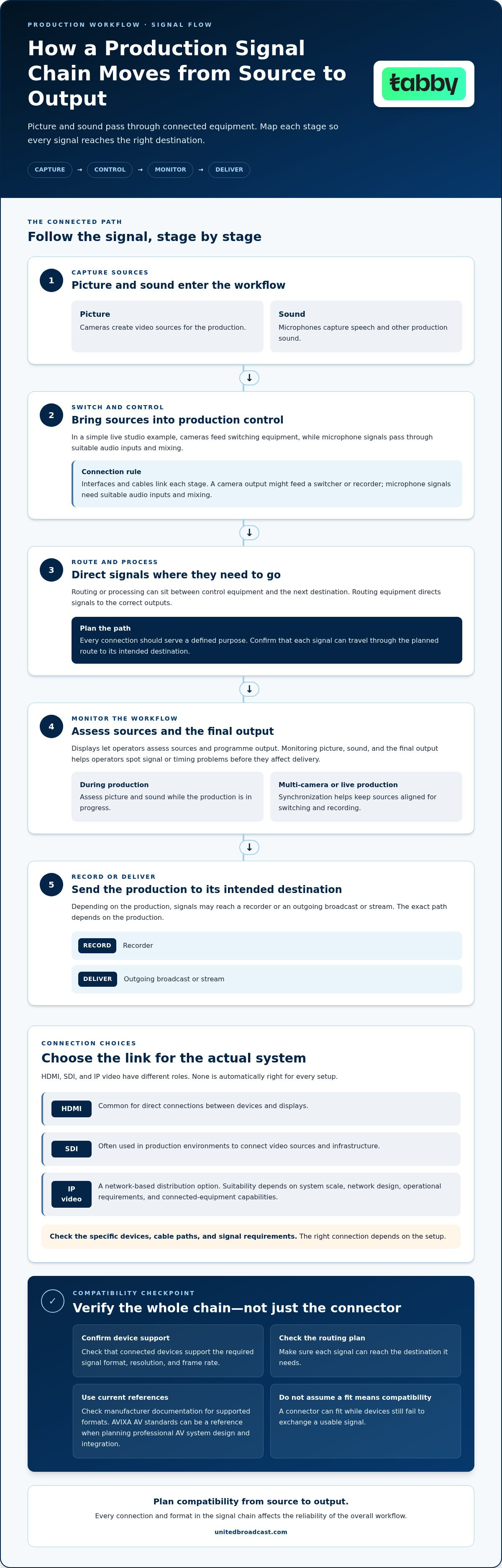
A production signal chain carries picture and sound from their sources to the intended audience or recording destination. In a simple live studio example, cameras and microphones feed switching and audio-control equipment. Signals may then pass through routing or processing to operator monitors, a recorder, or an outgoing broadcast or stream. The exact path depends on the production, but every connection should serve a defined purpose.
What connects cameras, audio, monitoring, and broadcast infrastructure?
Interfaces and cables link each stage. A camera output might feed a switcher or recorder. Microphone signals pass through suitable audio inputs and mixing before monitoring and delivery. Displays let operators assess sources and programme output, while routing equipment directs signals to the correct destinations. Broadcast studio gear provides infrastructure to connect sources, operators, control points, and outputs.
SDI and HDMI are both used for video connections, but their typical roles differ. HDMI is common for direct connections between devices and displays, while SDI is often used in production environments to connect video sources and infrastructure. Neither is automatically right for every setup. Check the specific devices, cable paths, and signal requirements. IP video is another design option, particularly when a workflow benefits from network-based distribution. Its suitability depends on system scale, network design, operational requirements, and the capabilities of the connected equipment.
Why do interoperability and synchronization matter?
Connectors are only one part of compatibility. Connected devices also need to support the required signal format, resolution, and frame rate, and the routing plan must carry each signal where it needs to go. A connector can fit while the devices still fail to exchange a usable signal. Check manufacturer documentation for supported formats, and consult AVIXA AV standards as a reference when planning professional AV system design and integration.
In multi-camera or live-production environments, synchronization helps keep sources aligned for switching and recording. Monitoring each source and the final output helps operators spot signal or timing problems before they affect delivery. Plan compatibility from source to output, because every connection and format in the signal chain affects the reliability of the overall workflow.
For broadcast environments and studio setups, discussing system integration requirements connects equipment choices to the intended signal path.
Comparing Professional AV Equipment for Production Needs
The right equipment mix depends on how a production operates, not just on headline specifications. A fixed studio can prioritize repeatable setups and integrated control, while live and location workflows place different demands on routing, portability, and crew coordination. Use this comparison to identify which requirements matter most for your system.
| System need | Studio production | Live broadcast | Field or location |
|---|---|---|---|
| Capture | Cameras and lenses suited to planned shots and repeatable positions. | Coordinated camera sources that support the programme format. | Portable camera and lens choices suited to the location and setup demands. |
| Lighting | Controlled lighting designed for consistent scenes. | Lighting that supports the venue and live operation. | Portable lighting appropriate to available space and conditions. |
| Audio | Capture and monitoring suited to the room and production. | Clear, coordinated audio paths for presenters, sources, and output. | Audio equipment that can be positioned and monitored efficiently on site. |
| Monitoring | Positioned displays for camera, picture, and production checks. | Access to source and programme monitoring during transmission. | Monitoring that is practical to transport and use at the operating position. |
| Routing | Planned connections between sources, control, recording, and output. | Dependable signal distribution among sources, switching, and delivery. | A streamlined signal path that limits setup complexity. |
| Control and growth | Repeatable operation, with room to add sources or roles. | Clear operator coordination and resilience across live signal paths. | Simple controls, manageable setup, and expansion that doesn’t undermine portability. |
Which priorities change between studio and live production?
Studios benefit from controlled lighting, known camera positions, consistent monitoring, and carefully planned routing. Live production leaves less room for interruption, so crews need coordinated sources, switching, communications, and dependable distribution. Field workflows trade some fixed infrastructure for portability. Consider transport, setup demands, environmental conditions, and how operators will monitor picture and sound wherever the system is used. For live events and mobile productions, safeguarding delicate audio and lighting gear in transit with durable flight cases from ProX is essential to keeping equipment operational.
How should teams compare equipment beyond headline specifications?
Compare each option against the actual workflow. Check compatibility with existing infrastructure, operator familiarity, serviceability, and the effort required to integrate and maintain the system. A feature is essential only if it supports a production requirement. Additional capability can add complexity without improving the operation. AVIXA, the Audiovisual and Integrated Experience Association (AVIXA), provides industry resources for professional AV planning.
For camera-category guidance, see this professional video camera guide. If lighting is central to the setup, assess fixture placement, control, and the production environment as part of the system plan. Test every choice against the intended workflow. For help aligning equipment and integration needs, discuss your system requirements.
How to Plan a Professional AV System Before Buying Equipment
A dependable system starts with a clear brief, not a catalogue. Before purchasing professional AV equipment, document what the production needs to accomplish, how the team will operate it, and what the final output must support. This keeps equipment choices tied to actual requirements and brings integration needs into view early.
What information should a team gather before system design?
Build an inventory of the current setup and planned workflow. Record:
- Production requirements: Content formats, expected outputs, and the number and type of sources used.
- Operating conditions: Studio or location environment, room dimensions, power and cable constraints, and access to equipment for operation and servicing.
- People and roles: Who operates, monitors, and maintains each part of the system, and how much control each role needs.
- Existing equipment: Cameras, lenses, lighting, audio, monitors, routing and recording equipment, plus each device’s connection types and supported formats.
Then map the workflow from source to output. Mark which existing components can remain, which interfaces connect them, and where operators encounter delays or recurring workarounds. For example, if moving a signal between devices requires repeated manual reconnection, that dependency may indicate a routing or infrastructure need rather than a reason to replace the camera.
How can teams plan for reliability and future changes?
Design for daily operation as well as the equipment list. Consider clear cable paths, access to connection points, service access around installed gear, and documented operating procedures. Simple labels and defined signal routes help operators see what connects where and support consistent handovers between staff.
Plan capacity around documented needs. If the current workflow uses a defined set of sources, design for those sources and identify realistic additions the team expects to make. Modular infrastructure can leave room for an extra source or a changed workflow without requiring every project to be built around hypothetical expansion. Keep planned growth proportionate to the production’s direction.
System integration brings equipment and infrastructure together as a coherent broadcast or studio environment. It connects design decisions, interfaces, routing, and operator requirements. Repair and technical support help maintain equipment over its working life. Include support in the system plan rather than treating it as an afterthought.
With a requirements inventory and signal-flow plan in hand, you can discuss the design, integration, and support needs for your setup.
Professional AV Equipment, Integration, and Support from UBMS
A professional system depends on more than individual devices. Cameras, cinema lenses, lighting, and broadcast studio gear need to suit the production requirements and work together as an operational setup. United Broadcast & Media Solutions (UBMS) supplies professional equipment and provides system integration for broadcast environments and studio setups across the UAE.
How does equipment supply connect with system integration?
Start with the facility’s documented needs: the sources it uses, how operators control them, and where signals need to go. Equipment selection can then account for those needs alongside existing infrastructure. A camera and lens, for example, should be considered in relation to the monitoring and signal path they need to support, rather than selected in isolation.
System integration connects components into a working environment. It accounts for how equipment, interfaces, routing, control, and operator roles fit together so the complete setup supports its intended workflow. This matters in studios and broadcast environments, where disconnected choices can add operating steps or complicate maintenance.
What role do technical support and equipment servicing play?
Technical support and repair access are part of long-term system planning. Equipment needs maintenance over its working life, and a service issue can affect the workflow that depends on it. UBMS has a dedicated service center for professional equipment repairs and technical support. Including service needs in planning helps organizations consider operational readiness alongside the initial system design.
Founded in 1997, UBMS brings professional equipment supply, system integration, and service-center support together. These capabilities connect equipment decisions with the practical needs of operating and maintaining broadcast and studio systems.
For deeper infrastructure planning, explore a broadcast studio gear guide. To discuss professional AV equipment and system requirements, share your production workflow, existing infrastructure, and intended outputs with UBMS.
Build a System That Supports Your Next Production
A dependable setup starts with the workflow. Define your production format, operating environment, crew, and delivery needs before selecting equipment. Then map how picture and sound move through capture, processing, monitoring, and output. This makes it easier to identify essential components and plan compatibility across the signal chain.
Priorities also change by application. A controlled studio, live broadcast, and field setup each place different demands on lighting, routing, monitoring, portability, and operator control. Use those requirements to guide equipment choices, and allow for realistic changes without adding unnecessary complexity.
UBMS supports professional AV equipment planning with cameras, lenses, lighting, and broadcast studio gear, alongside system integration for broadcast and studio environments. The company also provides equipment repairs and technical support through a dedicated service center. This connects equipment selection with integration and ongoing technical care.
With a clear plan and the right technical support, you can build a system that serves your production today and gives your team a confident path forward.
Frequently Asked Questions
What is considered professional AV equipment?
Professional AV equipment is a coordinated set of tools used to capture, process, monitor, and deliver audio and visual content. A production system may include cameras and lenses, lighting, audio capture, monitors, routing or switching equipment, and broadcast studio gear. What makes the setup professional is how its components support the production workflow, operating requirements, and intended output, rather than any single device or brand.
What equipment is needed for a professional video studio?
A professional video studio typically needs cameras and suitable lenses, lighting, audio capture equipment, monitoring, and infrastructure to route, control, record, or deliver signals. The exact setup depends on the studio’s format, crew, and outputs. A single-camera recording room may need a simpler signal path than a multi-camera studio with live switching. Map the workflow first, then identify the equipment and connections each step requires.
How do I choose professional AV equipment for my workflow?
Choose professional AV equipment by documenting what you produce, where the system operates, who uses it, and how content must be delivered. Inventory existing cameras, lenses, lighting, audio, monitoring, and connections before deciding what to add or replace. Then map the signal path and check that devices support compatible interfaces and formats. This workflow-first approach helps distinguish essential capabilities from optional features and supports a maintainable system.
Can different brands of professional AV equipment work together?
Yes, equipment from different brands can work together when the specific devices support compatible connections, signal formats, resolutions, frame rates, and control requirements. Brand alone doesn’t establish compatibility. Check manufacturer documentation for the equipment being connected, including routing, synchronization, or configuration requirements. For a studio or broadcast setup, assess the complete signal path before purchase so a suitable-looking device doesn’t introduce a mismatch elsewhere in the workflow.
What is the difference between professional AV equipment and consumer AV equipment?
The main difference is the workflow each system is designed to support. Consumer AV devices often serve standalone or simpler uses, while professional systems are selected for production demands involving control, monitoring, signal routing, and integration with other equipment. A professional setup may include dedicated cameras, cinema lenses, lighting, and broadcast studio gear. The right choice depends on the required operation and output, not on a label alone.
Why is system integration important for professional AV equipment?
System integration connects equipment and infrastructure into an operational workflow. It helps ensure that sources, routing, control, monitoring, and output work together as intended in a broadcast environment or studio setup. Without a system-level plan, individual devices may require workarounds or fail to support the complete signal path. Integration also aligns equipment selection with facility requirements, operator roles, and planned maintenance.
How often should professional AV equipment be serviced?
There isn’t one service interval that suits every device and production environment. Follow the manufacturer’s maintenance guidance and consider how frequently equipment is used, the conditions it operates in, and its role in the workflow. Keep a record of servicing and address faults or changes in performance promptly. Before important productions, teams can also check equipment condition, connections, and operation as part of their preparation routine.


