





Broadcast Studio Setup: A Practical Planning Guide for 2026
A dependable broadcast studio setup starts with the production workflow, not the camera list. Before choosing cameras or a switcher, define how signals will move, who will operate the system, and where each programme needs to go. Planning these details first helps prevent compatibility gaps and costly redesigns.
This guide walks through a practical planning sequence, from defining production requirements to mapping signal flow, selecting infrastructure, and preparing for commissioning. Use it to make decisions based on the programmes you produce and how your team works, rather than assembling equipment without a clear system plan.
Whether you’re building a new facility or upgrading an existing one, the aim is a coordinated workflow that meets current requirements and can accommodate considered changes. Professional system integration brings equipment and technical processes together, from camera and audio sources to monitoring, recording, and output.
Key Takeaways
- Define the productions, users, and delivery outputs your studio must support before selecting equipment.
- Map each signal path from camera and audio sources through control and monitoring to recording or distribution.
- Match studio complexity to the workflow, then plan for expansion without adding unnecessary systems.
- Use a phased broadcast studio setup plan to coordinate room layout, cabling, installation, testing, and operator handover.
- Professional system integration connects equipment and configuration into a coordinated environment operators can use reliably.
Broadcast studio setup starts with the productions you need to deliver
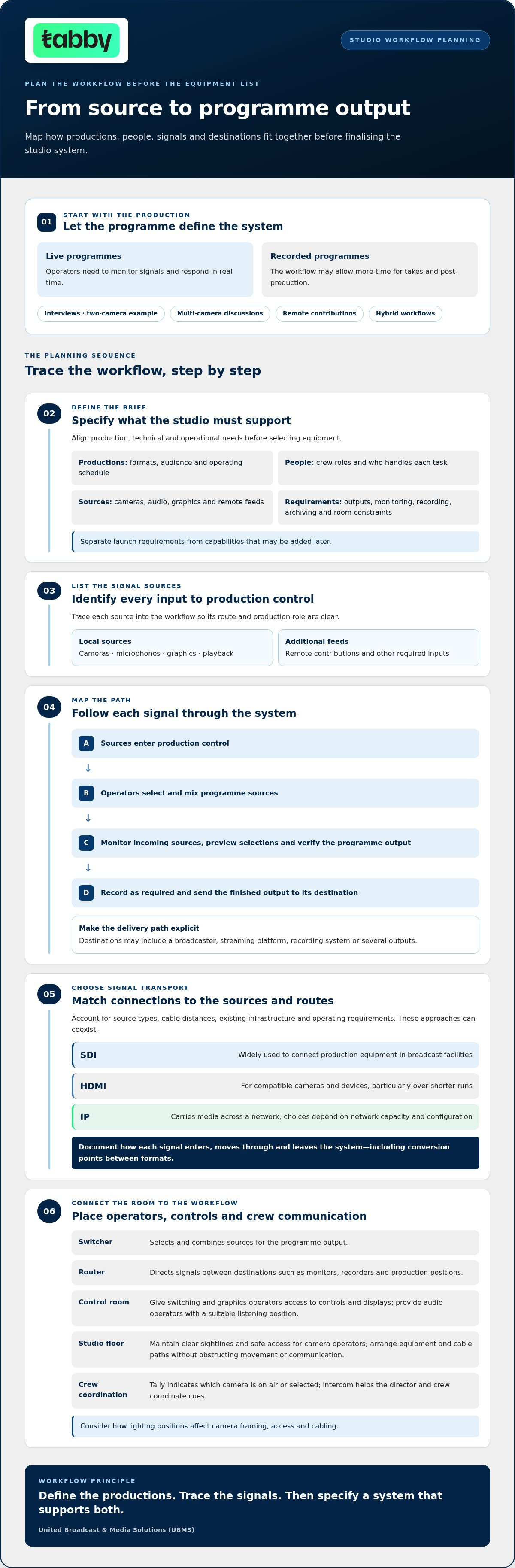
Define the productions, users, and outputs before specifying equipment. A studio for presenter-led live programmes has different needs from one used for recorded interviews, remote contributions, or multi-camera discussions. A broadcast studio setup is an integrated production environment that connects people, sources, technical systems, and delivery outputs into a workable process.
Start by listing the programme formats and where each one will go. Live broadcasts require operators to monitor and respond to signals in real time. Recorded programmes may allow more time for takes and post-production. An interview may need a two-camera arrangement, while a multi-camera discussion adds requirements for coordinated camera operation, switching, audio, and communications. Remote contributions add incoming feeds that operators need to monitor alongside local sources. A hybrid workflow may combine several formats.
Room and control-room requirements depend on the crew, operating schedule, and output destinations. In a small team, one operator may cover several roles, so the control layout and workflow should account for those tasks. Larger teams may need dedicated positions for cameras, audio, graphics, switching, and communications. Outputs for a broadcaster, streaming platform, recording system, or several destinations each need a clear monitoring and delivery path. This overview of a television production studio provides context on the relationship between the studio floor and production control room.
Which production formats should the studio support?
Make operating responsibilities explicit. Identify who handles each camera and who manages audio, graphics, switching, and studio communications. If one person covers multiple roles, include those tasks in the workflow and control-room layout. Use this professional video camera guide to compare camera options against the formats, operating conditions, and outputs you have defined.
What should a studio requirements brief include?
Use a written brief to align production, technical, and operational decisions before specifying equipment. Include:
- Production formats, intended audience, crew roles, and operating schedule.
- Signal sources, including cameras, audio, graphics, and remote contributions.
- Required outputs and expectations for monitoring, recording, and archiving.
- Room constraints, operator access, and capabilities required at launch versus later.
This brief translates production goals into connected technical requirements. It also gives the design team a reference for evaluating equipment and identifying dependencies before installation.
Design the broadcast studio workflow from camera input to final output
Map signal paths before finalising equipment. Signal flow shows how each source reaches its intended destination. A typical workflow brings cameras, microphones, graphics, playback, and remote feeds into production control. Operators select and mix sources, check them on monitors, record the programme or individual feeds as needed, then send the finished output to its destination, such as a streaming platform or broadcast chain.
Choose signal transport based on source types, cable distances, existing infrastructure, and operating requirements. SDI is widely used in broadcast facilities to connect production equipment. HDMI often connects compatible cameras and devices, particularly over shorter runs. IP transport can carry media across a network, with design choices depending on network capacity and configuration. These approaches can coexist. Specify how each signal enters, moves through, and leaves the system, including any conversion points between formats.
How do studio cameras, audio, graphics, and routing connect?
Trace each input through the workflow. Camera feeds and microphones pass through their respective production systems, while graphics, playback, and remote contributions enter as additional sources. A video switcher selects and combines sources for the programme output. A router serves a different purpose: it directs signals between destinations such as monitors, recorders, and production positions. The types and number of sources determine the inputs, routes, and outputs the system needs.
Include monitoring and recording points in the signal map. Operators need to check incoming sources, preview selections, and verify the programme output. Decide whether recording needs to capture the finished programme, separate feeds, or both, based on production and archive requirements.
What belongs in the control room and studio floor?
Position operators according to the tasks they perform. Switching and graphics operators need clear access to control surfaces and displays. Audio operators need a suitable listening position. Camera operators need unobstructed sightlines and safe access on the studio floor. Arrange equipment, cable paths, and work areas so they do not obstruct movement or communication.
In multi-person productions, tally indicates which camera is on air or selected, while intercom helps the director and crew coordinate cues. These tools connect control-room decisions with activity on the studio floor. Lighting positions also affect camera framing, access, and cable routes. Use this professional lighting equipment guide to consider lighting in relation to the production environment.
A workflow map can reveal gaps before installation. UBMS provides broadcast system integration support to coordinate equipment and technical systems around planned signal paths.
Choose a broadcast studio design that balances capability and complexity
Cameras and a switcher alone do not make a production-ready studio. The system also needs suitable signal routing, monitoring, audio, lighting, recording, cabling, and control arrangements. Choose each component to support the defined workflow rather than adding capabilities simply because they are available. A broadcast studio gear guide can help with equipment research, but the production plan should determine what belongs in the system.
Compare design approaches against the productions the studio needs to support:
Focused, single-workflow design: Suits a defined format and a consistent operating team. It can keep routing and daily operation straightforward, but may offer less flexibility if production formats or source requirements change.
Flexible, multi-format studio: Supports a wider mix of productions, sources, and outputs. It can accommodate varied workflows, but needs more planning for routing, monitoring, control, and operator training.
Next, assess signal transport. SDI, IP, and hybrid infrastructure each suit different equipment, signal paths, existing systems, and operating requirements. A hybrid design can connect different transport types, but conversion points and end-to-end signal handling need to be planned. No single approach is right for every studio.
When does a simpler studio workflow make sense?
A focused design is a good fit when the studio primarily delivers a consistent programme format with a stable crew and a known set of sources and outputs. Avoiding unnecessary workflow branches can make setup, training, and routine troubleshooting more manageable. The trade-off is reduced flexibility: later additions may require changes to routing, infrastructure, or operating procedures. Document realistic expansion needs while the initial design is being planned.
When should planners consider IP or hybrid infrastructure?
Consider IP or hybrid transport when it fits the planned workflow and system requirements, not simply as a technology preference. Assess interoperability, timing, monitoring, and control across the complete signal path. Use technical documentation to confirm that devices and network components are designed to work together. Plan how operators will identify and manage signals, because network-based workflows still need clear monitoring and control.
Separate confirmed launch requirements from possible expansion scenarios. Note whether additional sources, destinations, or production formats are expected later, then assess how the architecture could accommodate them. Do not assume every device will interoperate. This keeps the design grounded in current needs while making growth a deliberate consideration. UBMS provides broadcast system integration support to coordinate equipment and infrastructure around the studio plan.
Plan installation, commissioning, and studio readiness in clear phases
A reliable broadcast studio setup takes more than connecting equipment. Installation should follow an approved design, and commissioning should verify that complete workflows operate as intended. A phased process helps teams manage dependencies, identify issues before handover, and prepare operators to use the studio.
- Approve requirements. Confirm production workflows, signal paths, source and output requirements, operator roles, and room constraints. Resolve design decisions before installation.
- Complete the technical design. Map equipment locations, rack positions, cable routes, power and network connections, ventilation needs, and operator and maintenance access. Document device dependencies and how each signal will connect.
- Prepare the room and install. Check that the layout supports sightlines, movement, and equipment access. Install cabling according to the plan, label both ends clearly, and position equipment so connections can be traced and serviced.
- Commission the system. Test sources and destinations individually, then validate complete production workflows. Check routing, monitoring, communications, recording, and programme output under the operating conditions the studio is designed to support.
- Hand over and document. Provide system settings, signal and cable labels, operating procedures, and a record of equipment dependencies. Walk operators through routine operation, fault response, and support escalation.
What should happen before equipment installation?
Before work starts, compare the approved workflow with the actual room. Confirm where cameras, control positions, displays, racks, and connection points will go. Check that cable routes will not obstruct operator access or maintenance. Coordinate power, network, ventilation, and equipment requirements so dependent systems are ready when needed. Review lighting positions in relation to cameras, framing, and cabling, using the available professional lighting equipment as part of the plan.
How should teams test and hand over a new studio?
Start with individual checks. Verify each camera, audio source, graphics input, and remote feed, then confirm that intended destinations receive the correct signals. Next, run complete workflows, such as switching sources, monitoring the programme output, recording, and checking communications between operators. Record test results and note dependencies that affect normal operation. During handover, have operators perform routine tasks, review documented fault-response steps, and explain how to escalate issues for support.
How broadcast system integration turns a studio plan into a working environment
A studio plan becomes useful when equipment, configuration, and operating procedures are coordinated around the production workflow. Broadcast system integration connects these decisions, bringing cameras, lenses, lighting, routing, monitoring, and control into one technical environment rather than treating them as isolated purchases.
For a broadcast studio setup, integration starts with agreed requirements and signal paths. Equipment selection should reflect the production tasks each system needs to support. Configuration defines how sources connect, where signals are routed, what operators can monitor, and how outputs reach recording or distribution. Commissioning tests those workflows, and operator handover helps the team understand how to use the system.
What does a broadcast system integrator contribute?
Integration brings equipment choices and workflow design together. Camera and lens requirements affect how productions are captured. Lighting supports the intended image and studio arrangement. Routing, monitoring, and control connect sources to production and output. The integrator coordinates these dependencies against the approved design and documents the system configuration.
This coordination helps teams identify connection or workflow gaps before they disrupt operations. It also gives operators a clearer understanding of how equipment works together, what each signal path is designed to do, and where to begin troubleshooting. UBMS supplies professional cameras, lenses, lighting, and broadcast studio equipment, and provides system integration services to connect equipment selection with a coordinated technical workflow.
How can ongoing technical support protect studio operations?
Studio readiness continues after commissioning. Clear documentation supports routine operation, staff training, maintenance, and future changes. Keep system diagrams, equipment and cable labels, configuration records, operating procedures, and known dependencies accessible to the people responsible for the studio. When an issue arises, these records can help narrow troubleshooting to the relevant source, connection, or component.
To develop a coordinated studio plan, outline your production workflows, key sources, intended outputs, and operational constraints. This information gives integration planning a practical starting point.
Build a studio ready for what comes next
A dependable broadcast studio setup begins with production requirements, not an equipment list. Define formats, users, and outputs first. Then map signal flow and choose a design that balances current needs with realistic room for growth.
Include installation and commissioning in the technical plan. Clear cabling, documented dependencies, end-to-end workflow testing, and operator handover help turn separate components into a coordinated working environment. Professional integration connects equipment selection with configuration and ongoing technical support.
Founded in 1997, United Broadcast & Media Solutions provides broadcast system integration and professional equipment support through its service center. These services connect studio planning, implementation, and equipment care.
With a clear plan and coordinated technical support, your studio can serve its current productions and adapt thoughtfully as requirements evolve.
Frequently Asked Questions
Is a broadcast studio setup only about buying cameras and a video switcher?
No. Cameras and a switcher are only parts of a functional studio. A complete plan also defines production workflows, signal routing, monitoring, recording, communications, room layout, and final outputs. These elements need to work as a coordinated system. Start by identifying the formats and tasks the studio must support, then map the equipment and infrastructure required for each workflow.
What equipment is needed for a broadcast studio setup?
How do you plan a broadcast studio signal flow?
List each source, such as cameras, audio, graphics, playback, and remote feeds. Map where every source needs to go for switching, monitoring, recording, and distribution. Identify routing and control points, then document and test the signal paths end to end. A clear signal-flow diagram can reveal equipment dependencies before installation and give operators a reference for commissioning, troubleshooting, and future workflow changes.
Should a broadcast studio use SDI, IP, or a hybrid system?
There is no single transport choice for every studio. The right architecture depends on production requirements, existing infrastructure, interoperability, routing needs, and operational complexity. Assess SDI, IP, or a hybrid approach against the intended signal paths and expansion plans. Document system requirements and use technical documentation to validate device compatibility before finalising the design. Choose transport to suit the workflow, not simply because a method is familiar.
How can a broadcast studio setup be made easier to expand?
Plan for realistic growth by documenting current workflows and likely changes, such as additional sources, destinations, or production formats. Consider how routing, cabling, control, monitoring, and room layout would accommodate them. Keep the initial design aligned with immediate requirements while avoiding choices that unnecessarily restrict expansion. Maintain an up-to-date system diagram and equipment documentation so future planning starts with a clear record of the studio configuration.
How do you test a broadcast studio after installation?
Test individual sources and destinations first, then run complete production workflows. Verify camera feeds, audio paths, switching, routing, monitoring, recording, communications, and final outputs. Record test results and document system settings, labels, and operating procedures. Include operators in the handover so they can practise routine workflows and understand how to respond if a signal or device does not behave as expected. This checks both system operation and operator readiness.
When should a broadcast studio project involve a system integrator?
Involve an integrator when equipment categories, signal paths, operator roles, or production formats need to work together. An integrator can translate requirements into a coordinated system design, align equipment and infrastructure, and support commissioning and operator handover. Bring the workflow brief, room constraints, and expected outputs into planning. These give technical decisions a shared reference and help identify equipment and workflow dependencies before implementation begins.


