





Designing a Small TV Studio Control Room: A Practical 2026 Guide
A smaller control room can support a smoother production when the right people, displays, and equipment are arranged around the work they need to do. Designing a small TV studio control room can feel like a choice between squeezing in more equipment and accepting compromises. A better starting point is the production workflow: who operates each position, what they need to see and hear, and how signals move from source to output.
In a compact room, every desk, display, cable route, and operator position matters. Adding equipment before mapping the workflow can create clutter without improving reliability. A clear plan helps you choose a practical layout, set up monitoring for the decisions operators make, and create signal paths that are easier to test and maintain.
This guide shows how to turn production requirements into a workable room plan, connect workflow decisions to equipment and monitoring choices, and identify what to confirm before installation and commissioning. It also explains how to plan for possible changes without building capabilities the facility does not need yet.
Key Takeaways
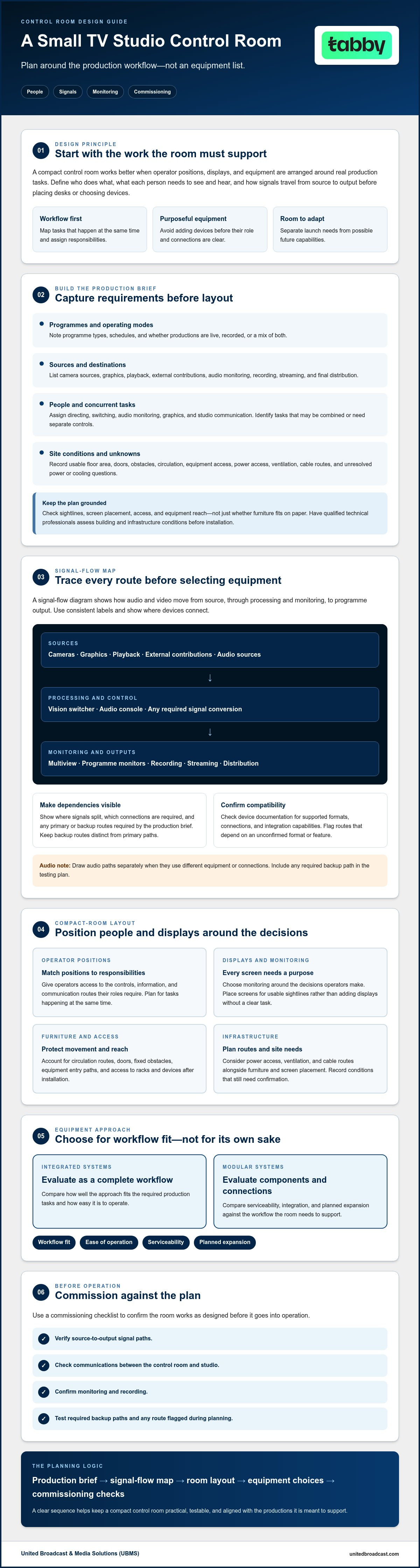
- When designing a small TV studio control room, start with the production brief so the room supports real programme and crew requirements.
- Sketch the complete signal path before selecting equipment to identify connections, formats, and monitoring needs that must work together.
- Choose operator positions and displays around the tasks that happen at the same time, rather than adding screens without a clear purpose.
- Compare integrated and modular systems by workflow fit, ease of operation, serviceability, and planned expansion.
- Use a commissioning checklist to verify source-to-output paths, communications, monitoring, and recording before the room goes into operation.
Start Designing a Small TV Studio Control Room With the Production Brief
Before placing a desk or selecting equipment, define what the room needs to support during a production. A control room is the operational hub where the team directs the programme, switches sources, monitors picture and sound, and communicates with people in the studio. The Production control room overview provides a useful introduction to the room’s purpose and common production roles.
Designing a small TV studio control room starts with the workflow, not the equipment list. Write down the programme formats, crew roles, operating schedule, and whether productions are live, recorded, or a mix of both. These details show which tasks happen at the same time, what operators need to see, and how the room must function.
Which production requirements should shape the room plan?
Map each programme from input to output. List camera sources, graphics and playback needs, audio monitoring, recording, streaming, and final distribution. Then assign responsibilities: who directs, switches, monitors audio, manages graphics, and communicates with the studio? In a one-person workflow, some tasks may be combined. In a team, operators may need separate controls and clear ways to communicate.
Separate the capabilities needed for the first production from features that may be useful later. This keeps the initial design focused while making possible additions visible in the plan. For instance, dedicated production studios like Podcast Zurich demonstrate how designing around core audio and video workflow requirements creates an efficient, professional setup without unnecessary complexity.
How do room constraints affect control-room design?
Measure the usable floor area and note doors, fixed obstacles, circulation routes, power access, and equipment entry paths before assigning operator positions or rack locations. Check sightlines and screen placement alongside ventilation and cable routes. A layout that fits on paper may still obstruct access or make equipment difficult to reach after furniture and racks are installed.
Record unknowns, such as available power capacity or cooling provision, rather than making assumptions. Ask appropriately qualified technical professionals to assess building and infrastructure conditions before installation.
For a practical brief, include:
- Programme types, production schedules, and live or recorded operating modes.
- Sources and required paths for graphics, playback, audio, recording, streaming, and distribution.
- Operator responsibilities, communication needs, and tasks performed concurrently.
- Room measurements, obstacles, access routes, power and cooling information, and unresolved site questions.
- Essential launch requirements, separated from future capabilities.
Use this brief as the reference for the room layout and equipment decisions. In a compact facility, workflow dependencies matter as much as room dimensions. Each operator needs access to the controls, information, and communication routes required for their role, without crowding the available space.
Map the TV Control Room Signal Flow Before Selecting Equipment
A signal-flow diagram turns production requirements into a technical plan. Signal flow is the route audio and video content follows from its source through processing and monitoring to the final programme output. For anyone designing a small TV studio control room, mapping that route first helps identify which devices must connect, where signals need to split, and what operators need to monitor.
Start with a simple diagram rather than a detailed equipment specification. Draw the sources on one side and the destinations on the other, then add each step between them. For example, a camera feed may go to the vision switcher, appear on multiview and programme monitors, and continue to recording and distribution. Show audio paths separately when they use different equipment or connections.
How should sources, switching, and programme outputs connect?
Use consistent labels for every camera, graphics input, playback source, and external contribution. Show where the vision switcher, audio console, recording system, monitoring displays, streaming path, and other distribution destinations connect. Mark primary and backup routes when the production brief requires them. Distinguish each backup path from the primary route and include it in the testing plan.
Use the diagram to identify where signal conversion may be needed instead of assuming devices will connect directly. Before selecting equipment or confirming quantities, check each device’s documentation for supported formats, connections, and integration capabilities. Flag any route that depends on an unconfirmed format or feature for verification.
What should operators monitor during a production?
A multiview display can show several sources and production status views together, while dedicated programme and preview monitors let operators assess selected outputs independently. Decide which views are essential at each position. A director may need to see programme and preview clearly, while a technical operator may need source and system-status information. The arrangement should reflect the tasks that happen at the same time.
Include audio confidence monitoring so the responsible operator can check the signal being produced rather than assume it is present. Document communication needs as well. Tally indications can help coordinate camera operation, while intercom routes should reflect who needs to speak with whom during each programme. Tie the diagram to crew roles so monitoring and communication support the actual workflow.
- Label every source and destination consistently.
- Show video, audio, recording, monitoring, and distribution paths.
- Mark required backup routes and unresolved compatibility questions.
- Note what each operator needs to see and hear.
Once the flow is documented, equipment selection becomes a compatibility and workflow exercise rather than guesswork. To review a proposed control-room signal plan with a technical partner, you can discuss your system integration requirements.
Plan Compact Control-Room Layout, Monitoring, and Operator Comfort
A compact room works best when each operator can reach essential controls, see the displays needed for their role, and communicate without obstructing someone else. When designing a small TV studio control room, arrange positions around task dependencies. Place operators who coordinate frequently where they can communicate easily, then check that screens remain visible from their seated working positions.
Test the arrangement on a floor-plan sketch before committing to furniture or equipment locations. Mark desks, chairs, displays, racks, doors, and circulation routes. A layout that looks efficient on paper may leave too little room to sit comfortably, move between positions, or access equipment for maintenance.
How should you arrange operators and displays in a small room?
Keep frequently used controls and essential status displays within comfortable sight and reach. A shared multiview display can make several sources visible in one place, but it may not be enough if an operator needs to watch programme output and preview at the same time. Add dedicated displays when simultaneous viewing supports a specific task, not simply to increase the screen count.
Check screen angles from each chair and preserve sightlines between operators who need to coordinate during a live production. Include equipment access in the sketch. Racks and work surfaces should not block circulation or make routine connections difficult to reach.
How can acoustics, lighting, and cooling support reliable operation?
Equipment generates heat, so include planned equipment locations in the ventilation review. Have qualified specialists assess ventilation and heat loads against the intended system rather than relying on assumptions. For wider infrastructure context, relate these room-level decisions to the topics covered in an advanced broadcast studio gear guide.
- Check seating, reach, and circulation with furniture shown to scale.
- Confirm that each operator can see the displays required for their tasks.
- Choose shared or dedicated monitoring based on what must be viewed simultaneously.
- Review glare, room noise, equipment access, ventilation, and heat before finalizing the plan.
Compare Equipment Approaches for a Small TV Studio Control Room
Equipment should match the operating model, not simply fill the rack. When designing a small TV studio control room, compare systems by how well they support required tasks, how straightforward they are to operate, and how easily they can be serviced or expanded. A system with fewer components can still be a poor fit if one operator must manage several time-critical tasks at once.
Should a compact control room use an integrated or modular system?
An integrated configuration can simplify operation when programme requirements are stable and well defined. Functions may follow a more unified workflow, which can suit a compact team that values a consistent operating approach. Confirm exactly which functions are included and how the system handles the inputs, outputs, monitoring, and recording your production requires.
A modular approach can support staged development, provided interfaces and compatibility between components are planned in advance. It may offer flexibility to change or add components, but each connection and control method needs to be understood. Neither approach is universally better. Choose based on workflow, operator familiarity, service requirements, and the growth you actually anticipate.
What equipment criteria matter more than product count?
Start with the functions in the production plan: switching, audio, monitoring, recording, and communications. Then assess each candidate system against the documented signal flow. Check the number and type of required inputs and outputs, control methods, supported formats, and any redundancy the production brief calls for. Verify compatibility in the selected equipment documentation before committing to a configuration.
Consider the difference between a single-operator and small-team workflow. One operator may need a carefully prioritized control surface and clear access to essential status information. A team can divide responsibilities, but the equipment still needs to support concurrent tasks and communication routes. If one person is expected to switch, monitor audio, manage playback, and check recording simultaneously, test whether that workload is practical before finalizing the system.
- Workflow fit: Can operators complete their assigned tasks without unnecessary steps?
- Operability: Are controls and status information clear for the people using them?
- Serviceability: Are documentation, connections, and support arrangements understood?
- Planned growth: Can future changes be assessed without assuming unverified compatibility?
Include cameras in the comparison only if source selection is part of the project. Review the professional video cameras category against the production’s requirements, then confirm connections and format support with the relevant equipment documentation. The goal is a coherent system, not the largest equipment list.
Build, Integrate, and Commission the Small TV Studio Control Room
A room is ready for production only after its complete workflow has been installed, tested, and documented. For anyone designing a small TV studio control room, commissioning should follow a clear sequence: confirm the production brief, approve the system design, verify site infrastructure, install the equipment, test the signal paths, and orient operators before handover.
Before installation, compare the approved design with the equipment and the room. Confirm that connections, power arrangements, cable routes, equipment placement, and ventilation match the plan. Resolve compatibility questions using the selected devices’ documentation, and record any changes so the final system diagram reflects what was installed.
What should the installation and commissioning checklist include?
Check that equipment is secure and accessible, cables are labelled at both ends, and power and ventilation arrangements suit the installed system. Then test the production workflow, not just individual devices. Follow each source through switching to programme output, and verify audio, preview and programme monitoring, recording, and distribution. Test the required communication routes and any backup paths included in the design.
Record the result of each test, including failures or unresolved issues, the relevant configuration, and who is responsible for follow-up. A practical checklist can include:
- Source and destination labels match the final signal-flow diagram.
- Each required video and audio path works from source to output.
- Operators can see the monitoring information required for their roles.
- Recording and communication workflows perform as expected.
- Open issues have an owner and a documented next action.
How can technical integration support a reliable handover?
Give the integration team the approved signal-flow diagram, equipment list, and confirmed requirements to review. Once testing is complete, provide operators with practical orientation: how to start and run the workflow, where to find key settings, and what checks to perform if a source, output, or recording path fails. Put signal labels, configuration details, operating procedures, basic fault checks, and equipment responsibilities in one accessible handover pack.
United Broadcast & Media Solutions offers system integration services. Discussing the documented design with UBMS technical specialists can help clarify integration requirements before installation. For support with integration, contact UBMS about broadcast integration.
Put Your Control-Room Plan Into Practice
Effective control-room design begins with the production brief, then follows the real workflow through signal paths, operator positions, monitoring, and commissioning. The most suitable equipment approach supports the required tasks, fits the available space, and can be tested and maintained without unnecessary complexity.
When designing a small TV studio control room, keep the plan grounded in confirmed requirements. Document how sources reach programme output, what each operator must monitor, and how the system will be tested and handed over. These decisions help create a compact facility that works for current productions and can be reviewed as requirements change.
United Broadcast & Media Solutions offers professional video and digital cinema cameras, cinema lenses, professional lighting equipment, and broadcast studio gear, along with system integration services and service center repairs and maintenance for professional equipment.
A clear plan is a strong foundation. With a defined workflow, appropriate integration, and thorough commissioning checks, your control room can be ready to support coordinated productions.
Frequently Asked Questions
What does a TV studio control room do?
A TV studio control room coordinates the technical and operational work behind a programme. Depending on the production, operators may switch camera sources, manage audio, cue graphics, monitor programme output, record content, and communicate with the studio floor. The workflow determines the room’s layout and equipment needs. When designing a small TV studio control room, list the required tasks and responsibilities first, then plan operator positions, displays, equipment, and signal paths around them.
How much space is needed for a small TV studio control room?
There’s no single room size that suits every production. Space requirements depend on the number of operators, equipment, access routes, display layout, ventilation, and tasks performed. Measure the usable room area, then test a scaled layout for sightlines, comfortable reach, seating, circulation, and equipment access. Account for doors and fixed obstacles as well. Have building and technical requirements assessed before installation, especially if power or cooling conditions haven’t been confirmed.
What equipment is essential in a small TV studio control room?
Essential equipment depends on the production workflow, but planning commonly includes source connections, video switching, audio control, monitoring, recording, communications, and programme outputs. Don’t rely on a generic equipment checklist. Map each required source to its destination, identify which operator uses each function, and verify device compatibility in the manufacturers’ documentation. Include equipment only if it supports a defined production requirement or a considered future capability.
Is one operator enough to run a small TV studio control room?
One operator may be enough when the production’s tasks are simple and don’t need attention at the same time. A live programme may require simultaneous switching, audio monitoring, graphics management, and communication, making a small team more suitable. Document each role and when its tasks occur before assigning responsibilities. Test the proposed workflow and assess the operational risk before expecting one person to handle multiple critical actions concurrently.
How many monitors does a small TV control room need?
The number of monitors depends on what operators must view simultaneously. A multiview display can show several sources together, while dedicated programme, preview, or audio-status displays can support specific tasks. List the required views for each operator and production stage before choosing screens. Then check viewing distance, screen angle, glare, and legibility from the planned seating positions. Add dedicated displays where they serve a clear monitoring need.
Should a small TV control room use SDI, HDMI, or IP video?
The right approach depends on the sources, device interfaces, workflow, and distribution requirements. SDI, HDMI, and IP video have different compatibility and system-design considerations. List the required connections and signal formats, then verify them against the documentation for every selected device. For a mixed workflow, identify where conversion may be needed and confirm the complete source-to-output path before installation. Don’t assume devices are compatible based on connector type alone.
What should be tested before a control room goes live?
Test every required route from source to programme output, including switching, audio, monitoring, recording, communications, and distribution. Confirm that equipment and cable labels match the signal-flow diagram and that operators can perform their assigned tasks from their positions. Document test results, configuration details, unresolved issues, and fault-response procedures. Before regular operation, orient operators and rehearse a representative production workflow so the team can check the system in realistic conditions.


