





Corporate Video Production Equipment Checklist: Build a Shoot-Ready Kit
A weak point in a corporate video setup may be the connection between the camera and the rest of the system, not the camera itself. A professional-looking image depends on compatible lenses, reliable power and media, suitable lighting, clear audio, and effective monitoring. This corporate video production equipment checklist helps you separate essentials from optional upgrades and spot gaps before shoot day.
Professional results don’t require overbuilding your kit. Start with the production workflow, compare equipment tiers, and check compatibility before choosing cameras, lenses, support, power, lighting, audio, monitoring, and backup options. As production needs grow, a planned system can make new equipment easier to integrate. United Broadcast & Media Solutions (UBMS) supplies professional video and digital cinema cameras, cinema lenses, lighting equipment, and broadcast studio gear, and provides system integration services for studio and broadcast setups.
Key Takeaways
- Use the corporate video production equipment checklist to prioritise gear for the brief, whether you’re filming interviews or covering events.
- Compare cameras and lenses by recording requirements, operating style, and compatibility, not just image quality.
- Build lighting and audio into practical kit tiers that match the crew and the need for repeatable setups.
- Trace the full signal path and test power, connections, recording, and playback before the shoot.
- Separate essential, workload-dependent, and future-stage equipment to create a reliable setup that can scale.
Corporate video production equipment checklist: start with the production brief
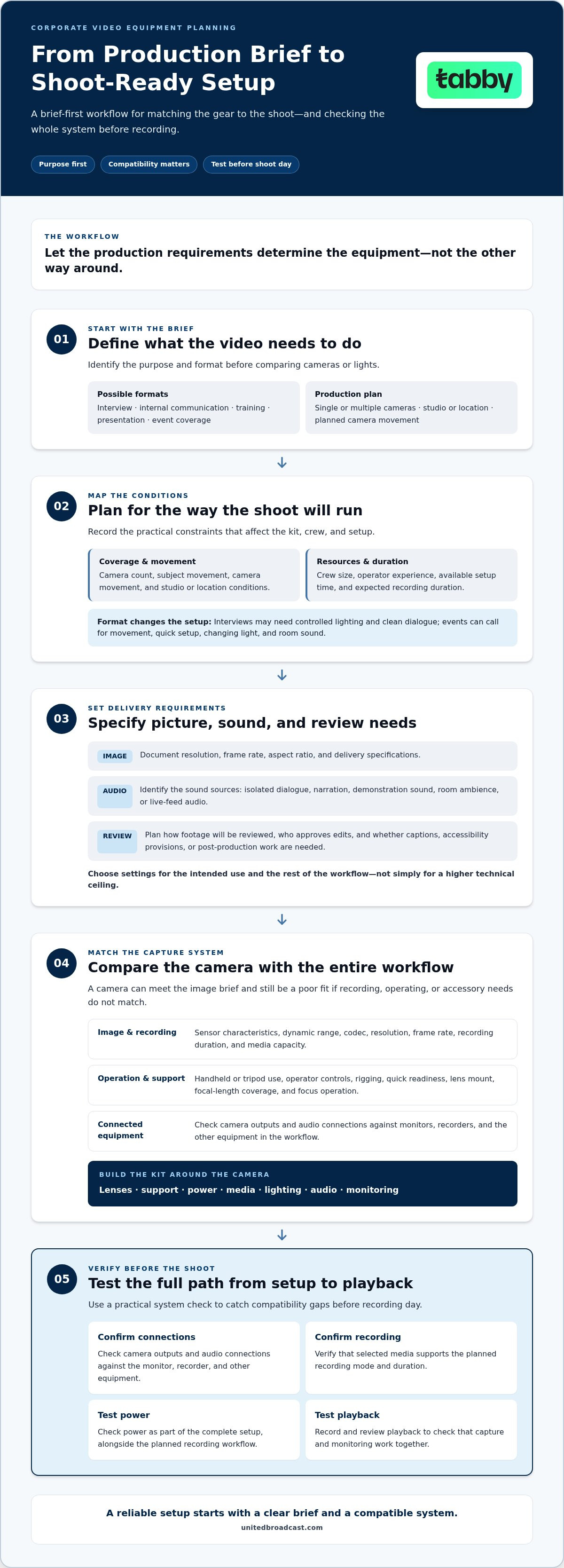
Before comparing cameras or lights, define what the video needs to accomplish and how you’ll record it. A corporate video production equipment checklist is most useful when it turns the brief into practical priorities. Not every shoot needs the same kit.
Use this brief-first checklist to guide equipment choices:
- Purpose and format: Identify whether the project is an interview, internal communication, training video, presentation, or event coverage.
- Shooting plan: Note whether you need single-camera or multi-camera coverage, a studio or location setup, and any planned camera movement.
- Production resources: Record crew size, operator experience, setup time, and expected recording duration.
- Technical delivery: Specify image and audio requirements, how footage will be reviewed, and any captioning, accessibility, or post-production needs.
Let the brief determine the equipment. The right kit is the one that reliably meets the shoot’s requirements.
Define the corporate video format and shooting conditions
Before selecting equipment, write down the number of cameras, whether you’ll shoot in a studio or on location, how much the camera or subject will move, and how long each recording may run. Add who will operate the kit and how much setup time is available. These details help you decide whether a compact configuration will work or whether the production needs more support equipment and crew capacity. The Video production process spans pre-production, production, and post-production, so plan equipment for the entire workflow, not just capture. When planning the camera setup, compare professional video cameras against the requirements you’ve documented.
Set image, sound, and delivery requirements
Confirm the required resolution, frame rate, aspect ratio, and delivery specifications before choosing a camera or recording workflow. These requirements affect the available capture options and how footage moves through review and post-production. Don’t choose a format only because it offers a higher technical ceiling. Select settings that suit the intended use and the rest of the workflow.
Describe the sound the finished video needs. An interview may depend on clear, isolated dialogue, while training content may need both narration and the sound of a demonstration. Event coverage could require room ambience or audio from a live feed. Include how each source will be captured and monitored so the equipment can support the planned recording.
Camera and lens checklist: match capture equipment to the brief
Once the production requirements are clear, assess the camera as part of a complete capture system. A corporate video production equipment checklist should connect image and recording needs with lenses, support, power, media, monitoring, and signal connections. A camera may meet the image brief but still be a poor fit if its recording workflow or accessories don’t suit the shoot.
Use these checks to compare camera categories:
- Image requirements: Match sensor characteristics and dynamic range to the intended look and lighting conditions.
- Recording requirements: Align codec, resolution, frame rate, recording duration, and media capacity with delivery and post-production needs.
- Operating style: Consider handheld or tripod operation, operator controls, rigging needs, and how quickly the camera must be ready.
- System compatibility: Map camera outputs and audio connections to monitors, recorders, and other equipment in the workflow.
Professional video cameras and digital cinema cameras can suit different workflows. Compare options against the intended recording and operating requirements rather than choosing by category name alone.
Choose a camera by workflow, not headline specifications
Compare supported recording formats, frame rates, dynamic range, and media requirements with the planned delivery. A higher frame rate or more demanding codec can affect storage, recording duration, and post-production handling, so consider the full path from capture to review. Also assess menu access, physical controls, rigging, monitoring connections, and the need for sustained recording.
Before choosing a camera, check its supported formats and outputs against the rest of the system. Confirm that the intended monitor or recorder accepts the required signal and that the selected media supports the planned recording mode. These checks help prevent a capable camera from becoming a bottleneck.
Check lenses, support, power, and media together
Match the lens mount and focal-length coverage to the shots. A fixed interview position has different framing needs from an event where subjects move around a room. Consider focus operation as well: the operator needs to hold focus reliably for the planned shooting style. Assess tripod or other support at the same time, since camera and lens weight affect stability and handling.
Check the supporting items as a system: compatible batteries and spare power, media suited to the selected recording settings, and a monitor that gives the operator a usable view. Verify connections, mounting, and cable reach during setup, not on shoot day. A simple compatibility table can list each component, its connection or mount, and any required accessory.
For a larger setup, system planning can help align camera, lens, and monitoring requirements before components are brought together. Discuss your camera-system requirements as part of that planning.
Lighting and audio equipment checklist: compare essential kit tiers
Plan lighting and audio as part of the shoot, not as last-minute additions to the camera kit. A useful corporate video production equipment checklist separates what every setup needs from equipment that earns its place because of the workload, crew size, or need for repeatable results.
Intelligible dialogue and controlled lighting are the foundation of consistent corporate video. Start with the scene and the crew available, then scale the equipment accordingly:
- Lean: For a simple, controlled interview, prioritise a key light and suitable modifier, stable stands, a microphone matched to the speaker, headphones, and a monitored recording path. Keep the setup manageable for the available operator.
- Standard: For recurring interviews or presentations, add fill and background control, more flexible modifiers, dependable grip, and a dedicated audio monitoring role or process. Consistent placement and power planning make it easier to recreate the setup.
- Expanded: For multi-person scenes, larger spaces, or event coverage, plan additional fixtures, stands, grip, power distribution, audio inputs, and backup recording capacity. Make sure the crew can position, monitor, and adjust the extra equipment.
These are workload tiers, not quality rankings. A lean kit may be right for a controlled scene. Extra fixtures or recording paths are useful when the scene, coverage, or operating demands call for them.
Build lighting around the subject and location
Plan the key light first. Then decide whether fill is needed to manage contrast and whether a background light or practical source will help separate the subject from the room. Choose fixtures and modifiers to suit the space and intended look. Include stands, grip, power distribution, and cable routing in the plan. A fixture is only useful if it can be positioned and powered safely. Compare professional lighting equipment by fixture type and the supporting gear each setup requires.
Capture clear dialogue with a resilient audio path
For a single-speaker interview, a microphone positioned close to the subject can help prioritise dialogue. A presentation or multi-person scene may need separate microphones for each speaker or a planned room feed. Choose an approach based on movement, framing, and the number of voices. Assign someone to listen on headphones and watch levels rather than assuming the camera operator can monitor every detail alone.
Before the shoot, trace the audio route from microphone to recorder or camera input. Confirm connector compatibility, available inputs, monitoring, gain levels, and where any backup recording will be captured. Make a test recording and listen for noise, distortion, handling sounds, and missing channels. Where the workflow allows, use an independent capture path for backup rather than another copy of the same recording.
Production-readiness checklist: verify monitoring, recording, and signal flow
A production setup is ready when every signal reaches its intended destination and the recording has been checked. Treat the camera, audio source, monitor, recorder, and output as one connected path. This is where the corporate video production equipment checklist becomes an operational tool: it helps the team catch connection, power, or media gaps before recording matters.
Test the complete signal and monitoring path
Follow each signal from source to destination. For every camera, microphone, recorder, display, or switcher, identify what connects to what and who will monitor it. Use connectors suited to the equipment and workflow. These may include HDMI or SDI for video, XLR for audio, and timecode connections when synchronised recording is part of the setup. Don’t assume two devices will communicate just because a cable fits.
- Power up in a planned order. Check that cameras, audio equipment, monitors, and recording devices start correctly, and confirm the intended power sources are connected.
- Confirm the video path. Send the camera signal to the intended monitor, recorder, or switcher. Check that the receiving equipment recognises the required resolution and frame rate.
- Confirm the audio path. Verify that each microphone reaches the intended camera input or audio recorder. Check channel assignment and listen for a usable signal at the monitoring position.
- Check synchronisation and routing. If the workflow uses timecode, confirm that devices follow the planned settings. Trace each output to its destination, especially in multi-camera or monitored setups.
- Make a short test recording. Record the planned combination of picture and sound. Don’t rely only on meters or a live monitor feed.
- Play back and inspect. Review the recording on the intended playback device. Check picture, focus, exposure, audio channels, sound quality, and whether the file is accessible.
Prepare power, media, cables, and contingencies
Prepare recording media according to the production team’s established data-handling procedure. Format and label it as planned, then confirm the recording device recognises it and has enough space for the intended work. Charge batteries, identify available power access, and confirm the setup can be powered for the planned recording period.
Pack cables and adapters that match the equipment connections, including compatible backups for critical links. Route and secure cables to reduce trip hazards and accidental disconnection. Keep spare media and power accessible, and make sure the team knows what to do if a recording path fails.
Finish the readiness check with a clear handover. Assign responsibility for footage copies, equipment checks after use, and escalation of technical issues. A written record of faults or changed connections helps the next operator understand the system state. Teams planning a connected studio or broadcast workflow can use UBMS system integration support for production setups.
Compare corporate video production equipment and plan the next step
A finished equipment list should show more than what the team plans to buy. Clarify which components support every production, which solve a recurring workload, and which can wait until the system expands. Use the corporate video production equipment checklist to compare the complete workflow, including compatibility, operating complexity, maintenance needs, and capacity to scale.
Sort each item into one of three planning tiers:
- Essential: Equipment required for the current workflow to capture, monitor, record, and review reliably. Include the core camera and lens setup, necessary support, lighting and audio, power, media, and monitoring. Confirm that connections and formats work across the system.
- Workload-dependent: Equipment that becomes necessary for a regular production type or operating condition. Examples include extra lighting control for repeatable interviews, additional audio inputs for multi-person scenes, or more monitoring positions for a multi-camera setup.
- Future-stage: Equipment that supports planned growth rather than a current production need, such as additional camera positions or expanded studio routing. Record what must change in the existing system to accommodate it.
Prioritise equipment by production frequency and operational risk
Prioritise components used on nearly every shoot before occasional-use refinements. A missing cable, unsuitable media, or unreliable power plan can stop an otherwise complete setup; a specialised accessory may affect only one type of production. Rank each item by how often it is needed and the impact if it is unavailable or incompatible.
Factor in shared equipment and crew capability. A device used by several teams needs clear handling, storage, and maintenance routines. If a setup depends on specialist operator knowledge, document the procedure or simplify the workflow where practical. Include servicing and repair requirements in readiness planning, not as an afterthought.
Plan a compatible setup with technical support
Before finalising equipment choices, summarise the intended workflow in one document: production types, equipment categories, signal connections, operating roles, and expected growth. Compare options as a complete system. A capable camera or fixture may still add complexity if it requires different media, connectors, power arrangements, or operator skills than the team can support.
For broadcast and studio environments, system integration helps align equipment and connections into a coordinated setup. UBMS provides professional equipment expertise, system integration, and service-center repairs and technical support. These services support equipment planning, integration, and ongoing system readiness.
Use this comparison to decide what the team needs now, what its workload justifies, and what belongs in a future expansion plan. Then bring the requirements together for a focused discussion.
Turn your equipment plan into a confident next step
Make the corporate video production equipment checklist a working document, not a one-time shopping list. Revisit it as production needs change, and record decisions, responsibilities, and planned upgrades so the whole team can work from the same equipment plan. This keeps future additions connected to the workflow instead of becoming isolated purchases.
A clear plan helps align technical requirements with practical priorities. Bring your intended use, current setup, and growth plans together, then identify where specialist equipment guidance or system planning can help move the work forward.
With a considered plan in place, your team can build capability step by step and approach each production with greater confidence. Contact UBMS to plan your corporate video equipment setup.
Frequently Asked Questions
What equipment do you need for corporate video production?
A dependable corporate video production equipment checklist covers capture gear, sound, lighting, support, and a way to review recordings. The right kit depends on the job: a presenter-led video may also need a teleprompter, while a product demonstration may require close-up support and clear views of small details. Include cases, labels, and basic cleaning supplies in your plan. These practical items help protect equipment and keep it organised between shoots.
Is a cinema camera necessary for corporate video production?
Can one camera setup handle interviews, training videos, and events?
One camera system can cover all three, but a single fixed configuration may not suit every job. A training shoot may need a clear view of a demonstration, while an event often calls for faster reframing and greater mobility. Build a common core, then plan interchangeable accessories, lens coverage, and support for each format. If teams share the setup, document how to return it to a known configuration after each shoot.
How do you choose lighting equipment for corporate video?
Choose lighting for the space, subject, and look you need to reproduce. In a small interview room, prioritise controllable fixtures and modifiers that fit the available floor space. In a larger room, consider how to illuminate the subject without obstructing movement. Check colour consistency when combining fixtures, and account for daylight or existing room lights. A lighting test from the intended camera position can reveal unwanted shadows or reflections.
What audio equipment is essential for recording corporate interviews?
For an interview, plan a microphone that suits the speaker’s clothing, movement, and distance from the camera, along with a way to monitor the recording. A lavalier microphone can suit a seated speaker who needs a natural on-camera appearance; a boom microphone may be preferable when clothing noise is a concern. Listen for air-conditioning, room echo, and fabric rustle during a rehearsal. Record a short sample at the speaker’s expected volume before the full interview begins.
How do you check that video production equipment is compatible?
Make a compatibility table before assembling the kit. Record each device’s input or output type, supported signal formats, power requirements, media type, and mounting connection. Then trace a real configuration from source to destination. Check that the camera’s output can be received by the monitor or recorder and that the recorded file suits the post-production workflow. A physical connection test is more useful than relying on similar-looking ports or assumptions based on equipment category.
What should be included in a pre-shoot equipment checklist?
Include equipment identification, assigned operator, required accessories, power sources, media status, and the location of backup items. Add space to record the tested setup and note faults or substitutions. Before departure, confirm that cases are accounted for and accessories are with the correct camera or audio kit. After the shoot, track returns and report issues while details are fresh. This creates a practical handover between the people preparing, operating, and maintaining the equipment.


