





Studio Cameras: How to Choose the Right Camera in 2026
The camera with the highest resolution may be the wrong choice for your studio. Product listings often group studio, live-production and cinema cameras together, even though these formats support different workflows. To find studio cameras that fit your production, look beyond the category label and consider how each model will connect to your existing equipment.
Start with the camera’s job. A fixed PTZ camera, broadcast camcorder, digital cinema camera and mirrorless model each have different strengths. Resolution matters, but so do frame rates, lens options, control requirements and connections such as SDI or IP. The right combination depends on how you capture, route and deliver your production.
This guide compares camera types and the specifications that affect daily operation. It also uses examples from the collection to illustrate different production needs, not to make one-size-fits-all recommendations. Use the criteria to narrow your shortlist and assess how each option fits your studio workflow, including any system integration needs.
Key Takeaways
- Match studio cameras to the production format and level of camera control your workflow requires.
- Compare sensor, resolution, frame rates and lens mount against your intended output, not headline specifications alone.
- Use collection examples to build a shortlist by production need, rather than treating one camera as the universal choice.
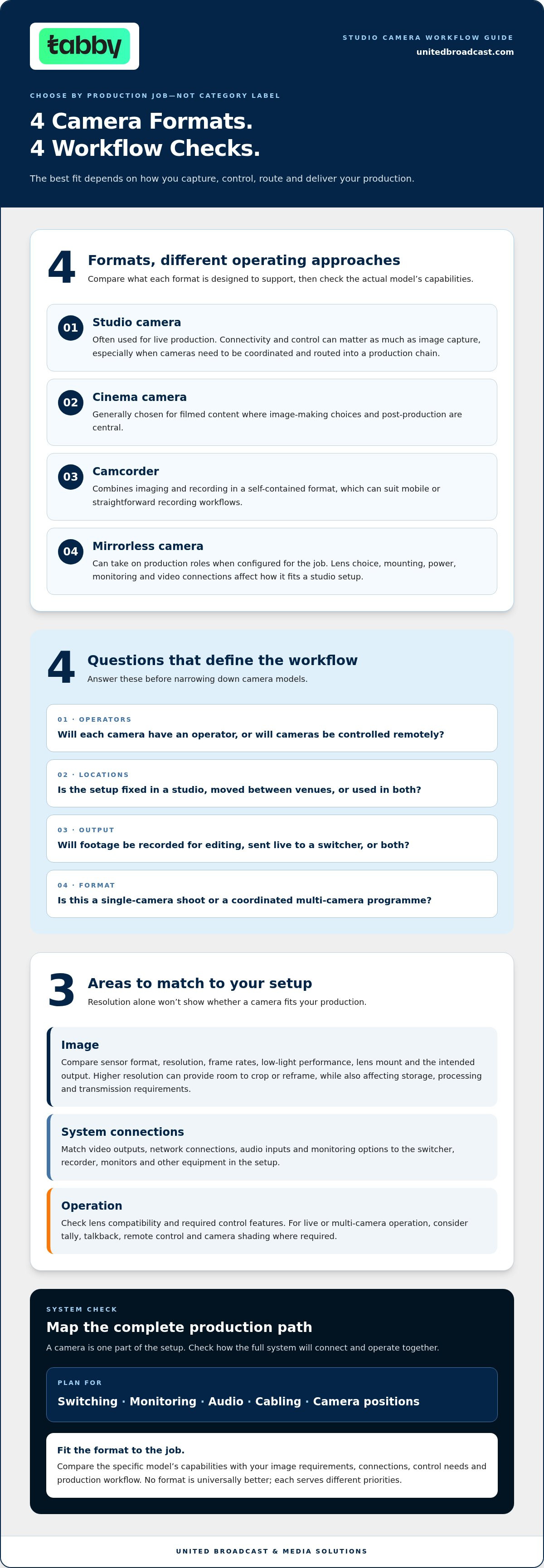
- Map the complete setup, including switching, monitoring, audio, cabling and camera positions, before selecting a camera.
- Factor system integration and equipment support into your production’s long-term needs.
What Counts as a Studio Camera? Start With the Production Job
A studio camera is best understood by its role in a production, not by the label on a product page. It supports a fixed, live or repeatable workflow where consistent operation, compatible connections and coordination with other equipment matter. Depending on the setup, that role can be filled by different camera formats.
Listings may group studio cameras with cinema cameras, camcorders, PTZ cameras and mirrorless models. These categories describe different designs and operating approaches, not interchangeable products. A Professional video camera overview explains how studio-camera setups can connect to a camera control unit (CCU) and support multi-camera operation. Whether you need that kind of control depends on the production.
Studio camera, cinema camera, or camcorder: what is the difference?
Studio cameras are commonly used for live production, where operators or control systems need to frame shots, coordinate cameras and route video into the production chain. Connectivity and control can matter as much as image capture. Cinema cameras are generally chosen for filmed content where image-making choices and post-production are central. Camcorders combine imaging and recording in a self-contained format, which can suit mobile or straightforward recording workflows. No format is universally better; each serves different priorities.
Mirrorless cameras can also take on production roles when configured for the job. Lens choice, mounting, power, monitoring and video connections all affect how well a camera fits a studio setup. The professional video camera collection includes distinct formats. Compare each model with your planned workflow instead of relying on the category name alone.
Which production workflows need a studio camera?
Studio cameras can suit live programmes, events, interviews and recurring productions where a consistent setup or coordinated camera coverage is useful. A single-camera shoot may need only an operator and a recording or streaming path. A multi-camera production adds coordination: camera positions, communication, control and switching all need to work together.
Before comparing models, define the operating conditions:
- Operators: Will each camera have an operator, or will cameras be controlled remotely?
- Locations: Is the setup fixed in a studio, moved between venues or used in both?
- Output: Will footage be recorded for editing, sent live to a switcher, or both?
- Format: Is this a single-camera shoot or a coordinated multi-camera programme?
These answers establish the camera’s role. Then compare the specifications and connections that support it, rather than selecting by category label alone.
Which Studio Camera Features Matter Most for Your Workflow?
Assess each camera against the image you need to deliver and the equipment it must work with. Resolution alone won’t tell you whether a model suits your production. Sensor format, frame rates, lens compatibility, recording options and control connections all affect image capture and day-to-day operation.
Compare sensor format, resolution, frame rates, low-light performance, lens mount and required connections before choosing a camera body. Use that checklist to narrow the options. Then match the specific model’s capabilities to your production requirements.
Image requirements: sensor, resolution, frame rate, and dynamic range
Start with the intended output. A production delivered in a particular resolution or frame rate needs a camera that supports it throughout the recording or live-output path. Higher resolution can provide room to crop or reframe, but it can also affect storage, processing and transmission requirements. Frame rates should match the motion and delivery format you plan to use.
Sensor format influences framing, depth of field and which lenses provide the field of view you need. Low-light performance and dynamic range matter when lighting conditions or scene contrast make them relevant. Compare model-specific figures rather than assuming that cameras with similar designs share the same capabilities.
Connections, control, and lens compatibility
Treat the camera as part of a system. Match its video outputs, network connections, audio inputs and monitoring options to the switcher, recorder, monitors and other equipment in your setup. When integrating video switchers, matrix routers, or signal extenders into the workflow, retailers like HDTV Supply can provide compatible professional audio-visual gear. For live or multi-camera operation, account for tally, talkback, remote control and camera shading where required. A connection mismatch can complicate signal routing and camera operation.
Lens mount matters as much as the camera body. It determines which lenses can be used directly and can influence framing, focus operation and future equipment choices. Review the lenses already in your workflow, then identify what the camera and lens combination needs to do.
- Image: Confirm delivery resolution, frame rates, sensor format and relevant low-light needs.
- System: Match video, audio, network and monitoring connections to your equipment.
- Operation: Check control features and lens compatibility against the way the production runs.
For broader category context, browse the professional video camera collection. Once you’ve defined the image and system requirements, explore studio camera options using those criteria.
Studio Camera Types Compared: Choose the Format That Fits
Camera categories describe design and typical operation, but they don’t determine whether a camera suits your production. Compare formats by workflow, operator control and setup requirements. The right choice depends on the complete signal path and how the camera will be used, not on a universal ranking of studio cameras.
| Camera format | Strongest-fit workflow | Control approach | Setup considerations |
|---|---|---|---|
| Studio camera | Live programmes and coordinated studio productions | Designed to work within a production control environment | Plan connections, camera control and integration with other studio equipment |
| Digital cinema camera | Filmed content with emphasis on image capture and post-production | Typically operated at the camera, with controls and accessories selected for the shoot | Allow for rigging, monitoring, power and the required video outputs |
| Camcorder | Mobile recording and productions that benefit from an integrated camera-and-recording format | Direct camera operation | Consider how its integrated design fits the recording and live-output workflow |
| PTZ camera | Fixed positions where remote camera movement is part of the setup | Remote positioning and operation | Plan mounting, control and signal connections |
| Mirrorless camera | Flexible shoots where a compact interchangeable-lens format fits the production | Usually operated at the camera | Assess lens, monitoring, power and connection requirements for the intended role |
When to consider a cinema camera or mirrorless camera
A cinema camera may suit a production built around deliberate image capture and post-production. The Sony FX30 is an example of a compact digital cinema camera; the Sony FX3 offers a full-frame cinema-camera format, though full frame isn’t essential for every workflow. The Canon EOS R5 C illustrates a hybrid approach for productions that combine cinema and stills needs. Treat these as examples of different formats, and compare each model’s specifications with your production requirements.
Mirrorless cameras can also be adapted for studio or other professional production roles. Factor in the equipment needed to support the camera, rather than comparing the body alone.
When a camcorder or PTZ camera may fit better
Camcorders such as the Sony PXW-Z90 and PXW-Z190 are examples to consider when an integrated camera format suits the way you record or operate. For a remote-camera position, the Sony BRC-X1000 is another format example. Remote positioning can reduce the need to place an operator at every camera, while cinema-camera setups may require more rigging for monitoring, power and control.
These formats aren’t interchangeable. Compare the professional video camera collection against your operator plan, camera positions and production requirements.
Studio Camera Shortlist: Collection Models by Production Need
This shortlist groups examples by the production questions they can help answer. It isn’t a ranking or a universal recommendation. Compare each camera with your recording, lens, control and connection requirements to see how it could fit your workflow.
Compact cinema and hybrid camera examples
- Sony FX30: A compact digital cinema camera with 6K oversampling information in its supplied listing. Consider it when evaluating a compact cinema format for image capture. The Sony FX30 with XLR handle is a separate collection listing, so compare it as a distinct configuration.
- Canon EOS R5 C: An example of a camera that combines cinema recording and still photography. It may suit a workflow that needs both motion-picture and still-image capture. Compare its recording modes and other relevant specifications with your production needs.
These examples raise a practical question: does your production benefit from a cinema-oriented camera, or a hybrid format that can also support stills? The answer depends on the intended output and wider equipment setup, not simply on body size or category.
Broadcast and remote-camera examples
- Sony PXW-Z90: The supplied product details identify it as a 4K HDR camcorder with autofocus and streaming features. It’s an example to consider if an integrated camcorder format and those capabilities suit your recording or streaming workflow.
- Sony PXW-Z280: A broadcast-oriented handheld camcorder example. It can help you compare a purpose-built handheld format with a cinema camera that may require additional rigging for operation.
- Sony BRC-X1000: A remote-camera example for productions considering 4K capture from a remotely positioned camera. Its role differs from an operator-led handheld or cinema camera, so assess it against your planned camera positions and control approach.
The useful question isn’t which format wins. It’s whether the camera’s operating style matches the production: a hybrid capture requirement, handheld broadcast operation or a remote position. Compare the features your workflow depends on, then consider the control and connections needed across the full system.
Before You Buy a Studio Camera: Check the Complete System
A camera can meet your image requirements and still create problems if it doesn’t fit the rest of the production chain. Camera compatibility depends on the complete signal path, from the camera output through switching, monitoring and recording to final delivery. Map how each component connects before settling on a model.
A practical six-step camera evaluation
- Define the workflow. Identify the production format, locations, crew and operating style. A fixed multi-camera programme has different needs from a single-camera recording setup.
- Set the output requirements. Determine the delivery resolution, frame rates and whether the production will be recorded, streamed or both. Match recording formats to the intended post-production workflow.
- Map the connections. Compare camera outputs with the inputs on your switcher, recorder and other system components. Include audio connections, cabling and network requirements in the signal plan.
- Check lenses. Confirm that the mount and lens options suit your framing needs and existing equipment. Don’t choose a body first and leave lens compatibility until later.
- Plan control and monitoring. Account for camera positions, operator access, remote-control needs and how each feed will be monitored. Multi-camera setups may also require coordinated control features.
- Include support and integration. Consider how the camera will fit into the wider studio system and how professional equipment support factors into ongoing operation.
Small oversights can affect the whole setup. A switcher may not accept the camera’s output as expected. Monitoring can be inconvenient if you haven’t considered camera positions, while audio equipment and cable runs can affect where cameras can be placed. Choosing on resolution alone, overlooking the lens mount or missing a connection requirement can turn a promising shortlist into a system that needs more planning.
UBMS provides broadcast system integration for professional production environments and operates a dedicated service center for professional equipment repairs and technical support. Reviewing broadcast studio gear alongside the cameras can also help clarify how switching, monitoring and other equipment fit into the system.
From shortlist to a supported production setup
Compare models in the studio camera collection against your six-step checklist. UBMS’s system integration services and professional equipment service center support the needs of the complete production setup.
Choose a Camera That Fits the Whole Production
The right camera choice starts with the production job, not the product label. Decide whether your workflow calls for a cinema camera, camcorder, PTZ or mirrorless format, then compare image requirements, lenses, connections and control features with the rest of your system.
Before committing, trace the signal path through switching, monitoring, audio and recording. A camera that matches your output and operating plan is more useful than one chosen on resolution alone. For multi-camera or fixed studio workflows, account for camera positions and integration needs too.
UBMS supplies professional video and digital cinema cameras, cinema lenses, professional lighting equipment and broadcast studio gear. Its system integration services and dedicated service center for professional equipment repairs and technical support can help support the wider setup.
With clear requirements in hand, compare studio cameras with confidence and choose a setup that supports your production goals.
Frequently Asked Questions
What is the difference between a studio camera and a cinema camera?
A studio camera is defined mainly by its role in a live, fixed or repeatable production workflow, while a cinema camera is generally selected for image capture and post-production. Studio setups may prioritise connections and coordinated control, especially across multiple cameras. Cinema cameras offer a different approach to image-making but may need additional rigging for monitoring, power or operation. The right format depends on the production requirements, not which category sounds more advanced.
Which camera is best for a small studio?
The best option depends on what the studio produces and how its cameras will be operated. A single-camera interview setup may have different needs from a compact multi-camera programme. Consider available camera positions, operator access, output and recording requirements, lens choices, connections and room for supporting equipment. A PTZ camera may suit a fixed remote position, while a camcorder or cinema camera could fit other workflows. For smaller operations looking to manage setup costs, checking specialist pre-owned outlets like useddigitalcamerasuk.co.uk can make acquiring dependable digital cameras and camcorders much more economical. Compare complete setups, not camera bodies alone.
Can I use a cinema camera for live studio production?
Yes. A cinema camera can be used for live studio production if its outputs and operating setup fit the production system. Check how it will connect to the switcher, monitors and recording equipment, and plan for power, camera control and any required rigging. For multi-camera work, consider how operators or control systems will coordinate the cameras. A cinema camera can work, but the workflow may require additional equipment compared with an integrated live-production setup.
What should I compare when buying a studio camera?
Compare the camera’s sensor format, resolution, frame rates, low-light performance and recording options with your intended output. Then check its lens mount, lens choices, video and audio connections, monitoring options, control features and power requirements. For studio cameras in a multi-camera setup, consider how each unit will connect to the switcher and how camera positions affect operation. Match the model’s specifications to the needs of your production before selecting equipment.
Is a PTZ camera suitable for a studio?
A PTZ camera can suit a studio when cameras need to be positioned remotely, such as at fixed shooting locations where placing an operator at each camera isn’t practical. Assess how the camera will be mounted, controlled and connected to the rest of the system. Also consider whether remote operation meets the framing and movement needs of the production. PTZ is a camera format with a particular operating approach, not an automatic fit for every studio.
Do I need to buy a lens separately for a studio camera?
It depends on the camera and how it is supplied. Some camera formats use interchangeable lenses, while others may have an integrated lens. Check the product details and identify the lens mount before planning a setup. If a lens is required separately, match it to the camera and the desired framing, focus operation and shooting distance. Include lens requirements early so you don’t assess the camera body in isolation.
How do I know if a studio camera will work with my existing equipment?
Compare the camera’s outputs and control options with the inputs and requirements of your switcher, monitors, recorder, audio equipment and cabling. Check signal formats, monitoring needs, power and how the camera will be controlled from its planned position. Compatibility depends on the entire signal path, not just whether one connector fits. UBMS provides system integration for broadcast environments and studio setups, helping connect equipment within a professional production workflow.


