





Solving Overheating Issues in Cinema Cameras: A Practical Guide
A camera that stops recording during a take can disrupt a carefully scheduled shoot. Heat may come from demanding recording settings, restricted airflow, direct sunlight, or a fault. Solving overheating issues in cinema cameras starts with identifying likely causes, not guessing at a quick fix that could put equipment or production at risk.
Some warmth during demanding operation may be expected, but warning behaviour and operating limits vary by camera. Check the manufacturer’s guidance for your model, and note when a warning appears, which recording settings are in use, and how the camera is positioned. These details can help distinguish operating conditions from a recurring problem.
This guide explains how to assess common contributors to heat and take safe, practical steps to reduce thermal load on set. You’ll also learn when persistent or repeated overheating calls for professional assessment. A methodical approach helps you make informed adjustments, reduce avoidable interruptions, and protect production continuity.
Key Takeaways
- Interpret heat warnings and symptoms using your camera’s manual; warmth alone doesn’t confirm a fault.
- Assess recording settings, ambient conditions, and rigging to identify factors that may add thermal load.
- When solving overheating issues in cinema cameras, change one variable at a time and follow on-screen warnings before adjusting your setup.
- Plan recording schedules and set procedures around model-specific operating guidance rather than assuming a universal runtime.
- Recurring warnings or unexpected shutdowns call for professional assessment, not internal repairs without the right expertise.
Why Cinema Cameras Overheat, and What the First Warning Can Tell You
A cinema camera can feel warm during demanding operation without having a fault. Treat overheating as a camera-specific condition: heat becomes a concern when the camera displays a thermal warning, interrupts recording or operation, or reaches a limit stated in the manufacturer’s guidance. The distinction matters. A warm housing alone doesn’t confirm internal damage, while a warning or unexpected shutdown deserves attention even if the camera cools and resumes working.
Normal operating warmth is a physical sensation; overheating is behaviour defined by the camera’s warning system or manufacturer guidance. Check the manual for your exact model and configuration rather than relying on another camera’s temperature limits or warning behaviour. This model-specific approach applies across professional video cameras, whose operating guidance can differ.
Thermal management describes how electronic equipment handles heat generated during operation and heat exchanged with its surroundings. The overview of Thermal management of electronic devices provides useful background, but the camera manual remains the authority for interpreting your equipment’s warnings.
Which symptoms matter more than the camera feeling warm?
Record what the camera actually does before deciding why. Capture the exact warning text, whether recording stops, and whether the camera changes a setting or display. Note whether the same behaviour returns under similar conditions or appears unexpectedly. These observations help separate repeatable operating patterns from assumptions about sensor or internal damage, which can’t be diagnosed by touch alone.
- Warning message or icon, recorded as displayed.
- Recording mode, including resolution, frame rate, and codec if shown.
- Elapsed time from recording start to warning or interruption.
- Environment, such as direct sun, shade, or a warm interior.
- Power source and connected accessories or rigging.
- What happened next, including whether recording stopped or settings changed.
Why heat is a production-continuity concern
A recording interruption can affect the take, schedule, and crew’s media-handling plan. If a warning appears, follow the camera’s on-screen instructions and manufacturer guidance. Don’t assume a clip is complete just because the camera has recovered. Confirm recorded material according to your normal media workflow before preparing for another take.
Repeated warnings are worth investigating, even if the camera resumes after a pause. A symptom log gives operators a clearer basis for comparing conditions and planning around model-specific guidance. In hot weather or during outdoor work, record the camera’s exposure to direct sun and surrounding conditions. This doesn’t mean every warm camera is unsafe or damaged. It makes solving overheating issues in cinema cameras a more disciplined process: document behaviour first, then assess what changed.
How Recording Settings, Environment, and Rigging Add Thermal Load
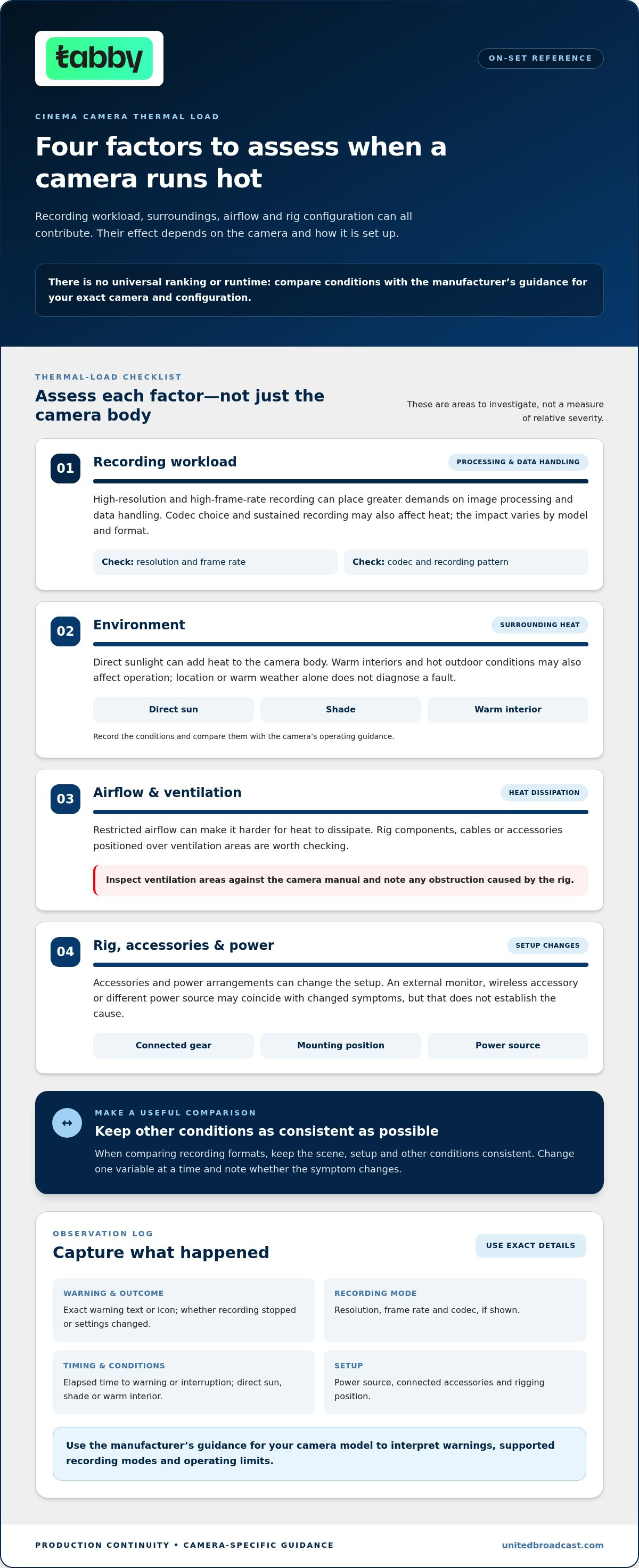
Heat is rarely explained by a single setting or accessory. A demanding recording format can increase the camera’s processing workload, while direct sunlight, warm surroundings, or restricted airflow can make it harder for heat to dissipate. The combined effect depends on the camera’s design and how it’s configured for the shoot.
Camera heat depends on the camera, its recording workload, the rig setup, and the operating environment. Treat each as a factor to assess, not proof of a fault. For crews solving overheating issues in cinema cameras, comparing the setup and conditions against the manufacturer’s operating guidance is more useful than assuming one resolution or recording duration is always safe or unsafe.
How recording workload affects camera temperature
High-resolution and high-frame-rate recording can place greater demands on a camera’s image processing and data handling. Codec choice and sustained recording may also affect heat generation, but the impact varies by model and recording format. A camera used for a series of short takes may behave differently from the same camera recording continuously, so avoid applying another model’s runtime assumptions.
Check the manufacturer’s documentation for supported recording modes, operating limits, and thermal warnings. If you compare formats during troubleshooting, keep the scene, setup, and other conditions as consistent as possible. That makes it easier to see whether a change in resolution, frame rate, codec, or recording pattern coincides with a different symptom.
How the production environment and rig can restrict heat dissipation
Inspect the camera’s surroundings. Direct sun can add heat to the body, while a warm interior or hot outdoor conditions may affect how the camera operates. Neither location nor warm weather alone diagnoses a problem. Compare actual conditions with the camera’s guidance and look for airflow restrictions, including rig components, cables, or accessories positioned over ventilation areas.
Accessories and power arrangements can change the setup, so include them in your assessment. An external monitor, wireless accessory, or different power source may coincide with a change in symptoms, but don’t assume it is the cause. Compare configurations carefully and record what is connected and where it is mounted.
- Check ventilation areas against the camera manual and clear any obstruction caused by rigging.
- Note whether the camera is in direct sunlight, shade, or a warm enclosed space.
- Record the recording format, power source, and connected accessories.
- Compare the setup with a less demanding recording mode only when the production allows it.
Keep your camera configuration and operating guidance accessible during prep so the crew can recognize relevant factors before a scheduled take. If heat warnings continue despite a suitable setup and manufacturer-guided operation, request professional camera technical support.
A Safe Troubleshooting Sequence for Cinema Camera Overheating
When a temperature warning appears, protect the take and equipment before testing possible causes. Follow the camera’s on-screen instructions and manual for your specific model. Don’t force continued recording, remove media during a write operation, or try improvised cooling methods. A controlled process makes solving overheating issues in cinema cameras safer and gives a service team more useful information if the symptom persists.
- Preserve the recording. Note the time and warning, then follow the camera’s instructions about pausing or ending a recording. Once the camera is in a safe state, follow your normal media-handling procedure and verify footage as your workflow allows. Don’t assume a clip was completed simply because the camera later recovers.
- Follow the manufacturer’s warning and shutdown guidance. Check the exact message in the manual. If it directs you to stop recording or power down, do so. Avoid repeatedly restarting the camera to see whether the warning returns.
- Allow gradual cooling. Move the camera away from direct sun or other added heat to a suitable, ventilated environment. Let it cool naturally according to the manufacturer’s instructions. Don’t use ice, refrigeration, cold packs, or other rapid-cooling methods, which can expose equipment to conditions it wasn’t designed for.
- Review the operating conditions. Record the recording mode, elapsed time, power source, accessories, rig position, and environment. Compare these details with the camera’s operating guidance, including specified limits and any instructions for the warning you saw.
- Run a controlled test only when appropriate. Once the camera is ready for operation under the manual’s guidance, repeat a test under comparable conditions. Change one factor at a time, such as a nonessential accessory or recording setting, and note the outcome. Don’t test if the warning instructions say to stop using the camera.
Changing one variable at a time matters. If you simultaneously alter the codec, remove accessories, change the power source, and move into shade, you won’t know which condition affected the symptom. Keep tests within the manufacturer’s recommended settings and conditions. Don’t deliberately push the camera until it shuts down to establish a limit.
Use this compact checklist to decide what happens next:
- Immediate actions: Follow the warning, protect the recording, and allow the camera to cool gradually in a ventilated place away from added heat.
- Controlled tests: Review the manual, record the setup, and adjust only one nonessential variable at a time when operation is permitted.
- Escalation: Stop testing if warnings recur, the camera shuts down unexpectedly, or symptoms continue under manufacturer-recommended conditions. Don’t open the camera or attempt internal repairs without appropriate authorization and expertise.
If the issue persists, a qualified technical assessment can help distinguish a setup-related trigger from a camera fault. United Broadcast & Media Solutions (UBMS) provides professional equipment repair and technical support. Discuss recurring camera symptoms with the service team.
Prevent Recurring Cinema Camera Heat Problems on Set
Reliable operation starts before the camera rolls. A prevention plan should be specific to the camera model, recording format, and production setup, not based on a universal runtime or temperature assumption. Check the manufacturer’s manual for supported modes, operating guidance, and the meaning of each thermal warning. Share relevant instructions with the crew so everyone knows how to respond if conditions change during a take.
Create a camera-specific thermal plan before the shoot
Test the planned configuration under conditions that reasonably reflect the shoot before relying on it for critical coverage. Use the intended recording mode and include the accessories, external power, media, and monitoring equipment planned for production. A test won’t guarantee the same behaviour on every shoot, but it can reveal whether the setup brings up warnings under the tested conditions.
Record what was tested, including camera settings, rig configuration, ambient conditions, and any warning behaviour. If the shoot moves between locations or recording formats, identify which changes could affect the setup and revisit the manual as needed. Plan recording blocks and breaks around the manufacturer’s guidance; don’t assume a fixed recording duration or cooling interval applies across cameras.
Reduce avoidable interruptions during long recording sessions
During rigging, keep the camera’s ventilation areas clear and confirm that cages, cables, and mounted equipment don’t obstruct them. Where practical, assign a crew member to monitor camera warnings and note operating conditions during extended recording. This creates a clear record for troubleshooting and helps the team respond promptly rather than overlooking a warning during a busy setup.
For critical coverage, consider an alternate shot or camera plan that fits the production’s resources. This is a continuity measure, not a reason to ignore a warning or continue using a camera contrary to its manual. If a warning appears, follow the model-specific instructions and adjust the schedule accordingly.
Use a short pre-roll check before each recording block. It makes preventive steps part of the workflow rather than a response to an interruption.
- Settings: Confirm the planned resolution, frame rate, codec, and recording mode against the manual.
- Environment: Check for direct sunlight, warm surroundings, and changes since the camera was configured.
- Power and accessories: Confirm the intended power source, media, monitoring equipment, and connected accessories.
- Ventilation: Check that rigging and cables leave ventilation areas unobstructed.
- Warnings: Confirm the crew can recognize the camera’s thermal warning and knows where to find its instructions.
Methodical preparation supports production continuity and makes solving overheating issues in cinema cameras less dependent on guesswork. If recurring warnings persist despite following the camera’s guidance, professional assessment is a practical next step.
When to Stop Troubleshooting and Request Cinema Camera Service
Troubleshooting should clarify the conditions behind a warning, not become repeated attempts to make the camera operate through one. Stop testing and arrange a professional assessment if thermal warnings recur during controlled use, the camera shuts down unexpectedly, or symptoms continue while operating within the manufacturer’s recommended conditions. A camera that recovers after cooling may still need investigation if the same behaviour returns.
Signs that warrant professional technical assessment
Repeated warnings across comparable tests are a useful escalation point, especially when you’ve checked the recording mode, setup, and relevant manual guidance. Also stop if you notice unusual behaviour or visible damage. Don’t infer a specific internal fault from symptoms alone, and don’t continue a test that conflicts with the manufacturer’s instructions.
Separate documented manufacturer guidance from general troubleshooting suggestions. The manual defines the model’s warnings and operating instructions; advice that applies broadly may not suit your camera. Don’t open the camera or attempt internal repairs unless you have the appropriate authorization and expertise. Internal work can introduce further risk and may complicate assessment.
What information helps a camera service team assess the issue?
A clear record helps technical staff understand what happened and under which conditions. Include the camera model and firmware information, recording mode, elapsed time before the warning, exact warning text, and whether recording stopped or the camera behaved unexpectedly. Note the power arrangement, media, attached accessories, rig configuration, and operating environment. If the symptom appeared during a test, record what changed and what stayed constant.
- Camera details: Model and firmware version, if known.
- Recording details: Resolution, frame rate, codec, and recording duration before the symptom.
- Setup: Accessories, power source, media, and any relevant rigging.
- Conditions: Ambient setting, exposure to direct sun, and whether the issue recurred under similar circumstances.
- Observed behaviour: Exact warning text, shutdowns, setting changes, or other symptoms, without guessing at the cause.
Include this information when requesting assessment, and preserve any relevant notes or warning records. A service team can use them as a starting point for evaluating the reported behaviour without assuming in advance what repair or outcome may be required.
United Broadcast & Media Solutions (UBMS) provides professional equipment repair and technical support, including authorized ARRI and Sony service centres. For production planning, the professional camera range offers context on camera systems. Recurring symptoms are best directed to qualified technical support. A methodical handover makes solving overheating issues in cinema cameras more informed and helps keep production continuity in view.
Make Camera Reliability Part of the Next Production Plan
Recurring heat warnings are a reason to turn troubleshooting into a clear equipment decision, not another on-set experiment. Use what you’ve documented to decide whether the camera can be used under manufacturer guidance or needs professional assessment before critical coverage. That approach makes solving overheating issues in cinema cameras part of protecting production continuity, rather than a last-minute response during a take.
United Broadcast provides dedicated professional equipment repair and technical support, including authorized ARRI and Sony service centres. If camera symptoms persist or return, a technical assessment can help inform your next equipment decision without relying on guesswork.
With sound preparation and the right support, your crew can approach the next shoot with greater confidence and keep its attention on the work in front of the lens. Contact our team about professional camera technical support.
Frequently Asked Questions
Can recording in 4K make a cinema camera overheat?
Yes, 4K recording can contribute to heat on some camera models, but the resolution label alone doesn’t establish overheating. A 4K mode may place a different processing and data load on one camera than another. Compare only modes supported by your model, and treat frame rate and codec as part of the format choice. Review the manufacturer’s guidance before selecting a mode for uninterrupted critical coverage.
How long can a cinema camera record before overheating?
There’s no universal recording duration that applies to every camera and setup. Even the same camera may behave differently with another recording format, power arrangement, or surrounding temperature. Before a long interview or event, test the complete configuration for a representative period and note any warnings or changes in operation. Use those observations alongside the manufacturer’s limits to build a schedule with practical flexibility.
Is it safe to keep filming after a camera displays a temperature warning?
Follow the warning and the camera’s instructions, not the pressure to finish a take. If the manual directs you to stop recording or power down, comply rather than dismissing the message or repeatedly restarting the camera. Don’t apply rapid cooling methods. Once it’s safe to handle the recording workflow, note what was happening and the exact warning. Seek technical assessment if it recurs or appears unexpectedly.
Can an external monitor make a cinema camera overheat?
An external monitor doesn’t automatically overheat a camera, though its mount or cabling could affect airflow in a particular rig. If you suspect a connection, compare the setup with and without the monitor only when it’s safe and practical to do so. Keep the recording mode and environment consistent, and check the camera manual for ventilation guidance. This can help distinguish a rig-related factor from a symptom that persists independently.
Can powering a cinema camera externally contribute to overheating?
It can be a variable to investigate, but an external power setup alone doesn’t prove the source of a warning. Follow the camera and power accessory manufacturers’ compatibility instructions, and record the battery or external supply used during the test. A dummy battery may move heat from the internal battery outside the camera body, but the complete setup still matters. If symptoms persist, provide the power details to a technical service team.
Will a firmware update fix cinema camera overheating?
A firmware update may change thermal management on a specific model, but it can’t be assumed to resolve every cause. For solving overheating issues in cinema cameras, check the release notes for your exact model and confirm whether the update addresses relevant behaviour. Follow the manufacturer’s update procedure, including precautions for power and media, and record the installed version. If warnings continue afterwards, seek professional assessment rather than repeatedly changing settings.


