





Teleprompter Buying Guide: Choosing the Right System
The largest screen or lowest-cost rig isn’t automatically the right choice. Teleprompters that don’t suit your camera, lens, reading distance, or production setup can create more problems than they solve. Start with your workflow, whether you’re recording with a compact camera, running a studio, operating PTZ cameras, or presenting on a speech stage.
If you’re unsure how to compare formats or check whether a tablet, monitor, camera, and mounting setup will work together, you’re not alone. This guide will help you shortlist teleprompters for your production, understand which specifications affect day-to-day use, and avoid compatibility surprises before purchasing. We’ll compare compact, studio, PTZ, and speech-stage systems, then cover display and beamsplitter considerations, camera and lens fit, and control options such as remotes and software. The goal is a practical match for your production requirements, not a system chosen by screen size alone.
Key Takeaways
- Use five practical checks to narrow your options, starting with production format and ending with system compatibility.
- Compare teleprompters by their intended role, including compact tablet rigs, PTZ enclosures, and presenter-facing displays.
- Assess brightness, inputs, display size, and beamsplitter glass against your venue and signal chain.
- Use example systems such as the Datavideo TP-650 Mark II and Autocue Navigator as starting points, not universal recommendations.
- Check current product specifications and included components before purchase to confirm the setup fits your equipment.
What Is a Teleprompter, and Which Production Problem Does It Solve?
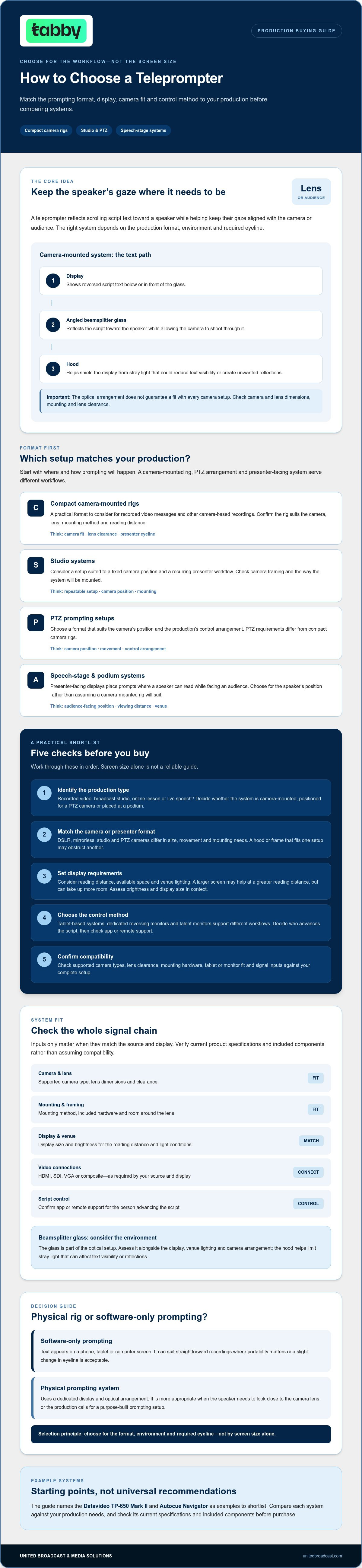
A teleprompter reflects scrolling script text toward a speaker while keeping their gaze aligned with the camera or audience. In a camera-mounted system, the presenter reads text reflected by beamsplitter glass while the camera records through the glass without capturing the displayed words. This helps the speaker deliver prepared remarks without looking down at separate notes. For a broader overview of the technology and its history, see What is a teleprompter.
Physical prompting systems use a dedicated display and optical arrangement. Software-only prompting presents text on a phone, tablet, or computer screen. Software can suit straightforward recordings where a slight change in eyeline is acceptable or portability matters. A physical rig is more appropriate when the speaker needs to look close to the camera lens or the production requires a purpose-built prompting setup. The right choice depends on the format, environment, and required eyeline.
How a camera-mounted teleprompter keeps the speaker on lens
A typical camera-mounted system combines a display, a hood, and beamsplitter glass positioned in front of the lens. The display sits below or in front of the glass and shows reversed script text. The angled glass reflects that text toward the speaker while allowing the camera to shoot through it. The hood helps shield the display from stray light that could reduce text visibility or create unwanted reflections.
This optical arrangement doesn’t guarantee a fit with every camera setup. Before selecting a unit, check its supported camera and lens dimensions, mounting method, and clearance around the lens. Confirm the product specifications and included hardware rather than assuming a rig will fit because it appears suitable for your camera format.
Where teleprompters are used, from video messages to live events
For a recorded video message, a compact camera-mounted system can help a presenter deliver prepared remarks while looking near the lens. Broadcast studios may need a rig suited to a fixed camera position and a recurring presenter workflow. Online teaching can call for a flexible arrangement, particularly when the presenter must refer to a script while addressing the camera. Live speeches use a different format: podium or speech-stage systems place prompts where a speaker can read them while facing an audience.
PTZ prompting setups also differ from compact camera rigs because they must suit the camera’s position and the production’s control arrangement. Format, mounting location, and viewing distance all affect usability. If you’re comparing camera types before choosing a system, review this guide to professional video cameras. These workflow differences are why teleprompters should be selected for the production, not just by display size.
How to Choose Teleprompters: Five Checks Before You Buy
Start with the production workflow, then confirm that the equipment will fit and connect as required. Screen size alone isn’t a reliable guide. Viewing distance, camera framing, venue lighting, and where the presenter needs to look all affect usability. Use these five checks to narrow your options before comparing specific teleprompters.
- Identify the production type. A recorded video message, broadcast studio, online lesson, and live speech have different prompting requirements. Decide whether the system will be camera-mounted, positioned for a PTZ camera, or placed at a podium before considering its display.
- Match the camera or presenter format. DSLR and mirrorless cameras, studio cameras, and PTZ cameras differ in size, movement, and mounting needs. A hood or frame that fits one setup may obstruct another. For a podium presentation, choose a format designed for the speaker’s position rather than assuming a camera-mounted rig will suit.
- Set display requirements. Consider how far the presenter will read from the screen, how much space the rig occupies, and the light in the venue. A larger screen may help at a greater reading distance, but it can also take up more room. Assess brightness and display size in the context of the actual setup.
- Choose the control method. Tablet-based systems, dedicated reversing monitors, and talent monitors support different workflows. Decide whether the speaker or an operator will advance the script, then check whether the prompting application or remote supports that method.
- Confirm compatibility. Check the product listing for supported camera types, lens clearance, mounting hardware, tablet or monitor fit, and signal inputs. HDMI, SDI, VGA, or composite connections matter only if they match the source and display in your signal chain.
Match the system to camera, lens, and production format
Camera movement and available mounting space affect the hood, frame, and support arrangement you need. For example, the LENSGO TC12 is listed as an option for DSLR or mirrorless cameras and tablets up to 12.9 inches. Treat those details as a starting point, not a fit guarantee. Compare your camera body, lens, tablet, and mounting configuration with the current product specifications before purchasing.
Compare display, brightness, inputs, and script control
Tablet systems differ from dedicated reversing monitors. Talent monitors may serve a separate feedback role, while high-brightness displays can be relevant in brighter venues. Check that the required inputs match your signal path, and confirm how scripts are loaded, mirrored, and controlled. Before ordering, verify the production format, camera and lens fit, viewing distance, display needs, control method, mounting, and signal connections. Review the available teleprompter systems as examples, then confirm the product details for your setup.
Which Teleprompter Format Fits Your Studio, Stage, or Camera?
No single format suits every production. Choose by camera placement, presenter position, venue, and who will operate the script. The examples below illustrate workflows rather than universal recommendations. Check current product listings for exact specifications, included components, and compatibility before purchase.
| Format | Intended production | Key selection check | Representative listed product |
|---|---|---|---|
| Compact tablet system | Creator recordings, online classes, and small crews | Tablet size, camera fit, mounting, and supplied components | NEEWER X12 Pro |
| Studio camera system | Fixed-position studio and broadcast work | Camera clearance, display approach, and support arrangement | Prompter People Prompter Pal Pro, 12-inch tablet or monitor configurations |
| PTZ enclosure | PTZ camera installations | Camera dimensions, movement clearance, and mounting | Prompter People ROBO Jr 17-inch |
| Talent monitor | Presenter feedback in studio or event workflows | Whether the display is for script prompting or talent feedback | Prompter People Prompter Pal Pro monitor configuration |
| Presidential pair | Live speeches and conference presentations | Speaker position, audience sightlines, and paired placement | Autocue Navigator and StagePro pairs |
Compact camera-mounted systems for creators and small crews
For a vlog, online class, live broadcast, or recorded video, the NEEWER X12 Pro is a listed example for those use cases. Portability and a manageable setup can matter to a small crew, but confirm tablet dimensions, camera and lens fit, mounting method, and which components are included. A tablet-based system uses a separate device for the script. A dedicated monitor configuration takes a different approach, so check the specific package rather than assuming accessories are included.
PTZ, studio, and stage systems for managed productions
PTZ cameras need room to pan, tilt, and zoom, so an enclosure must suit the camera’s dimensions and movement without restricting operation. The Prompter People ROBO Jr 17-inch is a listed PTZ example, but confirm camera compatibility before purchase. In a studio, a fixed camera position may favour a dedicated camera system. For speeches, conference formats such as Autocue Navigator and StagePro pairs position prompts for the presenter rather than enclosing a camera. Match the format to the venue, sightlines, and crew workflow.
Prompter People Prompter Pal Pro 12-inch tablet and monitor configurations also show why the display approach matters. Choose based on the device and signal workflow your production requires, then verify the current product details.
What Features Matter Most, and Which Buying Mistakes Should You Avoid?
The right features depend on the production, not the number of options on a specification sheet. A tablet can be convenient if you already use a compatible device and want a compact workflow. A dedicated reversing monitor may better suit a setup built around a separate display and signal path. Larger displays can help when the presenter reads from farther away, but they also affect the system’s footprint and placement. A talent feedback monitor serves a different purpose: it lets on-set talent view a monitor feed rather than displaying the script for prompting.
A more advanced system isn’t automatically a better fit. For a straightforward recording, additional inputs or a larger display may add complexity without addressing a real production need. Match each feature to the venue, reading distance, camera framing, crew roles, and signal chain. Before ordering, confirm whether the remote, tablet, software, stand, and camera mount are included. Don’t assume they come with the main unit.
Check optical quality, viewing conditions, and signal connections
Beamsplitter glass reflects script text toward the presenter while allowing the camera to record through it. Scratches or other damage can interfere with the reflected image or the camera’s view, so inspect the glass condition and confirm replacement requirements when assessing a system. The listed Autocue Medium Wide-Angle Beamsplitter is an example of a replacement component, not a complete teleprompter. Verify its intended use and specifications before treating it as a match.
Assess display brightness and size in the actual venue, including the presenter’s viewing distance and available space. Check monitor inputs against the equipment outputs in your production chain. An HDMI, SDI, VGA, or composite connection is useful only if it matches the devices you intend to connect. Confirm the required signal path rather than choosing by connector list alone.
Avoid compatibility, mounting, and workflow mismatches
For PTZ systems, check the camera’s dimensions, movement clearance, mounting arrangement, and the product’s stated compatibility. An enclosure that restricts pan, tilt, or zoom won’t suit the workflow. Also distinguish a prompting display from a talent feedback monitor: the latter supports on-set viewing, not script reading.
Finally, verify that the prompting software and its controls work together. The Datavideo WR-500 is listed with dvPrompter Plus, but confirm current compatibility and included components in the product details before purchase. Check that the control method suits the operator, speaker, and script workflow.
Teleprompter Shortlist: Examples for Different Production Needs
Use this shortlist to identify systems worth investigating for a particular workflow, not to treat any model as a universal recommendation. Teleprompters should match the camera or presenter format, venue, crew operation, and required display. Product configurations and specifications can vary, so confirm current listings and included components before purchase.
Shortlist examples for camera, studio, and PTZ workflows
- Compact recording and creator setups: The NEEWER X12 Pro is listed for vlog, online class, live broadcast, and video-recording use cases. The LENSGO TC12 is another example for compact camera workflows. Check tablet dimensions, camera and lens clearance, mounting, and whether the required device or accessories are included.
- Studio or ENG-style camera work: The Datavideo TP-650 Mark II is listed for standard ENG mounting or freestanding configurations. Confirm which configuration suits your support arrangement and camera, and check the current listing for the required mounting components.
- PTZ productions: Prompter People ROBO 24-inch models are examples to consider for PTZ workflows. Check camera dimensions and movement clearance, then confirm whether you need a talent monitor configuration. A talent monitor supports on-set viewing and is distinct from the script display.
Display products can have different roles within the same setup. The Autocue Explorer 19-inch is listed as a monitor, while the Autocue/QTV 22-inch is a talent feedback monitor. Neither label alone confirms that a display is the prompting screen your workflow requires. CueScript software belongs in the prompting-software part of the system. Verify its compatibility with the chosen hardware and operating workflow.
Shortlist examples for conferences and broadcast environments
- Conference prompting: The Autocue Navigator 17-inch is a listed conference prompting system. Check placement, presenter sightlines, and the configuration needed for the venue.
- Speeches and live events: Prompter People StagePro pairs are listed presidential prompting kits. Assess paired placement and audience-facing sightlines for the speaker’s position.
For a wider studio plan, consider how the prompting system fits alongside the cameras, displays, and other broadcast studio gear in the production chain. UBMS supplies professional video cameras, cinema lenses, lighting equipment, and broadcast studio gear, and offers system integration for broadcast environments and studio setups. The best shortlist is the one that meets the actual workflow without adding unnecessary complexity. Compare intended use first, then verify model specifications, compatibility, and included components against current product information.
Review the teleprompter collection and confirm current specifications before purchase.
Choose a System That Fits Your Next Production
The strongest buying decision starts with the workflow, not the largest display or longest feature list. Match the format to the camera or presenter, then check viewing distance, venue, mounting, signal connections, and script-control needs. Before purchasing, confirm current specifications and exactly which components are included.
The listed collection includes examples for compact, studio, PTZ, conference, and stage prompting. Products from brands such as NEEWER, Autocue, and Datavideo are included among the examples in this guide. Check current brand coverage and product details in the relevant listings as you build your shortlist.
With compatibility and production requirements clear, you can select teleprompters that support your team’s workflow and give presenters a practical way to deliver their script. Compare the details, then browse UBMS’s teleprompter collection to review available systems.
Frequently Asked Questions
What is a teleprompter, and how does it work?
A teleprompter displays scrolling script text so a speaker can read while looking toward a camera or audience. In a camera-mounted system, a display reflects text off angled beamsplitter glass toward the presenter. The camera records through the glass, while the reflected words sit near the lens and aren’t intended to appear in the recording. Other formats place prompts beside or in front of a live speaker.
How do I choose the right teleprompter for my camera?
Choose a system that suits your camera format, lens, mounting arrangement, and production workflow. Check the product specifications for supported camera types, lens clearance, mounting hardware, and any tablet or monitor requirements. Consider how far the presenter will read from the display and whether the hood or frame affects framing or camera movement. Don’t assume a system fits just because it’s described for a similar camera category.
Can I use a tablet as a teleprompter?
Yes. A compatible tablet can display a script in a prompting application, either as part of a physical camera-mounted rig or as a simple software-only setup. Check that the tablet’s dimensions fit the holder and that the software can display text in the required orientation and scrolling style. A tablet setup can be convenient, but it may not provide the same camera-facing eyeline as a beamsplitter system.
What is the difference between a camera teleprompter and a presidential teleprompter?
A camera teleprompter places reflected script text in front of the camera lens so a presenter can read while looking toward the camera. A presidential teleprompter typically uses paired transparent prompting panels positioned for a live speaker to read while facing an audience. The choice depends on whether the production records a camera-facing presentation or supports a speech on stage. Confirm placement and sightlines for the venue.
Do teleprompters work with PTZ cameras?
Yes, some systems are designed for PTZ camera workflows, but compatibility must be confirmed for the exact camera and prompting unit. Check camera dimensions, enclosure fit, mounting, and clearance through the full pan, tilt, and zoom range. Also consider where the prompt display sits relative to the camera and presenter. Don’t select a PTZ enclosure based on screen size alone. Consult the current product specifications.
Do I need a dedicated monitor or can I use a tablet?
Either can work, depending on the production. A tablet-based system can suit a compact setup if the device fits the rig and the application supports the required prompting controls. A dedicated monitor may better match a workflow that needs a separate display and specific signal connections. Check the display’s role, brightness, size, inputs, and compatibility with your signal chain before deciding.
What should I check before buying a teleprompter?
Confirm the production format, camera and lens fit, viewing distance, display type, mounting method, and script-control approach. Check signal inputs against the equipment you’ll connect, and verify software and remote compatibility. Review the listing to see whether a tablet, stand, mount, remote, or software is included rather than assuming it comes with the system. These checks help prevent a mismatch between the product and your actual workflow.


