

Studio Headphones for Video Editing: Which Type Should You Choose
Neutral sound matters more than exaggerated bass when choosing the best studio headphones for video editing. A balanced frequency response helps you judge dialogue, background noise and effects without the headphones colouring what you hear. Closed-back designs can reduce outside noise, and headphones can support editing when monitors aren’t practical. However, they aren’t a universal replacement for speakers.
Headphones can make audio decisions more reliable, especially in a noisy workspace or when you need to work quietly. The right choice depends on how accurately they reproduce the full mix, how well they isolate you from your surroundings and how comfortably you can wear them during an editing session.
This guide explains what to look for in frequency response, when headphones can stand in for monitors and where they have limitations. It also compares common studio headphone types and models by practical editing criteria, so you can narrow your options for video work in the UAE.
Key Takeaways
- Choose headphones that reproduce audio evenly rather than boosting bass or treble, so dialogue and effects are easier to assess.
- Prioritize a secure, comfortable fit for long editing sessions; pressure and fatigue can affect how well you monitor sound.
- Use headphones when room noise or monitoring constraints make speakers impractical, while treating them as a complement to monitors when possible.
- Consider closed-back headphones when you need to limit outside noise and keep playback from spilling into a shared workspace.
- Compare headphone types by isolation, comfort, and how you edit, then use the decision guide to narrow the options.
What frequence response do headphones need for video editing?
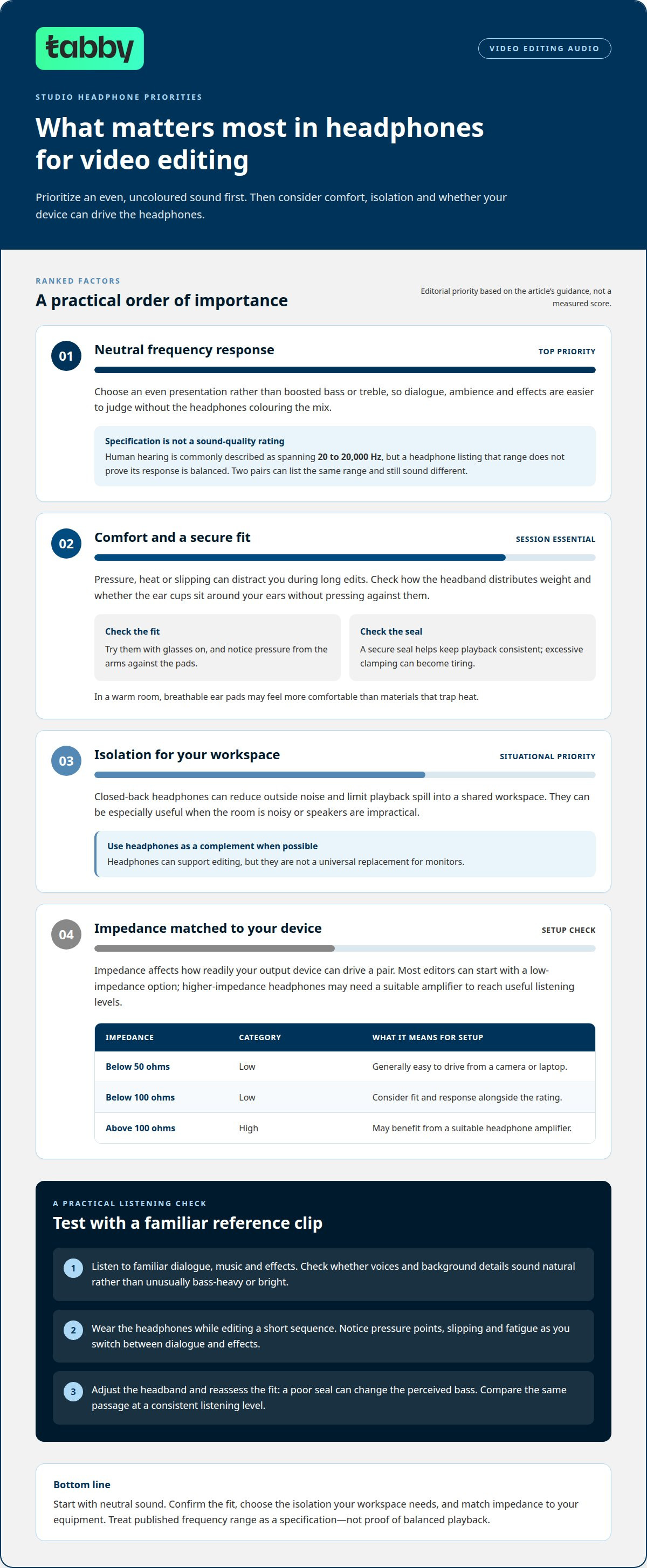
For video editing, choose headphones with an even, uncoloured frequency response across the audible range, rather than a pronounced bass or treble boost. Human hearing is generally considered to span 20 to 20,000 Hz, but a headphone specification showing that range doesn’t prove the sound is balanced. Impedance also affects the setup: headphones below 50 ohms are generally easy to drive from a camera or laptop without extra amplification. Headphones below 100 ohms are described as low impedance, while those above 100 ohms are high impedance. Most editors can start with a low-impedance pair; higher-impedance headphones may need a suitable headphone amplifier to reach useful listening levels.
Frequency response describes how strongly headphones reproduce different pitches. For example, a model that emphasizes low frequencies can make a quiet hum seem prominent, while boosted treble can make hiss or sharp consonants sound more noticeable. These shifts can affect decisions on dialogue, ambience and sound effects. Treat the published frequency range as a specification, not a quality rating: two pairs can both list 20 to 20,000 Hz and still sound different. Use familiar reference material, such as a dialogue clip you know well, to judge whether voices and background details sound natural.
Comfort matters because pressure, heat or an unstable fit can distract you during long editing sessions. Check how the headband distributes weight and whether the ear cups sit around your ears without pressing against them. If you wear glasses, assess the fit with them on, since the arms can press against the ear pads. A secure seal helps keep playback consistent, but excessive clamping force can become tiring. In a warm room, breathable ear pads may feel more comfortable than materials that trap heat.
Try a practical fit test before committing to a full session. Wear the headphones while editing a short sequence, then check for pressure points, slipping and fatigue as you switch between dialogue and effects. Recheck the fit after adjusting the headband, since a poor seal can change the perceived bass. Keep playback at a level that lets you hear detail without turning it up to compensate for discomfort. A familiar reference clip makes it easier to distinguish changes in fit from changes in the mix.
| Option | Impedance | Comfort and use |
|---|---|---|
| Low-impedance headphones | Below 50 ohms | Typically easier to drive from a camera or laptop |
| Other low-impedance headphones | Below 100 ohms | Consider fit and response alongside the rating |
| High-impedance headphones | Above 100 ohms | May benefit from a suitable headphone amplifier |
Match the impedance to your output device, then prioritize an even response and a comfortable fit during a reference-clip editing session.
Choose studio headphones with neutral sound rather than boosted bass or treble. Test them with familiar dialogue and effects to check that voices and background details sound natural.
Flat frequency response for accurate audio mixing
A flat frequency response helps editors make mix decisions without headphones strongly emphasizing particular pitches. Human hearing is generally considered to span 20 to 20,000 Hz, but that specification alone doesn’t show whether playback sounds balanced.
Frequency Response and Sound Accuracy
Frequency response describes how headphones reproduce low, middle and high pitches. An even presentation helps you judge dialogue against music, ambience and effects. If headphones emphasize bass, for example, you might lower low-frequency content in the mix, only to find it sounds thin elsewhere. Compare familiar speech and effects across headphones to spot obvious tonal shifts before making detailed adjustments.
Frequency Response and Human Hearing
The commonly cited hearing range runs from 20 to 20,000 Hz, but listeners don’t perceive every frequency equally. A headphone’s response across that range affects how clearly you hear details such as low rumbles, vocal presence and high-frequency hiss. A printed range cannot describe every listening difference. Use a reference clip with speech, music and quiet background detail to assess whether important sounds remain audible without turning one frequency area into the focus.
Frequency Response and Sound Balance
A balanced response keeps bass, midrange and treble in proportion, making it easier to hear how each element sits in a mix. An exaggerated treble peak can make sibilant dialogue sound harsh, while elevated bass can mask a quiet rumble. Listen to the same reference passage at a consistent level and note whether voices and effects retain a natural relationship. This listening check is more useful than choosing by frequency-range figures alone.
Neutral Studio and Consumer Headphones
Neutral studio headphones aim to reveal a recording’s tonal balance, while some consumer headphones emphasize bass or treble. What is the difference between neutral studio headphones and consumer headphones for video editing? Studio models are intended to expose mix details; consumer tuning may make playback more pleasing but less revealing. A Sony MDR model can serve as a comparison point, but judge its sound rather than relying on the brand name.
Use a familiar dialogue clip to check whether consonants, low background noise and music remain distinct. If a headphone makes the clip sound unusually bass-heavy or bright, account for that coloration before changing the mix. Repeat the comparison on another listening system when practical. For options to compare, browse the headphone selection and focus on a balanced presentation suited to your editing work.
Audio monitors can cost thousands of dollars, so headphone evaluation remains important when choosing a monitoring approach. Don’t treat a stated frequency range as proof of neutrality. Instead, listen to familiar dialogue, music and effects and judge whether their tonal balance feels consistent. Repeating the comparison can help you notice when bass, midrange or treble draws attention away from the mix, keeping adjustments grounded in what you hear.
Headphones as an alternative to audio monitors
Headphones are a practical monitoring option when speakers might disturb others or room acoustics interfere. They can support editing and reference checks, but sound different from a speaker setup.
Reference Monitoring and Mixing
Headphones let you inspect dialogue, edits and subtle effects without relying on a treated room. Replay a cut between dialogue clips, for example, to hear changes in background tone or level. Headphones can reveal small details clearly, but they don’t reproduce the same interaction between speakers and a room. Use them for close listening, then compare the mix through speakers when your workspace allows.
Monitoring Accuracy and Isolation
Isolation reduces competing sounds, helping you focus on quiet details. Closed-back headphones can be useful in a shared office, while open-back headphones allow more sound to escape. Neither design guarantees accurate sound. Frequency response, fit and playback level still shape what you hear, so use a consistent reference clip to catch distracting changes between edits.
Headphones deliver the left and right channels directly to each ear. With speakers, each ear hears some sound from both speakers as it travels across the room. This difference affects how you perceive stereo placement and space. A pan that seems clearly separated on headphones may feel less distinct through speakers. When possible, check important placement decisions on more than one listening setup.
Studio in-ear monitors are another compact option. Their fit can reduce surrounding noise, which can help in a noisy location or during a camera-side review. They may be less suitable for long sessions if the fit causes pressure or fatigue. Before detailed editing, test speech, a quiet ambience track and a short music passage.
Headphones can replace monitors for specific tasks, but they don’t reproduce every aspect of a room-based listening environment. A consumer pair may make music sound appealing, yet its tuning can obscure details needed for editing decisions. Treat headphone monitoring as one part of a broader workflow, not proof that a mix will translate everywhere.
- For quiet editing: Use closed-back headphones to reduce nearby distractions.
- For detail checks: Replay dialogue and low-level effects at a consistent level.
- For stereo decisions: Compare headphone placement with speaker playback when available.
- For mobile monitoring: Try in-ear monitors, then assess fit during a real editing task.
Closed-back headphones and external noise isolation
Closed-back headphones use sealed ear cups to reduce outside sound reaching the listener. For video editors working near conversation, ventilation or equipment fans, this isolation can make dialogue details easier to monitor. It also limits headphone sound reaching nearby microphones, which matters during recording and voice-over tracking. Isolation is not the same as noise cancellation, and it won’t remove every sound in a room. Its practical benefit is a quieter listening environment for focused review.
During recording, headphone sound can leak into a microphone and be heard beneath a voice or instrument. A closed-back design helps contain playback, especially when a presenter needs to hear a guide track while speaking. Play a short voice-over passage at a level that remains clear without masking the live voice, then listen back for guide audio leaking into the recording. If you hear leakage, lower playback and adjust the ear cup seal.
Open-back and closed-back designs suit different priorities. Open-back ear cups let more air and sound pass through, so you can hear more of the room and people nearby can hear playback. Closed-back cups provide more separation from the environment and contain playback better. For editing in a shared space or recording beside a microphone, choose closed-back headphones. In a quiet room where isolation matters less, open-back headphones may suit longer critical-listening sessions.
The Neumann NDH 20 is a named closed-back studio headphone option to consider, while a Beyerdynamic DT model may also appear in a comparison. Those names alone don’t establish which pair fits your workflow. Compare how each handles dialogue, room tone and playback leakage in your own setting. Check the seal with glasses if you wear them, since a gap around the ear pads can reduce isolation. Also consider comfort, cable movement and how easily you can monitor at a consistent level.
- For recording: Use closed-back headphones to help keep a guide track out of the microphone.
- For noisy rooms: Choose a design that reduces surrounding distractions.
- For open, quiet rooms: Consider whether open-back monitoring better suits your listening preference.
- For model comparisons: Play the same dialogue and ambience clips through each candidate.
Before a long edit, test the headphones with a real recording task. Monitor a voice-over, pause playback and listen for sound bleeding into the microphone. Then review the clip for dialogue clarity and unwanted room noise. This practical check shows whether the closed-back design suits your recording setup, rather than relying on the product category or model name alone.
Recommended studio headphones for video editing
The best studio headphones for video editing reproduce dialogue and effects without strongly colouring their tonal balance. No model is the most accurate choice for every listener based on its name alone. Wired headphones avoid the additional transmission path of wireless playback, making them a practical choice for edits that depend on tight picture-and-sound synchronisation.
Frequency Accuracy for Dialogue and Sound Effects
For dialogue work, listen for clear speech without bass or treble dominating. Compare a spoken clip, room tone and a sharp sound effect through each candidate. Neumann NDH 20 and Beyerdynamic DT are examples of model families to assess, not guarantees of a particular sound. Check the exact model’s response, comfort and build quality, then judge whether quiet details and consonants remain distinct.
Wired and Wireless Headphone Latency
Wired headphones connect directly to the monitoring output, avoiding wireless transmission delay. That makes them a straightforward choice for syncing dialogue, effects and picture edits. Wireless headphones offer freedom of movement, but transmission and processing can introduce latency. If wireless suits your workflow, test synchronisation against a visible event, such as a door closing, before making precise timing decisions.
Use headphone categories as comparison points, not rankings. Tuning and comfort vary between models, including those in the Beyerdynamic DT family.
| Option | Best suited to | Decision point |
|---|---|---|
| Wired closed-back studio headphones | Editing near other people | Isolation and fit |
| Wired open-back studio headphones | Quiet-room listening | Room noise and listening preference |
| Wireless over-ear headphones | Moving around a workspace | Picture-and-sound synchronisation |
| Studio in-ear monitors | Compact monitoring | Fit and comfort |
| Neumann NDH 20 | Closed-back comparison | Specific response and fit |
| Beyerdynamic DT headphones | Studio headphone comparison | Exact model and design |
| Consumer over-ear headphones | Everyday playback reference | Possible sound coloration |
To find the best studio headphones for video editing for your workflow, first decide whether you need a wired connection, wireless convenience or greater isolation. Compare suitable types using the same dialogue and effects sequence. Listen for clear consonants, audible low-level details and natural transitions. This repeatable test is more useful than assuming an expensive pair or higher price guarantees balanced sound.
Assess comfort and construction alongside sound. Headphones that shift during editing can change their fit, while uncomfortable ear cups can distract during repeated review. Test them with glasses if needed, and check that the cable reaches your workstation without pulling. These practical details help you find a pair that suits your monitoring routine.
United Broadcast & Media Solutions (UBMS): Professional Video Cameras
United Broadcast & Media Solutions (UBMS) supports production workflows with professional video cameras, digital cinema cameras, cinema lenses and broadcast studio gear. Once you’ve chosen a monitoring approach, consider how camera and studio equipment fit into the wider production setup. For example, your camera workflow may call for compatible lenses and studio gear to meet capture and monitoring needs.
Turn to UBMS when planning a camera or broadcast studio equipment setup, or when assessing how equipment choices fit your production needs. The right configuration depends on your workflow, recording environment and equipment already in use.
For guidance on professional video cameras and broadcast studio gear, contact United Broadcast & Media Solutions (UBMS).
Build a monitoring setup that fits your workflow
The best studio headphones for video editing help you make consistent decisions within your workflow. They aren’t necessarily the most expensive pair or the most prominent model name. Give comfort, connection type and monitoring conditions as much attention as sound. If your workflow changes, revisit your setup and test it against the material you edit most often. Deliberate comparisons can clarify your monitoring choices and help you work with greater confidence.
Choose headphones that support your work now and can accommodate changing production needs.
Frequently Asked Questions
Are open-back or closed-back headphones better for video editing?
Closed-back headphones are usually more suitable beside an active microphone or in a shared room. Open-back designs suit quieter spaces where sound escaping the ear cups won’t disturb others. When reviewing narration near a live voice-over microphone, use closed-back headphones and pause playback before recording. For a final review in a quiet room, open-back headphones can work if room noise doesn’t compete with the audio.
What should video editors know about headphone sound leakage, isolation, and hearing safety?
Leakage is playback that others or a nearby microphone can hear; isolation describes how much room sound reaches you. Test both by recording a short passage with headphones playing, then listening for bleed during pauses. For comfortable listening, use the lowest level that lets you judge edits and take quiet breaks. If you feel tempted to raise the volume to overcome fatigue, reduce playback instead. A clear monitor mix shouldn’t require uncomfortable volume.
Which studio headphones are most comfortable for long editing sessions?
Choose headphones with a stable fit, evenly distributed headband pressure and ear cups that don’t press against your ears. Test them during a short editing session, with glasses if relevant, and check for pressure, slipping, heat or fatigue.


