





How to Convince Your Boss to Invest in Better Video Gear
What if the strongest argument for better video gear isn’t a sharper image, but fewer production delays? If your cameras, lenses, lighting, or studio equipment contribute to retakes, inconsistent results, or workflow bottlenecks, convincing your boss to invest in better video gear starts with showing how those problems affect the work. A request focused only on image quality can sound discretionary. A request tied to production needs and business objectives gives management something practical to evaluate.
Expect management to ask what the investment will deliver, what it will cost, and whether existing equipment can meet the need. Build your proposal around evidence rather than broad promises. Track issues such as setup time, equipment failures, reshoots, and post-production corrections, then connect them to the team’s goals.
This guide explains how to document current limitations, compare equipment options using consistent operational and financial criteria, and present a phased recommendation with measurable outcomes. It also covers training, system integration, and maintenance, so your plan supports a reliable production workflow and fits the organisation’s budget priorities.
Key Takeaways
- Link specific production problems to an organisational objective, and document their operational impact.
- Define production requirements first, then match each limitation to the capability the equipment needs to provide.
- Compare keeping the current setup, upgrading key components, and investing in a broader system against the same practical criteria.
- Make convincing your boss to invest in better video gear easier with a concise proposal covering evidence, options, a recommendation, implementation, and success measures.
- Plan procurement, setup, testing, user orientation, integration, and maintenance so the equipment fits the workflow over time.
How to build the business case for better video gear
Start with the production problem, not a shopping list. Perhaps a camera struggles to deliver consistent results in a recurring recording environment, equipment issues interrupt scheduled sessions, or lighting setup takes longer than the team can afford. Describe the operational effect: inconsistent quality, delayed delivery, retakes, downtime, or reduced team capacity. Then connect it to an objective your department already owns, such as meeting production commitments or improving workflow consistency.
A clear business case sets out the need, options, expected benefits, and basis for a decision. Make the request specific: what capability or equipment change is needed, what operational change it is expected to enable, and how you will assess whether it worked. Don’t present improved image quality as the only benefit. Explain why that quality matters to the intended output or organisational goal.
What business priorities should the equipment proposal support?
Review team objectives, production commitments, and budget priorities before recommending an upgrade. Choose outcomes decision-makers can evaluate, such as consistent recording conditions, fewer disruptions, or a more efficient setup workflow. Keep the connection direct. If the team produces recurring internal updates, for example, explain how the current setup affects the reliability and repeatability of those productions. “More professional” is not a business outcome on its own.
Which baseline evidence makes a gear request credible?
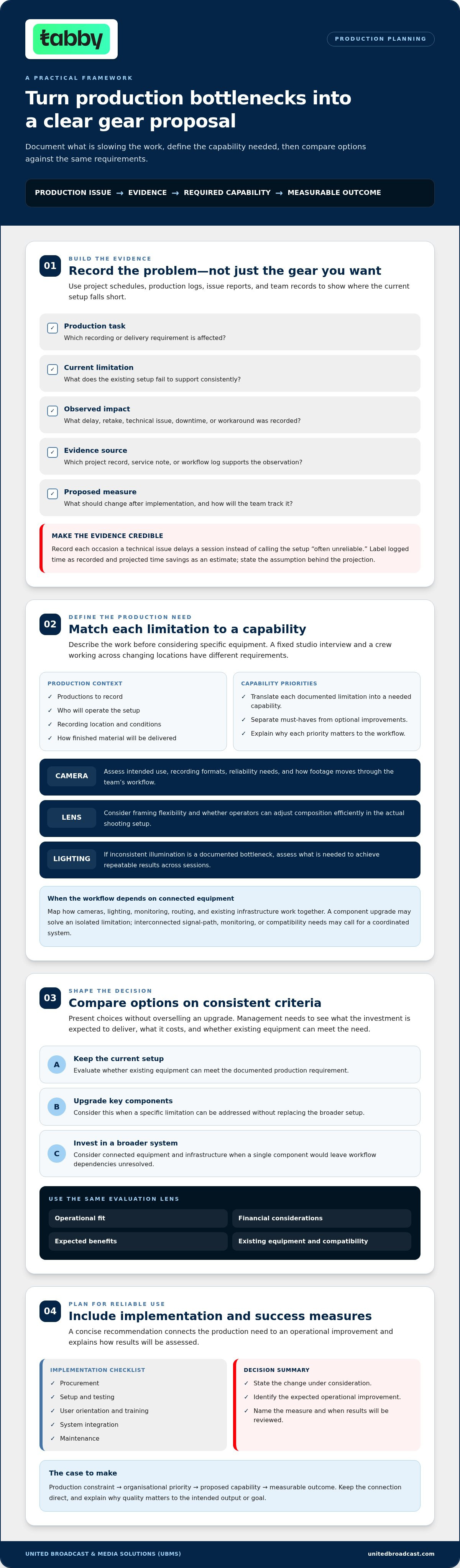
Use project schedules, production logs, issue reports, and team records to find recurring constraints. Before researching equipment, build a simple evidence table:
- Production task: What recording or delivery requirement is affected?
- Current limitation: What does the existing setup fail to support consistently?
- Observed impact: What delay, retake, technical issue, or workaround was recorded?
- Evidence source: Which project record, service note, or workflow log supports the observation?
- Proposed measure: What should change after implementation, and how will the team track it?
For example, record each occasion when a technical issue delayed a session instead of describing the setup as “often unreliable.” Separate measured facts from estimates: label logged time as recorded and projected time savings as an estimate, and state the assumption behind the projection. This makes evidence gaps visible and keeps the proposal credible.
Close with a concise decision request: the change under consideration, the expected operational improvement, and when results will be reviewed. When convincing your boss to invest in better video gear, show a clear line from production constraint to business priority to measurable outcome.
Translate production bottlenecks into the right video gear
Once you have documented the production issue, define the work the equipment must support before considering specific gear. Describe the productions, who will operate the setup, where recording takes place, the recording conditions, and how the finished material will be delivered. A fixed studio interview, for example, has different requirements from a crew working across changing locations.
Next, translate each limitation into a capability. If framing options constrain a recurring production, define the range of framing flexibility operators need. If results vary between sessions, identify which part of the image-making workflow needs to become more consistent. This keeps the proposal focused on documented problems instead of treating every upgrade as essential. Separate must-have capabilities from optional improvements, and explain why each priority matters to the workflow.
How do camera, lens, and lighting needs differ?
Camera requirements depend on intended use, recording formats, reliability needs, and how footage moves through the team’s workflow. Assess the professional video camera range against those needs rather than making a shortlist based only on desirable features. Lens selection affects framing and flexibility. Consider whether operators need to adjust composition efficiently within the actual shooting setup. Lighting needs depend on recording conditions and the team’s ability to achieve repeatable results across sessions. If inconsistent illumination is a documented bottleneck, compare professional lighting equipment against that specific requirement.
When does an integrated studio or broadcast setup make sense?
A component upgrade may address an isolated limitation. A coordinated system may be more suitable when cameras, lighting, monitoring, routing, and existing infrastructure depend on one another to deliver the required workflow. Map those dependencies before recommending a broader investment. If a new camera alone won’t resolve a signal path, monitoring, or compatibility issue, describe the complete operational requirement instead of proposing an incomplete fix. A structured business case guide can help organise the problem, options, and analysis behind your recommendation.
Use a simple mapping table to make the equipment rationale clear:
- Production requirement: What must the team record and deliver?
- Documented limitation: Where does the current workflow fall short?
- Required capability: What must change to address that gap?
- Priority: Is the capability essential or optional?
- Dependencies: What other equipment or infrastructure must work with it?
This chain makes the recommendation easier to assess and helps prevent spending on features unrelated to the production need. It also gives technical specialists a clear basis for evaluating camera, lens, lighting, or system integration requirements. This practical mapping is central to convincing your boss to invest in better video gear.
Compare gear investment options without overselling the upgrade
A credible recommendation shows that you considered alternatives, not just the most extensive upgrade. Compare three choices: retain the current setup, replace or improve critical components, or invest in a broader coordinated system. For each option, show which documented limitations it addresses, which remain, and what workarounds the team would still need.
Apply the same criteria to every option: workflow fit, compatibility with existing cameras, lenses, lighting, and studio infrastructure, expected use, technical support, and lifecycle implications. Include the full cost picture in AED where figures are available, such as equipment, integration, setup, training, and planned maintenance. Separate quotes or other known costs from estimates and assumptions. Record non-financial benefits, such as a more consistent setup or fewer workflow handoffs, separately from monetary projections.
How should you compare a targeted upgrade with a full system?
A targeted upgrade can address a specific bottleneck, but may leave related compatibility or workflow issues unresolved. A broader system may meet connected requirements, while involving more components and implementation dependencies. Staging improvements can spread the work over time. A coordinated setup may better support components that need to function together. State the trade-offs plainly, including what each option will not solve.
- Keep the current setup: Identify which limitations remain and the ongoing workarounds they require.
- Upgrade critical components: Name the bottlenecks addressed, compatibility considerations, and any gaps left for a later phase.
- Invest in a broader system: Explain the connected workflow needs addressed, dependencies, and support or maintenance considerations.
For each option, list known costs, estimated costs, assumptions, and non-financial benefits separately. Avoid promising a payback date unless the calculation is supported by evidence. If you project time savings, show the current baseline, expected change, and assumptions behind the estimate. Decision-makers can then assess the reasoning without mistaking a forecast for a guaranteed result.
How can you address the concern that equipment will sit unused?
Estimate utilization from scheduled productions and realistic team capacity, not an optimistic target. Identify intended users, the workflows the equipment will support, and who is responsible for upkeep. Set review milestones to compare actual use with the plan and assess whether the equipment addressed the original bottleneck. This makes utilization a measurable part of the recommendation, not an afterthought.
When convincing your boss to invest in better video gear, a balanced comparison shows that the preferred option is proportionate to the need. It also gives management a clear basis to approve a focused upgrade, choose a phased approach, or retain the existing setup if the evidence does not justify further investment.
Prepare a concise video gear proposal your boss can evaluate
Make the decision easy to follow. Organise the main proposal around six points: problem, evidence, options, recommendation, implementation, and success measures. Put detailed specifications, compatibility notes, supporting records, cost assumptions in AED, and technical dependencies in an appendix. This gives management a clear recommendation without obscuring the detail needed to evaluate it.
If you are proposing camera equipment, use a professional camera guide to understand categories and terminology, then explain why the recommended capabilities match your team’s workflow. The guide can inform your assessment, but internal production evidence should drive the decision.
What should the one-page investment summary include?
State the current limitation, why it matters to a team or organisational objective, and the decision you are requesting. Summarise the preferred option, the alternatives considered, and the main trade-offs. Finish with measurable indicators and a practical review point after deployment. For example, track the same workflow issue recorded in your baseline, such as delays or retakes, and compare the results after the change.
- Problem and evidence: Describe the constraint and cite the internal records that support it.
- Options and recommendation: Summarise the alternatives, preferred approach, and why it fits the need.
- Implementation: Note the planned sequence, responsibilities, and dependencies.
- Success measures: Identify what will be measured, how it will be recorded, and when it will be reviewed.
Use a phased recommendation if it can reduce disruption or let the team assess an initial stage before proceeding. Define what the phase includes, what it depends on, and what evidence will inform the next decision. Treat a later phase as a review point based on observed needs and outcomes, not as automatic approval.
How can you prepare for management’s main questions?
Prepare concise answers about expected usage, compatibility with existing equipment and infrastructure, support and maintenance needs, and implementation responsibilities. Address risks directly, such as integration issues or the learning curve, and explain how the plan will manage them. Base utilization estimates on planned productions and realistic team capacity. Use internal records where available, and label forecasts, assumptions, and unresolved questions clearly.
When convincing your boss to invest in better video gear, make both the recommendation and its limits clear. Don’t promise a specific return unless the evidence supports it. Show the basis for each estimate so decision-makers can distinguish recorded facts from projections and assess the trade-offs with confidence.
Move from video gear approval to a supported implementation plan
Approval is the start of the work, not the finish. Turn the decision into a rollout sequence covering equipment selection, procurement, setup or installation, testing, and adoption in the production workflow. Before deployment, identify dependencies such as compatibility with existing equipment, signal paths, power, monitoring, routing, and the people who will operate the system. Resolving these details early helps prevent a purchase from becoming an isolated upgrade that does not fit the wider setup. For teams whose installations also include dedicated review lounges or presentation rooms, looking at how premium home cinema and audio providers like SoundXcel configure sound systems can offer valuable guidance on integrating high-quality acoustic playback into media environments.
What belongs in a realistic rollout plan?
Set out practical stages, with an owner and completion check for each. The sequence might include confirming the approved configuration, preparing the environment, setting up and testing the equipment, orienting users, and introducing it into scheduled productions. Assign responsibility for operation, maintenance coordination, and outcome tracking. Include a review of actual utilization and workflow issues so the team can address problems and assess whether the equipment is meeting its intended purpose.
- Selection and procurement: Confirm the approved equipment and compatibility or integration requirements.
- Setup and testing: Check the complete workflow, from recording through monitoring and delivery.
- User orientation: Ensure operators understand the setup and agreed production workflow.
- Review: Track usage and the success measures established in the proposal, then document issues for follow-up.
How can a technical partner support the equipment decision?
For broadcast or studio environments, system integration can align equipment with existing infrastructure and the intended workflow. A coordinated assessment brings cameras, lighting, monitoring, and routing requirements into one plan rather than treating each component as a separate purchase. If your proposal includes studio infrastructure, use a relevant broadcast studio gear guide to inform the planning, while basing final requirements on your organisation’s setup.
Include maintenance and repair planning in the equipment lifecycle, alongside ownership and internal processes for reporting faults. A dedicated service center for professional equipment repairs and maintenance can support that plan. Clarify how service needs will be coordinated internally and how equipment downtime will be recorded.
A supported rollout strengthens the case for convincing your boss to invest in better video gear. It shows who will use the equipment, how it will fit the production environment, and how the team will assess results. For a project-specific discussion about professional equipment or system integration requirements, contact United Broadcast & Media Solutions.
Turn your equipment proposal into a clear next step
A strong gear request connects a documented production bottleneck to an organisational priority, then compares options using the same practical criteria. Keep the recommendation focused: show what the investment is expected to change, how the team will measure results, and how implementation, compatibility, and ongoing maintenance will be managed. This evidence-led approach makes convincing your boss to invest in better video gear a considered business decision, not simply a request for newer equipment.
United Broadcast & Media Solutions supplies professional video and digital cinema cameras, cinema lenses, professional lighting equipment, and broadcast studio gear. UBMS also provides system integration for broadcast environments and studio setups, alongside a dedicated service center for professional equipment repairs and maintenance. These offerings can support an equipment plan shaped around your production workflow and technical requirements.
Build your case around the work your team needs to do. A clear plan gives decision-makers a practical basis for moving forward.
Frequently Asked Questions
How do I convince my boss to invest in better video gear?
Build the request around a documented production problem and the business priority it affects. Use internal records to show recurring delays, retakes, technical issues, or workflow workarounds, then compare practical options and explain how your recommendation addresses the need. Include expected users, implementation responsibilities, and measurable review criteria. Separate recorded evidence from forecasts so management can assess the proposal without relying on unsupported claims or guaranteed returns.
What should I include in a video equipment proposal?
Include the current workflow limitation, evidence supporting it, and its relevance to team or organisational objectives. Summarise the options considered, your recommendation, and the main trade-offs. Add implementation steps, compatibility considerations, ownership, and success measures. Keep the main proposal concise, with detailed specifications and assumptions in an appendix. Decision-makers should quickly understand what approval you are requesting, why it matters, and how the team will evaluate the result.
How can I prove that better video equipment will benefit the business?
Use internal records to establish a baseline, such as logs of technical issues, production delays, retakes, or workarounds. Explain which documented limitations the proposed equipment is intended to address, then define indicators to review after implementation. For example, track the same type of delay before and after deployment. Be clear about what is measured and what is projected. Don’t promise a specific return unless reliable data supports the calculation.
How do I respond when my boss says a phone is good enough?
Acknowledge that a phone may meet the needs of some recording tasks, then compare its capabilities with the requirements of the production in question. Identify any evidenced gaps in workflow, repeatability, connectivity, reliability, or compatibility with existing systems. Avoid arguing that professional equipment is always necessary. Recommend an upgrade only when production requirements and internal evidence show that the current tool cannot consistently support the required workflow.
Should we upgrade one piece of video gear or replace the whole setup?
Compare both options against the same criteria: production requirements, compatibility, expected use, workflow impact, and support needs. A targeted upgrade may solve a specific bottleneck while leaving other limitations in place. A broader system may make sense when components depend on one another to function effectively. Show what each option addresses, what remains unresolved, and the operational trade-offs of a staged improvement versus a coordinated setup.
How do I estimate whether professional video gear will be used enough?
Base your estimate on planned productions, current workloads, and realistic team capacity. Identify who will use the equipment and which workflows it will support. Clearly label utilization forecasts as estimates rather than guaranteed demand. After deployment, set a review point to compare actual use with the plan and check whether the equipment addressed the intended need. This gives management a practical basis for assessing utilization and making future decisions.
What if my company does not have the expertise to use new video gear?
Include adoption and technical responsibilities in the plan. Identify who will operate the equipment, what setup or integration is needed, and how the team will establish a consistent workflow. United Broadcast & Media Solutions provides system integration services for broadcast environments and studio setups, as well as a dedicated service center for professional equipment repairs and maintenance. Assign internal owners for operation and upkeep, then review workflow issues and equipment use after implementation.


