

Camera Crane Packages with Custom Column and Arm Options
The longest jib arm is not automatically the right choice for a camera move. In cinematography, cranes and jib arms support the camera, and the right setup depends on the required reach, column height, camera configuration and installation layout.
A jib arm is a small crane that holds the camera, so choosing its length and supporting column is part of planning how the system will work in the space. A package should suit the intended shots and the practical requirements of the installation, rather than rely on one standard configuration.
This guide explains how camera crane packages are configured, what to consider when selecting custom column heights and jib arm lengths, and how installation, relocation and maintenance fit into the equipment’s lifecycle. It also outlines the information that helps shape a setup for a studio or production environment in the UAE, so you can assess the options before moving to the next step.
Key Takeaways
- Match a camera crane package to the intended camera move, studio layout and production requirements rather than choosing by arm length alone.
- Understand how column height, jib-arm length and the number of arms shape a custom configuration.
- Plan installation, relocation and maintenance as part of the system’s operational lifecycle.
- Compare common crane configurations by how they mount and move, then consider which best suits the working space.
- Explore how United Broadcast & Media Solutions’ professional cameras, cinema lenses and lighting equipment can support a broader production setup.
Camera crane packages
In cinematography, a camera jib is a small crane that supports a camera. Planning a package starts with the shot, the support arrangement and the available space on set.
Camera Crane Options
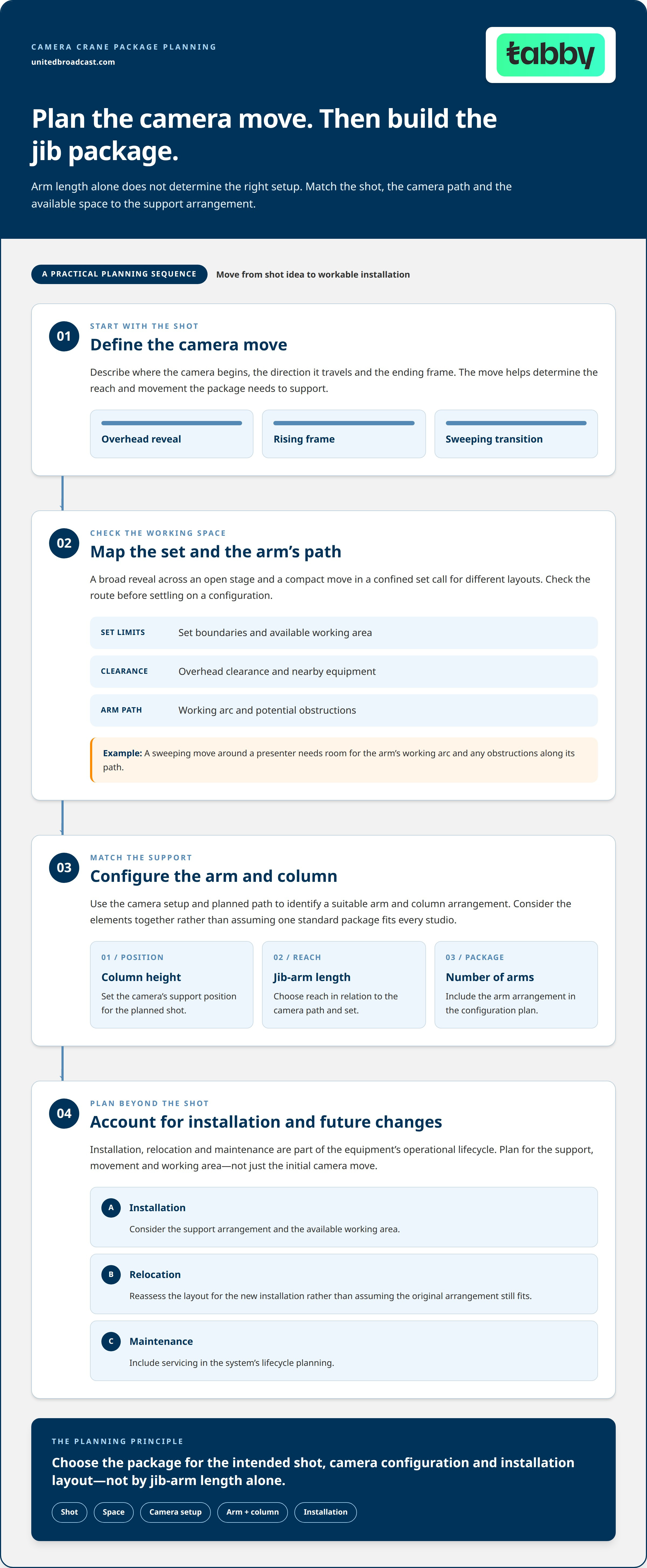
Assess a camera crane package by how its components work together for a specific production. Start with the camera move: an overhead reveal, a rising frame or a sweeping transition each places different demands on reach and movement. Then define the camera setup and its path. These decisions help identify a suitable arm and column arrangement without assuming one standard package fits every studio.
For example, a studio planning a sweeping move around a presenter needs to account for the arm’s working arc and any obstructions along its path. A compact move in a confined set calls for a different layout than a broad reveal across an open stage. Map the shot and surrounding set before settling on a configuration.
- Shot: Describe the camera’s starting point, direction and ending frame.
- Space: Note the set boundaries, overhead clearance and nearby equipment.
- Support: Align the column and arm arrangement with the planned movement.
Industry Crane and Jib Arm Types
Industry jib cranes handle loads around a work area, while camera jibs carry a camera for production movement. Pillar-mounted and wall-mounted designs are common industrial configurations. Freestanding jib cranes can offer 360-degree rotation, while wall-mounted versions generally provide rotation up to 180 degrees, depending on installation. These arrangements serve different spaces and tasks.
Capacity and mounting also distinguish industrial equipment. A typical jib crane capacity range is 125 kg to 5,000 kg, depending on design, mounting type and boom length. Listed mobile and portable davit cranes have rated capacities of 1,000 kg and 600 kg respectively. These figures describe industrial lifting equipment, not camera crane capacity.
A multi-arm slewing jib crane uses a column with a special static design to absorb forces from several arms. Cranes on a shared column can operate independently. A camera jib, by contrast, supports only the camera, so its package is planned around camera movement rather than material handling. Keeping these categories distinct helps match equipment to the production task.
Customisable column height, jib-arm length and number of arms
For a workshop or job site, choose a crane around the load, working area and required movement. Industrial jib capacities range from 125 kg to 5,000 kg, while reach and lift height depend on the crane’s design, arm length and column arrangement.
Column Height and Arm Configuration
Column height determines where the arm operates in relation to work surfaces, overhead structures and the load’s pickup point. Set it against the required lift path, then select an arm length that reaches the work area without obstructing nearby activity. A 3 m free-standing jib arm provides one concrete configuration example, but its suitability depends on site geometry.
Multiple arms can serve separate work zones from a shared column. Their arrangement needs a special static design to absorb the forces from several arms, while each crane can operate independently. Plan arm directions around benches, access routes and equipment, and keep any remote work position clear.
Capacity, Reach, and Lift Height
Capacity, reach and lift height describe different limits. Capacity is the load a crane is rated to handle; reach is the working distance from its support; lift height is the available vertical travel. A longer arm can extend coverage, but capacity depends on the design, mounting type and boom length.
For instance, listed mobile and portable davit cranes have rated capacities of 1,000 kg and 600 kg. These are distinct equipment examples, not interchangeable ratings for every jib design. A typical industrial jib range runs from 125 kg to 5,000 kg, depending on design, mounting and boom length.
To select a configuration, define the heaviest load, its pickup point and destination, then map the required vertical travel. Compare these needs with the crane’s rated capacity at its working reach, rather than assuming maximum capacity stays constant along the arm. This distinction matters when planning a longer sweep around a workshop bay.
- Column: Set its height against overhead clearance and pickup level.
- Arm: Choose the reach needed to cover the work area.
- Arms: Plan shared-column positions around separate work zones.
- Rating: Match capacity to the load and its operating position.
A 3 m arm can be a useful starting point for discussing reach, but it doesn’t define lift height or load rating by itself. Those depend on the complete crane configuration and the path the load must follow. Explore cranes and jib arm configurations in relation to your planned lifting task.
Installation, relocation and maintenance
Installation planning should account for the crane’s support, load path and working area. For a jib crane, these details also inform servicing and any later relocation.
Installation and Relocation
Start by documenting the proposed crane location, mounting arrangement, load path and surrounding work zones. A wall-mounted jib needs a suitable supporting structure, while a freestanding model needs an appropriate floor position. The planned arm movement must also clear benches, access routes and nearby equipment.
Relocation involves more than changing the crane’s position. A new site may have different support conditions, clearances or operating paths, so reassess the layout before returning the equipment to service. Record both the original configuration and the revised arrangement to keep installation details clear for operators and maintenance staff.
Purchase and installation budgets depend on the equipment configuration and project scope. Capacity, mounting type, arm dimensions, delivery, installation work and relocation needs all affect the total. Plan for equipment, site preparation and installation as separate items, and assess each against the intended operating layout.
Maintenance and Inspection Requirements
In the UAE, plan inspections and maintenance according to applicable workplace requirements and the equipment manufacturer’s instructions. Keep a record for each crane that describes its configuration, inspection findings, service history and completed repairs. This creates a useful reference when maintenance staff assess changes or recurring issues.
After relocating a crane or adjusting its arm arrangement, review the installation and operating path before returning it to normal use. Record the review alongside the updated layout. This connects the equipment’s current condition to its service history, rather than relying on an older record from a different setup.
Safety Risks and Prevention
Potential risks include a swinging load striking people or equipment, a dropped load, or contact with nearby structures. In a shared workshop, define the load path and keep unrelated activity clear of the lifting zone. Operators also need to understand the crane’s rated capacity and controls before use.
Follow a consistent pre-operation process: review the intended movement, inspect the equipment for visible issues and keep the load within its rated capacity. Stop if a problem arises, such as unusual movement or contact with an obstruction. These steps address common hazards while allowing for differences between crane designs.
For a multi-arm setup, include each arm’s operating area in the site plan. Independent operation from a shared column does not remove the need to manage intersecting paths. Clear communication between operators helps prevent conflicting simultaneous movements.
Steps also include regular inspection: workplace jib cranes must be inspected regularly under the UK Lifting Operations and Lifting Equipment Regulations (LOLER). Keep inspection findings with the crane’s configuration and service history, so maintenance staff can consider its current condition alongside previous records. Inspection is part of ongoing maintenance, including after relocation or adjustment, when the revised installation and operating path should be reviewed. This keeps inspection records connected to the crane’s setup and previous checks.
Jib arm length
Arm length determines how far a jib can reach from its support, but maximum reach alone does not define a suitable setup. In a workshop, first map the pickup point, destination and required travel path. A jib serving one bench, for example, needs a different reach from one covering several work positions along a production line.
Measure from the crane’s mounting point to the farthest intended load position. Include the space needed for the load to approach and leave each position. This gives you a practical reach requirement instead of a selection based only on the room’s overall width.
A longer jib can extend the covered area, but it also changes the crane’s operating geometry. The supporting arrangement and rated capacity must suit the selected arm and intended task. Treat the arm, column and mounting as one system, especially when a wall, pillar or shared column shapes the installation.
- Map the route: Mark pickup and placement points for each regular task.
- Measure reach: Use the crane support as the reference point.
- Review obstructions: Note walls, workbenches and equipment along the arm’s travel.
- Match the configuration: Align arm length with the support and operating area.
Consider a maintenance bay where a load moves between a service position and a nearby workbench. A short arm may cover both points if they are close to the support. If the workbench is farther away, the required reach changes. Let the layout, not the room’s label, guide the decision.
In a production space, plot the arm’s full sweep on a plan. Check whether its movement crosses a walkway or another work zone. A layout that reaches the intended stations without crossing active areas can make the operating path easier to manage.
Arm selection also affects future flexibility. A fixed work area may suit a reach planned around established stations. A workshop with changing tasks may need a configuration that accommodates regular operating patterns without creating avoidable obstructions. Identify those patterns before specifying the arm.
Record the selected reach alongside the mounting position and intended load path. This helps keep installation, maintenance and later relocation aligned with the original task. For a multi-arm arrangement, document each arm’s work area separately so operators can see where its movement begins and ends.
What types of cranes and jib arms are used in industry?
Industrial crane designs suit different loads, support structures and work areas. A jib’s position and movement help distinguish one configuration from another.
A jib is a horizontal or near-horizontal beam that supports a load away from its main support. It usually attaches to a vertical mast or tower, though some designs use an inclined boom. This arrangement serves localized material-handling tasks in manufacturing, warehouses, workshops and maintenance areas.
Some cranes use a jib as an extension at the top of a tower, adding lifting or moving capability. A saddle jib projects at a right angle from the tower, with a trolley and hook moving along the arm. This layout can position a load across the jib’s working path.
Level-luffing mechanisms address a different movement requirement. As the jib moves through its range, the mechanism can keep the load at approximately the same vertical height. This is useful when a task calls for moving a load sideways while limiting changes in height.
Jib-less designs offer another distinction. In a derrick, the load hangs directly from the boom, which is sometimes called a jib. Its load path therefore differs from that of a saddle jib, where a trolley and hook travel along a horizontal extension.
Vehicle-mounted equipment serves mobile work. Van cranes can lift loads up to half a tonne, depending on the model. They are a separate option from fixed industrial jibs, which are associated with a particular support and work area.
Use the work pattern to narrow down the configuration. A fixed maintenance station may suit a jib that serves one localized area. A tower crane with a saddle jib suits a different arrangement, with a trolley carrying the hook along the arm. For mobile lifting between locations, a van crane offers a vehicle-mounted format.
- Identify the support: Determine whether the design uses a mast, tower, inclined boom or vehicle.
- Trace the load path: Note whether the load hangs from a hook, trolley or boom.
- Match movement to the task: Consider whether the load must travel laterally or maintain its approximate height.
- Separate fixed and mobile work: Choose around a defined station or vehicle-based operation.
These distinctions help prevent category confusion when selecting equipment. A camera jib carries a camera for cinematography, while industrial jibs handle materials. Start with the load and task, then compare support style and movement before choosing a crane arrangement.
An important distinction is that the jib describes the beam, while the crane arrangement describes how the beam is supported and how the load moves. A jib or jib arm is a horizontal or near-horizontal crane beam that supports a load away from the main support. This definition applies across the configurations discussed here; it does not, by itself, identify whether the crane is fixed, tower-based or vehicle-mounted.
A saddle jib is a horizontal extension at a right angle to a crane tower, with a hook attached to a trolley. This describes both its position and load path: the extension projects from the tower, and the trolley carries the hook along it. Compare those features with the task’s support and movement requirements.
United Broadcast & Media Solutions (UBMS)
United Broadcast & Media Solutions (UBMS) helps production teams plan professional camera and studio equipment around their operational requirements. If you are assessing a crane setup alongside the wider production workflow, UBMS can support decisions involving professional video cameras, digital cinema cameras, cinema lenses and lighting equipment. Its system integration services can help coordinate equipment within a studio environment. This is a practical next step when the camera platform, imaging equipment and studio systems need to be considered together rather than as separate purchases. UBMS also operates a service center for camera repairs and equipment maintenance. Contact United Broadcast & Media Solutions to discuss your production equipment requirements.
Plan the Next Production Move
Turn your planned camera move into a practical production brief. Describe the shot, the space it needs to cross and the equipment that must work around it. This gives your team a clear basis for coordinating the camera platform with the wider studio setup before finalizing installation or production plans.
United Broadcast & Media Solutions offers professional video cameras, digital cinema cameras and cinema lenses. These equipment categories can inform decisions about the imaging setup for productions involving camera movement. Consider the camera and lens alongside the intended framing, rather than treating the crane as an isolated purchase.
Use the next step to connect your planned movement with the equipment and production requirements that matter to your team.
A clear plan is a strong starting point for shaping a camera move that suits your production.
Frequently Asked Questions
What are cranes and jib arms, and how do they work?
Crane systems move a load along a planned path, while the jib is the projecting arm that supports or guides it. On a film set, a camera jib can move a camera from a low frame to an elevated view. In a workshop, a material-handling jib can position a component beside a service bench. The support, arm movement and suspended load together determine the working area.
What steps are involved in installing and maintaining a jib crane?
Installation and maintenance begin by matching the crane layout to its operating task. Document the load route and mounting position, install the support and arm for that arrangement, then review the movement path before routine operation. Keep a service record covering inspection findings, adjustments and repairs. For example, if a jib moves differently after relocation, record the change and have the setup assessed before resuming normal use.
How much do cranes and jib arms cost to buy, rent, and install?
Installation costs depend on the configuration and project scope, including mounting, delivery, site preparation and installation work.


