





Broadcast Camera Repair: A Professional Guide to Diagnosis and Service
A camera fault discovered just before a scheduled production can disrupt the entire workflow. But the symptom alone may not reveal the cause: an image issue, power failure or connection fault could involve the camera, lens, power supply or wider system. Effective broadcast camera repair starts with clear fault evidence, not guesswork.
Downtime is stressful, and sending equipment for service without useful details can make it harder to reproduce the problem. Record what happened, when it occurred and which components were connected. This gives technicians a more useful starting point for diagnosis and helps clarify practical next steps.
In this guide, you’ll learn what symptoms and setup details to document, how to prepare a camera and related equipment for service, and what a professional assessment can establish. You’ll also find guidance for deciding on a repair next step that supports reliable production. United Broadcast & Media Solutions provides professional equipment repairs and maintenance through its dedicated service center, supporting broadcast workflows with a practical, informed approach.
Key Takeaways
- Group symptoms by image, recording, power, controls and connections to describe a fault clearly.
- Professional diagnosis uses the evidence to inspect and isolate possible causes before explaining the findings.
- Weigh repair against replacement using the camera’s condition, recurring faults, production needs and workflow compatibility.
- Record the camera’s operating context and relevant settings before handover to support an informed broadcast camera repair discussion.
- UBMS’s dedicated service center provides professional equipment repairs and technical support for broadcast environments.
Broadcast Camera Repair: Recognizing Faults That Need Professional Attention
A camera fault can affect a single shot, a recording setup or the pace of a scheduled production. Clear observations help distinguish a recurring equipment issue from a temporary problem elsewhere in the workflow. A symptom is a useful starting point, but it doesn’t identify the failed component on its own.
A broadcast camera fault is a symptom that requires diagnosis, not a confirmed cause. An unstable picture, for example, could relate to the camera, lens, power, signal path or a connected device. Describe what you observe without assuming which part is responsible.
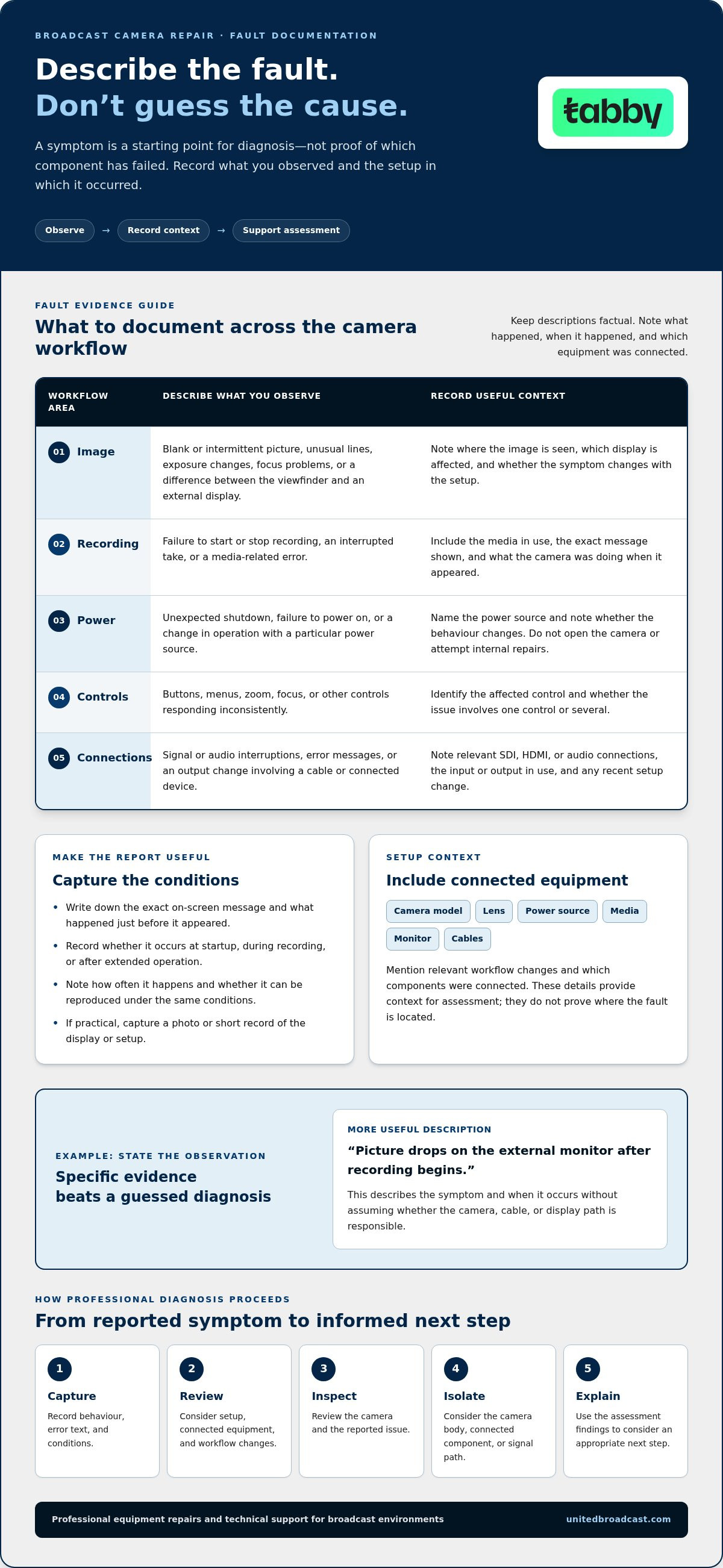
Organize symptoms by the part of the workflow they affect:
- Image: Note a blank or intermittent picture, unusual lines, exposure changes, focus problems or an image that differs between the viewfinder and an external display.
- Recording: Record whether the camera fails to start or stop recording, interrupts a take, or displays a media-related error. Include the media in use and what the camera showed.
- Power: Describe unexpected shutdowns, failure to power on or changes in operation with a particular power source. Avoid opening the camera or attempting internal repairs.
- Controls: Identify buttons, menus, zoom, focus or other controls that respond inconsistently. Note whether the issue affects one control or several.
- Connections: Record signal or audio interruptions, error messages and any change in output when a cable or connected device is involved.
Which camera symptoms should be documented?
Write down the exact message on screen and describe what happened immediately before it appeared. Note whether the symptom occurs at startup, during recording or after extended operation. Include how often it happens and whether you can reproduce it under the same conditions. A repeatable fault offers different diagnostic evidence from a one-off event, but neither confirms a specific cause.
Keep the description factual: “picture drops on the external monitor after recording begins” is more useful than “camera output is broken.” If practical, capture a photo or short record of the display or setup. Don’t change internal settings or attempt invasive repairs to make the symptom disappear before assessment.
Could the fault be in a connected device?
Consider whether the behaviour changes with the lens, power source, recording media or external monitor. Note any relevant SDI, HDMI or audio connections, along with which output or input was in use. If the issue appeared after a setup change, record what changed and when.
These details give technicians workflow context, not proof of fault location. A picture problem seen on one monitor may involve the camera, cable or display path; a recording interruption may involve the camera or media. For broadcast camera repair, documenting the symptom and its operating conditions helps guide diagnosis without prematurely attributing the fault to one component.
How Professional Broadcast Camera Diagnosis Narrows Down the Cause
Professional diagnosis turns a reported camera problem into a structured assessment. Rather than treating the first visible symptom as a confirmed failure, a technician considers when it occurs, the equipment’s operating context and how the camera fits into the signal path. The assessment depends on the equipment and reported fault.
Repeatable symptoms and clear workflow context help narrow the possible causes of a camera fault. A note that “the feed drops” leaves several possibilities open. Recording where the feed is viewed, which connections are in use and when the interruption occurs gives the assessment more useful context.
- Capture the symptoms. Describe the behaviour, any displayed error text and the conditions under which it appears.
- Review the context. Consider the camera’s setup, connected equipment and relevant workflow changes.
- Inspect the equipment. Review the camera and reported issue before drawing conclusions.
- Isolate possible causes. Consider whether the evidence points toward the camera body, a connected component or the signal path.
- Explain the findings. Use the assessment to understand the issue and consider an appropriate next step.
What information helps technicians assess a camera fault?
Provide the camera model, a concise description of the fault and the exact wording of any displayed error. Explain when the issue occurs, whether it can be reproduced and what the camera was doing at the time. Include relevant accessories, such as the lens, power source, media, monitor and connected cables. Note recent setup or workflow changes that may relate to the symptom, without presenting them as its proven cause.
This information gives the assessment a focused starting point and can help distinguish a recurring pattern from an isolated event. Share observations rather than a diagnosis, and let the equipment assessment establish what the evidence indicates.
Why must diagnosis consider the whole camera setup?
A camera is one part of a production chain. The lens and mount affect the imaging setup, while power and media are relevant to camera operation and recording. Cables, external monitors and recording equipment can also affect what appears downstream. If the camera’s own display looks normal but an external monitor shows a problem, that difference can guide assessment without proving which component is responsible.
Production context matters to broadcast camera repair because the reported symptom may appear in one part of the workflow while its cause lies elsewhere. Conclusions should remain conditional until the relevant equipment has been assessed. To discuss a camera fault with UBMS, share the issue with the UBMS team and describe how it appears in your setup.
Broadcast Camera Repair or Replacement: How to Weigh the Options
Choosing between repair and replacement depends on the camera’s role in production, not just the fact that it has developed a fault. An assessment can clarify the issue and help the team compare practical options. Consider the equipment’s condition, whether faults recur, and how well the current setup meets operational requirements.
A camera may still suit a production’s image, recording and connection needs, even if it requires attention. Alternatively, a fault may prompt a wider review of a workflow that no longer supports how the team works. Keep the decision tied to evidence and production requirements rather than assuming either repair or replacement is always preferable.
When is a repair assessment a sensible first step?
An assessment can be useful when the camera remains central to an established workflow, including a setup built around existing lenses, support equipment or studio connections. It can also help when intermittent faults return after normal operation resumes. A camera that works for some sessions but fails unpredictably may still create planning challenges. Diagnosis gives the team information to weigh before deciding on a repair path.
- Condition: Consider the camera’s overall operating state alongside the reported fault, not in isolation.
- Recurrence: Account for how often the problem returns and whether it affects critical production tasks.
- Workflow role: Identify the camera’s place in the setup and the equipment or procedures that depend on it.
- Assessment findings: Use the professional evaluation to inform the decision, without presuming a particular repair method or outcome.
When should a production team consider replacement?
Replacement may merit consideration if production requirements have changed or the current camera no longer fits the workflow. Compare the outputs, connections and recording requirements the team needs with the equipment already in use. Also consider how a replacement would integrate with existing lenses, monitoring, recording and studio systems. A change that meets one requirement but complicates the wider setup may not be the best operational fit.
For broader camera-category selection context, compare your production needs with the professional video camera range. Focus on the specifications and workflow requirements relevant to the job rather than choosing by category alone.
In practice, repair assessment and replacement are connected decisions. The assessment describes the fault; the production team can then consider that information alongside recurrence, equipment condition and compatibility needs. For broadcast camera repair, a clear decision process helps keep the choice aligned with day-to-day production demands without relying on blanket cost or turnaround assumptions.
Preparing a Broadcast Camera for Repair and Protecting Production Continuity
Preparing a camera for service involves more than packing the body. A clear fault record, useful workflow context and a plan for upcoming production help the team manage the handover without assuming how long an assessment or repair will take. In broadcast camera repair, accurate information is more useful than a guessed diagnosis.
What should you include with a repair request?
Start with the camera model and a concise description of the fault. Add the circumstances in which it appears, any displayed error text and whether it affects the camera body, an external display or another part of the signal chain. Describe prior troubleshooting factually. For example, distinguish “the output returned after reconnecting the cable” from “the cable caused the fault.”
Before handover, use this checklist to organize relevant information:
- Camera model and a clear description of the symptom.
- When it occurs, how often it happens and whether it can be reproduced.
- Error messages or other visible indicators, recorded accurately.
- Relevant accessories and connections, such as the lens, media, power source, SDI or HDMI path, monitor and audio equipment.
- Recent changes to the setup, workflow or operating conditions that may help explain the issue.
- Accessories included with the camera, identified clearly in the handover details.
Where practical, record workflow details that may be difficult to reconstruct later. These could include relevant camera settings, output configuration, signal routing or audio setup. Focus on information connected to the fault and the way the camera is used; avoid changing settings just to make the equipment appear ready for assessment.
How can teams reduce disruption while equipment is assessed?
Map the camera’s role in the production before it leaves the setup. Note upcoming shoot or transmission dates, the shots or functions that depend on it, and any equipment or system connections that may be affected. This gives the production team a clearer view of the operational impact during assessment.
Then plan a workable temporary approach using equipment already available to the team. This might mean reassigning another camera, adjusting coverage or revising a setup, provided those changes suit the production’s technical and editorial needs. Build the plan around confirmed resources and service information rather than an assumed loan unit or fixed service timeline.
Keep producers, operators and technical stakeholders informed with confirmed service information. If no reliable duration is available, communicate that the timing remains uncertain and update the plan when new information is received. Clear, measured updates help teams coordinate without turning an estimate into a promise.
UBMS provides professional equipment repairs and technical support through its dedicated service center. A concise fault record and an accurate account of the camera’s workflow give the service discussion a useful starting point.
Broadcast Camera Repair Support Through the UBMS Service Center
A broadcast camera is part of a wider professional media workflow, so repair support should take account of both the equipment and its production role. United Broadcast & Media Solutions provides professional equipment repairs and technical support through its dedicated service center. Sharing a clear fault description and relevant workflow context makes the service discussion more informed, while leaving the cause and outcome to assessment.
What professional support means for camera owners
Professional media equipment operates within production environments where camera behaviour can affect connected equipment and established workflows. UBMS supports broadcast environments through technical services and system integration, providing broader context for professional equipment support. Not every camera fault involves integration, so the reported symptom and equipment assessment should guide the discussion.
UBMS has operated since 1997. This company history provides context for its role in the professional media sector. Each service requirement depends on the equipment and reported issue.
A helpful service discussion begins with specific observations: what the camera does, when the behaviour occurs and how the camera is used in the production setup. If a fault affects an external feed or connected recording equipment, describe where it appears. This gives the issue operational context while leaving the cause open for assessment.
How to take the next step with UBMS
Before discussing a broadcast camera repair requirement, prepare a short summary to frame the conversation:
- Camera details: Note the model and identify the equipment being discussed.
- Observed symptoms: Describe the behaviour plainly, including any displayed error text and when the issue occurs.
- Production context: Explain the camera’s role and mention relevant connected equipment or workflow details.
- Previous steps: Record any troubleshooting already attempted, stating what happened without presenting a suspected cause as confirmed.
This concise record helps keep the discussion focused on the actual issue. It can also help distinguish a symptom affecting the camera from one appearing elsewhere in the connected workflow. You don’t need to make a technical diagnosis before raising the requirement; accurate observations are more useful than assumptions about a failed component.
Share the relevant details with UBMS to discuss professional equipment repair and technical support. Keep the summary factual, and include context that helps explain how the camera is being used or how the symptom appears.
Make Your Next Camera Service Decision With Confidence
Use a service decision to strengthen future equipment planning. After an assessment, keep a concise record of the findings and agreed next steps alongside the camera’s technical history. This gives production and technical teams a reference when reviewing recurring issues, evolving workflow requirements or future system integration needs.
Approach broadcast camera repair as part of maintaining a dependable production operation. Clear information and a considered service discussion can help your team decide how to move forward in line with its equipment and workflow priorities.
Contact UBMS with your camera model, fault symptoms and relevant setup details to discuss professional equipment repair and technical support.
Frequently Asked Questions
Can a broadcast camera be repaired?
Yes, a broadcast camera may be repairable, but the fault and equipment condition determine what options are practical. A professional assessment can help establish whether the issue is serviceable and what the next step may involve. For example, an intermittent control problem and a camera that won’t power on call for different assessments. Avoid assuming a camera is beyond repair based on one symptom, or that every fault can be resolved.
What information should I provide when requesting broadcast camera repair?
Share the camera model, a brief account of what it does, and any error text or indicator you observed. Add the approximate date the issue began and whether it followed a change in setup or use. If a recorded clip illustrates an image or recording problem, note that it exists and follow the service team’s guidance about sharing media. State prior troubleshooting accurately, without presenting a suspected cause as fact.
How long does broadcast camera repair take?
There isn’t one reliable timeframe for every repair. Duration can depend on the fault, the assessment required and whether relevant parts are available. A straightforward issue and a complex internal fault may follow different paths, so a general estimate shouldn’t be treated as a confirmed schedule. If the camera is needed for a particular production date, share that deadline during the service discussion and plan around the timing provided for your case.
Is it better to repair or replace a broadcast camera?
Neither option is automatically better; base the choice on the camera’s condition and its continuing fit for production. Consider whether the body meets current requirements, whether operators and existing equipment can continue working with it, and whether a replacement would require changes to accessories or established procedures. A repair assessment can add useful information to this decision. Compare the operational impact of each route, not just the initial fault.
Can a camera fault come from equipment connected to the camera?
Yes. A symptom that appears on a monitor or recording device can originate elsewhere in the signal chain, including a cable, external display or recorder. For instance, if the camera’s own display looks normal but the external feed doesn’t, that difference is useful evidence, though it doesn’t prove which component has failed. Note where the symptom appears and whether it changes when a connection is removed or replaced.
Should I attempt to repair a broadcast camera myself?
Limit self-troubleshooting to simple, non-invasive checks, such as verifying the power source, reseating an external cable or following a reset procedure in the camera’s manual. Don’t open the camera body or attempt work on internal circuitry, sensors or optics. A failed DIY repair can complicate the assessment and may affect equipment condition. For persistent or recurring issues, record what you tried and leave internal diagnosis to professional service.


