

Benefits of a Box Camera for Live Production in Changing Light
A live-production camera should not lock you into one lens or framing choice. The benefits of a box camera for live production include a modular setup that accommodates different lenses, adds useful angles and fits multicamera workflows. With the right lens and placement, it can also provide a consistent view as lighting changes across a venue or scene.
It’s reasonable to focus on image quality and reliability first: a camera angle only helps if it works with the lighting, subject and production setup. The key is understanding how a box camera’s flexibility translates into practical choices, from framing a close-up to coordinating views across a live event.
This guide explains how box cameras can support varied lighting, multicamera configurations and additional angles, and why interchangeable lenses matter. It also compares box cameras with studio and PTZ cameras, helping you decide whether their strengths fit your production requirements.
Key Takeaways
- Match the lens and camera position to the subject and changing light to keep each shot useful throughout a live production.
- Plan multicamera roles in advance, with distinct wide, medium and close-up views that work together in the production workflow.
- Use an additional camera angle to add visual variety, while keeping framing and exposure consistent across the feed.
- Consider a box camera when compact placement and interchangeable lenses suit the shot; it doesn’t pan or tilt on its own.
- Assess the camera, lens and production setup as a system, including how the camera will be mounted and connected.
Image quality in varied lighting conditions
Changing light can make shots look inconsistent. A stage, for example, may combine bright spotlights, a dim audience area and a screen showing bright graphics. A box camera can be assigned a defined view, such as a presenter under the key light. This focused role makes it easier to set exposure for the image that matters instead of treating the whole venue as one lighting zone.
Multiple cameras can capture different lighting conditions and give the production team more options for a consistent final programme. A wide view might include a dark auditorium and bright stage, while a close-up frames a speaker against a lit backdrop. The images will not match automatically. Before streaming, compare the views on the production monitor and adjust exposure and white balance so skin tones and neutral surfaces look consistent across angles.
Use a clear setup sequence during rehearsal. First, frame the subject and identify the brightest highlights and deepest shadows. Set exposure for important details, such as a speaker’s face, rather than letting a bright screen dominate. Then compare the camera view with the other angles under the same stage cues. If the lighting changes during a performance, review the relevant view before switching to it live.
Lighting equipment also affects what the camera can capture. A controlled key light can make a presenter easier to expose against a darker set, while careful placement can reduce harsh shadows. In a UAE conference room with daylight entering through windows, the lighting balance may shift during the event. Manage the room’s light and the camera’s exposure together; changing camera settings alone cannot make every part of a high-contrast scene equally visible.
- Check highlights: Bright LED screens or spotlights can lose visible detail when overexposed.
- Check shadows: Dark clothing and an unlit audience can merge into the background.
- Compare angles: Review wide and close-up images together before switching between them.
These checks make image quality a production decision, not simply a camera specification. Keep the subject, lighting and exposure priorities consistent across views, then rehearse transitions using the actual event cues. For a camera choice that supports a defined live-production role, review the professional video camera selection. Pairing suitable lighting equipment with considered camera placement can help the crew produce cleaner images as the scene changes.
Many bullet cameras provide infrared night visibility up to 100 feet. This can help preserve a usable view when ambient light falls, though framing and exposure still matter.
Multicam accessories and camera configurations
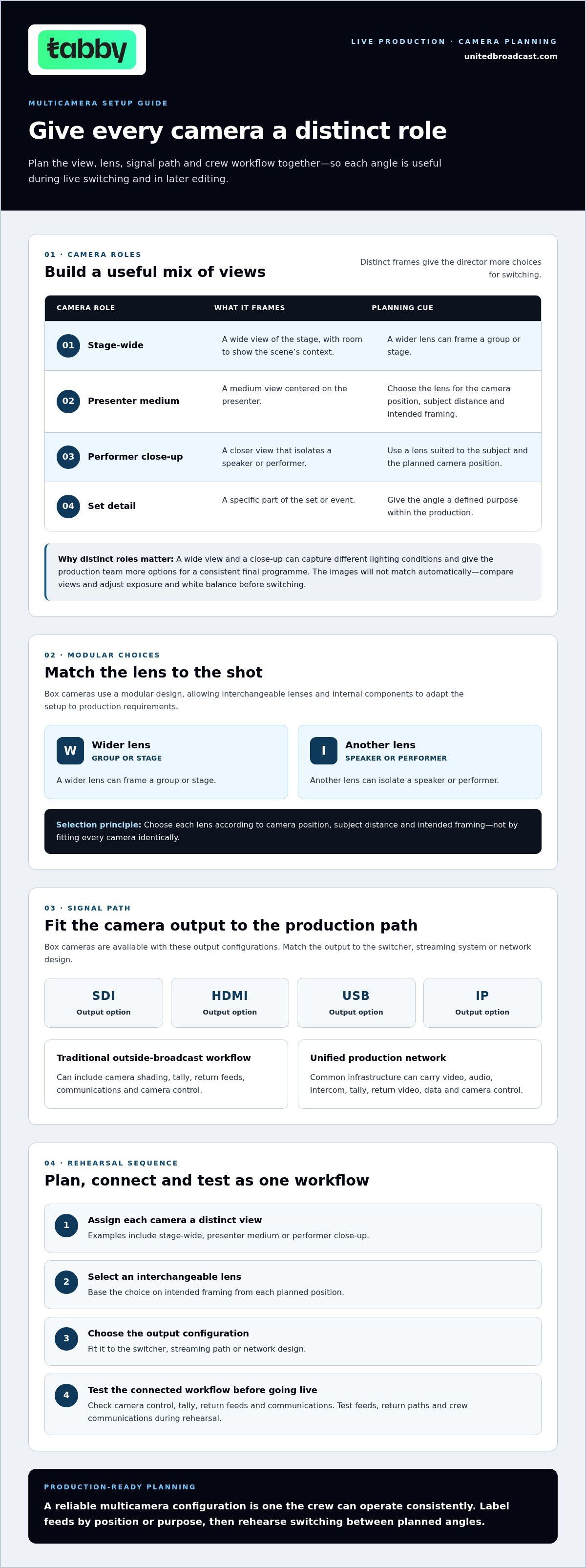
A multicamera plan works best when each camera has a defined role. At a live concert, one box camera might hold a wide stage view while another frames a performer close-up. A third angle could cover a presenter or a specific part of the set. Distinct roles give the director more choices for live switching and provide useful footage for later editing. This approach suits events where one fixed frame cannot show both context and detail.
Box cameras use a modular design, allowing interchangeable lenses and internal components to adapt the setup to production requirements. A wider lens can frame a group or stage, while another lens can isolate a speaker or performer. This flexibility also supports creative cinema-style configurations within a live workflow. Select each lens according to the camera position, subject distance and intended framing, rather than fitting every camera identically.
Signal connections shape the configuration too. Box cameras are available with SDI, HDMI, USB and IP streaming output configurations. Match the output to the production path, such as a switcher or streaming system. Cinema cameras can also integrate into traditional outside-broadcast workflows that retain camera shading, tally, return feeds, communications and camera control. Those established processes help crews operate different camera types within a coordinated production.
A unified production network can carry video, audio, intercom, tally, return video, data and camera control over common infrastructure. An IP backbone can transport video, intercom, tally and return signals across a venue, helping production elements stay coordinated. For an event with cameras around a hall or an outdoor site—where infrastructure providers like VMS Event Rental (VMS Group) supply canopies and marquee setups to protect technical hubs and gear—map each camera’s output and role before installation. Test feeds, return paths and crew communications during rehearsal.
- Assign each camera a distinct view, such as stage-wide, presenter medium or performer close-up.
- Select an interchangeable lens that achieves the intended framing from each planned position.
- Choose an output configuration that fits the switcher, streaming path or network design.
- Test camera control, tally, return feeds and communications as one workflow before going live.
Reliability comes from a configuration the crew can operate consistently, not simply from adding cameras. Label feeds by position or purpose, then rehearse switching between planned angles. If you’re developing a multicamera setup, discuss your production requirements with the team before settling on a camera and lens configuration.
For live events, multiple cameras can capture different shots simultaneously, allowing footage to be edited later into a more dynamic final product. Media production teams such as LLC Pictures use multi-camera setups to capture wide shots, medium shots, and close-ups of a live event, giving editors options across the scene. Planning framing and intended roles for each camera can make those perspectives useful both during the event and in post-production.
Physical camera choices also affect how crews adapt a setup. Bullet cameras typically have fixed housings and lenses, while box cameras offer greater customization for indoor use. UAE production teams may need to switch a camera between a motorized gimbal and a studio tripod in less than thirty seconds. Preparing compatible mounting and support arrangements for that change can help crews move efficiently while keeping each camera’s role clear.
Production value and varied camera angles
For live production, choose a box camera that suits the required lens, framing and signal path. No single model suits every venue: a fixed close-up position has different needs from a wide stage view. Match the camera configuration to the shot and the way the production team will use its feed. The benefits of a box camera for live production are clearest when it fills a specific coverage need.
A dedicated secondary angle adds flexibility without replacing the main camera. In a livestream, a wide shot can establish the venue while a box camera frames a speaker, performer or demonstration area. Switching between these views gives the director more options. The benefit comes from purposeful coverage: each angle should reveal useful detail or context that the other view misses.
For a concert, a camera aimed at the lead performer can capture expressions and instrument details, while another view keeps the full stage visible. Bidar Video Production used an 8-camera setup to film the Baligh Hamdi concert at Stanford’s Bing Concert Hall. That example shows how separate camera positions can serve distinct roles. It doesn’t mean every production needs eight cameras; the number of useful setups depends on the event, venue and shots required.
Plan the switching sequence before the event. Identify moments where a tighter view adds value, such as a presenter demonstrating an object or an artist showing fine details in their work. Keep a wide angle available for transitions and group moments. During rehearsal, confirm that each camera’s framing works with the other signals in the programme, then practise switching at the right cue. This supports cleaner transitions and more efficient direction. These practical benefits of a box camera for live production depend on assigning each feed a clear purpose.
- Define the purpose: Give each camera a distinct subject, position or framing task.
- Prioritize useful cuts: Switch when the alternate angle adds context, detail or a clearer view.
- Rehearse transitions: Test the camera signals and planned cues before the livestream begins.
Extra angles help only when the crew can use them reliably. A close-up that arrives late, obscures important action or repeats the wide view adds little. Review the planned shots from the audience’s perspective: does each clarify the event or bring viewers closer to an important moment? For a compact venue or fixed livestream position, a box camera can provide a practical additional angle. Its value comes from the shot it enables, not simply from adding another feed.
How does a box camera compare with a studio camera or PTZ camera for live production?
Choose between these camera types by considering framing, movement and crew workflow. At a live conference, a box camera can provide a compact, dedicated view of a presenter. A studio camera may better suit a staffed control-room setup, while a PTZ camera fits shots that need remote pan, tilt and zoom. The right choice depends on the job each camera must perform.
A box camera offers a modular approach. Choose an interchangeable lens for a stage-wide composition or a tighter shot from a fixed position. This flexibility is useful when the camera must fit a particular space or provide a distinctive angle. Its compact form can also suit tight spaces, such as beside a lectern or within a small studio set.
Studio cameras are commonly used in established studio workflows, where an operator and production team manage the camera as part of the programme. Cinema cameras can also fit traditional outside-broadcast workflows that use camera shading, tally, return feeds, communications and camera control. Workflow compatibility is therefore an important consideration when comparing a box-style setup with a studio configuration.
Movement is one clear difference. A box camera can zoom, but it does not pan or tilt. A PTZ camera can change its viewing direction remotely, which is useful when one camera must cover different parts of a room. For example, a PTZ camera can move between a presenter and a questioner, while a box camera can hold a composed presenter shot from a fixed position.
Assess the production using these practical questions:
- Is the camera position fixed? A compact box camera can suit a constrained position with a planned angle.
- Must one camera follow changing action? Remote pan and tilt can make a PTZ a better fit for changing viewpoints.
- Does the workflow depend on studio operations? Consider how tally, camera control and return feeds fit the existing setup.
- Will framing change between productions? Interchangeable lenses let a box camera adapt to different shot requirements.
For a panel discussion, a fixed box camera can hold a consistent close-up while a PTZ camera covers movement around the room. A studio camera may suit a production built around a staffed studio workflow. Compare the required shots, operator role, camera position and control process before choosing. The right configuration covers the programme’s actual needs without adding movement or workflow features the crew will not use.
What are the limitations and risks of using box cameras in live production?
A box camera is not a complete camera movement system. It can zoom, but it does not pan or tilt, so its framing remains tied to its physical position. At a panel discussion, for example, a fixed camera can hold a speaker’s close-up but cannot turn towards a questioner. Plan another angle or a separate movement method when the programme requires changing viewpoints.
Lens flexibility also brings setup decisions. The lens affects framing from the camera’s position, so a mismatch can leave a presenter too small or crop important action. Before the event, place the camera where it will be used and rehearse the required shot. Check the full frame for lecterns, stage edges and audience movement. Test the zoom range against the planned action, rather than relying on a viewfinder check alone.
Mounting creates a separate mechanical risk. A camera configuration weighing 5.2 kilograms exceeds the maximum payload of a gimbal rated for 4.5 kilograms. That mismatch can compromise the rig’s operation. Include the camera, lens and attached accessories when assessing the complete configuration. If the setup changes between a tripod and moving support, recheck the mounted load and balance after each change.
Use this pre-production sequence to reduce avoidable problems:
- Confirm movement needs: Identify shots that require panning or tilting, then assign an appropriate camera position or movement solution.
- Test the lens and frame: Rehearse the actual subject movement from the planned camera position.
- Assess the full rig: Account for the camera configuration against the support’s maximum payload.
- Rehearse the live path: Test the camera feed, framing and transitions before the event begins.
A fixed box camera can create blind spots if the stage layout changes after setup. At a live performance, a stand, microphone or moving performer might obstruct the planned close-up. Check the sightline from the installed position, then test the view during rehearsal with performers or presenters in place. Include a usable alternate angle in the production plan for moments the fixed frame cannot cover.
The central trade-off is control versus adaptability. A fixed box camera provides a dedicated image, but its angle, lens and mounting need careful planning. Choose it for a stable shot, not as the only camera when the event depends on following unscripted movement. Giving it a clear role and testing the configuration helps prevent predictable framing and rigging problems.
United Broadcast & Media Solutions (UBMS): Professional Video Cameras
United Broadcast & Media Solutions (UBMS) helps production teams assess camera equipment for live workflows. If a box camera suits your planned angles, lens requirements and signal path, explore professional video cameras and digital cinema cameras alongside cinema lenses for the required framing. Professional lighting equipment can also help shape the scene, particularly when stage or venue lighting varies.
Turn to UBMS when comparing camera options for a multicamera setup or refining an existing configuration. Consider the camera’s role, the lens needed from its position and how its image will fit into your production workflow. UBMS also offers system integration for broadcast environments and studio setups, connecting equipment choices to the shots and working conditions your team needs.
Contact United Broadcast & Media Solutions to discuss your live-production camera requirements.
Plan your next camera configuration with confidence
Assessing the benefits of a box camera for live production starts with a shot plan, not a specification sheet alone. Identify the views your event needs, where each camera can be positioned and how the crew will use its feed. Then compare the lens, mounting arrangement and production workflow against those requirements.
This gives your team a practical basis for deciding whether a box camera should anchor a fixed angle or complement another camera type. For a production in the UAE, consider the venue, the lighting changes expected during the event and the image each audience view needs to deliver. A clear plan helps turn equipment decisions into a configuration that supports the production’s creative intent.
With a defined role for every camera, your next live setup can start with a clear, considered plan.
Frequently Asked Questions
What are the key benefits of box cameras for live sports and events?
Box cameras can give a production a dedicated view of an important part of an event. A fixed camera, for example, can frame a referee’s area, a podium or a demonstration table while the main coverage follows the action. This can keep important details visible without changing the primary camera’s composition. Decide what viewers need to see beyond the main action, then assign the camera a clear purpose.
What image quality and lens options do broadcast box cameras offer?
Image quality and lens choice depend on the camera and lens combination. Box cameras support interchangeable lenses, letting the production choose optics suited to the camera position and intended framing. Before selecting a setup, assess subject distance, available light, desired depth of field and how the final feed will be displayed. Review test footage on the production monitor, since a viewfinder alone may not show how details will look in the finished programme.
How do box cameras perform in low light and fast-moving scenes?
Performance depends on the camera, lens, exposure settings, available light and speed of the action. In a dim hall, test the actual subject before the event. Increasing gain can brighten an image but may also make noise more visible. For fast movement, test exposure with performers or players moving at event speed. Add or reposition lighting where possible, then review faces and moving details on the programme monitor.


